Critical HTML Content
Introduction
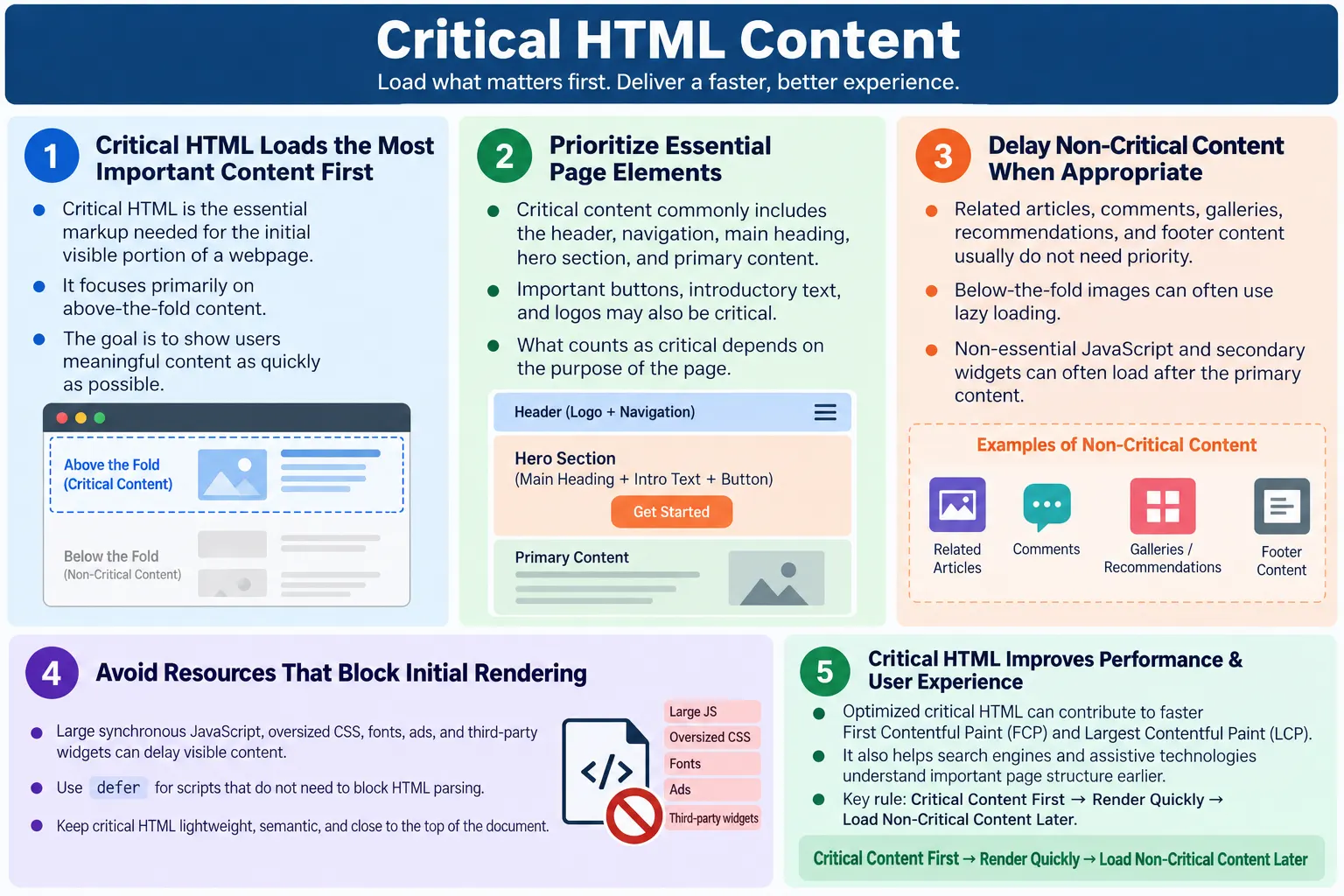
Critical HTML Content refers to the essential HTML elements and content that the browser needs immediately to render the initial view of a webpage. This initial view is often called above-the-fold content, meaning the content visible without scrolling. Critical HTML also includes the markup that helps search engines quickly understand the page topic, structure, navigation, and primary purpose. It is the part of the document that gives users and crawlers the first meaningful signal about what the page is.
This content is delivered as part of the initial HTML response before additional resources such as CSS, JavaScript, images, fonts, analytics scripts, advertisements, comments, and recommendation widgets are fully loaded. When critical HTML is well organized, the browser can begin building the DOM and showing meaningful content quickly. When critical HTML is buried beneath unnecessary markup or delayed by blocking resources, users may see a blank screen or a slow-loading page even when the server eventually sends all required content.
Optimizing critical HTML improves First Contentful Paint, Largest Contentful Paint, Core Web Vitals support, user experience, and search engine understanding. The goal is not to make every part of the page load at the same time. The goal is to deliver the most important content first, then allow non-critical content to load afterward. A fast webpage gives users something useful quickly while the rest of the page continues to complete in the background.
What Is Critical HTML Content?
Critical HTML is the portion of HTML required to display the first visible part of a webpage. It usually includes the document structure, header, navigation, main heading, introductory text, hero section, essential buttons, logo, and any immediately visible primary content. These elements help the user answer basic questions right away: Where am I? What is this page about? What can I do next?
Browser Requests Page
  ↓
HTML Arrives
  ↓
Critical HTML Parsed
  ↓
Initial Content Appears
  ↓
Remaining Resources Load
The browser can begin rendering even while other resources continue downloading. This is why the initial HTML response matters so much. HTML gives the browser the page structure and allows it to discover other resources. If the critical content appears early in the document and is not blocked unnecessarily, users perceive the page as faster. If the critical content appears late or depends on heavy JavaScript before it can be shown, the page feels slower.
Critical HTML does not mean only the first few lines of the file. It means the meaningful structure needed for the initial screen and early understanding. A page may have metadata in the head, a header, a navigation region, a primary heading, a short description, and a call-to-action. Together, these form the critical experience. The remaining sections, such as related articles, comments, reviews, and footer links, are useful but usually less urgent for first paint.
Why Critical HTML Is Important
When users open a webpage, they expect to see meaningful content quickly. A blank screen creates doubt. Users may think the site is broken, slow, or unreliable. If a page shows a header, navigation, title, and introductory content quickly, users understand that the page is loading and can begin reading or interacting. Perceived performance matters almost as much as measured performance.
Without Critical HTML:

Request
  ↓
Waiting...
  ↓
Blank Screen

With Optimized HTML:

Request
  ↓
Header
  ↓
Navigation
  ↓
Main Heading
  ↓
Content Appears
Critical HTML also matters for search engines. Crawlers analyze the HTML document to identify the page title, metadata, headings, internal links, content hierarchy, and primary topic. If important content is missing from the initial HTML or hidden behind unnecessary client-side work, search engines may need more effort to understand the page. Modern search engines can process JavaScript to some extent, but clean initial HTML is still a strong foundation.
For accessibility, critical HTML provides landmarks, headings, navigation, and readable content early. Screen reader users and keyboard users benefit when the page begins with meaningful structure rather than a large block of hidden content or script-dependent placeholders. Good critical HTML improves the experience for browsers, users, crawlers, and assistive technologies at the same time.
HTML Rendering Process
The rendering process begins with the HTML document. The browser downloads the HTML, parses it, builds the DOM, discovers linked CSS and JavaScript, loads required resources, calculates styles, performs layout, paints content, and updates the page as more resources arrive. Everything starts with the document. If the document is delayed, bloated, or poorly ordered, the rest of the rendering process is affected.
Download HTML
  ↓
Parse HTML
  ↓
Build DOM
  ↓
Load CSS
  ↓
Load JavaScript
  ↓
Render Page
The browser does not wait for the entire internet to finish before doing useful work. It streams and parses HTML progressively. As the browser finds elements and resources, it begins building the internal representation of the page. This progressive behavior is one reason placing important content early in the document is valuable. The sooner the browser sees meaningful markup, the sooner it can start preparing the visible page.
CSS and JavaScript can influence this flow. CSS is often render-blocking because the browser needs styles to avoid painting an incorrect layout. JavaScript can also block parsing if loaded synchronously in the wrong place. Critical HTML optimization therefore includes both content order and resource strategy. The markup should expose important content early, and non-essential resources should not unnecessarily prevent that content from appearing.
What Is Considered Critical?
Critical HTML usually includes the visible and semantic elements that define the page's first impression. The exact content depends on the page type. A tutorial page may treat the heading, intro paragraph, navigation, and first explanatory section as critical. A product page may treat the product name, price, main image, purchase button, and trust signals as critical. A login page may treat the form and authentication controls as critical. The common principle is that critical content is what users need immediately.
- Page title and metadata
- Header
- Navigation
- Main heading
- Hero section
- Primary content
- Essential buttons
- Logo
- Important introductory text
<body>
  <header>
    <h1>HTML Tutorial</h1>
  </header>

  <main>
    <p>Learn HTML step by step.</p>
  </main>
</body>
This content appears immediately after the page begins rendering. It tells the user what the page is about and gives the browser a simple structure to parse. The example is intentionally small, but the idea applies to real pages: the first meaningful content should be easy to find, easy to render, and not buried under unrelated markup.
Above-the-Fold Content
Above-the-fold content is the portion of a webpage visible without scrolling. The term comes from newspapers, where the top half of the folded paper needed to attract attention. On the web, the fold varies by device, viewport size, browser chrome, zoom level, and orientation. A desktop screen, phone screen, and tablet screen all have different first views. Even so, the concept remains useful because every page has an initial visible area.
Logo
Navigation
Main Heading
Button
────────────
Scroll
This section should contain the most important information. It does not need to contain everything. In fact, trying to place too much content above the fold can create a cluttered design and a heavy initial load. The purpose is to deliver clarity quickly. Users should know where they are, what the page offers, and what action or reading path is available next.
For learning websites, above-the-fold content often includes the site navigation, article title, introduction, and maybe a language switch or course navigation. For landing pages, it may include a hero message and call-to-action. For documentation pages, it may include the topic title, summary, and table of contents. Critical HTML should match the page's purpose.
Non-Critical Content
Non-critical content is useful content that does not need to appear immediately for the first meaningful view. It may appear below the fold, depend on user interaction, or support secondary goals. Examples include related articles, comments, large image galleries, footer links, recommendations, archive lists, promotional widgets, and secondary navigation sections. These elements can still be valuable, but they do not need the same loading priority as the primary heading and visible content.
- Related articles
- Comments
- Large image galleries
- Footer links
- Recommendations
- Archive pages
- Secondary promotional sections
Separating critical from non-critical content helps teams make performance decisions. Below-the-fold images can often be lazy-loaded. Non-essential JavaScript can often be deferred. Recommendation widgets can load after the main content. Footer content can remain in the HTML but does not need to block initial rendering. This prioritization creates a smoother experience.
The mistake is not having non-critical content. The mistake is treating every piece of content as equally urgent. A page can contain rich supporting content while still prioritizing the first visible experience.
HTML Structure
Good structure helps browsers, search engines, and assistive technologies understand the page quickly. Semantic HTML is especially useful for critical content because it communicates meaning directly. A <header> element identifies introductory or navigational content. A <nav> element identifies navigation. A <main> element identifies the primary content. A clear <h1> identifies the main topic.
<header>
  <nav>
  </nav>
</header>

<main>
  <h1>HTML Course</h1>
  <p>Introduction...</p>
</main>
This structure is better than a page built from many generic wrappers with no clear landmarks. Semantic elements reduce ambiguity. They help screen readers provide navigation shortcuts. They help search engines identify page hierarchy. They help developers maintain the page. Critical HTML should be simple, semantic, and purposeful.
Avoid excessive nesting in critical sections. If the browser must parse a large menu, many hidden panels, and several wrapper layers before it reaches the main heading, the document is not prioritizing the user's first need. Keep the critical path lean. Place important content near the top of the document when possible.
Critical Resources
Critical HTML does not exist alone. It works with critical resources, especially CSS and visible images. The browser typically prioritizes the HTML document, critical CSS, main content, remaining CSS, images, and JavaScript depending on how the page is written. The HTML defines the structure that everything else builds upon. If the HTML points to a blocking stylesheet or script, those resources can affect how quickly content appears.
HTML
  ↓
Critical CSS
  ↓
Main Content
  ↓
Remaining CSS
  ↓
Images
  ↓
JavaScript
Critical CSS is the CSS needed to style the above-the-fold content. Non-critical CSS can sometimes load later. JavaScript that is not needed for the initial view can often be deferred. Fonts should be handled carefully because slow font loading can delay or shift text rendering. The exact strategy depends on the site, but the principle is consistent: do not let non-essential resources block essential content.
For static tutorial pages, critical resources may include the main stylesheet, the document HTML, and any top image if it appears immediately. For application pages, critical resources may include framework bundles, initial data, and layout styles. The more complex the application, the more important it becomes to identify what is truly required for first render.
Hero Section
A hero section is often the most visible part of a page. It may contain a heading, description, call-to-action button, and hero image. Because it is usually visible immediately, it is often part of critical HTML. The hero section sets expectations and helps users decide whether to continue. If it loads slowly, the whole page feels slow.
Heading
  ↓
Description
  ↓
Call-to-Action Button
  ↓
Hero Image
The hero heading and description should be present in HTML, not hidden inside an image. Real text loads faster, scales better, supports accessibility, and helps search engines understand the page. If the hero includes an image, the image should have correct width and height attributes, useful alt text when meaningful, and appropriate loading priority. A visible hero image is often related to Largest Contentful Paint, so it should usually load promptly.
Do not lazy-load the main hero image if it is visible immediately. Lazy loading is intended for off-screen content. When applied to the image that users need first, it can delay the largest visible element and hurt perceived performance. Below-the-fold images are better candidates for lazy loading.
Avoid Blocking Critical Content
Critical HTML should not be unnecessarily delayed by non-essential resources. A common problem occurs when a large JavaScript file must download and execute before the main content appears. This can happen in heavy client-side applications where the initial HTML contains only an empty root element and all visible content is generated later. That architecture can work, but it requires careful performance planning.
Bad:

HTML
  ↓
Large JavaScript
  ↓
Content Delayed

Better:

HTML
  ↓
Render Content
  ↓
Load JavaScript
For content-heavy pages, the main article content should ideally be present in the initial HTML. JavaScript can enhance the page afterward. This approach is faster, more resilient, and easier for crawlers and assistive technologies to interpret. If JavaScript fails, users can still access the core content.
Blocking can also come from oversized CSS, slow fonts, synchronous scripts, third-party widgets, ad scripts, analytics scripts, and large menus. Some resources are necessary, but their placement and loading attributes matter. Use defer for scripts that do not need to block parsing. Keep critical CSS efficient. Load non-essential features after the first meaningful content appears.
Images and Critical HTML
Images can strongly affect the initial render. A large image near the top of the page may become the Largest Contentful Paint element. If that image is too large, missing dimensions, incorrectly lazy-loaded, or slow to download, the page's performance can suffer. HTML controls important image behavior through attributes such as src, width, height, alt, loading, decoding, and sometimes fetchpriority.
<img
  src="hero.webp"
  width="800"
  height="400"
  alt="HTML Tutorial">
Width and height help the browser reserve space and avoid layout shift. Alt text helps accessibility and gives context when the image is meaningful. The image format should be appropriate and compressed. The displayed dimensions should match the actual need; sending a very large image for a small display area wastes bandwidth.
For images below the fold, lazy loading is often helpful.
<img
  loading="lazy"
  src="course.webp"
  alt="HTML Course">
The hero image usually should not be lazy-loaded because it is immediately visible. Below-the-fold course images, galleries, related article thumbnails, and footer images can often use lazy loading. This keeps the first render focused on what users can see immediately.
Browser Workflow
The browser workflow for critical content can be summarized as critical HTML, DOM, first paint, and remaining content. Fast delivery of critical HTML speeds up rendering because the browser gets meaningful structure early. It can build the initial DOM, apply styles, and show visible content while continuing to process the rest of the page.
Critical HTML
  ↓
DOM
  ↓
First Paint
  ↓
Remaining Content
First paint is not always enough by itself. A page might paint a background color quickly but still delay meaningful text. First Contentful Paint is more useful because it measures when text, image, or other content first appears. Largest Contentful Paint often reflects when the main visible element appears. Critical HTML contributes to both by ensuring meaningful content is available early.
The browser can only render what it receives and understands. If meaningful content is missing from the initial document or delayed by scripts, rendering slows. If the critical HTML is present and well structured, the browser can move faster.
SEO Benefits
Critical HTML helps search engines quickly identify page topic, main heading, content hierarchy, navigation, internal links, and metadata. Search engines rely on these signals to understand what the page is about and how it relates to the rest of the website. A page with clear initial HTML is easier to crawl and interpret than a page where important content appears only after complex client-side rendering.
- Page topic
- Main heading
- Content hierarchy
- Navigation
- Internal links
- Metadata
Critical HTML also supports internal linking. If the navigation and important links are present in the HTML, crawlers can discover related pages efficiently. For a learning website, this matters because tutorials are often connected in a sequence. The main content, previous and next links, and course navigation should be accessible without depending entirely on delayed scripts.
Performance also supports SEO indirectly. Faster rendering improves user experience, especially on mobile devices. Users who see useful content quickly are more likely to stay, read, and interact. Search engines consider many signals, and page experience is one part of the broader quality picture.
Performance Benefits
Optimized critical HTML contributes to faster First Contentful Paint, faster Largest Contentful Paint, reduced render delay, better mobile experience, and improved Core Web Vitals support. These benefits come from giving the browser the essential structure and content quickly while avoiding unnecessary blocking work.
- Faster First Contentful Paint
- Faster Largest Contentful Paint
- Reduced render delay
- Better mobile experience
- Improved Core Web Vitals support
On mobile devices, the benefits are especially important. Mobile networks can be slower and less stable. Devices may have less processing power. A heavy initial document, large synchronous scripts, oversized hero image, or excessive DOM can delay the first meaningful view. Critical HTML optimization reduces this initial burden.
Performance improvements should be measured with tools such as Lighthouse, Chrome DevTools, PageSpeed Insights, and field data when available. The goal is not only to make the code look clean, but to improve real user experience.
Best Practices
Good critical HTML starts with lightweight initial markup. Place important content near the top of the document. Use semantic HTML. Include one clear <h1>. Avoid unnecessary nesting. Optimize the hero image. Defer non-essential JavaScript. Lazy-load below-the-fold images. Minify HTML for production. Enable Gzip or Brotli compression. These practices help the browser display useful content quickly.
- Keep initial HTML lightweight
- Place important content near the top of the document
- Use semantic HTML
- Include one clear
<h1> - Avoid unnecessary nesting
- Optimize the hero image
- Defer non-essential JavaScript
- Lazy-load below-the-fold images
- Minify HTML for production
- Enable Gzip or Brotli compression
Best practices should be applied with judgment. Not every page needs a hero image. Not every script can be deferred. Not every stylesheet can be delayed. The point is to understand which resources are necessary for the first view and which can wait. Optimization is a prioritization exercise.
Common Mistakes
One common mistake is placing too much HTML before the main content. Large menus, huge hidden sections, repeated widgets, and oversized banners can appear before the main heading in the document. Users wait longer before seeing meaningful content, and search engines may need to process unnecessary structure before reaching the primary topic.
Large Menus
  ↓
Huge Hidden Content
  ↓
Main Heading
Another mistake is loading everything immediately. Not all images, scripts, widgets, and below-the-fold sections need to load before the page becomes usable. Prioritize critical content first. Load secondary content later when appropriate. A third mistake is building a huge DOM with thousands of unnecessary elements. This increases parsing and rendering work.
Excessive nesting is also common. Generic wrapper layers can make the document heavier and harder to maintain. A simple structure is usually better. Lazy loading the hero image is another frequent problem. The main visible image should normally load immediately because it often contributes to Largest Contentful Paint.
Real-World Example
Consider a course website. The critical section may contain the logo, navigation, course title, enroll button, and course description. These elements tell the learner what course they are viewing and what action they can take. Below that, the page may include student reviews, frequently asked questions, related lessons, author details, and footer links. Those sections are useful, but they are not all critical for the initial render.
Course Website

Logo
  ↓
Navigation
  ↓
Course Title
  ↓
Enroll Button
  ↓
Course Description

────────────

Student Reviews
FAQ
Footer
Only the first section is critical for the initial view. Reviews and FAQ content can appear lower on the page. Images in those sections can be lazy-loaded. Scripts supporting secondary widgets can be deferred. The user gets a fast first impression, while the full page still provides rich content afterward.
The same idea applies to article pages. The site header, article title, introduction, and first content section are critical. Related posts, comments, and footer navigation are less critical. Prioritizing this way makes the page feel faster without removing useful content.
Selenium Perspective
Automation testers may verify that the main heading loads correctly, the hero section is visible, critical buttons appear promptly, above-the-fold content renders correctly, and lazy loading works for non-critical images. Selenium can check the presence and visibility of important elements, but it is not the best tool for measuring rendering metrics such as First Contentful Paint or Largest Contentful Paint.
Performance-focused tools such as Lighthouse, Chrome DevTools, PageSpeed Insights, and real user monitoring are better suited for rendering metrics. Selenium can support functional verification after performance changes. For example, after deferring scripts or lazy-loading images, Selenium tests can confirm that navigation, buttons, forms, and visible content still work correctly.
A practical testing approach combines both. Use performance tools to measure critical rendering behavior. Use Selenium to confirm user-facing functionality. Use manual review to ensure the first visible content is meaningful and not blocked by unnecessary elements.
Common Interview Questions
What is critical HTML content? Critical HTML content is the essential HTML required to render the initial visible portion of a webpage and provide meaningful content to users quickly.
Why is critical HTML important? It improves page loading speed, Core Web Vitals support, user experience, and helps search engines understand the page early in the rendering process.
What content is usually considered critical? Common examples include the header, navigation, main heading, hero section, primary content, and call-to-action buttons.
Should all images load immediately? No. Images below the fold are often lazy-loaded, while the hero image is typically loaded immediately because it is visible and may contribute to Largest Contentful Paint.
Does critical HTML improve SEO? It supports SEO indirectly by improving performance and helping search engines understand important page content early.
Which Core Web Vitals benefit from optimized critical HTML? Optimized critical HTML can contribute to better First Contentful Paint and Largest Contentful Paint.
Comparison Table
| Critical Content | Non-Critical Content |
|---|---|
| Header | Footer |
| Navigation | Related articles |
| Main heading | Comments |
| Hero section | Large galleries |
| Primary content | Recommendations |
| CTA button | Archive pages |
Interview-Ready Answer
Critical HTML Content is the essential portion of an HTML document that the browser needs to render the initial visible section of a webpage. It typically includes the header, navigation, main heading, hero section, primary content, and key call-to-action elements. Optimizing critical HTML by keeping it lightweight, using semantic markup, prioritizing above-the-fold content, and delaying non-essential resources improves rendering speed, Core Web Vitals, user experience, and helps search engines understand the page more efficiently.
A strong answer should also mention that not all page content has the same priority. Above-the-fold content should be available quickly, while below-the-fold content such as related articles, comments, galleries, and footer sections can load later when appropriate. The goal is to show useful content first while the rest of the page continues loading in the background.
One-Line Insight
Critical HTML is the foundation of a fast webpage because it delivers the content users need to see first while everything else loads in the background.