Common HTML Interview Questions
Introduction
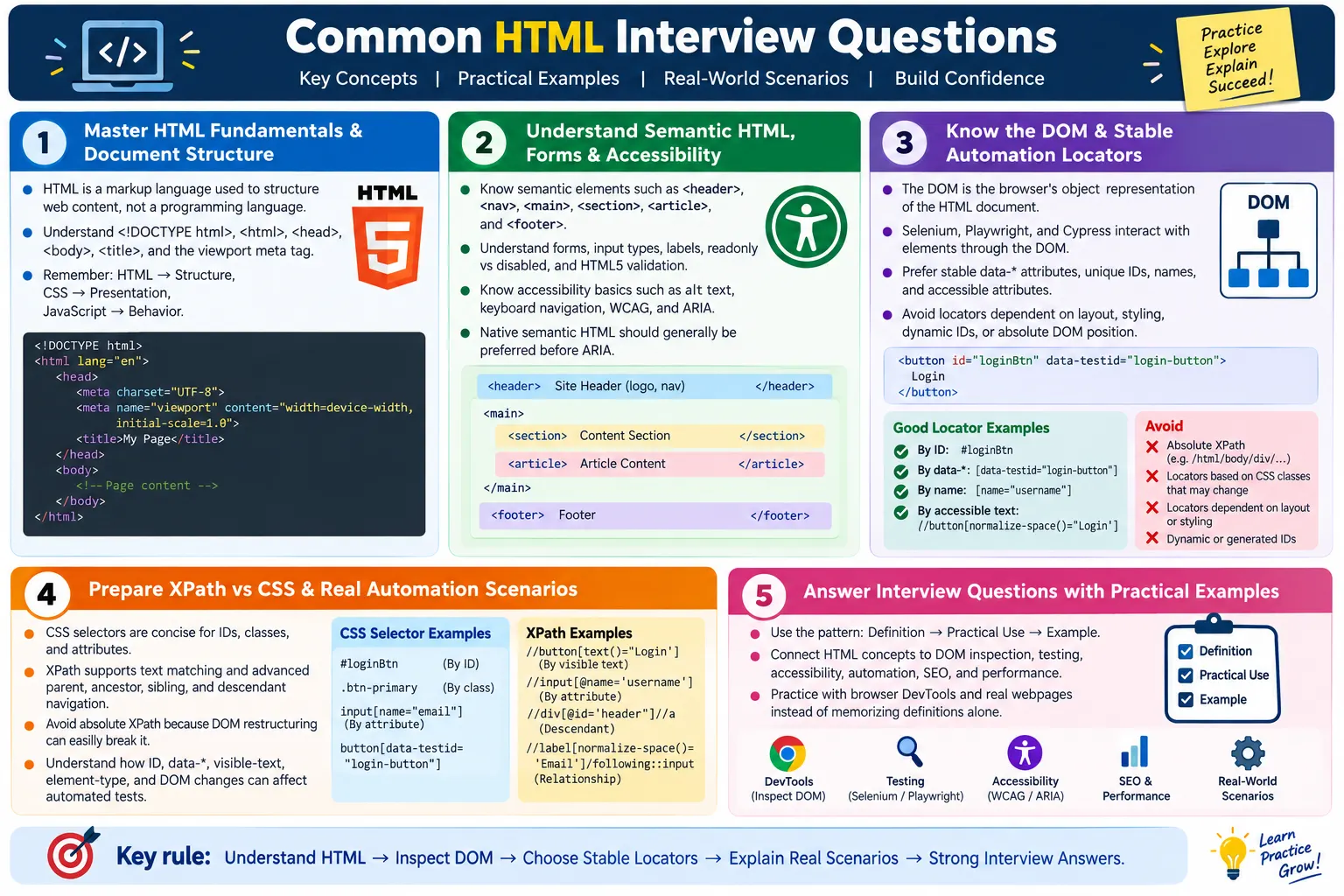
HTML interview questions are common for manual testing, Selenium automation testing, Playwright, Cypress, QA engineering, front-end development, and SDET roles. Even when the job title is not "front-end developer", interviewers expect candidates who work with web applications to understand the structure of a webpage. Automation testers interact with HTML elements every day. Manual testers inspect DOM behavior, labels, links, forms, and browser rendering. Developers build and maintain the markup that all other layers depend on.
Common HTML interview questions usually test practical understanding rather than memorization. An interviewer may ask what HTML is, but the stronger answer connects HTML to page structure, the DOM, browser rendering, accessibility, automation locators, and maintainability. A candidate who can explain HTML in relation to real testing and development work stands out more than someone who only repeats definitions.
This article expands the most frequently asked HTML interview questions into connected explanations. It covers fundamentals, document structure, semantic elements, forms, attributes, DOM inspection, automation-friendly HTML, XPath and CSS selectors, accessibility, performance, SEO, standards, and real project scenarios. The goal is to help you answer confidently with examples and practical reasoning.
Who Should Prepare These Questions?
HTML fundamentals are useful for many roles. Manual testers need HTML knowledge to inspect defects, understand form behavior, verify labels, review links, and communicate clearly with developers. Selenium, Playwright, and Cypress automation testers need HTML knowledge because locators are built from the DOM. QA engineers and SDETs need HTML knowledge to debug web UI failures and design reliable tests. Front-end developers need deeper HTML knowledge because they create the structure itself.
- Manual Testing
- Selenium Automation Testing
- Playwright
- Cypress
- QA Engineer
- Front-End Developer at basic to intermediate level
- SDET roles focused on HTML fundamentals
For testing roles, HTML is not only theory. It is the surface you inspect and automate. If you understand HTML deeply, you can identify whether a failure is caused by a test script, application behavior, invalid markup, dynamic DOM changes, accessibility issues, or unstable locators.
HTML Fundamentals
The first set of interview questions usually covers basic definitions. These questions seem simple, but they reveal whether the candidate understands the role of HTML in the web platform.
1. What is HTML? HTML stands for HyperText Markup Language. It is the standard markup language used to create and structure web pages. It defines elements such as headings, paragraphs, images, links, forms, tables, and multimedia. Browsers parse HTML and render it as a webpage for users.
2. Is HTML a programming language? No. HTML is a markup language, not a programming language. It structures content but does not contain programming constructs such as variables, loops, conditions, or functions. It describes what content exists and how that content is organized.
3. What is the role of HTML in web development? HTML provides the structure and content of a webpage. CSS handles presentation, such as colors, spacing, typography, and layout. JavaScript adds behavior and interactivity. A strong answer should mention separation of concerns: HTML for structure, CSS for presentation, and JavaScript for behavior.
HTML, CSS, and JavaScript
Interviewers often ask the difference between HTML, CSS, and JavaScript because it tests whether you understand the front-end stack. HTML creates the page structure. CSS styles that structure. JavaScript manipulates the DOM and adds interactive behavior.
| HTML | CSS | JavaScript |
|---|---|---|
| Structure | Presentation | Behavior |
| Creates page content | Styles content | Adds interactivity |
| Builds the DOM | Builds the CSSOM | Manipulates the DOM |
4. What is a web browser? A web browser is software that downloads HTML, CSS, JavaScript, images, and other resources, builds the DOM and CSSOM, executes scripts, and renders webpages for users. Examples include Chrome, Edge, Firefox, and Safari.
For testers, this is important because automation tools interact with the browser and DOM. The browser does not simply display raw HTML. It parses, corrects, builds, lays out, paints, and updates the page.
HTML Document Structure
HTML document questions test whether you understand the standard page skeleton. These are common in beginner and intermediate interviews.
5. What is the purpose of <!DOCTYPE html>? It tells the browser to render the page using modern HTML standards mode. Without the correct doctype, browsers may use quirks mode, which can cause inconsistent layout behavior.
6. What is the purpose of the <html> element? It is the root element of every HTML document and contains both the <head> and <body> sections. The lang attribute on this element identifies the document language.
7. What is the difference between <head> and <body>? The head contains metadata and resources that describe or support the page. The body contains visible content and interactive elements that users see and use.
<head> |
<body> |
|---|---|
| Metadata | Visible content |
| Title | Text |
| Meta tags | Images |
| Stylesheets | Forms and buttons |
Title and Viewport Questions
8. Why is the <title> tag important? The title tag defines the browser tab title. It is also important for SEO, bookmarking, usability, and search result display. Every important page should have a unique and descriptive title.
9. What is the viewport meta tag? The viewport meta tag controls how the page is displayed on mobile devices. A common value is:
<meta
  name="viewport"
  content="width=device-width, initial-scale=1.0">
This tells the browser to match the viewport width to the device width and use an initial zoom level of 1. Without it, responsive layouts may not display correctly on mobile.
Semantic HTML Elements
10. What are semantic HTML elements? Semantic elements are HTML elements that describe the meaning or role of the content. Examples include <header>, <nav>, <main>, <section>, <article>, <aside>, and <footer>.
<header><nav><main><section><article><aside><footer>
Semantic HTML improves accessibility, SEO, maintainability, and code readability. It helps assistive technologies and search engines understand page structure. It also helps developers and testers inspect the DOM more easily.
Div, Span, Section, and Article
11. What is the difference between <div> and <span>? A <div> is a block-level generic container used to group larger sections. A <span> is an inline generic container used to wrap text or inline content.
<div> |
<span> |
|---|---|
| Block-level | Inline |
| Groups larger sections | Wraps inline content |
12. What is the difference between <section> and <article>? A section groups related content under a theme. An article represents independent, self-contained content that could stand on its own, such as a blog post, news article, tutorial, or forum post.
Text Semantics
13. What is the difference between <strong> and <b>? <strong> adds semantic importance and is typically rendered in bold. <b> is primarily stylistic and does not add the same semantic importance.
14. What is the difference between <em> and <i>? <em> indicates emphasized content. <i> is used for stylistic or alternate voice text, such as technical terms, foreign words, or names, depending on context.
Interviewers ask these questions to check whether you understand that HTML is not only about visual rendering. Meaning matters. A screen reader, search engine, or maintenance developer benefits from semantic choices.
Forms
15. What is a form? A form collects user input for processing. Forms are used for login, registration, search, checkout, contact, feedback, profile updates, and many other workflows.
16. Name some HTML input types. Common input types include text, email, password, number, date, checkbox, radio, file, search, tel, and url. Correct input types improve validation, mobile keyboard behavior, and accessibility.
- text
- password
- number
- date
- checkbox
- radio
- file
- search
- tel
- url
17. What is the difference between readonly and disabled? Readonly fields cannot be edited by the user but are usually submitted with the form. Disabled fields cannot be interacted with and are usually not submitted.
| Readonly | Disabled |
|---|---|
| User cannot edit | User cannot interact |
| Usually submitted with form | Usually not submitted |
| Can often receive focus | Cannot receive focus |
Labels and HTML5 Validation
18. Why is <label> important? A label improves accessibility, clickability, and form usability. It helps screen readers announce the purpose of the input. It also lets users click the label to focus or activate the associated field.
19. What is HTML5 validation? HTML5 validation is built-in browser validation using attributes such as required, pattern, min, max, and maxlength. It helps catch simple input issues before submission, although server-side validation is still required for security and correctness.
requiredpatternminmaxmaxlength
HTML Attributes
20. What are HTML attributes? Attributes provide additional information about HTML elements. They appear in the opening tag and can define behavior, identification, accessibility, validation, linking, or metadata.
<input
  id="email"
  type="email"
  required>
21. What is the alt attribute? The alt attribute provides alternative text for images. It is used by screen readers and displayed when an image cannot load. Meaningful alt text is important for accessibility and image understanding.
22. What are custom data-* attributes? Custom data attributes store extra information on HTML elements. They are commonly used for JavaScript behavior, analytics, and UI automation.
<button data-testid="login-button">
  Login
</button>
23. Why use placeholder? Placeholder text displays temporary hint text inside input fields. It should not replace a real label because it disappears when the user types and may not be sufficient for accessibility.
24. What is the difference between id and class? An ID is unique and identifies one element. A class is reusable and can be applied to multiple elements for styling, grouping, or behavior.
DOM and Automation
25. What is the DOM? The DOM, or Document Object Model, is the browser's object representation of an HTML document. Automation tools interact with the DOM, not the raw HTML file. JavaScript also uses the DOM to read, change, add, or remove elements.
26. Why should automation testers know HTML? Automation testers should know HTML because tools like Selenium, Playwright, and Cypress locate and interact with HTML elements in the DOM. If testers understand attributes, nesting, element types, labels, and dynamic changes, they can create more stable tests and debug failures faster.
27. What is DOM inspection? DOM inspection means using browser developer tools to inspect HTML elements, attributes, styles, event behavior, and hierarchy. It is a core skill for testers because it helps identify reliable locators and understand how the application is structured.
28. Which HTML attributes are useful for automation? Useful attributes include id, name, data-*, aria-label, type, and href. Stable custom test attributes are often the best choice when available.
29. What are stable locators? Stable locators continue to work despite minor UI changes. They are usually based on stable attributes such as data-testid, unique IDs, names, or accessible attributes. They avoid fragile dependency on layout, styling, or absolute DOM position.
XPath and CSS Selectors
30. What is the difference between XPath and CSS Selector? CSS selectors are concise and well-suited for IDs, classes, and attributes. XPath supports text matching and advanced DOM traversal such as parent, ancestor, sibling, and descendant navigation.
31. Which locator is generally preferred? When available, prefer stable data-* attributes, unique ID, name, accessible attributes, CSS selectors, and then relative XPath. The exact choice depends on the application and locator stability.
- Stable
data-*attributes - Unique ID
- Name
- Accessible attributes
- CSS Selector
- Relative XPath
32. Why avoid absolute XPath? Absolute XPath depends on the exact DOM structure from the root of the document. It breaks easily after layout changes, wrapper additions, or component refactoring. Relative locators based on stable attributes are more maintainable.
33. Can CSS locate elements by text? Standard CSS selectors cannot match elements based on visible text. Tools may provide extra text-based locator APIs, but that is not standard CSS.
34. Can XPath locate parent elements? Yes. XPath supports parent, ancestor, sibling, and descendant navigation. This makes XPath useful when DOM traversal is needed.
Accessibility Questions
35. What is web accessibility? Web accessibility means designing and developing websites so they are usable by people with disabilities, including users who rely on screen readers, keyboard navigation, zoom, captions, high contrast, or other assistive technologies.
36. What is WCAG? WCAG stands for Web Content Accessibility Guidelines. These guidelines are published by the W3C and provide standards for making web content more accessible.
37. What is ARIA? ARIA stands for Accessible Rich Internet Applications. It provides additional accessibility information for assistive technologies when native HTML cannot express a custom interaction clearly. Native HTML should be preferred first.
38. What is aria-label? aria-label provides an accessible name for elements that may not have visible text, such as icon-only buttons. It should be meaningful and used carefully.
39. Why are semantic elements important? Semantic elements improve accessibility, SEO, maintainability, and code readability. They give meaning to the page structure.
Performance Questions
40. What is lazy loading? Lazy loading means loading images or iframes only when needed, usually when they approach the viewport. It improves initial page load performance when used correctly.
41. Why reduce DOM size? A smaller DOM improves rendering performance, JavaScript execution, memory usage, and automation speed. Excessive DOM nodes make pages heavier and harder to maintain.
42. What does the defer attribute do? The defer attribute delays execution of an external script until after the HTML document has been parsed. It helps prevent non-critical scripts from blocking parsing.
SEO Questions
43. Why is the <title> tag important? It helps search engines and users identify the page. It appears in the browser tab and may appear in search results.
44. Why use a meta description? A meta description summarizes the page for search engines and may appear in search results. It should be unique and accurate.
45. Why use semantic HTML for SEO? Semantic elements help search engines better understand page structure and content. Proper headings, links, articles, and navigation make content easier to interpret.
Standards Questions
46. What is the W3C? The World Wide Web Consortium develops many web standards such as CSS, WCAG, SVG, and WebAuthn. It helps keep the web interoperable across browsers and tools.
47. What is HTML validation? HTML validation checks HTML against web standards to detect syntax and structural errors. Validation helps ensure cleaner, more predictable markup.
48. Name some deprecated HTML tags. Examples include <font>, <center>, <big>, <strike>, and <tt>. Modern HTML uses semantic elements and CSS instead.
49. What is Separation of Concerns? Separation of Concerns means separating HTML for structure, CSS for presentation, and JavaScript for behavior. This improves maintainability and scalability.
Real Project Questions
50. What makes HTML automation-friendly? Automation-friendly HTML has stable IDs, data-* attributes, semantic structure, a simple DOM, unique identifiers, and predictable patterns. It avoids dynamic IDs and duplicate elements that confuse tests.
51. Why are data-testid attributes useful? They provide stable locators independent of styling and layout. When a UI changes visually, a stable test ID can remain the same, reducing automation maintenance.
52. Why should IDs be unique? Unique IDs ensure reliable JavaScript, CSS targeting, accessibility relationships, anchor navigation, and automation locators.
53. What HTML changes commonly break automation? ID changes, data-* attribute changes, visible text changes for text-based locators, DOM restructuring, and element type changes often break automation.
54. Which HTML changes usually do not break automation? Color, font, margin, and padding changes usually do not break automation as long as locator-related attributes and behavior remain unchanged.
Top 10 Frequently Asked HTML Interview Questions
The most frequently asked HTML interview questions often combine fundamentals and practical testing knowledge. Candidates should be ready to answer these clearly and with examples.
- What is HTML?
- Is HTML a programming language?
- What is the DOM?
- What is semantic HTML?
- What is the difference between id and class?
- What is the difference between XPath and CSS Selector?
- What are data-* attributes?
- Why avoid absolute XPath?
- What is Separation of Concerns?
- Why should automation testers understand HTML?
How to Answer HTML Interview Questions
A strong interview answer has three parts: definition, practical use, and example. For example, when asked what semantic HTML is, do not only say "meaningful HTML". Explain that semantic elements describe the role of content, give examples such as <nav> and <main>, and connect the concept to accessibility, SEO, and maintainability.
For automation roles, connect answers to DOM inspection and stable locators. If asked about IDs, explain uniqueness and how duplicate IDs affect JavaScript, labels, and Selenium. If asked about forms, mention labels, input types, validation, and test data. Practical answers show that you can apply HTML knowledge in real projects.
Interview Preparation Tips
Interview preparation should focus on understanding concepts through examples. Read HTML, inspect real pages, use browser DevTools, practice locating elements, and compare XPath and CSS selectors. Study accessibility basics and learn why semantic structure matters.
- Learn semantic HTML elements.
- Practice DOM inspection using browser DevTools.
- Understand HTML forms and input types.
- Master HTML attributes used in automation.
- Know accessibility basics such as labels, alt text, and ARIA.
- Understand XPath and CSS selector differences.
- Learn stable locator strategies.
- Be familiar with HTML validation and linting tools.
- Understand how HTML changes affect automation.
- Explain concepts with practical examples rather than memorizing definitions.
Common Mistakes in HTML Interviews
One common mistake is giving only memorized definitions. Interviewers often follow up with practical questions. If you say HTML is a markup language, they may ask how Selenium uses it or how the browser turns it into the DOM. Prepare to connect each concept to real work.
Another mistake is confusing semantic and visual elements. Candidates may say <b> and <strong> are the same because both appear bold. A better answer explains that <strong> communicates importance, while <b> is primarily stylistic. Similarly, headings should not be chosen only for font size.
For automation roles, a common mistake is relying too much on absolute XPath. Interviewers expect candidates to understand why stable locators are better. If you can explain data attributes, unique IDs, accessible names, and relative selectors, your answer will be stronger.
Scenario-Based HTML Questions
Many interviewers move from definitions to scenarios. Scenario questions reveal whether you can apply HTML knowledge in real projects. For example, an interviewer may ask what you would check if a form field is not accessible. A strong answer would mention labels, matching for and id values, visible error messages, required field indication, keyboard focus, and screen reader behavior.
Another scenario may ask why a Selenium test fails after a UI redesign. A weak answer might only say the XPath changed. A stronger answer explains that automation may fail when IDs, data attributes, visible text, element types, or DOM hierarchy change. It also recommends using stable locators such as data-testid or unique IDs instead of absolute XPath.
You may also be asked what to check when a page looks fine but fails accessibility review. A practical answer should mention semantic structure, heading hierarchy, image alt text, form labels, keyboard navigation, focus indicators, ARIA usage, and color contrast. These questions reward candidates who can inspect HTML beyond the visual output.
Questions for Manual Testers
Manual testers are often asked HTML questions because they need to understand what they are testing. A tester who understands HTML can write better defects, communicate clearly with developers, and verify fixes more accurately. For example, if a label is missing, the tester can report that the input does not have an associated <label> instead of saying only that the form is confusing.
Manual testers should be ready for questions about forms, links, images, headings, accessibility basics, and browser developer tools. They should know how to inspect an element, check an href, verify image alt text, identify disabled and readonly fields, and confirm whether required validation is browser-based or application-based.
A good manual testing answer connects HTML to user behavior. If a link has unclear text, users may not understand where it goes. If an image has no alt text, screen reader users may miss important information. If headings are out of order, the page becomes harder to navigate. HTML knowledge makes manual testing more precise.
Questions for Automation Testers
Automation testers should prepare deeply for DOM, locators, attributes, dynamic elements, forms, and stable selector strategy. Interviewers often ask how to choose a locator. A strong answer explains that stable data-* attributes and unique IDs are preferred when available, while absolute XPath should be avoided because it depends on exact DOM position.
Automation testers should also understand how HTML changes affect tests. A color change normally should not break a test. A changed data-testid, changed ID, changed button text, or replaced button element can break a test. DOM restructuring can break XPath-based locators. Dynamic IDs can create flaky tests. Duplicate IDs can cause the automation tool to select the wrong element.
For Selenium specifically, candidates should know that Selenium interacts with the DOM through locators. It does not understand business intent unless the HTML exposes stable attributes or accessible names. Good automation depends on good HTML.
Questions for Front-End Developers
Front-end developers may receive deeper questions about semantic HTML, accessibility, performance, SEO, forms, media, and maintainability. Interviewers may ask when to use <button> instead of <a>. A strong answer says that links navigate to destinations, while buttons trigger actions. Using the correct element improves accessibility and keyboard behavior.
Developers may also be asked about heading hierarchy, document landmarks, ARIA, responsive images, lazy loading, deferred scripts, and validation. These questions test whether the developer builds HTML that works for users, search engines, assistive technologies, and automated tests.
A front-end developer should not treat HTML as a minor layer. In modern development, frameworks generate HTML, but the final DOM still matters. React, Angular, or Vue components can still produce poor HTML if developers ignore semantics.
How to Explain the DOM in Interviews
The DOM is one of the most important concepts for testers and developers. A simple answer is that the DOM is the browser's object representation of the HTML document. A stronger answer explains that the browser parses HTML, creates nodes for elements and text, and exposes those nodes so JavaScript and automation tools can interact with them.
For example, when Selenium clicks a login button, it is not clicking the raw text in the HTML file. It finds a DOM element using a locator and sends an interaction to the browser. When JavaScript updates a page, it modifies DOM nodes. When DevTools shows the Elements panel, it shows the current DOM, which may differ from the original source if JavaScript changed it.
This distinction helps answer follow-up questions. View Source shows the original HTML delivered by the server. Inspect Element shows the live DOM after parsing and JavaScript changes. Automation usually interacts with the live DOM.
How to Explain Semantic HTML in Interviews
Semantic HTML is a frequent topic because it connects many areas. A good answer should not only list semantic tags. It should explain that semantic HTML uses elements according to meaning. A <nav> identifies navigation. A <main> identifies primary content. An <article> identifies independent content. A <footer> identifies footer information.
Then connect the benefit. Semantic HTML improves accessibility because assistive technologies can understand landmarks and structure. It improves SEO because search engines can better interpret the page. It improves maintainability because developers can read the markup more easily. It improves automation because page regions and elements are more predictable.
Interviewers often like answers that mention both users and tools. Semantic HTML is not only a coding style; it affects how many systems understand the page.
How to Explain Forms in Interviews
Forms are a major interview area because web applications rely on user input. A strong form answer should include labels, input types, validation, required fields, error messages, disabled and readonly behavior, fieldsets, and submission methods. Candidates should explain that client-side validation improves usability but server-side validation is still required.
For testing roles, connect forms to test design. Positive tests use valid data. Negative tests use invalid data. Boundary tests check min, max, maxlength, and pattern rules. Accessibility tests check labels, focus order, keyboard use, and error announcements. Automation tests need stable locators for fields and buttons.
When an interviewer asks about <label>, do not stop at "it shows text". Explain that it associates text with a control, improves screen reader support, increases clickable area, and makes forms easier to use.
How to Explain Accessibility Basics
Accessibility answers should be practical and respectful. Web accessibility means making websites usable for people with disabilities. In HTML, the basics include semantic elements, labels, alt text, keyboard navigation, visible focus, descriptive link text, correct headings, and careful ARIA usage.
A good answer should mention that ARIA should not be the first solution. Native HTML is preferred because it already includes built-in semantics and behavior. Use a real button instead of a div with role="button". Use a real label instead of relying only on placeholder text. Use headings for structure, not just for large text.
For QA roles, explain how you would test accessibility at a basic level: inspect labels and alt text, navigate with keyboard, check focus visibility, review heading order, and use accessibility tools as support. This shows practical awareness.
How to Explain HTML Performance
HTML performance questions often focus on lazy loading, DOM size, script loading, image dimensions, and critical content. A strong answer explains that HTML affects what the browser discovers first. Large DOMs, render-blocking scripts, missing image dimensions, and unnecessary hidden content can slow pages down.
When asked about lazy loading, mention that below-the-fold images can use loading="lazy", but hero images should usually not be lazy-loaded because they are needed immediately. When asked about defer, explain that it lets the browser parse HTML before executing the script.
For testers, performance awareness helps identify defects such as layout shift, slow rendering, heavy pages, and delayed interactivity. HTML choices are part of that picture.
How to Explain SEO Basics
SEO interview questions for HTML usually focus on title, meta description, headings, semantic structure, canonical links, robots meta tag, alt text, and internal links. A good answer explains that search engines use HTML to understand page content and structure.
Do not overstate SEO claims. A semantic tag alone does not guarantee ranking. But clean structure, unique metadata, meaningful links, proper headings, and crawlable content help search engines interpret the page. Important content should be present in HTML and not only embedded in images.
For public websites, SEO-friendly HTML is part of quality. A wrong canonical link, duplicate title, missing description, or accidental noindex can cause real business problems.
Practice Questions with Short Answers
Before interviews, practice short answers that are accurate and expandable. Short answers help you start confidently, and then you can add examples if the interviewer asks for more.
What is semantic HTML? Semantic HTML uses elements that describe the meaning of content, such as <nav>, <main>, and <article>.
Why avoid absolute XPath? Absolute XPath depends on exact DOM structure and breaks easily when layout changes.
Why use data-testid? It provides a stable locator for automation that is independent of styling and layout.
Why should IDs be unique? Unique IDs support reliable labels, JavaScript, CSS targeting, accessibility, and automation.
Why is alt text important? Alt text provides a text alternative for images, helping screen reader users and supporting image understanding.
Final Preparation Strategy
The best way to prepare is to combine reading with hands-on inspection. Open a real webpage, inspect elements, identify headings, links, forms, images, IDs, classes, data attributes, and ARIA attributes. Try writing CSS selectors and XPath expressions. Check how the DOM changes after clicking buttons or opening menus.
Then explain what you see in plain language. This is excellent interview practice. If you can inspect a page and explain why a locator is stable, why a label is missing, why a heading hierarchy is weak, or why a semantic element is better than a div, you are ready for practical HTML interview questions.
Do not memorize only answers. Build the skill to reason from the DOM. Interviewers value candidates who can debug and explain real pages.
Interview-Ready Summary
HTML interview questions typically focus on document structure, semantic HTML, forms, attributes, accessibility, the DOM, XPath vs CSS selectors, automation-friendly locators, HTML5 features, validation, performance, SEO, and web standards. For automation testers, the most important topics are DOM inspection, stable locators, data-* attributes, semantic HTML, and understanding how HTML changes affect automated tests.
A strong candidate does not treat HTML as only tags. They understand how HTML becomes the DOM, how tools interact with it, how accessibility depends on it, how SEO reads it, how performance is affected by it, and how automation becomes more stable when the markup is clean and predictable.
One-Line Insight
If you understand HTML deeply, you can inspect, automate, debug, and test almost any web application with confidence.