Comments Strategy
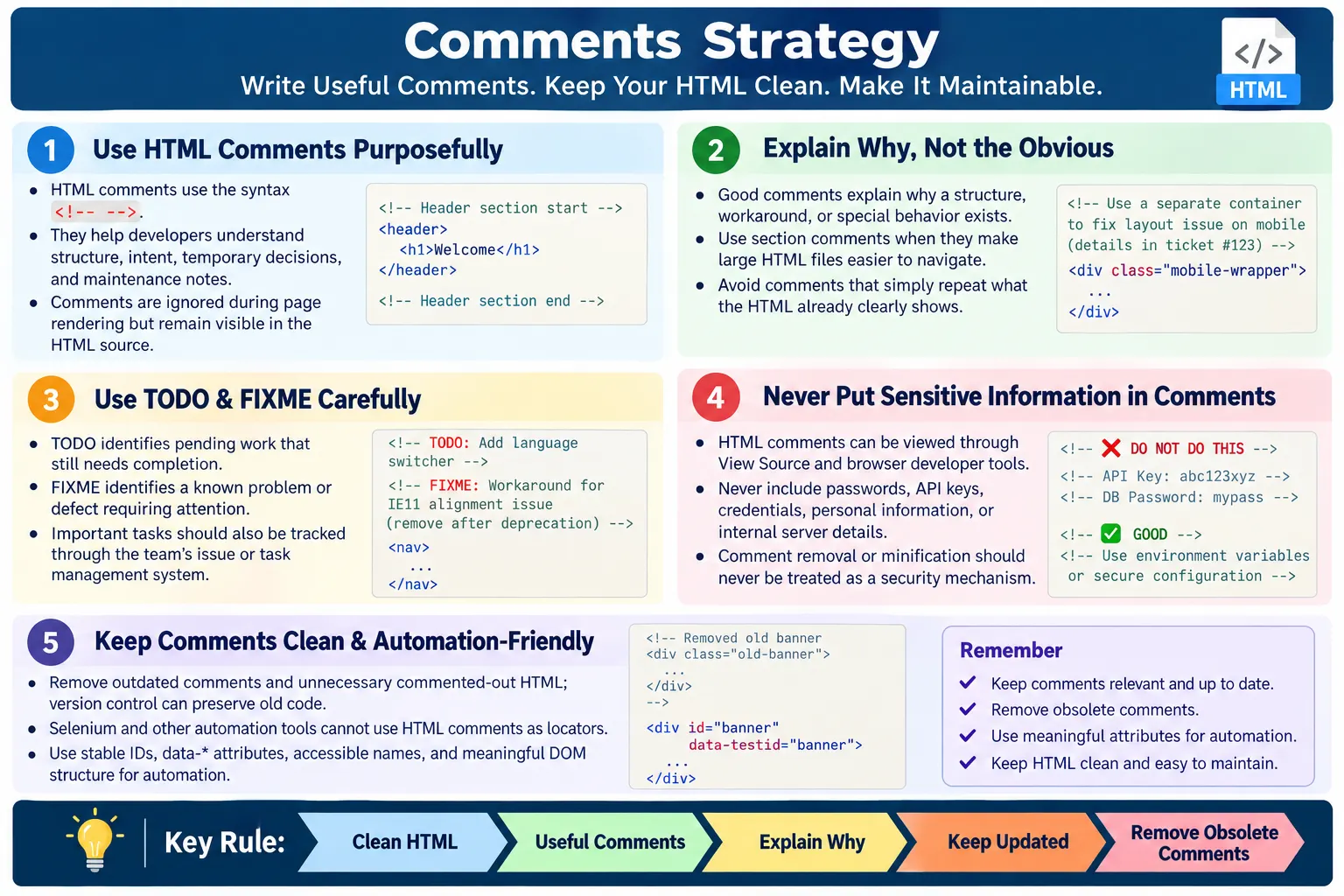
Introduction
Comments strategy is the practice of using HTML comments purposefully and consistently to improve code readability, maintainability, and collaboration without cluttering the markup. Comments are not meant to decorate code. They are meant to help future readers understand structure, intent, temporary decisions, known problems, and maintenance notes that are not obvious from the HTML itself.
HTML comments are written for developers, not for browsers or end users. Browsers ignore comments during rendering, so comments do not appear visually on the webpage. However, comments are still part of the HTML source. Anyone can view them through View Source or browser developer tools. That fact shapes every good commenting strategy: comments can help a team, but they must never contain secrets, private information, passwords, API keys, or internal details that should not be public.
A good strategy helps teams organize HTML files, explain complex sections, improve collaboration, simplify maintenance, and assist debugging. A poor strategy does the opposite. Too many comments create noise. Outdated comments create confusion. Commented-out code makes files longer and harder to trust. Sensitive comments create security risk. The goal is to comment enough to help, but not so much that the comments become another problem to maintain.
What Are HTML Comments?
HTML comments are notes written inside an HTML document that browsers ignore when rendering the page. They are placed between the opening marker <!-- and the closing marker -->. Anything inside that comment is treated as developer-facing text, not visible page content.
<!-- This is an HTML comment -->The comment is visible in the page source but is not displayed on the webpage. This makes comments useful for developers who read or maintain the HTML file. A comment can identify the start of a section, explain why a temporary banner exists, mark pending work, or describe a non-obvious structure.
Comments should not be confused with visible text. If information is meant for users, it should be written as real HTML content. If information is meant for developers only, it may be a comment. That distinction keeps the page meaningful for users and maintainable for the team.
Why Use Comments?
Comments help developers understand code. They are especially useful when a file is long, a section has special behavior, a workaround exists for a browser issue, or a temporary block must be removed later. A useful comment reduces the time required to understand the code.
Write HTML
  ↓
Add Helpful Comments
  ↓
Easy Understanding
  ↓
Easy Maintenance
For example, a section comment can make a long HTML file easier to scan. A maintenance comment can explain why a banner should be removed after a campaign. A TODO comment can make pending work visible during review. A FIXME comment can identify a known issue that needs attention.
The value of a comment depends on whether it adds information that the code does not already provide. A comment that says Button above a <button> element does not help. A comment that says the button is the primary submit action for a registration flow is more useful because it explains purpose.
Basic Example
A basic section comment can identify the beginning of a major page area. In small pages, this may not be necessary. In long pages, it can help developers move through the file faster.
<!-- Header Section -->

<header>
  <h1>SoftwareTips4U</h1>
</header>
The comment identifies the beginning of the header section. This is useful when the surrounding document has many sections and nested structures. However, if the file is short and the <header> is already obvious, the comment may be unnecessary. A good comments strategy always considers context.
Section Comments
Large pages are easier to navigate with section comments. Section comments act like signposts in a file. They are helpful when HTML contains repeated layout regions, advertisements, long forms, complex tables, or many content blocks.
<!-- Navigation -->
<nav>
  ...
</nav>

<!-- Main Content -->
<main>
  ...
</main>

<!-- Footer -->
<footer>
  ...
</footer>
These comments improve readability, especially in long documents. They can also help content editors or junior developers locate the part of the page they need to update. Still, section comments should not replace semantic HTML. The best structure uses semantic elements first and comments only where they add useful orientation.
Explain Complex Logic
Sometimes the HTML structure requires explanation. A section may exist only for authenticated users, a wrapper may be needed for a third-party script, or a specific markup order may be required for accessibility or browser compatibility. These cases are good candidates for comments because the reason may not be obvious from the tags alone.
<!--
This section is displayed only
after user authentication.
-->

<section>
  ...
</section>
Comments should explain why something exists rather than simply repeating what the code already says. If a developer sees a strange wrapper, a comment can explain that the wrapper is required by an embedded widget. If a heading level appears unusual, a comment can explain that it preserves the page hierarchy. Good comments prevent accidental removal of intentional code.
Mark Temporary Code
Temporary code should be marked clearly when it is truly temporary. Campaign banners, migration blocks, beta notices, special announcements, and seasonal promotions often need start and end dates. A comment can help the team remember why the code exists and when it should be reviewed.
<!--
Temporary banner for summer sale.
Remove after campaign ends.
-->

<section>
  ...
</section>
Temporary comments should include enough information to act on later. A comment that only says temporary is weak because it does not say why, when, or under what condition the code should be removed. A better comment mentions the campaign, feature flag, release, date, or ticket reference when appropriate.
The danger with temporary comments is that they often become permanent. Teams should review temporary comments during release cleanup, sprint cleanup, or periodic code maintenance. A comment strategy should include not only how to add comments, but also how to remove them.
TODO Comments
TODO comments highlight pending work. They are useful when a task is known but cannot be completed immediately. For example, a placeholder image may need replacement before production, or a section may need updated copy after approval.
<!-- TODO:
Replace placeholder image
before production -->
TODO comments should be used carefully. A TODO without ownership or follow-up can remain in the code for months. In professional projects, TODO comments should ideally connect to an issue, ticket, release task, or review checklist. If the work is important enough to block release, it should not rely only on a comment hidden in HTML.
FIXME Comments
FIXME comments identify known problems that need attention. They are more serious than TODO comments because they usually point to a defect or broken behavior. For example, a dropdown alignment issue on Safari may be marked with FIXME until the team can fix it.
<!-- FIXME:
Dropdown alignment issue
on Safari -->
FIXME comments are useful during active development, but they should not become a substitute for defect tracking. If the issue affects users, it should be logged properly. The comment can help developers understand the local context, but the issue tracker should manage priority, ownership, and resolution.
Commenting Reusable Sections
Reusable sections can benefit from comments when the same structure appears across many places. A comment such as Reusable Course Card can help developers recognize a shared pattern. It can also prevent accidental changes that break consistency across pages.
<!-- Reusable Course Card -->

<article>
  ...
</article>
This is especially useful in static HTML sites where reusable patterns may be copied into multiple files. In framework-based projects, component names often provide this clarity. In plain HTML, a short comment can provide orientation, but the pattern should still use meaningful classes and semantic markup.
Comments in Forms
Large forms can become difficult to scan. Comments can group sections such as login details, personal information, payment information, shipping address, billing address, consent fields, and submit actions. This makes the form easier to maintain.
<!-- Login Form -->

<form>
  ...
</form>
However, comments are not a replacement for proper labels, fieldsets, legends, and accessible error handling. Users and assistive technologies do not benefit from developer comments. If the form needs grouping for users, use visible headings or semantic elements such as <fieldset> and <legend>. Comments help developers; semantic HTML helps users.
Comments for Automation
Comments can help developers understand that a section is important for automation, but automation tools should not rely on comments. Selenium, Playwright, and Cypress interact with elements in the DOM. Comments are not reliable element locators and should not be used as testing hooks.
<!-- Automation Test Area -->

<button data-testid="login-button">
  Login
</button>
Automation should rely on stable locators such as data-* attributes, accessible names, IDs, or meaningful structure. A comment can tell developers why a data-testid exists, but the test should use the attribute, not the comment. This keeps tests stable and readable.
Browser Workflow
Browsers receive HTML, parse it, ignore comments for rendering, build the DOM, and display the page. Comments do not create visible boxes, text, layout, or styling. They are not part of the user-facing interface.
HTML
  ↓
Browser
  ↓
Ignore Comments
  ↓
Render Page
Even though comments do not affect rendering, they still increase the size of the HTML file. Usually this impact is small, but unnecessary comments across many pages can add avoidable weight. In production builds, some teams remove comments during minification. Static sites may leave comments in place, so teams should be careful about what comments contain.
Good Comments
A good comment is descriptive, concise, accurate, and useful. It explains intent, context, constraints, or organization. It should reduce confusion for the next person who reads the file. For example, Primary Navigation is clearer than Nav, and Temporary tax notice for 2026 filing campaign is clearer than Temporary thing.
<!-- Primary Navigation -->Good comments are also current. A correct comment today can become wrong after code changes. If the code is updated, the related comment must be updated too. A stale comment is worse than no comment because it actively misleads the reader.
Avoid Obvious Comments
Obvious comments repeat what the code already says. They add clutter without adding understanding. For example, a comment that says Button directly above a button element is not useful.
<!-- Button -->
<button>
  Submit
</button>
A better comment explains intent when the intent is not obvious. For example, Primary submit button for registration gives more context than Button. Still, even that comment may be unnecessary if the surrounding form and button text already make the purpose clear. The best code often needs fewer comments because it is self-explanatory.
Avoid Outdated Comments
Outdated comments create confusion. If a comment says Login Button but the code now contains a Register button, the reader cannot trust the comment or the code without investigating further.
<!-- Login Button -->
<button>
  Register
</button>
This is one of the biggest risks of comments. HTML changes, but comments are easy to forget. During code review, reviewers should check whether comments still match the code. During refactoring, developers should update or remove comments as part of the change.
Avoid Commented-Out HTML
Leaving old code inside comments is a common habit, but it usually makes files harder to maintain. Version control systems such as Git already preserve history. If code is no longer needed, it should usually be removed rather than left as a large commented block.
<!--
<div>
  Old Menu
</div>
-->
Commented-out HTML creates uncertainty. Is the code waiting to come back? Is it obsolete? Was it forgotten? Does it still matter? If the team needs to keep a reference, it is usually better to use version control, documentation, or a ticket. Production HTML should not become a storage area for old experiments.
Do Not Store Sensitive Information
Never place sensitive information in HTML comments. Comments are visible in View Source and browser developer tools. They can be read by users, competitors, bots, crawlers, and attackers. A comment is not private just because it is not rendered on the page.
- Passwords
- API keys
- Database credentials
- Internal server details
- Personal information
<!-- Password: admin123 -->This is a serious security risk. Secrets belong in secure configuration systems, environment variables, backend services, or protected secret stores, not in HTML. Even internal notes can expose architecture details that should not be public.
HTML Comments vs CSS and JavaScript Comments
Each language has its own comment syntax. HTML uses <!-- -->. CSS uses /* */. JavaScript uses // for single-line comments and /* */ for block comments. Mixing syntaxes incorrectly can break code or produce unexpected output.
| Language | Comment Syntax |
|---|---|
| HTML | <!-- --> |
| CSS | /* */ |
| JavaScript | // or /* */ |
When HTML contains inline CSS or JavaScript, use the correct comment syntax for that language. In modern development, inline code should be limited where possible, but understanding the syntax difference remains important.
Comments and Clean HTML
A strong comments strategy starts with clean HTML. If the markup is semantic, well-indented, consistently named, and logically structured, fewer comments are needed. Comments should support clean code, not compensate for messy code. If every line needs explanation, the HTML itself may need improvement.
For example, a semantic structure using <header>, <nav>, <main>, <article>, and <footer> is already easier to understand than a page made entirely of generic divs. Clear class names such as course-card and search-form reduce the need for explanatory comments.
The best comments explain decisions that cannot be expressed directly through the markup. They explain why a workaround exists, why a section is temporary, why an unusual structure is required, or how a reusable section should be maintained.
Comments and Team Collaboration
Comments can improve collaboration when many people work on the same codebase. They allow one developer to leave context for another. They help reviewers understand why a section was added. They help content editors avoid modifying sensitive areas. They help testers identify intentional behavior.
However, comments should not replace communication, documentation, or issue tracking. A comment is local context. It is not a project plan. If work must be tracked, assigned, prioritized, or reviewed, it should live in the team's normal tracking system. HTML comments are best used for short, local explanations.
Teams should agree on comment conventions. For example, they may decide to use TODO for pending work, FIXME for known defects, and section comments only for large page regions. Consistency makes comments easier to search and review.
Comments and Production Builds
Some production build processes remove comments from HTML to reduce file size and avoid exposing developer notes. Other static sites publish comments exactly as written. Because behavior differs by project, developers should assume that comments may be visible in production unless they know the build process removes them safely.
Even when comments are removed during build, sensitive information should still never be placed in comments. Build configuration can change, a development file can be deployed accidentally, or source code can be exposed through other means. Security should not depend on comment removal.
For public websites, keep comments professional, minimal, and safe. Anything in the source should be considered potentially visible to the world.
Comments and Debugging
Developers sometimes use comments while debugging. They may temporarily disable a section to isolate a layout issue or test whether a block causes a problem. This can be useful during local development, but it should not remain in committed production code unless there is a clear reason.
When debugging is complete, remove experimental comments and commented-out blocks. If the investigation reveals a permanent workaround, replace the temporary comment with a clear explanation. For example, instead of leaving several old versions of a menu commented out, keep the final menu and add a short note if a browser-specific structure is required.
Clean commits should not contain abandoned debugging notes. They make future readers wonder whether the code is unfinished.
Comments and Code Review
Code review is one of the best places to maintain comment quality. Reviewers should not only check whether the HTML works; they should also check whether the comments are useful, accurate, and safe. If a comment repeats the obvious, it can be removed. If a comment explains a workaround, the reviewer should verify that the workaround still makes sense. If a comment mentions a temporary change, the reviewer should ask whether there is a removal plan.
Reviewers should also look for comments that hide unfinished work. A page should not reach production with important unresolved TODOs unless the team has intentionally accepted that work as a known follow-up. A TODO inside HTML is easy to miss after deployment. If the work matters, it should also exist in the team's task tracker.
Comments can also reveal design problems. If a section needs many comments to explain basic structure, the markup itself may be too complex. In that case, the better fix may be to simplify the HTML, improve class names, or break the page into clearer reusable patterns. Comments should clarify code, not rescue unreadable code.
Comments and Version Control
Modern projects usually use version control systems such as Git. This changes how comments should be used. In older workflows, developers sometimes left large blocks of old code in comments because they wanted a backup. With version control, that is usually unnecessary. Git already stores previous versions of the file, so obsolete HTML can be removed confidently.
Instead of leaving old markup inside comments, commit the current clean version and rely on history if the old version is ever needed. This keeps the active file smaller and easier to read. It also prevents uncertainty. When developers see commented-out code in a file, they often wonder whether it is important, temporary, abandoned, or waiting for a future release. Removing dead code avoids that confusion.
Version control also helps explain why changes happened through commit messages and pull request descriptions. HTML comments should explain local code context. Commit messages should explain project-level change history. Using each tool for the right purpose keeps the codebase healthier.
Comments in Static Websites
Comments strategy is especially important in static websites because the HTML files may be deployed exactly as written. In many static sites, there is no build step that removes comments. This means every comment can become part of the public source. A harmless section comment is fine. A private note, internal URL, old credential, or unfinished business detail is not.
Static websites also tend to have many repeated files. A footer, navigation section, analytics script, or article layout may appear across hundreds of pages. Comments can help identify these shared regions, but the long-term solution should be reusable templates, includes, generators, or consistent page shells where possible. Comments alone cannot prevent drift between copied pages.
For static tutorial sites, comments can help maintain article structure during content creation. A developer may use section comments while drafting a page, then remove unnecessary ones before publishing. The published HTML should remain readable and safe.
Comments and Security Audits
Security reviews should include comments. Because HTML comments are visible to anyone who can access the page source, they can accidentally expose information. Attackers often inspect source code looking for hints such as hidden endpoints, old admin links, internal system names, test credentials, feature flags, or comments describing unfinished protections.
A security-conscious comments strategy treats public HTML as public information. Comments should never reveal how authentication works, where internal APIs live, what credentials were used during testing, what vulnerabilities are known, or which security controls are incomplete. Even if that information seems harmless, it can become useful when combined with other clues.
During audits, teams can search for comment markers and review them. They can also search for words such as password, key, token, secret, admin, internal, TODO, FIXME, temporary, and remove. This helps find comments that should be cleaned before release.
Comments and Minification
Minification is the process of reducing file size by removing unnecessary characters such as whitespace, line breaks, and sometimes comments. Some build tools remove HTML comments automatically during production builds. This can improve performance slightly and reduce public exposure of developer notes.
However, minification should not be treated as a security boundary. A team should not put secrets in comments and assume the minifier will remove them. Build tools can be misconfigured, skipped, or changed. A staging file can be copied to production accidentally. A static page can be uploaded manually. Safe comments are still required even when minification exists.
There are also cases where comments may be intentionally preserved, such as license comments or framework-specific markers. If a project has a build pipeline, the team should know whether comments are removed, preserved, or partially preserved. That knowledge helps set realistic standards for production HTML.
Comments and Documentation Boundaries
Not every explanation belongs in an HTML comment. Short local context belongs near the code. Longer explanations belong in documentation, README files, architecture notes, design system pages, or issue trackers. A comment should help a developer understand the immediate section, not become a full project document.
For example, a comment explaining that a wrapper is required for a third-party advertisement script may belong in the HTML. A long explanation of the entire ad integration process probably belongs in documentation. A short note saying a banner is temporary may belong in the HTML. A campaign plan with dates, owners, approval notes, and business goals belongs in a ticket or project document.
Keeping this boundary clear prevents HTML files from becoming cluttered. The code remains readable, while larger context remains available in the right place.
Comment Naming Conventions
Teams can also standardize comment labels. Common labels include TODO, FIXME, NOTE, WARNING, and TEMP. These labels make comments searchable. A developer can search for TODO before release, search for FIXME during bug cleanup, or search for TEMP after a campaign ends.
<!-- TODO: Replace placeholder image before launch -->
<!-- FIXME: Safari alignment issue in dropdown -->
<!-- NOTE: Wrapper required by third-party widget -->
<!-- TEMP: Remove campaign banner after July release -->
The labels should be used consistently. If one developer writes TODO, another writes To do, another writes pending, and another writes reminder, searching becomes harder. A small convention makes cleanup easier. The team can even include comment searches in release checklists.
Best Practices
A good comments strategy is simple and disciplined. Comment large sections when it improves navigation. Explain why, not what. Keep comments short and clear. Update comments when code changes. Remove obsolete comments. Use TODO and FIXME consistently. Never include sensitive information. Let clean, self-explanatory HTML reduce the need for comments.
- Comment large sections when useful.
- Explain why, not what.
- Keep comments short and clear.
- Update comments when code changes.
- Remove obsolete comments.
- Use TODO and FIXME consistently.
- Never include sensitive information.
- Let clean HTML reduce the need for comments.
The guiding rule is practical: a comment should make the next change easier, safer, or faster. If a comment does not do that, it may not belong in the file.
Common Mistakes
One mistake is commenting every line. Over-commenting makes HTML harder to read because the comments compete with the code. A comment such as Paragraph above a <p> element adds no value.
<!-- Paragraph -->
<p>Hello</p>
Another mistake is leaving outdated comments. Comments should always reflect the current code. If the code changes and the comment does not, the comment becomes technical debt. Sensitive information is a more serious mistake because comments are visible in source. Commented-out code is another common problem because version control already preserves history. Long comments can also reduce readability. If a comment needs several paragraphs, it may belong in documentation rather than inside HTML.
Selenium Perspective
Automation tools ignore HTML comments. Selenium does not locate elements using comments. It interacts with the DOM, attributes, visible text, accessible names, and element structure. Comments may help developers understand the page, but they do not affect Selenium locators.
- Automation tools ignore HTML comments.
- Automation tools cannot locate elements using comments.
- Automation depends on the DOM, attributes, and element structure.
- Comments may help humans, but they do not create testable elements.
For testing, use stable attributes such as data-testid, meaningful IDs, accessible labels, or robust CSS selectors. A comment can explain why a test hook exists, but the test hook itself must be part of the element.
Good vs Bad Commenting
| Good Practice | Poor Practice |
|---|---|
| Explain why | Explain the obvious |
| Organize sections | Comment every line |
| Keep comments updated | Leave outdated comments |
| Use TODO/FIXME when appropriate | Leave permanent TODOs |
| Remove obsolete code | Keep large blocks of commented-out HTML |
| Avoid secrets | Store passwords or keys in comments |
Common Interview Questions
What is an HTML comment? An HTML comment is developer-facing text enclosed within <!-- --> that browsers ignore during rendering.
Are HTML comments visible to users? They are not visible on the rendered page, but they are visible in page source and browser developer tools.
Should sensitive information be placed in HTML comments? No. Comments are accessible to anyone viewing the page source, so secrets must never be placed there.
Do HTML comments affect performance? Generally, the impact is negligible, but unnecessary comments slightly increase HTML file size.
Can Selenium use HTML comments? No. Selenium interacts with the DOM and cannot locate elements based on comments.
When should comments be added? Add comments when they explain the purpose, reasoning, organization, or temporary nature of code that is not immediately obvious.
Interview-Ready Answer
A comments strategy is a disciplined approach to using HTML comments to improve readability and maintainability without cluttering the code. Comments should organize large sections, explain non-obvious decisions, and identify temporary work using conventions such as TODO or FIXME. They should be concise, accurate, and updated as the code changes. Developers should avoid over-commenting, leaving commented-out code, or placing sensitive information in comments because HTML comments are visible in the page source.
Automation tools like Selenium ignore HTML comments entirely and rely on the DOM for element interaction. Good comments help humans understand code, but stable attributes, semantic HTML, and meaningful structure are what help automation and accessibility.
One-Line Insight
The best comments explain why the code exists, not what the code already says.