HTML Code Review Checklist
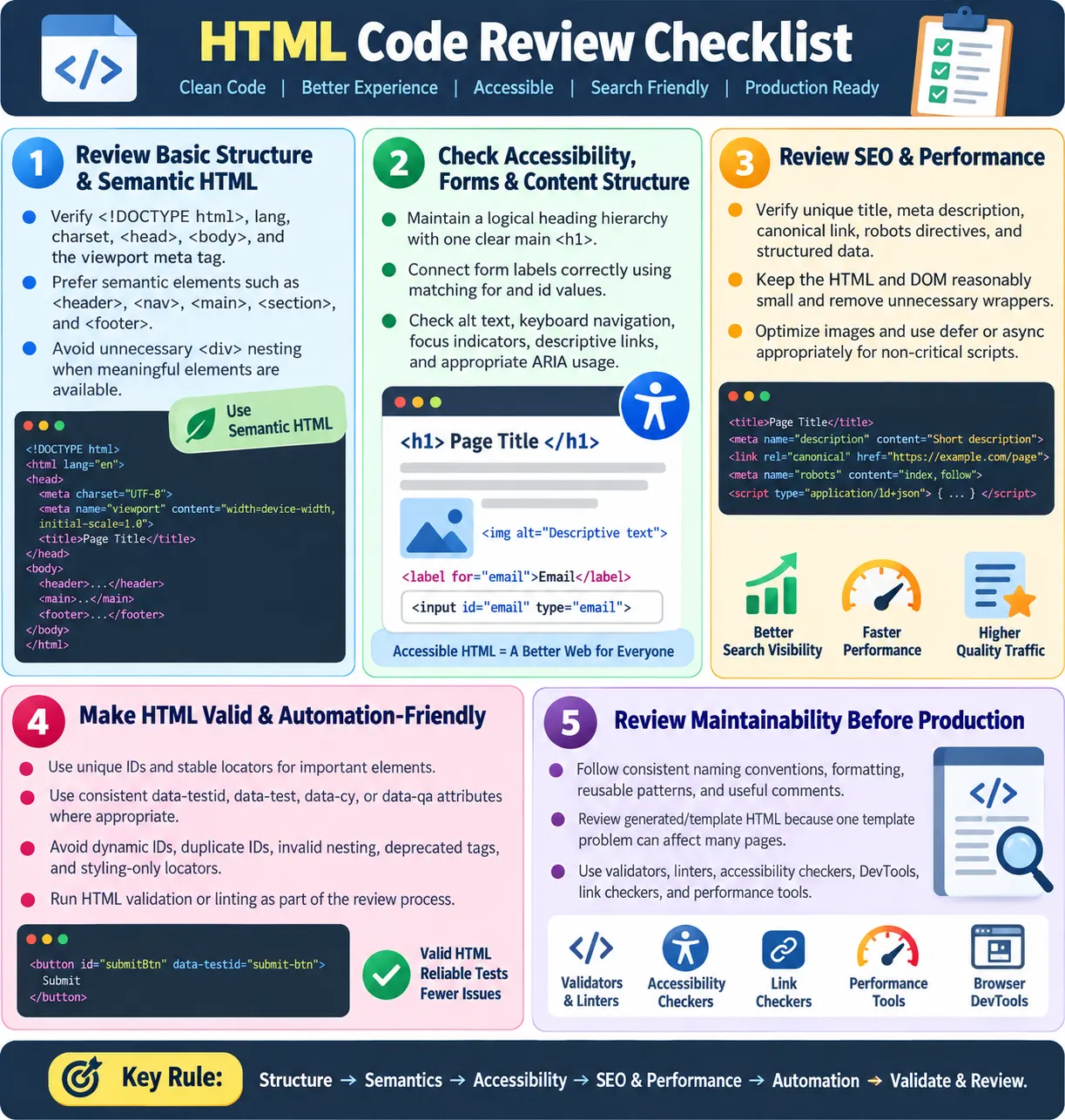
Introduction
An HTML code review checklist helps reviewers verify that a page is semantic, valid, accessible, SEO-friendly, performant, maintainable, and automation-friendly before code reaches production. HTML looks simple compared with programming languages, but poor HTML can create real production problems. It can break accessibility, weaken SEO, slow rendering, create unstable automation locators, and make future changes harder than necessary.
A good review checklist gives reviewers a repeatable way to inspect markup. Instead of reviewing HTML only by appearance in the browser, the reviewer checks the actual document structure, metadata, headings, forms, links, media, accessibility behavior, performance choices, and testing hooks. This is important because a page can look visually acceptable while still having invalid markup, poor heading hierarchy, missing labels, duplicate IDs, weak link text, or hidden automation problems.
Code review is a prevention activity. It is cheaper to catch issues before merge than after deployment. A missing viewport tag can hurt mobile usability. A missing label can block form accessibility. A duplicate ID can break JavaScript and Selenium locators. A noindex robots tag can remove a page from search results. A strong checklist catches these problems early.
Why HTML Code Review Matters
HTML is the foundation of the page. CSS depends on it for styling. JavaScript depends on it for behavior. Search engines depend on it for understanding content. Assistive technologies depend on it for accessible structure. Automation tools depend on it for stable locators. When HTML quality is weak, every layer above it becomes less reliable.
A browser often tries to recover from invalid HTML. That does not mean the HTML is correct. The browser may silently repair missing tags, rearrange invalid nesting, or tolerate duplicate attributes. The page may still render, but the DOM may not match what the developer expected. Code review helps catch these source-level issues before they become unpredictable browser behavior.
A checklist also makes review consistent. Without a checklist, one reviewer may focus only on formatting, another may focus only on accessibility, and another may miss SEO metadata entirely. A shared checklist raises the baseline for every page.
Basic HTML Structure
The first review area is the basic document structure. Every modern HTML page should begin with the HTML5 doctype, define the document language, include a head and body, declare the character set, and include a viewport meta tag for responsive behavior. These items are basic, but missing them can create real problems.
<!DOCTYPE html>is present.<html lang="en">or the correct language is used.<head>and<body>are properly defined.<meta charset="UTF-8">is present.- The viewport meta tag is included for mobile devices.
<meta name="viewport" content="width=device-width, initial-scale=1.0">The lang attribute matters for screen readers, translation tools, search engines, and browser behavior. The charset declaration prevents text encoding problems. The viewport tag allows mobile browsers to render the layout at the correct scale. A review should confirm these basics before moving into page-specific markup.
Semantic HTML
Semantic HTML means using elements according to their meaning rather than using generic containers everywhere. A reviewer should check whether the page uses landmarks and meaningful elements such as <header>, <nav>, <main>, <section>, <article>, <aside>, and <footer> where appropriate.
<header>for introductory or header content.<nav>for major navigation areas.<main>for the primary page content.<section>for thematic sections.<article>for independent content.<aside>for complementary content.<footer>for footer content.
The review should also look for unnecessary div soup. Divs are not wrong, but they should not replace meaningful elements when a semantic element clearly fits. Semantic HTML improves accessibility, SEO, readability, and maintainability. It also helps testers understand page structure when inspecting the DOM.
Heading Hierarchy
Heading hierarchy is one of the most important parts of HTML review. Headings create the outline of a page. Users scan them visually, screen reader users navigate by them, and search engines use them to understand content structure. A page should have one clear main <h1>, followed by logical lower-level headings.
- One clear main
<h1>is present. - Heading order is logical.
- The page does not jump unnecessarily from
<h1>to<h4>. - Headings describe the content clearly.
- Headings are not used only for styling.
<h1>HTML Course</h1>
<h2>Forms</h2>
<h3>Validation</h3>
A common mistake is choosing heading levels based on font size. This is wrong. Heading levels should represent structure. CSS should control appearance. If a heading needs to look smaller, style it with CSS instead of choosing an incorrect heading level.
Forms
Forms require careful review because they directly affect accessibility, data quality, user experience, and testing. Every input should have a proper label. The for value on the label should match the input's id. Correct input types should be used so browsers can provide suitable keyboards, validation behavior, and semantics.
- Every input has a proper
<label>. forandidvalues match.- Correct input types are used.
- Required fields are clearly indicated.
- Error messages are understandable.
- Related fields use
<fieldset>and<legend>where appropriate.
<label for="email">Email</label>
<input id="email" type="email" required>
Reviewers should not accept placeholder-only labels. A placeholder disappears when the user types and is not a reliable label. Error messages should be clear and connected to the field when possible. Required fields should be indicated visually and programmatically. For groups of radio buttons or checkboxes, <fieldset> and <legend> often provide the correct structure.
Accessibility
Accessibility review checks whether users with different abilities can use the page. It is not an optional enhancement. It is part of quality. Reviewers should check image alt text, keyboard navigation, focus indicators, link text, ARIA usage, and whether color is the only way meaning is communicated.
- Images have meaningful alt text.
- Decorative images use
alt="". - Keyboard navigation works.
- Focus indicator is visible.
- There are no keyboard traps.
- Link text is descriptive.
- ARIA is used only when needed.
- Color alone is not used to communicate meaning.
Reviewers should remember that ARIA is not a replacement for semantic HTML. If a native element works, prefer it. Use a real button for actions, a real link for navigation, and real form labels for inputs. ARIA is useful when native HTML cannot express the required pattern, but unnecessary ARIA can create confusion.
Images and Media
Images and media affect accessibility, performance, layout stability, SEO, and user experience. Reviewers should check file names, alt text, dimensions, lazy loading, video controls, and captions or transcripts where needed. Images should not be treated as decoration by default; the reviewer should decide whether the image communicates content.
- Image filenames are descriptive.
- Alt text is present where needed.
- Width and height are specified to reduce layout shift.
- Below-the-fold images use
loading="lazy". - Hero images are not lazy-loaded when they are critical to first paint.
- Videos have controls.
- Captions or transcripts are provided where needed.
Lazy loading is useful, but it should not be applied blindly. Important above-the-fold images, such as hero images that affect the first viewport, should usually load normally. Width and height attributes help the browser reserve space before the image loads, reducing layout shift.
Links
Links should be reviewed for correctness, clarity, and security. Internal links should work. Anchor text should describe the destination. External links that open in a new tab should include security attributes. Broken links create poor user experience and can hurt crawlability.
- Internal links work.
- Anchor text is descriptive.
- There are no broken links.
- External links opening in a new tab use security attributes.
<a href="https://example.com" target="_blank" rel="noopener noreferrer">
  Visit Example
</a>
A link that says "click here" is weaker than a link that describes the target. Descriptive link text helps users, screen reader users, search engines, and testers. Security attributes such as noopener and noreferrer reduce risks when opening external pages in a new tab.
SEO
SEO review starts in the HTML. The reviewer should check whether the page has a unique title, unique meta description, canonical link, correct robots meta tag, valid structured data if used, and meaningful internal links. Important content should be present in HTML, not only hidden inside images or unavailable scripts.
- Unique
<title>is present. - Unique meta description is present.
- Canonical link is correct.
- Robots meta tag is not accidentally set to noindex.
- Structured data is valid if used.
- Important content is present in HTML.
- Internal links support page hierarchy.
SEO review is not keyword stuffing. It is about clear structure and accurate metadata. A wrong canonical link can confuse search engines. An accidental noindex tag can remove a page from search results. Missing or duplicated titles reduce page clarity. HTML review catches these before publication.
Performance
HTML affects performance even before CSS and JavaScript are considered. Reviewers should check whether the HTML is unnecessarily large, whether the DOM has too many nodes, whether wrapper elements are excessive, and whether scripts are loaded appropriately. HTML should be structured, but not bloated.
- HTML is not overly large.
- DOM nodes are not excessive.
- Unnecessary wrapper elements are removed.
- Non-critical scripts use
deferorasync. - Images are optimized.
- Repeated hidden content is avoided.
<script src="app.js" defer></script>Reviewers should look for repeated hidden content, deeply nested wrappers, and large duplicated sections. A heavy DOM can slow rendering, style recalculation, JavaScript operations, and automation. Performance review begins with asking whether the markup is doing more than necessary.
Automation-Friendly HTML
Automation-friendly HTML helps testers build stable UI tests. Reviewers should check whether important elements have stable locators, whether IDs are unique, whether data attributes are used consistently, and whether test-critical elements avoid dynamic IDs. Styling classes should not be the only locator strategy for important elements.
- Important elements have stable locators.
- Unique IDs are used where appropriate.
data-testid,data-test,data-cy, ordata-qaare used consistently.- Dynamic IDs are avoided for test-critical elements.
- Duplicate IDs are avoided.
- Locators do not depend only on styling classes.
<button data-testid="login-button">Login</button>This does not mean every element needs a test ID. Important user actions and stable page areas are the priority. A good review ensures automation hooks support business behavior without cluttering every element unnecessarily.
Validity and Standards
Validity review checks whether the HTML follows modern standards. Invalid nesting, duplicate IDs, deprecated tags, unclosed tags, and invalid attributes should be corrected. Browsers may tolerate invalid HTML, but clean valid HTML is easier to maintain and more predictable across tools.
- No invalid nesting.
- No duplicate IDs.
- No deprecated tags like
<font>or<center>. - Tags are closed properly.
- Attributes are valid.
- HTML passes validation or linting.
Linting and validation should support code review. A reviewer should not spend time manually catching issues that tools can detect reliably. Automated checks create a baseline, and human reviewers focus on meaning, maintainability, and user impact.
Maintainability
Maintainability review checks whether the HTML will remain understandable and changeable over time. Naming conventions should be consistent. The HTML should be readable and properly formatted. Comments should explain why, not obvious what. Large commented-out blocks should be removed. Sensitive information must never appear in comments. Reusable patterns should be followed.
- Naming conventions are consistent.
- HTML is readable and properly formatted.
- Comments explain why, not obvious what.
- There are no large commented-out blocks.
- No sensitive information appears in comments.
- Reusable patterns are followed.
Maintainable HTML is boring in a good way. It follows patterns. It uses predictable naming. It avoids clever one-off structures. It makes the next developer's job easier. A reviewer should challenge markup that works today but will be hard to understand later.
Reviewing for Real Users
A checklist is useful, but reviewers should not become mechanical. The purpose of code review is to protect real users and the long-term health of the codebase. After checking structure, semantics, accessibility, SEO, performance, and automation, reviewers should also ask whether the page actually serves the user clearly.
Are labels understandable? Are links meaningful? Are headings useful? Is the content reachable by keyboard? Does the page work on mobile? Does the primary content appear in the HTML? Does the page avoid unnecessary complexity? These questions connect technical review to real user outcomes.
Reviewing Generated or Template-Based HTML
Many sites generate HTML through templates, components, markdown converters, static site generators, or server-side rendering. Reviewers should inspect both the source template and the final generated HTML. A template may look reasonable, but the generated output may contain duplicate IDs, invalid nesting, missing headings, or repeated hidden content.
Generated HTML should be validated and linted like hand-written HTML. If one template is wrong, it can affect hundreds of pages. This makes template review especially important. A small fix in a shared pattern can improve the whole site, while a small mistake can spread widely.
Reviewing HTML Before CSS and JavaScript
A useful review habit is to inspect the HTML before focusing on CSS and JavaScript. The visual design and interactive behavior matter, but they are built on top of the markup. If the markup is weak, CSS and JavaScript often become more complicated than necessary. A reviewer should first ask whether the page structure makes sense without styling.
For example, if a page uses generic divs for every area, CSS may need many extra classes to communicate layout and JavaScript may need custom selectors to find basic regions. If the same page uses <header>, <nav>, <main>, <article>, and <footer> correctly, the structure is already understandable. Styling becomes easier because the markup has meaning.
Reviewers can also temporarily imagine the page with CSS disabled. Would the content still appear in a logical order? Would headings still make sense? Would forms still be understandable? Would links still be usable? This mental check catches many structural problems that visual review can hide.
Reviewing Mobile Readiness
Mobile readiness begins in HTML. The viewport tag is essential, but it is not the only review point. Reviewers should check whether content order works on narrow screens, whether touch targets are real interactive elements, whether forms use appropriate input types, and whether images have dimensions and responsive behavior.
Correct input types are especially useful on mobile. An email field should use type="email", a phone field should use type="tel", and a search box should use type="search". These choices help mobile browsers show appropriate keyboards and improve the input experience.
Reviewers should also watch for HTML patterns that force fixed desktop assumptions. Tables, wide code blocks, large images, and long navigation menus need responsive handling. The HTML should support a layout that can adapt rather than forcing CSS to fight against rigid markup.
Reviewing Data Attributes
Data attributes can be useful for automation, behavior, analytics, and component state, but they should be reviewed carefully. A data attribute should have a clear purpose. It should not become a place to store secrets, large data payloads, or duplicated business logic. Reviewers should ask whether the attribute is stable, meaningful, and necessary.
For automation, values such as data-testid="login-button" or data-cy="checkout-button" are better than vague names like data-testid="btn1". The value should describe the business purpose of the element. This makes tests easier to read and maintain.
For JavaScript behavior, data attributes should be used consistently. If one area uses data-action and another uses data-role for the same purpose, the project becomes harder to understand. Review should protect naming consistency.
Reviewing Tables
Tables need special attention because they are often misused. Reviewers should confirm that tables are used for tabular data, not page layout. If the content represents rows and columns of related data, a table is appropriate. If the goal is layout, CSS Grid or Flexbox should be used instead.
For data tables, reviewers should check for <th> header cells, meaningful captions where helpful, proper grouping with <thead> and <tbody>, and correct relationships between headers and data. Complex tables may need additional accessibility attributes.
Responsive behavior should also be reviewed. Wide tables can break mobile layouts. The review should check whether the table has an appropriate responsive strategy, such as horizontal scrolling, stacked rows, simplified columns, or alternative summaries depending on the content.
Reviewing Lists and Menus
Lists should use list elements when the content is a list. Navigation menus often use lists because they represent a group of links. Reviewers should check whether unordered lists, ordered lists, and description lists are used correctly. If a group of related items is built from unrelated divs, the reviewer should ask whether a list would communicate the structure better.
For menus, the review should check link text, keyboard navigation, focus behavior, and semantic grouping. Dropdown menus and mobile menus need extra care because they often introduce keyboard traps, hidden content issues, and confusing focus order. HTML structure should support the intended interaction pattern.
Reviewers should also check that list styling does not remove meaning. Removing bullets visually with CSS is fine when the list remains semantic. Replacing a real list with arbitrary containers only to control appearance is usually weaker.
Reviewing Internationalization
Internationalization starts with correct language and text handling. The lang attribute should match the page language. If a page contains mixed-language content, specific sections or phrases may need their own lang attributes. This helps screen readers pronounce text correctly and helps tools understand content.
Reviewers should also check whether hard-coded text is appropriate for the project. In static content pages, hard-coded text is expected. In applications that support multiple languages, visible strings should usually come from localization resources. Directionality may also matter for right-to-left languages.
Character encoding is part of this review. UTF-8 should be present so the page can handle a wide range of characters reliably. This is especially important for multilingual learning sites and pages containing Tamil, symbols, code examples, and technical notation.
Reviewing Security-Sensitive HTML
HTML review should include simple security checks. External links opening in new tabs should use rel="noopener noreferrer". Comments should not contain sensitive information. Hidden inputs should not be trusted for security decisions because users can modify client-side HTML. User-generated content should be escaped properly before it appears in the page.
Reviewers should be cautious with inline event handlers such as onclick when the project standard discourages them. They should also review embedded third-party scripts, iframes, and external resources. A page can become risky if it loads untrusted scripts or embeds content without clear purpose.
Security review does not end at HTML, but HTML can expose risks. A checklist helps reviewers catch obvious issues before deeper security testing begins.
Reviewing Analytics, Ads, and Third-Party Scripts
Many production pages include analytics, advertising, tag managers, or third-party widgets. Reviewers should check whether these scripts are loaded consistently, whether they use async or defer when appropriate, and whether they appear in the expected place. A missing analytics tag may affect reporting. A duplicated ad script may hurt performance or create layout problems.
Third-party scripts should not block critical rendering unless there is a strong reason. Reviewers should also check whether ad containers or widgets create layout shift. If an ad area loads late and pushes content down, the user experience suffers. Stable dimensions and proper placement help reduce this issue.
For sites that rely on monetization, review should balance revenue scripts with user experience and performance. The HTML should support ads without breaking navigation, hiding content, or interfering with important links.
Reviewing Reusable Patterns
Reusable patterns should remain consistent across pages. If the project has an established article layout, card pattern, footer, sidebar, navigation, or form structure, reviewers should check whether the new page follows it. A page that invents a different structure without reason creates maintenance work later.
Consistency helps users because similar pages behave similarly. It helps developers because repeated structures are easier to maintain. It helps testers because automation can reuse locators and page objects. It helps SEO because content structure remains predictable.
If a page needs to deviate from a pattern, the reason should be clear. Review should distinguish between intentional variation and accidental inconsistency.
Reviewing Error and Empty States
HTML review should include non-happy paths where relevant. Forms, dashboards, search pages, tables, and dynamic content areas often need loading, empty, error, and success states. The markup for these states should be accessible and understandable.
An error message should not be just red text with no programmatic relationship to the field. An empty state should explain what happened and what the user can do next. A loading state should not trap keyboard focus or hide important context. A success message should be clear and announced where appropriate.
These states are easy to miss because reviewers often inspect only the default populated state. A strong checklist reminds reviewers to ask what happens when data is missing, validation fails, or loading takes time.
Reviewing with Tools
Manual review is important, but tools should support it. Reviewers should use validators, linters, accessibility checkers, browser developer tools, link checkers, and performance tools where appropriate. Tools catch repeatable issues faster than humans.
A useful workflow is to run linting and validation first, inspect the DOM in the browser, test keyboard navigation, check responsive layout, review metadata, and then inspect any page-specific behavior. This prevents reviewers from spending time on obvious syntax issues after they have already reviewed higher-level behavior.
Tools have limits. They can report missing attributes and invalid markup, but they cannot fully judge whether content is useful, whether a workflow makes sense, or whether a label is understandable to real users. Human review remains necessary.
How Reviewers Should Give Feedback
Good review feedback should be specific and actionable. Instead of saying "bad HTML", a reviewer should say "this input needs a label connected with for and id" or "this external link opens a new tab and should include rel noopener noreferrer". Specific feedback teaches the author and makes the fix clear.
Reviewers should prioritize issues by impact. Invalid nesting, missing labels, accidental noindex, duplicate IDs, and unstable automation hooks are high-value issues. Minor formatting differences may be handled by a formatter. Review time should focus on defects that affect users, search, performance, maintainability, or testing.
Good feedback also explains why when needed. A short reason helps developers learn. Over time, the team makes fewer repeated mistakes because the checklist becomes shared knowledge.
Quick Review Checklist
| Area | Review Point |
|---|---|
| Structure | DOCTYPE, lang, charset, viewport |
| Semantics | Proper landmarks and meaningful elements |
| Headings | Logical hierarchy |
| Forms | Labels, validation, input types |
| Accessibility | Alt text, keyboard, focus, ARIA |
| SEO | Title, description, canonical, robots |
| Performance | Small DOM, lazy loading, deferred scripts |
| Automation | Stable IDs and data-* attributes |
| Standards | Valid HTML, no deprecated tags |
| Maintainability | Clean names, formatting, useful comments |
Common Review Mistakes
One common mistake is reviewing only the visual result. A page can look correct while still having broken labels, missing metadata, poor heading hierarchy, or invalid nesting. Another mistake is assuming browser recovery means the HTML is acceptable. Browsers are forgiving, but professional code should still be clean.
A third mistake is treating accessibility, SEO, and automation as separate concerns that can be fixed later. Many of these issues begin in the HTML. Fixing them during review is cheaper than patching them after production. Reviewers should also avoid nitpicking low-value style issues while missing high-value structural issues.
Interview-Ready Answer
An HTML code review checklist verifies that the page uses valid, semantic, accessible, SEO-friendly, performant, and automation-friendly HTML. Reviewers should check document structure, heading hierarchy, form labels, image alt text, keyboard accessibility, metadata, canonical links, structured data, DOM size, deferred resources, stable locators, unique IDs, naming conventions, and standards compliance.
A strong review prevents accessibility issues, SEO problems, performance bottlenecks, invalid markup, maintainability problems, and automation failures before production. The goal is not only to make the page render, but to make the HTML reliable for users, browsers, search engines, assistive technologies, developers, and testing tools.
One-Line Insight
Good HTML code review catches problems early before they become user issues, SEO issues, or automation failures.