Clean HTML Principles
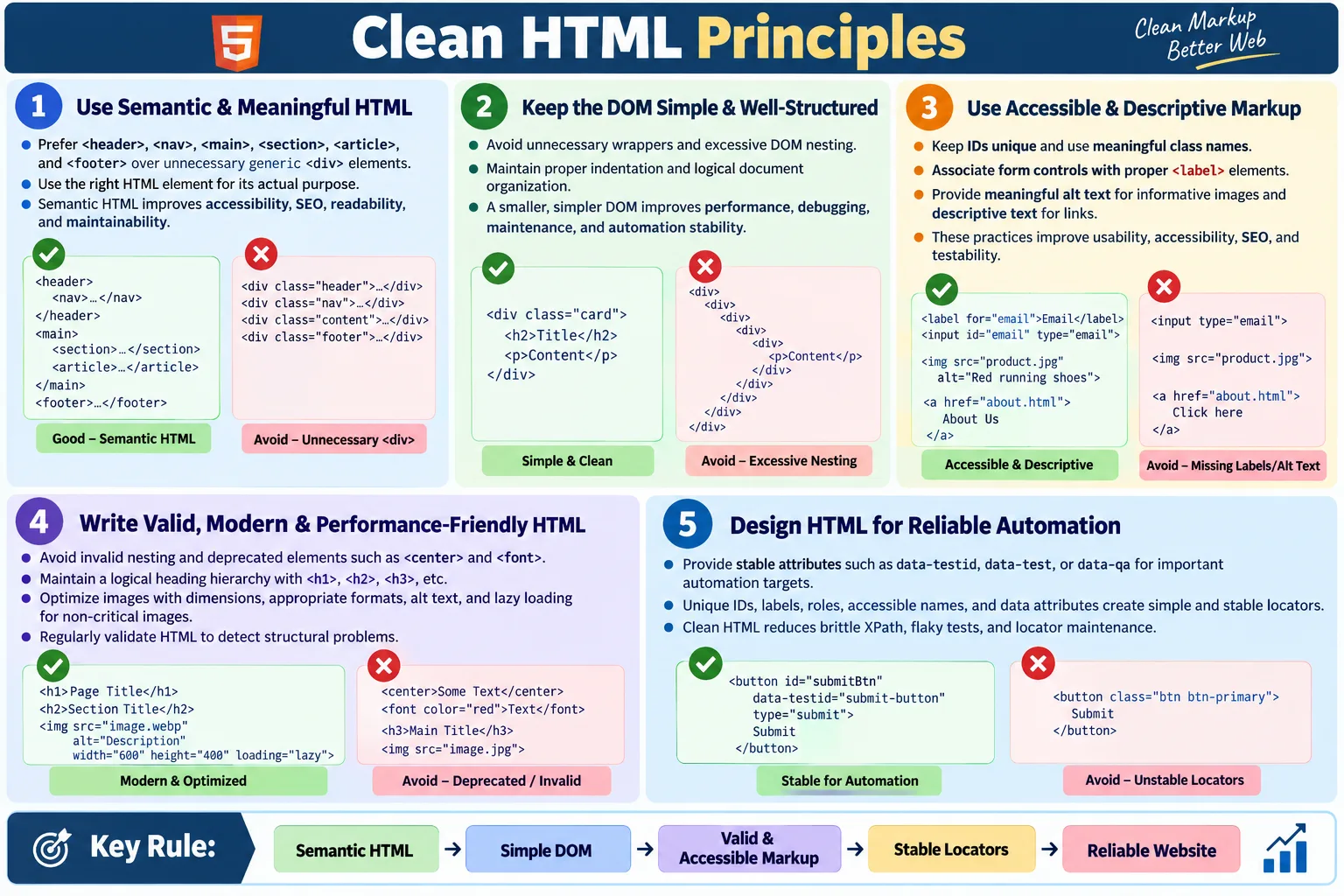
Introduction
Clean HTML refers to writing HTML that is well-structured, readable, semantic, maintainable, and standards-compliant. It is HTML that developers can understand, browsers can parse predictably, search engines can crawl clearly, assistive technologies can interpret correctly, and automation tools can inspect reliably. Clean HTML is not about writing the smallest possible amount of markup. It is about writing meaningful markup that communicates the structure and purpose of the content.
Following clean HTML principles improves readability, maintainability, accessibility, SEO, performance, and UI automation reliability. A clean page is easier to change because its structure is logical. It is easier to test because important elements have stable identifiers and meaningful relationships. It is easier for users because controls are labeled, links are descriptive, and content has a clear hierarchy. Clean HTML is one of the simplest ways to improve the quality of a website before adding any advanced framework or tooling.
Many website problems begin with poor markup. Excessive generic divs, duplicate IDs, missing labels, invalid nesting, vague class names, missing alt text, and layout-dependent structure can create maintenance pain. Browsers may still render the page, but rendering is not the only measure of quality. A page can look acceptable while being difficult to maintain, inaccessible, weak for SEO, and fragile for automation. Clean HTML prevents many of these problems early.
What Is Clean HTML?
Clean HTML follows best practices and avoids unnecessary complexity. It uses the right element for the right purpose. It keeps nesting reasonable. It uses meaningful names. It connects labels to form controls. It provides image alternatives. It avoids deprecated elements. It validates against standards. It keeps the DOM understandable instead of turning the page into a maze of anonymous containers.
Write HTML
  ↓
Follow Best Practices
  ↓
Clean Structure
  ↓
Easy Maintenance
  ↓
Reliable Website
Clean HTML is valuable because it acts as the foundation for everything else on the page. CSS styles the structure. JavaScript adds behavior to the structure. Search engines parse the structure. Screen readers navigate the structure. Automation tools locate elements in the structure. If the structure is weak, every layer above it becomes harder to work with.
Why Clean HTML Matters
Poor HTML can cause difficult maintenance, poor accessibility, fragile automation, SEO issues, rendering inconsistencies, and performance problems. These issues often appear slowly. A single extra div may not matter. A single vague class name may not matter. But over hundreds of pages and components, weak markup becomes technical debt. Developers become afraid to change pages because the structure is unclear. Testers write brittle locators because stable hooks are missing. Users struggle because labels and semantics are weak.
- Difficult maintenance
- Poor accessibility
- Fragile automation
- SEO issues
- Rendering inconsistencies
Clean HTML makes development and testing easier. It gives teams a shared structure they can reason about. It makes the page easier to inspect in DevTools. It also reduces the gap between what the developer intended and what the browser actually builds in the DOM.
Principle 1: Use Semantic HTML
Semantic HTML means using elements that describe their purpose. Instead of building everything with generic divs, use elements such as <header>, <nav>, <main>, <section>, <article>, and <footer> when they fit the content. Semantic elements create meaning in the document.
Instead of:

<div class="header">
<div class="menu">
<div class="content">

Use:

<header>
<nav>
<main>
<section>
<footer>
The benefits are practical. Semantic HTML improves accessibility because assistive technologies can understand regions and roles more clearly. It improves SEO because search engines can read the page structure more easily. It improves maintainability because developers can understand the document by reading the tags, not only class names.
Principle 2: Keep HTML Simple
Simple HTML avoids unnecessary wrapper elements. Some wrappers are useful for layout or styling, but excessive nesting makes the DOM harder to understand and maintain. Deep nesting also encourages fragile automation locators because testers may end up depending on exact parent-child positions.
Bad:

<div>
  <div>
    <div>
      <div>
        <p>Welcome</p>
      </div>
    </div>
  </div>
</div>

Better:

<section>
  <p>Welcome</p>
</section>
A smaller, simpler DOM improves readability and performance. It also makes browser DevTools inspection easier. If a page requires many nested elements, each wrapper should have a clear reason to exist.
Principle 3: Maintain Proper Indentation
Indentation does not change how the browser renders HTML, but it changes how humans understand it. Proper indentation shows hierarchy. It helps developers see which elements are parents, children, and siblings. It makes code reviews easier and reduces accidental nesting mistakes.
Poor:

<div><p>Hello</p><button>Save</button></div>

Better:

<div>
  <p>Hello</p>
  <button>Save</button>
</div>
Consistent formatting becomes more important as pages grow. In a team environment, formatting conventions reduce noise in code reviews and make markup easier to maintain over time.
Principle 4: Use Meaningful Element Names
Meaningful element choice is the heart of clean HTML. If content is a standalone article, use <article>. If content is navigation, use <nav>. If content is the main content of the page, use <main>. Generic containers should be used only when no semantic element fits.
Good:

<article>
  <h2>HTML Basics</h2>
</article>

Less meaningful:

<div>
  <h2>HTML Basics</h2>
</div>
Semantic elements provide meaning before CSS or JavaScript is added. This helps browsers, users, assistive technologies, and automation tools understand the page structure.
Principle 5: Use Unique IDs
IDs should be unique within a page. Duplicate IDs are invalid HTML and can cause problems for JavaScript, CSS, accessibility, labels, and automation. A locator such as By.id("email") becomes ambiguous if two fields share the same ID.
Bad:

<input id="email">
<input id="email">

Better:

<input id="personalEmail">
<input id="workEmail">
Unique IDs help JavaScript select the right element, CSS target elements correctly, labels connect to form controls, and automation tools locate elements reliably. They are a small detail with broad impact.
Principle 6: Write Meaningful Class Names
Class names should describe purpose or component role whenever practical. A class such as product-card communicates meaning. A class such as box1 does not. Appearance-based names can become misleading when the design changes. For example, a class named green-button becomes wrong if the button later becomes blue.
Bad:

<div class="box1">

Better:

<div class="product-card">
Meaningful names improve maintainability. They also help testers understand page sections quickly when inspecting the DOM. Class names should support comprehension, not hide intent.
Principle 7: Use Labels for Forms
Every important form control should have an associated label where appropriate. Labels improve accessibility, usability, and testability. They tell users what input is expected. They help screen readers announce fields correctly. They also make the HTML easier to inspect and automate.
Bad:

<input type="email">

Better:

<label for="email">Email</label>
<input
  id="email"
  type="email">
Placeholder text is not a replacement for a label. Placeholders disappear when users type, can have contrast issues, and may not provide the same accessibility support as labels. Clean HTML uses labels deliberately.
Principle 8: Add Alt Text to Images
Images that communicate meaning need alternative text. The alt attribute helps screen reader users understand image content and provides fallback text if the image cannot load. Decorative images should use empty alt text so assistive technologies can ignore them.
Bad:

<img src="logo.png">

Better:

<img
  src="logo.png"
  alt="Company Logo">
Good alt text should describe the image's purpose in context. It should not be stuffed with keywords. Clean HTML supports both accessibility and SEO by describing meaningful images accurately.
Principle 9: Use Descriptive Links
Link text should explain where the link goes or what action it performs. Generic text such as "Click Here" is weak because it does not make sense out of context. Screen reader users may navigate by links, and search engines also use link text as a signal.
Bad:

<a href="/course">
  Click Here
</a>

Better:

<a href="/course">
  HTML Course
</a>
Descriptive links improve accessibility, SEO, and usability. They also make tests and content reviews clearer because the link purpose is visible in the markup.
Principle 10: Reduce DOM Size
A smaller DOM improves performance and maintainability. Too many elements increase memory usage, slow style calculations, and make JavaScript operations more expensive. Excessive DOM size also makes inspection and automation harder.
Avoid unnecessary nesting:

<div>
  <div>
    <div>
      <div>
Use only the elements that are necessary. This does not mean stripping meaning from the page. It means avoiding empty wrappers and unnecessary structural noise. The best HTML is both meaningful and efficient.
Principle 11: Keep HTML Valid
Valid HTML follows standards. It avoids missing closing tags, invalid nesting, duplicate IDs, unsupported attributes, and deprecated elements. Browsers may repair invalid markup, but relying on browser repair creates risk because the final DOM may not match the source.
Correct:

<ul>
  <li>HTML</li>
  <li>CSS</li>
</ul>
Validation tools help catch problems early. Clean HTML should be checked regularly, especially when templates, components, or generated content change.
Principle 12: Use Proper Heading Hierarchy
Headings should describe the logical structure of the page. A page usually has one main <h1>, followed by sections with <h2>, subsections with <h3>, and so on. Avoid skipping heading levels without a logical reason.
Good:

<h1>HTML</h1>
<h2>Forms</h2>
<h3>Validation</h3>
Proper heading hierarchy improves readability, accessibility, and SEO. Screen reader users can navigate headings, search engines can understand document structure, and readers can scan content more easily.
Principle 13: Avoid Deprecated Elements
Deprecated elements such as <center> and <font> should be avoided. They mix presentation with structure and belong to older web practices. Modern HTML should describe content structure, while CSS should control presentation.
Avoid:

<center>
<font>
Using current standards improves maintainability and compatibility. It also keeps the codebase easier for new developers and testers to understand.
Principle 14: Use Data Attributes for Automation
Automation tests need stable locators. Data attributes such as data-testid, data-test, or data-qa provide stable hooks that are independent of styling. They are useful for important buttons, inputs, messages, table rows, cards, and workflow elements.
<button data-testid="login-button">
  Login
</button>
Clean HTML considers testability. A page that provides stable automation hooks reduces flaky tests and maintenance effort. This does not mean adding test IDs everywhere; it means adding them where automation needs reliable interaction or verification.
Principle 15: Optimize Images
Clean HTML includes image attributes that support performance and accessibility. Images should use suitable formats, meaningful alt text, width and height where possible, and lazy loading for non-critical images. This reduces layout shift and improves page loading.
<img
  src="course.webp"
  width="800"
  height="400"
  loading="lazy"
  alt="HTML Course">
Optimized images improve user experience. They also help search engines and assistive technologies understand image content when the image is meaningful.
Principle 16: Write Mobile-Friendly HTML
Mobile-friendly HTML starts with the viewport meta tag. Without it, mobile browsers may render the page as a scaled desktop layout. Clean HTML includes this metadata so responsive CSS can work correctly.
<meta
  name="viewport"
  content="width=device-width, initial-scale=1.0">
Mobile-friendly markup also avoids fixed-width assumptions and keeps content logically ordered. Good responsive design depends on both HTML structure and CSS behavior.
Principle 17: Organize HTML Logically
A logical document structure follows the natural flow of the page. Header and navigation come first, main content follows, and footer content appears later. Sections and articles are grouped meaningfully. This makes the page easier to read, navigate, and maintain.
<header>
  <nav></nav>
</header>

<main>
  <section></section>
</main>

<footer></footer>
Logical organization helps accessibility and automation. It gives the DOM a predictable structure and makes page inspection more direct.
Principle 18: Validate HTML
HTML validation tools detect syntax errors, invalid nesting, duplicate IDs, deprecated elements, and other structural problems. Validation helps produce predictable browser behavior and cleaner automation targets.
- Syntax errors
- Invalid nesting
- Duplicate IDs
- Deprecated elements
Validation should be part of regular development, not only a final check. It is easier to fix markup issues early than after they have spread through templates and components.
Browser Workflow
Clean HTML supports a predictable browser workflow. The browser parses the markup, builds the DOM, renders the page, and allows users and automation tools to interact with it. When HTML is valid and well-structured, this process is smoother and easier to debug.
Clean HTML
  ↓
Browser Parses
  ↓
DOM
  ↓
Render
  ↓
Fast & Reliable Page
If the HTML is invalid, the browser may repair it, creating a DOM that differs from the source. Clean HTML reduces this uncertainty.
Clean HTML in Team Projects
Clean HTML becomes more important when multiple people work on the same site. One developer may create a component, another may reuse it, a tester may automate it, and a content editor may update the text later. If the markup is clear, each person can understand the structure without guessing. If the markup is messy, every change becomes slower and riskier.
Team projects need consistent conventions. Agree on indentation, naming patterns, semantic structure, form labeling, image requirements, and automation hooks. For example, a team may decide that all important automation targets use data-testid, all form inputs must have labels, all pages must have one clear <main>, and all images that communicate meaning must include alt text. These simple rules prevent many future defects.
Code review is where clean HTML habits become real. Reviewers should not check only whether the page looks correct. They should also check whether the structure is meaningful, valid, accessible, and maintainable. Clean HTML is a shared engineering discipline, not a personal preference.
Refactoring Poor HTML
Many real projects already contain poor HTML. The practical answer is not always to rewrite everything. Refactoring should be risk-based. Start with pages and components that are frequently changed, heavily tested, important for SEO, or critical to business workflows. Login pages, checkout flows, search pages, dashboards, forms, and navigation components are good candidates.
When refactoring, preserve user behavior while improving structure. Replace unnecessary div chains with semantic elements. Add labels to form fields. Fix duplicate IDs. Add alt text. Replace deprecated elements. Add stable data attributes where automation needs them. Validate the page after changes. Then run relevant regression tests to confirm behavior remains correct.
Refactoring HTML should also consider CSS and JavaScript dependencies. Changing a div to a section may be safe semantically, but CSS selectors or scripts might depend on the old structure. A careful refactor updates related styles, scripts, tests, and documentation together.
Clean HTML and Accessibility
Accessibility is one of the strongest reasons to write clean HTML. Native semantic elements carry built-in meaning. A real button has keyboard behavior and button semantics. A real label connects text to an input. A heading communicates document structure. A nav element identifies navigation. When developers use these elements correctly, accessibility improves before any ARIA is added.
Poor HTML often forces developers to patch meaning later with ARIA and JavaScript. ARIA is useful, but it should not be used to replace native HTML when a native element already exists. A clickable div with ARIA role button and custom keyboard handling is usually worse than a real button. Clean HTML chooses the native element first.
Accessible clean HTML helps automation too. Tools that support role-based locators and accessible names work better when elements have correct semantics. A button named Save is easier for users and easier for tests than a clickable icon with no name.
Clean HTML and SEO
Search engines parse HTML to understand page content and structure. Clean HTML helps by providing meaningful headings, descriptive links, proper image alt text, semantic sections, canonical metadata, and valid document structure. SEO is not only about keywords. Technical clarity matters because crawlers need to understand what the page contains and how content is organized.
A clean heading hierarchy helps search engines and users scan content. Descriptive links provide context. Alt text helps image understanding when images are meaningful. Valid HTML reduces parsing ambiguity. Clean HTML does not guarantee rankings, but it gives SEO work a stronger foundation.
For tutorial sites, clean HTML is especially important because the content itself is the product. Headings, examples, tables, code blocks, and navigation should be structured clearly. This helps both learners and search engines.
Clean HTML and Performance
HTML affects performance through DOM size, resource hints, image attributes, document structure, and rendering work. A smaller DOM is generally easier for the browser to process. Proper image dimensions reduce layout shift. Lazy loading can delay non-critical images. Semantic structure can reduce unnecessary wrappers. Clean HTML does not replace performance optimization, but it supports it.
Performance problems often come from many layers: large images, heavy scripts, unused CSS, slow APIs, and inefficient rendering. HTML contributes to that ecosystem. Excessive nested elements increase style calculation and layout work. Missing width and height on images can cause page jumps. Poorly organized content can require more script manipulation than necessary.
Clean HTML is not about premature optimization. It is about avoiding waste. Use the elements needed to communicate structure and behavior. Avoid unnecessary nodes. Provide browser-friendly attributes. Let HTML do its job before adding complex JavaScript solutions.
Clean HTML and Automation
Automation testers depend on the DOM. Clean HTML gives them stable, meaningful targets. Unique IDs, names, labels, roles, accessible names, and data attributes make locators simpler. A clean page allows automation to locate elements by purpose instead of by fragile layout position.
Poor HTML creates brittle tests. If a button has no ID, no text, no label, no stable attribute, and appears inside five nested divs, the tester may be forced to write an absolute XPath. That test may break during the next layout change. Clean HTML prevents this by exposing stable hooks and meaningful relationships.
Testability should be considered part of clean HTML. Important user actions and business-critical elements should be easy to locate and verify. This benefits Selenium, Playwright, Cypress, and manual debugging.
Clean HTML Review Workflow
A practical review workflow can keep markup quality consistent. First, inspect the page visually to confirm the UI works. Second, inspect the DOM to check structure. Third, verify labels, headings, links, images, and important controls. Fourth, run an HTML validator. Fifth, check important automation locators and accessibility basics. This workflow catches issues that visual testing alone misses.
Visual Check
  ↓
DOM Inspection
  ↓
Accessibility Basics
  ↓
HTML Validation
  ↓
Automation Locator Review
This workflow is useful before release and during code review. It is especially valuable for new templates and reusable components because those patterns spread across many pages.
Benefits of Clean HTML
Clean HTML provides easier maintenance, better readability, improved accessibility, better SEO, better browser compatibility, better automation, and better performance. These benefits overlap. A semantic form with labels helps users, screen readers, testers, and search engines. A simple DOM helps performance and automation. Unique IDs help JavaScript and locators.
- Easier maintenance
- Better readability
- Improved accessibility
- Better SEO
- Better browser compatibility
- Better automation
- Better performance
The strongest reason to write clean HTML is long-term quality. Pages change. Teams change. Requirements change. Clean markup makes those changes safer.
Best Practices Checklist
A practical clean HTML checklist keeps teams consistent. It can be used during code review, testing, accessibility review, and automation planning. The checklist does not need to be complicated; it should focus on the markup habits that prevent common problems.
- Use semantic HTML
- Keep the DOM simple
- Use meaningful names
- Keep IDs unique
- Add labels
- Add alt text
- Use descriptive links
- Validate HTML
- Avoid deprecated elements
- Optimize images
- Use
data-*attributes for testing - Maintain proper indentation
Common Mistakes
Common mistakes include excessive div elements, duplicate IDs, missing labels, missing alt text, invalid HTML, and poor naming. Excessive divs should be replaced with semantic elements when appropriate. Duplicate IDs should always be fixed. Every important form control should have an associated label. Images should include meaningful alternative text unless they are decorative.
Poor names such as box1, test, and abc should be avoided. Prefer names such as product-card, login-button, and navigation-menu. Meaningful names make the code easier to understand and reduce mistakes during maintenance.
Selenium Perspective
Clean HTML makes automation easier by providing stable locators, predictable DOM structure, better accessibility, simpler inspection, and lower maintenance effort. Automation tools do not interact with visual intention; they interact with DOM elements. Clean markup gives automation a reliable structure to work with.
- Stable locators
- Predictable DOM structure
- Better accessibility
- Simpler inspection
- Lower maintenance effort
driver.findElement(
  By.cssSelector("[data-testid='login-button']"))
  .click();
This locator is more reliable than a fragile layout-based XPath because it identifies the element by purpose. Clean HTML supports this kind of stable test design.
Clean vs Poor HTML
| Clean HTML | Poor HTML |
|---|---|
| Semantic elements | Excessive generic <div> elements |
| Unique IDs | Duplicate IDs |
| Proper labels | Missing labels |
| Meaningful class names | Random names like box1 |
| Valid structure | Invalid nesting |
| Optimized images | Missing alt text and dimensions |
Stable data-* attributes |
Dynamic or styling-based locators |
Common Interview Questions
What is clean HTML? Clean HTML is HTML that is semantic, readable, maintainable, valid, and follows web standards.
Why use semantic HTML? Semantic HTML improves accessibility, SEO, maintainability, and code readability.
Why should IDs be unique? Unique IDs ensure reliable JavaScript behavior, CSS targeting, accessibility relationships, and automation locators.
Why use labels? Labels improve accessibility and make forms easier to use and automate.
Why avoid unnecessary div elements? They increase DOM size, reduce readability, and can make maintenance and automation more difficult.
Why is clean HTML important for automation? It provides stable attributes and a predictable DOM, making locators more reliable and reducing flaky tests.
Interview-Ready Answer
Clean HTML is HTML that is semantic, well-structured, readable, valid, and easy to maintain. It follows web standards by using semantic elements, proper heading hierarchy, unique IDs, meaningful class names, labels for forms, descriptive links, optimized images, and valid markup.
Clean HTML improves accessibility, SEO, browser compatibility, performance, and UI automation by creating a predictable DOM with stable locators. Following clean HTML principles results in websites that are easier to develop, test, and maintain over time.
One-Line Insight
Clean HTML is the foundation of quality web development; it makes websites easier for browsers, users, search engines, and automation tools to understand.