Canonical Links
Introduction
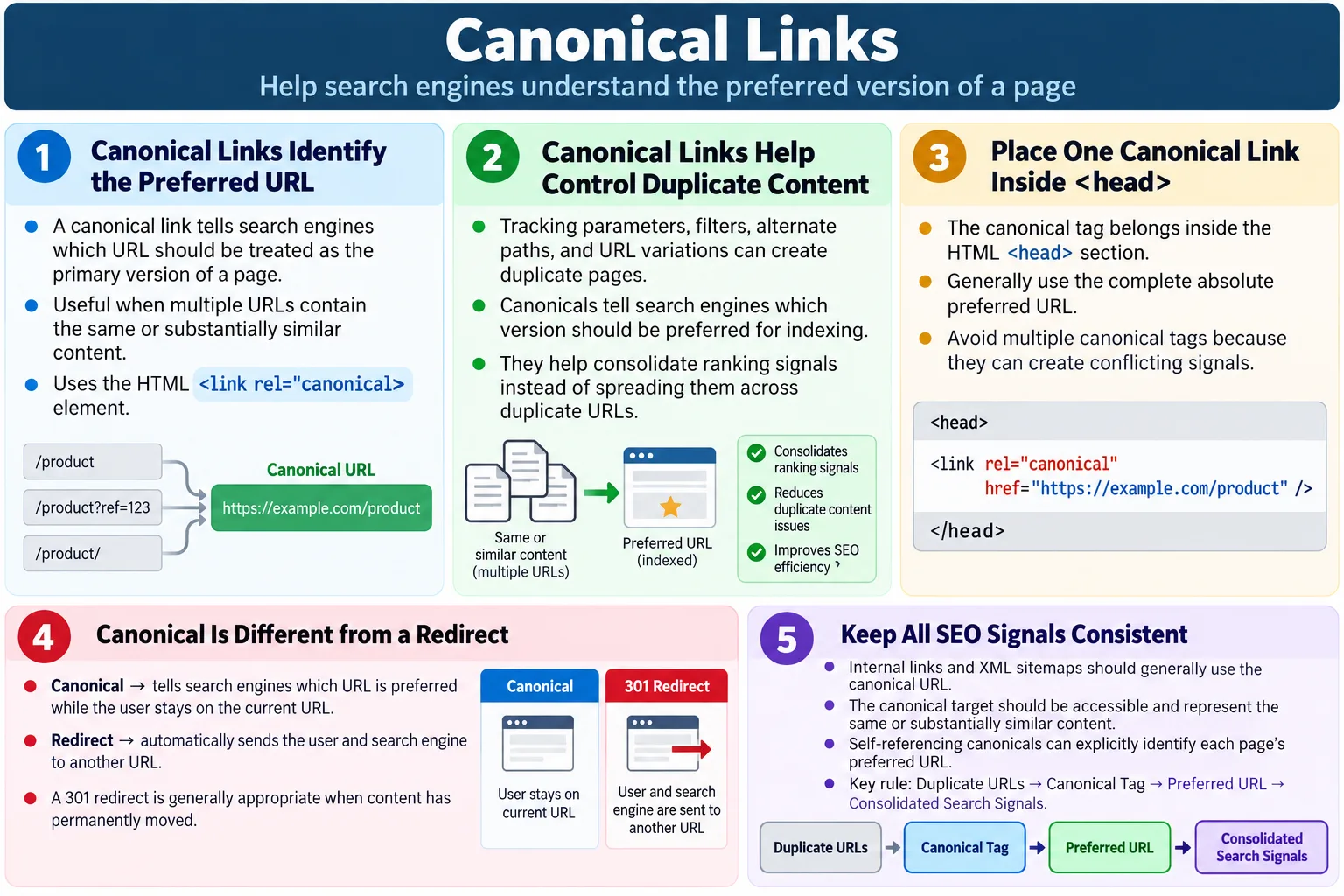
A Canonical Link is an HTML element that tells search engines which version of a webpage should be treated as the primary, preferred, or canonical version when multiple URLs contain the same or very similar content. It is one of the most important HTML-level SEO signals because websites often expose the same content through more than one URL. Without a clear preferred URL, search engines may index duplicate versions, split ranking signals, or choose a different version than the site owner intended.
Canonical links help prevent duplicate content issues by indicating the preferred URL that search engines should index and associate with ranking signals. They are implemented using the <link rel="canonical"> element inside the HTML <head> section. A canonical link does not change what the user sees in the browser. It does not redirect the user. It is mainly a signal for search engines and crawlers.
For learners, canonical links can feel abstract at first because they do not create a visible effect on the page. A button changes what the user can click. A heading changes what the user reads. A canonical link quietly communicates with search engines. Its importance becomes clear when a website has tracking parameters, filter URLs, duplicate product pages, www and non-www versions, HTTP and HTTPS versions, printable versions, or syndicated content. In all those situations, canonical links help clarify which URL should be treated as the main version.
What Is a Canonical Link?
A canonical link identifies the preferred URL for a webpage. It is written as a <link> element with rel="canonical" and an href value pointing to the preferred address. The preferred address is called the canonical URL. Search engines use this information to decide which version should be indexed and where signals should be consolidated.
<link
    rel="canonical"
    href="https://www.example.com/html-tutorial">
This tells search engines: treat this URL as the main version of this content. The page that contains the canonical tag may be the same URL as the canonical URL, or it may be a duplicate or alternate version that points to the preferred one. For example, a tracking URL such as https://example.com/course?source=email can point canonically to https://example.com/course.
The canonical link is not a command in the same way a redirect is. It is a strong hint or signal. Search engines usually respect correct canonical tags, but they may ignore a canonical if it is inconsistent, points to an unrelated page, redirects strangely, returns an error, or conflicts with other signals. This is why canonical implementation must be accurate and consistent.
Why Canonical Links Are Needed
Sometimes the same content is accessible through multiple URLs. This happens naturally on many websites. A product page may be reachable through category paths, campaign links, tracking parameters, filtered views, sorting options, and session URLs. A blog article may be accessible with and without a trailing slash. A site may respond to both www and non-www versions. Technically, these may be different URLs even if the content is the same.
https://example.com/product

https://www.example.com/product

https://example.com/product?ref=facebook

https://example.com/product?session=123
Although the content is the same, search engines may view these as separate pages. If each URL is treated independently, ranking signals such as links, engagement, and relevance may be spread across several duplicate URLs. This can weaken the preferred page. A canonical link helps search engines understand which version should receive the main indexing and ranking association.
Canonical links are also useful for large websites where URL variations are unavoidable. E-commerce websites often create filtered URLs. Learning websites may have tracking links from newsletters. Marketing teams may use campaign parameters. Analytics systems may add source parameters. The canonical tag helps keep the clean page URL as the preferred version even when users arrive through many variants.
Duplicate Content Problem
Duplicate content is not always intentional. It can be created by technical choices, CMS behavior, URL parameters, printer-friendly pages, syndicated content, or inconsistent internal linking. Search engines generally try to avoid showing many copies of the same content in search results. When duplicate versions exist, the search engine must choose one version. If you do not provide a canonical signal, the selected version may not be the one you prefer.
Page A
  ↓
Same Content
  ↓
Page B
  ↓
Same Content
  ↓
Page C
Without a canonical link, search engines may split ranking signals across multiple URLs, index duplicate pages, or choose a different version than you intended. For example, the URL with a tracking parameter might appear in search results instead of the clean URL. Or a duplicate category URL might compete with the main product URL. This is not ideal for users or site owners.
The canonical link reduces confusion. It tells search engines that the duplicates are not separate independent pages. They represent the same or substantially similar content, and one URL should be preferred. This helps search engines consolidate signals and keep the index cleaner.
How Canonical Links Work
The canonical workflow is simple. Multiple URLs may lead to the same or similar content. Each duplicate or alternate version includes a canonical link. That canonical link points to the preferred URL. Search engines read the canonical tag and use it as a signal for indexing and ranking consolidation.
Multiple URLs
  ↓
Canonical Link
  ↓
Preferred URL
  ↓
Search Engine Index
The canonical URL becomes the preferred version for indexing and consolidating ranking signals. If implemented properly, links and signals from duplicate versions can be associated with the canonical version. This helps avoid unnecessary competition between duplicate pages on the same site.
However, canonical links work best when other signals agree. Internal links should generally point to the canonical URL. XML sitemaps should list canonical URLs. The canonical URL should return a successful response. It should not be blocked by robots rules. It should not point to a completely unrelated page. Consistency strengthens the canonical signal.
Basic Example
Consider a page at https://www.softwaretips4u.com/html. If that is the preferred URL, the page can include a canonical tag pointing to itself. This is known as a self-referencing canonical when the current page and canonical target are the same.
<head>

<link
rel="canonical"
href="https://www.softwaretips4u.com/html">

</head>
The canonical tag should appear inside the <head> section. It should be present in the final HTML that crawlers receive. For static HTML pages, this is straightforward. For dynamic websites, templates should generate the correct canonical URL for each page.
The canonical URL should be absolute in most production setups. An absolute canonical includes the protocol and domain, such as https://www.example.com/page. This reduces ambiguity and makes the preferred URL explicit. The URL should also match the production URL format you want search engines to use.
Self-Referencing Canonical
Even if a page has only one obvious URL, many websites include a canonical link pointing to itself. This is called a self-referencing canonical. It makes the preferred URL explicit and helps protect the page from accidental parameter variations or inconsistent linking.
<link
rel="canonical"
href="https://www.example.com/html-course">
A self-referencing canonical says that this page is the main version of itself. This may sound unnecessary, but it is a common best practice. If someone links to the page with a tracking parameter, or if the page is accessible through a minor URL variation, the canonical signal still points to the clean preferred version.
Self-referencing canonicals are especially useful on large websites, static content sites, blogs, and documentation pages. They create a consistent rule: every indexable page declares its preferred address. This reduces ambiguity and makes SEO audits easier because each page can be checked for a canonical tag.
Example with Query Parameters
Query parameters often create duplicate content. A user may visit a page through an email campaign at https://example.com/course?source=email. The content may be exactly the same as https://example.com/course. The query parameter helps analytics, but it does not represent a separate page that should be indexed.
User visits:
https://example.com/course?source=email

Canonical:
<link
rel="canonical"
href="https://example.com/course">
In this case, the canonical points to the clean URL. Search engines can understand that the parameterized URL should not compete with the main course URL. Users can still access the tracking URL, analytics can still record the campaign, and search engines can still prefer the clean URL.
Not all query parameters are duplicates. Some parameters change the actual content significantly. For example, a search results page with a query parameter may produce different content based on the search term. In those cases, canonical strategy requires careful thought. The rule is to canonicalize only when the content is duplicate or substantially similar and one version should be preferred.
Example with Tracking Parameters
Marketing campaigns often add tracking parameters such as utm_source, utm_campaign, and similar values. These parameters help analytics tools identify traffic sources. They should not usually create separate indexable pages. The canonical tag can point all tracking variations back to the main page.
?page=1

?utm_source=facebook

?utm_campaign=summer

Canonical:
<link
rel="canonical"
href="https://example.com/products">
This prevents tracking URLs from becoming preferred search results. It also keeps ranking signals focused on the clean product or category URL. Without canonical handling, a site can accidentally create many URL variants for the same content, especially when campaign links are widely shared.
Tracking parameters are useful for marketing and analytics, but they are usually not useful as indexable URLs. The canonical link helps keep those purposes separate. Marketers can measure campaigns while search engines understand the preferred content URL.
Browser Workflow
The browser ignores the canonical link for display. When a user visits a page, the canonical tag does not change the address bar, does not navigate the user to the canonical URL, and does not alter the visible page. Its main audience is search engines and crawlers.
HTML
  ↓
Canonical Link
  ↓
Search Engine
  ↓
Preferred URL Indexed
This is an important distinction. Developers sometimes expect a canonical link to behave like a redirect. It does not. If a user opens https://example.com/product?ref=facebook, the browser stays on that URL. The canonical tag may tell search engines that https://example.com/product is preferred, but the user is not automatically moved there.
Because canonical links are invisible to users, they must be verified through the HTML source, developer tools, crawlers, or automated tests. A page can look perfectly correct in the browser while having a broken or missing canonical tag. SEO checks need to inspect the head metadata, not only the visual page.
Where Canonical Links Should Be Placed
A canonical link should be placed inside the <head> section of the HTML document. This is where metadata belongs. Placing the canonical tag in the body is incorrect and may be ignored. The head should contain the title, meta description, canonical link, stylesheet links, and other metadata.
<head>

<title>
HTML Tutorial
</title>

<link
rel="canonical"
href="https://example.com/html">

</head>
There should be only one canonical link per page. Multiple canonical tags create conflicting instructions. If a CMS plugin adds one canonical and a custom template adds another, the final HTML may contain duplicates. Search engines may ignore them or choose one unpredictably. Always inspect the final rendered HTML, not just the template source.
Canonical tags should also use the correct production domain and protocol. If your preferred site version is HTTPS, the canonical should use HTTPS. If your preferred host includes or excludes www, the canonical should match that choice. Consistency matters across internal links, sitemaps, redirects, and canonical tags.
Canonical vs Redirect
A canonical link and a redirect solve related but different problems. A canonical link suggests the preferred URL to search engines while allowing users to stay on the current page. A redirect sends users and search engines to a different URL. Canonicals are commonly used for duplicate or similar content that remains accessible. Redirects are used when a URL should no longer be used or content has moved.
| Canonical Link | Redirect |
|---|---|
| Suggests the preferred URL to search engines | Sends users and search engines to a different URL |
| User stays on the current page | User is taken to another page |
| Used for duplicate or similar content | Used when content has moved or the old URL should no longer be used |
Canonical:
Stay Here
  ↓
Preferred Version Declared

Redirect:
Old URL
  ↓
Automatically Opens
  ↓
New URL
If a page has permanently moved and users should no longer access the old URL, a 301 redirect is usually more appropriate than relying only on a canonical link. If the page still needs to be accessible but represents duplicate or similar content, a canonical may be appropriate. Choosing between them depends on user experience and content strategy.
Real-World Examples
Product pages often need canonical links. An e-commerce product may appear in different categories, color options, or filtered views. If each variation shows substantially the same product content, the site may choose one canonical product URL. This helps avoid duplicate product pages competing with each other.
Laptop
  ↓
Color Options
  ↓
One Canonical URL
Blog articles may be republished or shared across platforms. The original article can declare its canonical URL, and syndicated versions may also point back to the original when allowed. This helps search engines identify the source version.
Original Article
  ↓
Canonical URL
  ↓
Shared Across Platforms
E-commerce filters are another common case. URLs such as Products?color=red and Products?size=large may create many variations. Depending on the SEO strategy, some filtered pages may be canonicalized to the main products page, while valuable filtered pages may have their own canonical URLs. Marketing campaign parameters such as ?utm_source=email usually canonicalize back to the main page.
Best Practices
The first best practice is to place the canonical link inside the <head>. The second is to use the preferred page URL. The third is to use only one canonical link per page. These basics prevent many common mistakes. The canonical URL should be accessible and should return a successful response. It should not point to a broken page, unrelated page, or blocked page.
- Place the canonical link inside the
<head>. - Use the preferred page URL.
- Use one canonical link per page.
- Use consistent URL formatting, such as HTTPS if that is preferred.
- Use self-referencing canonicals where appropriate.
- Ensure the canonical URL is accessible and returns a successful response.
Canonical tags should align with internal links. If your internal links point to one URL but the canonical points to another, the signals are mixed. The XML sitemap should also list canonical URLs. A strong canonical strategy is consistent across templates, links, sitemaps, redirects, and metadata.
For static websites, canonical URLs should be generated carefully for every page. A copied page template should not leave the old canonical URL in place. This is a common issue when creating many tutorial pages. Each page must have its own canonical that matches its final public URL.
Common Mistakes
A missing canonical can be an issue when pages are accessible through multiple URLs. Not every page strictly requires a canonical in every possible situation, but many sites include self-referencing canonicals as a consistent best practice. Missing canonicals become more risky when tracking parameters, duplicate templates, or alternate URL paths exist.
An incorrect canonical URL is more serious. If a page about HTML tutorials points to a wrong page, search engines may receive a misleading signal. For example, a canonical pointing to https://wrong-page.com is not useful. Always point to the intended preferred page.
<link
rel="canonical"
href="https://wrong-page.com">
Multiple canonical tags are another common mistake. If the HTML contains two canonical links, search engines may not know which one to trust. This often happens when both a CMS plugin and a custom template generate canonical tags. Only one canonical link should be used per page.
<link rel="canonical"...>

<link rel="canonical"...>
Do not point a page about HTML tutorials to an unrelated CSS page. The canonical should represent the same content or the preferred version of substantially similar content. Also avoid mixing canonicals and redirects incorrectly. If a page has permanently moved and users should automatically reach the new URL, use a redirect rather than relying only on canonical metadata.
SEO Benefits
Canonical links help reduce duplicate content issues, consolidate ranking signals to a preferred URL, improve crawl efficiency, clarify which version should be indexed, and prevent parameter-based URL duplication. These benefits are especially important for large websites where URL variations can grow quickly.
- Reduce duplicate content issues.
- Consolidate ranking signals to a preferred URL.
- Improve crawl efficiency.
- Clarify which version should be indexed.
- Prevent parameter-based URL duplication.
Canonical links do not replace high-quality content, good internal linking, technical performance, or clean site architecture. They are one part of technical SEO. When implemented well, they reduce confusion and help search engines focus on the right URLs. When implemented poorly, they can create indexing problems.
The biggest benefit is clarity. Search engines process many signals, and canonical links help align those signals around the intended page. A clear canonical strategy makes the site easier to crawl, audit, and maintain.
Selenium Perspective
Automation testers may verify that the canonical tag exists, that the correct canonical URL is present, that only one canonical tag is defined, and that the canonical URL matches the expected page. This is useful for SEO regression tests, especially on websites where templates generate many pages.
String canonical =
driver.findElement(
By.cssSelector(
"link[rel='canonical']"))
.getAttribute("href");

System.out.println(canonical);
A basic Selenium check can validate a critical page. A broader SEO audit may use a crawler or script to check every page. For example, an audit can flag pages with missing canonicals, duplicate canonical tags, canonicals pointing to non-200 pages, canonicals pointing to unrelated URLs, or canonicals that do not match sitemap URLs.
Testers should remember that the canonical link is in the head, not the visible page. Visual testing will not catch canonical problems. Inspecting the DOM, HTML source, or metadata is necessary. This is why SEO checks are often part of technical validation rather than normal functional testing.
Common Interview Questions
What is a canonical link? A canonical link identifies the preferred version of a webpage when multiple URLs contain the same or similar content. It helps search engines understand which URL should be indexed and associated with ranking signals.
Where is the canonical link placed? It is placed inside the HTML <head> section. It should not be placed inside the visible body content.
What is the syntax? The syntax uses <link rel="canonical" href="https://example.com/page">. The href value should point to the preferred URL.
<link
rel="canonical"
href="https://example.com/page">
Why is it important? It helps search engines understand which URL should be indexed and prevents duplicate content issues. It can also consolidate ranking signals that might otherwise be split across duplicate URLs.
Does a canonical link redirect users? No. It provides guidance to search engines but does not change the page a user is viewing. If users need to be automatically sent to another URL, a redirect is required.
When should you use a redirect instead of a canonical? Use a 301 redirect when a page has permanently moved and users should automatically reach the new URL. Use canonical when duplicate or similar content remains accessible but one version should be preferred for indexing.
Comparison Table
| Canonical Link | 301 Redirect |
|---|---|
| Indicates the preferred URL | Moves users and search engines to a new URL |
| Current page remains accessible | Old URL forwards to the new URL |
| Used for duplicate or similar content | Used for permanently moved content |
| Primarily for search engines | Affects both users and search engines |
Practical Review Workflow
A practical canonical review starts by identifying the intended public URL for the page. That URL should be the one used in the canonical tag, internal links, and sitemap. Then check whether the page can be reached through other variations, such as query parameters, tracking links, trailing slash differences, HTTP and HTTPS differences, or www and non-www differences. If those variations show the same content, the canonical strategy should be clear.
Next, inspect the final HTML source or DOM. Verify that exactly one canonical tag exists in the head. Confirm that the canonical URL is absolute, uses the preferred protocol and host, and points to a page that loads successfully. If the canonical target redirects, fails, or points to a noindex page, review the setup. A canonical should point to a stable preferred URL.
Finally, compare the canonical with other SEO signals. The sitemap should list canonical URLs. Important internal links should point to canonical URLs. Redirect rules should not contradict canonical tags. Metadata should not be copied from another page by mistake. This kind of review is especially useful after template changes, migrations, URL changes, or bulk page creation.
Canonical Links in Static Websites
Static websites often look simple, but they still need careful canonical handling. A static tutorial page may exist as a physical file such as html-canonical-links.html, while the public canonical URL may be written without the .html extension depending on the hosting setup. If the site owner wants search engines to prefer the extensionless URL, the canonical should point to that version consistently. If the site uses the .html version publicly, the canonical should match that choice. The important point is consistency.
When many static pages are created from templates, a copied canonical URL is a common mistake. A developer may duplicate an existing page, change the visible article title, but forget to update the canonical. The result is a new page that points search engines to the old page. This can cause the new page to be ignored or treated as a duplicate of the wrong content. For content-heavy sites, this is one of the most important metadata checks to automate or review manually.
Static sites also benefit from self-referencing canonicals because they often receive traffic from social posts, newsletters, and campaign URLs. A clean canonical URL helps search engines understand the preferred version even when visitors arrive through shared links with tracking parameters. The canonical link becomes part of the page's technical identity, along with the title, meta description, and open graph URL.
Canonical Links During Site Migration
Canonical links become especially important during site migrations, but they should not be used as a substitute for proper redirects. A migration may change the domain, protocol, folder structure, filename style, or URL pattern. If an old URL should no longer be accessible, a 301 redirect is normally required. The new page should then include a self-referencing canonical pointing to the new preferred URL.
A weak migration setup might leave old pages accessible, add canonicals pointing to new pages, but fail to redirect users. This can leave users and crawlers moving through outdated URLs. A better migration plan redirects old URLs to their new equivalents and ensures the destination pages have correct canonical tags. Redirects handle user and crawler movement. Canonicals confirm the preferred destination page.
During migration testing, teams should verify several things. Old URLs should redirect to the correct new URLs. New URLs should return successful responses. Canonical tags on new pages should point to the new URLs, not the old ones. Sitemaps should list the new canonical URLs. Internal links should be updated to the new URLs. If any of these signals conflict, search engines may take longer to process the migration correctly.
Canonical Links and Pagination
Pagination requires careful canonical decisions. A product list may have /products?page=1, /products?page=2, and /products?page=3. These pages are not always exact duplicates because each page may show different products. In that case, canonicalizing every page to page 1 may hide deeper items from search engines. The correct strategy depends on the content and indexing goals.
If paginated pages show distinct content, each page may need a self-referencing canonical. If a view-all page exists and genuinely contains all items, some sites may canonicalize paginated versions to the view-all page. If pagination exists only because of tracking or sorting and the content is substantially the same, canonicalization may point to the clean version. There is no single rule that fits every paginated page.
This is why canonical links should be chosen based on content equivalence. If two URLs show the same or very similar content, a canonical relationship makes sense. If two URLs show meaningfully different content, forcing one canonical may remove valuable pages from indexing. Good canonical strategy requires understanding the page content, not only applying a tag mechanically.
Canonical Links and Internal Linking
Internal linking should support canonical decisions. If a page declares https://example.com/course as canonical, internal links should generally point to https://example.com/course, not to https://example.com/course?ref=menu or a non-preferred host version. Canonical tags can help consolidate signals, but clean internal links prevent unnecessary duplicates from being created in the first place.
This matters because search engines use internal links to discover pages and understand site structure. If the navigation, breadcrumbs, related links, and sitemap all point to the canonical URL, the signal is clear. If internal links point to many URL variations, canonical tags must work harder to clean up the confusion. A clean site should use canonical tags as reinforcement, not as a patch for messy linking.
For tutorial websites, this means nav links should point to the preferred page URLs. Related article links should do the same. If a page has a canonical URL without an extension, internal links should follow that pattern where the platform supports it. If the site uses .html links, canonicals should be planned consistently with how the production server resolves those URLs.
Canonical Audit Checklist
A canonical audit checklist helps catch mistakes before they affect indexing. Start by confirming that important indexable pages have a canonical tag. Then confirm that each page has only one canonical tag. Check that the canonical URL is absolute, uses the preferred protocol, uses the preferred host, and points to the correct page. Make sure the canonical target is not broken, blocked, unrelated, or marked noindex.
- Canonical tag exists on important indexable pages.
- Only one canonical tag appears in the head.
- The canonical URL uses the preferred HTTPS and host format.
- The canonical target returns a successful response.
- The canonical target represents the same or substantially similar content.
- Internal links and sitemaps use canonical URLs consistently.
- Old moved URLs use redirects instead of relying only on canonical tags.
- Templates do not copy another page's canonical URL by mistake.
This checklist is useful for developers, testers, SEO reviewers, and content teams. Developers can apply it while creating templates. Testers can validate it during regression checks. SEO reviewers can use it during audits. Content teams can use it when publishing new pages from copied templates. Canonical errors are often small in code but large in SEO impact, so a simple checklist is worth maintaining.
Interview-Ready Answer
A canonical link is an HTML <link rel="canonical"> element placed in the <head> section that tells search engines which version of a webpage should be treated as the preferred or canonical version. It helps prevent duplicate content issues by consolidating indexing and ranking signals to a single URL. Canonical links are commonly used for pages with query parameters, tracking URLs, filtered product listings, or other situations where the same content is available through multiple URLs.
Unlike a redirect, a canonical link does not send users to another page. It simply indicates the preferred URL to search engines. A strong interview answer should mention this distinction clearly. Use canonicals when duplicate or very similar pages remain accessible, and use redirects when an old URL should no longer be used and users should automatically reach the new URL.
One-Line Insight
A canonical link tells search engines, "These pages may look the same, but this is the URL you should treat as the original."