Breadcrumb Structure
Introduction
A breadcrumb is a secondary navigation system that shows users their current location within a website hierarchy and provides links back to previous levels. A typical breadcrumb might look like Home > Courses > HTML > Forms. This small navigation trail tells the user where the current page belongs and offers quick paths back to broader sections.
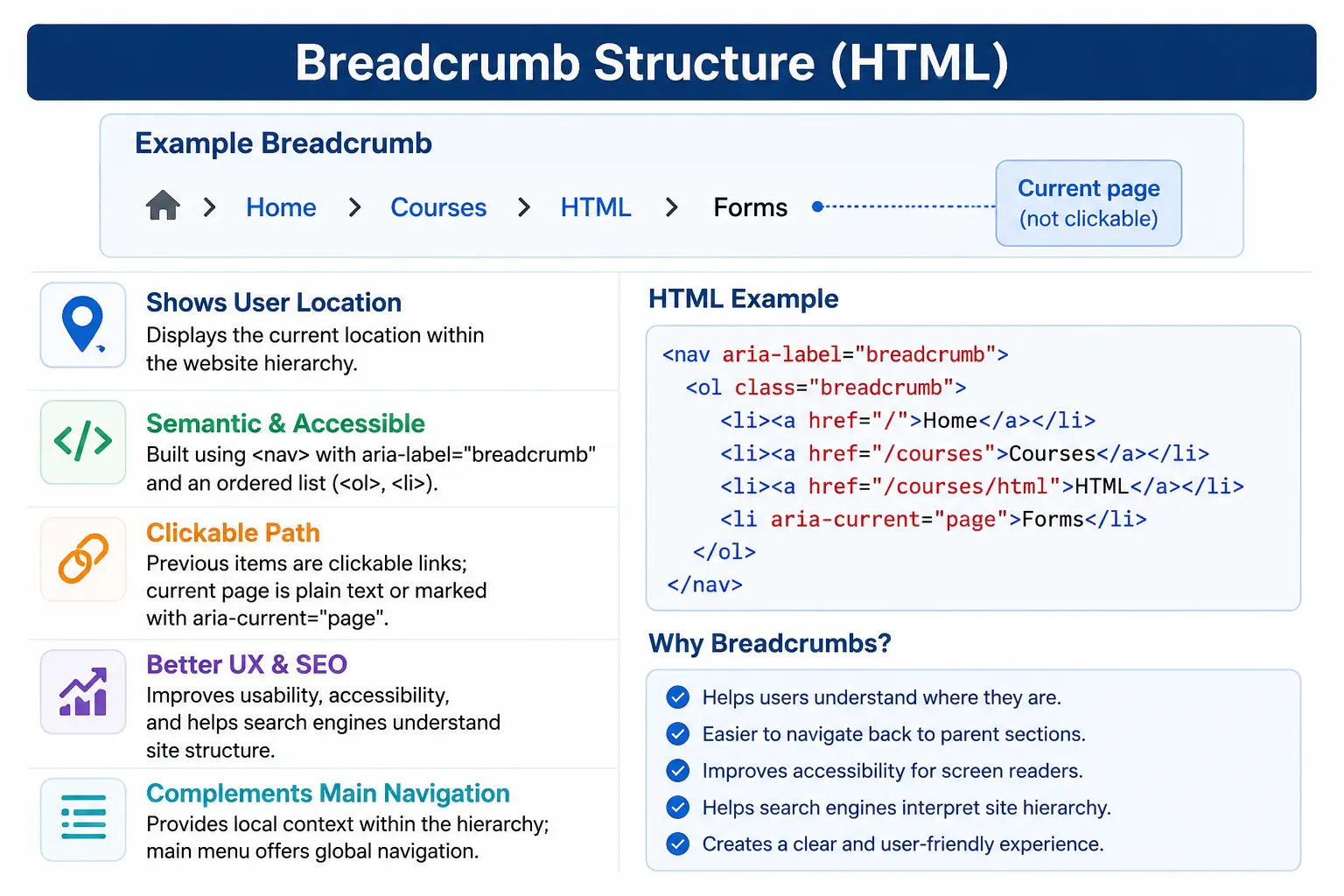
Breadcrumbs are widely used in e-commerce websites, documentation sites, learning platforms, blogs, enterprise applications, knowledge bases, and large content websites. They are especially useful when a website has multiple levels of organization. A product may belong to a category and subcategory. A tutorial may belong to a course and module. A documentation page may belong to a section and topic. Breadcrumbs make that hierarchy visible.
Breadcrumbs do not replace a main navigation menu. A main menu helps users move to major areas of a website, while breadcrumbs explain the current page's position inside the site structure. Together, they improve orientation, navigation efficiency, accessibility, and SEO clarity.
What Is a Breadcrumb?
A breadcrumb is a navigation trail that represents the path from the homepage or top-level section to the current page. It shows the hierarchy of pages in a compact, readable format.
Home
  ↓
Courses
  ↓
HTML
  ↓
Forms
Displayed visually, the same path often appears as:
Home > Courses > HTML > FormsEach earlier item is usually clickable. The final item normally represents the current page and is often not clickable. This helps users understand both their location and their available path back.
Why Is It Called a Breadcrumb?
The term breadcrumb comes from the fairy tale Hansel and Gretel, where breadcrumbs were left behind to help find the way back. In web navigation, breadcrumbs serve a similar purpose. They leave a visible trail that helps users understand where they are and how to move back to a higher level.
For example, if a user lands directly on a Forms lesson from a search engine, they may not know that the lesson belongs inside the HTML course. A breadcrumb trail such as Home > Courses > HTML > Forms immediately explains the page's context.
Why Use Breadcrumbs?
Breadcrumbs improve user experience by reducing confusion. Users can see their current position without opening a menu or guessing the site structure. They also improve navigation efficiency because users can jump to a parent category with one click. Instead of pressing the browser Back button multiple times, users can directly click Courses or HTML.
Breadcrumbs also help accessibility. When implemented with semantic HTML, screen readers can identify the breadcrumb region and announce the navigation sequence. This gives assistive technology users the same location awareness that visual users receive.
Breadcrumbs can also help SEO. Search engines use links and page structure to understand relationships between pages. A breadcrumb trail provides clear internal links and signals that a page belongs within a hierarchy. For large websites, this can improve content organization and discoverability.
Example Website Hierarchy
Consider a learning website with a course hierarchy.
Home
 └── Courses
      └── HTML
           └── Forms
The breadcrumb for the Forms page would be:
Home > Courses > HTML > FormsThis tells the user that Forms is not an isolated page. It belongs under HTML, which belongs under Courses, which belongs under Home.
Breadcrumb Components
A breadcrumb usually contains parent pages, the current page, and separators. Parent pages are clickable links. The current page is usually plain text or marked as the current item. Separators visually separate levels in the hierarchy.
Home > Blog > HTML TutorialIn this example, Home and Blog are parent levels. HTML Tutorial is the current page. The greater-than symbols are separators.
Basic HTML Breadcrumb
A simple breadcrumb can be created with a navigation element and anchor links. This basic version uses text separators.
<nav>
  <a href="index.html">Home</a>
  >
  <a href="courses.html">Courses</a>
  >
  <a href="html.html">HTML</a>
  >
  Forms
</nav>
The output is Home > Courses > HTML > Forms. This works visually, but a more professional implementation uses semantic navigation and an ordered list.
Using Semantic Navigation
Because breadcrumbs are a navigation system, they should be placed inside a <nav> element. A useful accessibility improvement is to label the navigation region with aria-label="breadcrumb".
<nav aria-label="breadcrumb">
  <a href="index.html">Home</a>
  >
  <a href="courses.html">Courses</a>
  >
  HTML
</nav>
The <nav> element tells browsers and assistive technologies that this is a navigation region. The aria-label clarifies that this particular navigation region is a breadcrumb, which is helpful if the page also has a main menu, footer menu, or sidebar menu.
Using Ordered Lists
Professional breadcrumb implementations often use an ordered list because breadcrumbs represent a sequence. The order matters: Home comes before Courses, Courses comes before HTML, and HTML comes before Forms.
<nav aria-label="breadcrumb">
  <ol>
    <li><a href="index.html">Home</a></li>
    <li><a href="courses.html">Courses</a></li>
    <li>HTML</li>
  </ol>
</nav>
This structure gives the breadcrumb semantic organization. The <ol> communicates that the items are ordered. Each <li> represents one level in the path.
Why Ordered Lists?
Breadcrumbs show hierarchy levels. Level 1 is usually Home. Level 2 may be Courses. Level 3 may be HTML. The sequence is meaningful. If the order changes, the location changes. That is why an ordered list is a natural fit.
nav
 │
 └── ol
      │
      ├── li
      ├── li
      └── li
CSS can visually hide the default numbering and insert separators such as > or /, but the underlying HTML still preserves the ordered relationship.
Current Page in Breadcrumbs
The last item in a breadcrumb usually represents the current page. It is often not clickable because the user is already on that page.
<li>Forms</li>Making the current page clickable is usually unnecessary and can be confusing. A link that points to the page the user is already viewing does not add meaningful navigation value.
<!-- Usually unnecessary for the active page -->
<li><a href="forms.html">Forms</a></li>
Some implementations also use aria-current="page" on the current breadcrumb item or link to communicate the active page to assistive technologies.
Real-World Breadcrumb Example
A complete breadcrumb for an HTML Forms page might look like this:
<nav aria-label="breadcrumb">
  <ol>
    <li><a href="index.html">Home</a></li>
    <li><a href="courses.html">Courses</a></li>
    <li><a href="html.html">HTML</a></li>
    <li aria-current="page">Forms</li>
  </ol>
</nav>
The visual output can be styled as Home > Courses > HTML > Forms. The HTML structure remains clear and accessible.
Common Breadcrumb Separators
Most websites use a simple greater-than symbol as a separator. Other common separators include slash, double angle quote, arrow, or vertical bar.
Home > Courses > HTML
Home / Courses / HTML
Home » Courses » HTML
Home → Courses → HTML
Home | Courses | HTML
Separators are usually visual decoration. Many implementations add them with CSS rather than placing them directly in the HTML. This keeps the HTML focused on structure and lets CSS handle presentation.
Types of Breadcrumbs
There are three common types of breadcrumbs: location-based, attribute-based, and path-based. Location-based breadcrumbs show the page's position in the site hierarchy. These are the most common and most useful for structured websites.
Attribute-based breadcrumbs are often used in e-commerce filtering. For example, a user may be viewing Shoes > Men > Running > Size 10. These breadcrumbs reflect selected attributes or filters rather than a strict page hierarchy.
Path-based breadcrumbs show the user's actual navigation path. These are less common because they can duplicate browser history behavior and become inconsistent. Most websites prefer location-based breadcrumbs because they provide stable structure.
Accessibility Benefits
Breadcrumbs can improve accessibility when implemented semantically. A screen reader may announce the breadcrumb as a navigation region and then announce the ordered list items. This helps users understand their current location and available parent links.
<nav aria-label="breadcrumb">
  <ol>
    <li><a href="index.html">Home</a></li>
    <li aria-current="page">HTML</li>
  </ol>
</nav>
A screen reader might communicate this as breadcrumb navigation, list of two items, Home, HTML. The exact announcement depends on the screen reader, but the semantic structure gives it useful information.
Breadcrumbs and SEO
Search engines use breadcrumbs to understand site hierarchy, page relationships, and content organization. A breadcrumb such as Home > Courses > HTML signals that HTML belongs under Courses. This helps search engines interpret the page within the larger website structure.
Breadcrumbs also create internal links to parent pages. These links help users and crawlers move upward through the site hierarchy. For large websites, this can support better crawl paths and clearer content grouping.
Structured Data Breadcrumbs
Advanced websites often add Schema.org breadcrumb markup using structured data. This can help search engines display breadcrumb paths in search results. For example, a result may show Home > Courses > HTML instead of a plain URL.
Structured data is usually added as JSON-LD in the page head or body. It does not replace visible breadcrumbs. The best implementation often includes both visible HTML breadcrumbs for users and structured data for search engines.
Breadcrumb vs Navigation Menu
A navigation menu and breadcrumb are related, but they solve different problems. A main navigation menu helps users move anywhere important in the site. It may contain Home, Courses, Blog, and Contact. A breadcrumb explains where the current page sits in a hierarchy, such as Home > Courses > HTML.
| Feature | Navigation Menu | Breadcrumb |
|---|---|---|
| Primary Purpose | Move to major site areas | Show current location |
| Typical Items | Home, Courses, Blog, Contact | Home > Courses > HTML |
| Scope | Broad navigation | Hierarchy trail |
| Replaces the Other? | No | No |
Most large websites use both. The main menu provides global navigation, while the breadcrumb provides local context.
Real-World Website Pattern
On a learning site such as SoftwareTips4U, a page about HTML Forms may use a breadcrumb like this:
Home
 > Courses
 > HTML
 > Forms
Users can jump directly back to HTML or Courses. This is faster than returning to the homepage and navigating down again. It also reinforces the course structure.
Common Mistakes
A common mistake is making the current page clickable. If the user is already on Forms, linking Forms to forms.html usually does not help.
<!-- Usually avoid this for the active page -->
<a href="forms.html">Forms</a>
Another mistake is not using a navigation landmark. A plain <div> may look correct visually, but it does not communicate navigation meaning.
<!-- Less meaningful -->
<div>Home > Courses</div>
A better version uses:
<nav aria-label="breadcrumb">
  ...
</nav>
Another mistake is missing intermediate hierarchy levels. If the actual structure is Home > Courses > HTML > Forms, a breadcrumb that says Home > Forms loses useful context. Breadcrumbs should reflect the real hierarchy.
Finally, breadcrumbs should not be used as a replacement for the main menu. They are secondary navigation. Users still need global navigation for major site areas.
Selenium Perspective
From a Selenium automation perspective, breadcrumbs can be located using the navigation landmark and aria label.
WebElement breadcrumb =
driver.findElement(
  By.cssSelector("nav[aria-label='breadcrumb']")
);
Breadcrumb items can be collected from list items.
List<WebElement> items =
driver.findElements(By.tagName("li"));
The current page is usually the last item.
String current =
items.get(items.size() - 1).getText();
Tests can verify that the breadcrumb exists, parent links point to correct URLs, and the final item matches the current page title or expected page context.
Comparison Table
| Feature | Breadcrumb |
|---|---|
| Shows Current Location | Yes |
| Displays Hierarchy | Yes |
| Helps Navigation | Yes |
| Improves Accessibility | Yes, when semantic |
| Improves SEO | Yes, through hierarchy and links |
| Replaces Main Menu | No |
Common Interview Questions
A common interview question is: what is a breadcrumb? The answer is that it is a navigation trail showing the user's location within a website hierarchy.
Another common question is which HTML element commonly contains breadcrumbs. The answer is <nav>, usually with aria-label="breadcrumb". Interviewers may also ask why that aria label is used. It improves accessibility by identifying the navigation region as a breadcrumb.
They may ask whether the current page should be clickable. Usually, no. The current page is already active, so it is normally plain text or marked with aria-current="page". They may also ask how breadcrumbs help SEO. Breadcrumbs help search engines understand site structure and page relationships.
Interview-Ready Answer
A breadcrumb is a secondary navigation component that displays the user's location within a website hierarchy, such as Home > Courses > HTML > Forms. Breadcrumbs are typically implemented using the <nav> element with an ordered list and improve usability, accessibility, and SEO by clearly showing page relationships and navigation paths.
Key Takeaway
Breadcrumbs answer the question: where am I in this website? They show hierarchy, provide quick links to parent levels, and help users recover context when they arrive from search engines or external links. They are especially useful on large websites with deep structures.
Use semantic HTML, label the breadcrumb navigation clearly, prefer ordered lists, avoid duplicate or misleading hierarchy, and keep the current page non-clickable in most cases. Breadcrumbs should support the main navigation, not replace it.
One-Line Insight
Breadcrumbs answer the question: “Where am I in this website?” and provide a quick path back.