Blocking vs Non-Blocking HTML Resources
Introduction
This difference is explained using the terms blocking resources and non-blocking resources.
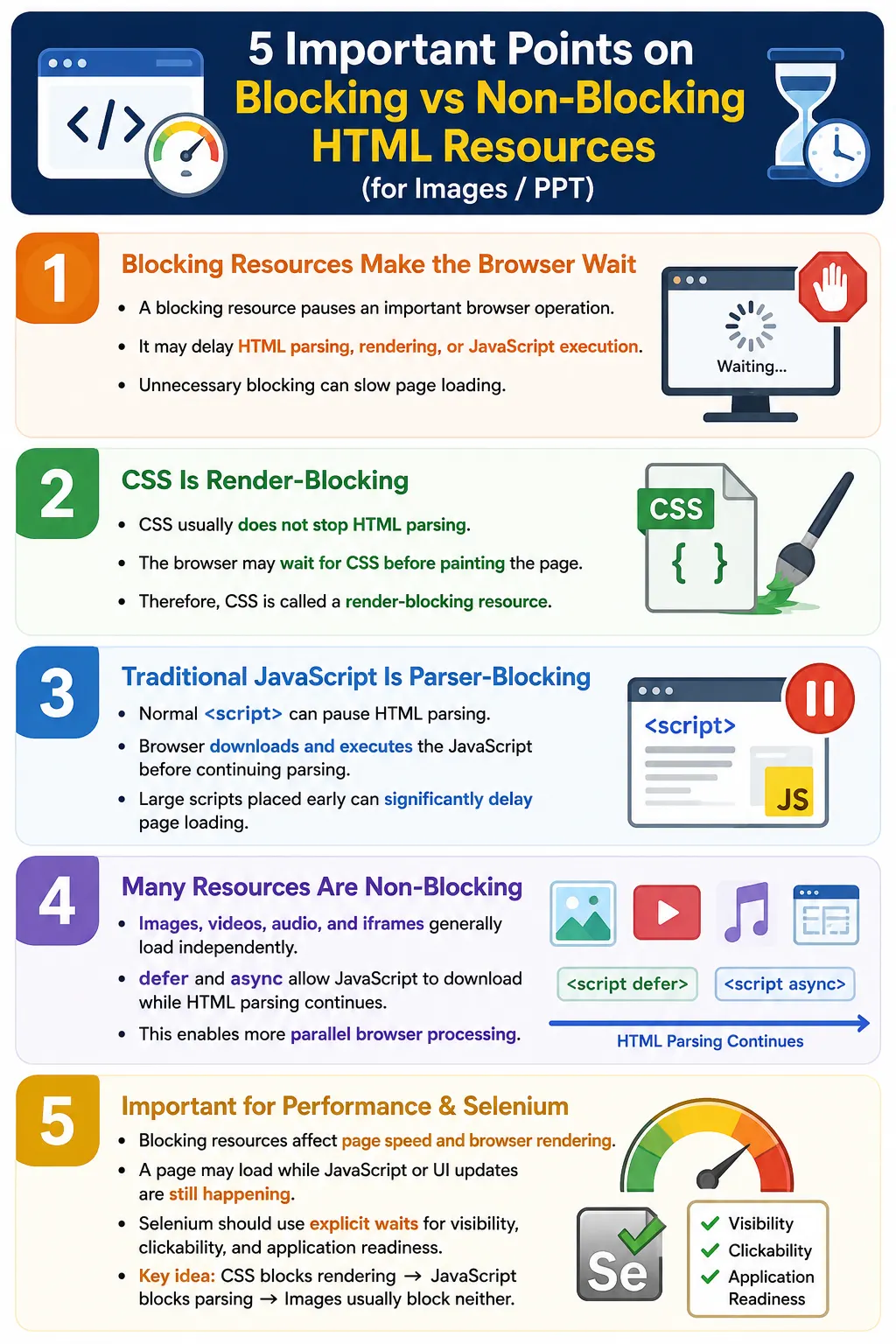
Understanding blocking and non-blocking resources is extremely important for web performance optimization, Core Web Vitals, browser rendering, frontend interviews, and Selenium automation. Many page-speed problems occur because critical resources block parsing or rendering unnecessarily. Similarly, many automation failures happen because the browser has received HTML, but scripts are still executing, CSS is still applying, or dynamic content is still being updated.
In simple terms, a blocking resource delays some important browser operation, while a non-blocking resource allows the browser to continue working while the resource loads in parallel.
The key idea is this:
Blocking Resource
        ↓
Browser Must Wait

Non-Blocking Resource
        ↓
Browser Can Continue
Knowing which resources block parsing, which block rendering, and which load independently helps developers build faster applications and helps testers understand real page readiness.
What Is a Blocking Resource?
A blocking resource is a resource that forces the browser to pause an important task until that resource is downloaded, parsed, executed, or processed.
The blocked task may be:
- HTML parsing
- Page rendering
- JavaScript execution
- Painting content on screen
A common example is a traditional JavaScript file:
<script src="app.js"></script>When the browser encounters this script during HTML parsing, the usual behavior is:
Parse HTML
     ↓
Encounter Script
     ↓
Stop Parsing
     ↓
Download JavaScript
     ↓
Execute JavaScript
     ↓
Resume Parsing
This script blocks HTML parsing because JavaScript can modify the DOM. The browser must execute it before it safely continues parsing the remaining document.
Blocking resources are not always bad. Some are necessary. However, unnecessary blocking resources can slow down page loading and delay visible content.
What Is a Non-Blocking Resource?
A non-blocking resource is a resource that can be downloaded or processed without stopping the browser’s main workflow.
A common example is an image:
<img src="logo.png">When the browser discovers this image, it can start downloading the image while continuing to parse the rest of the HTML.
The flow looks like this:
Parse HTML
     ↓
Discover Image
     ↓
Start Image Download
     ↓
Continue Parsing HTML
The image may appear later when the download finishes, but it does not normally stop the browser from building the DOM.
Non-blocking resources improve performance because the browser can work in parallel.
Why This Difference Matters
Blocking and non-blocking behavior directly affects user experience.
If critical resources are delayed, users may see a blank screen for longer. If JavaScript blocks parsing unnecessarily, the DOM is created more slowly. If CSS takes too long to load, the browser may delay painting content. These delays affect performance metrics such as First Contentful Paint, Largest Contentful Paint, and Time to Interactive.
For developers, understanding this topic helps optimize loading strategies.
For testers, it explains why a page may appear loaded but still not be ready for interaction.
For interview preparation, it is one of the most commonly discussed browser-rendering concepts.
Types of Blocking Resources
Not all blocking resources block the browser in the same way. Some block parsing. Some block rendering. Some delay interactivity.
HTML as the Initial Blocking Resource
HTML is the starting point of every webpage. Before the browser receives HTML, it cannot know what the page contains or which resources are needed.
The process begins like this:
Request HTML
      ↓
Receive HTML
      ↓
Parse HTML
Until the first HTML bytes arrive, the browser cannot create the DOM, discover CSS, discover JavaScript, or begin rendering meaningful page content.
This makes HTML the initial critical resource.
HTML itself is not usually called a blocking resource in the same sense as CSS or JavaScript, but it is the prerequisite for everything else.
Without HTML:
No DOM
No CSS Discovery
No JavaScript Discovery
No Render Tree
No Page Display
Render-Blocking CSS
CSS is one of the most important blocking resources because it affects rendering.
Example:
<link rel="stylesheet" href="style.css">When the browser discovers this stylesheet, it downloads and parses it.
The process looks like:
Download CSS
      ↓
Parse CSS
      ↓
Create CSSOM
      ↓
Render Page
CSS usually does not stop HTML parsing. The browser can continue parsing HTML while the CSS file downloads. However, CSS can block rendering because the browser needs styling information before painting the page.
This is why CSS is called a render-blocking resource.
The browser delays painting to avoid showing an unstyled page.
Why CSS Blocks Rendering
Without CSS, the browser may know the DOM structure, but it does not know how elements should look.
For example, without CSS, the browser may not know:
- Font size
- Color
- Margins
- Layout
- Display rules
- Responsive behavior
- Visibility
If the browser paints too early, users may briefly see an unstyled page. This is known as Flash of Unstyled Content, or FOUC.
The flow looks like this:
DOM Exists
CSS Not Ready
      ↓
Delay Paint
This delay is intentional because styled content usually provides a better user experience than unstyled content that suddenly changes.
Parser-Blocking JavaScript
Traditional JavaScript is the classic example of a parser-blocking resource.
Example:
<script src="app.js"></script>When encountered during parsing, the browser pauses.
HTML Parsing
      ↓
Pause
      ↓
Download JS
      ↓
Execute JS
      ↓
Resume Parsing
JavaScript blocks parsing because it can directly modify the document.
For example:
document.write("Hello");or:
document.body.innerHTML += "<h1>New Content</h1>";Since JavaScript can add, remove, or modify elements, the browser must execute it before continuing to build the DOM.
Why JavaScript Is Blocking
JavaScript is powerful because it can change almost everything about a page.
It can:
- Add elements
- Remove elements
- Modify text
- Change CSS classes
- Inject styles
- Load additional resources
- Create event handlers
- Rewrite document content
Because of this power, traditional scripts interrupt parsing.
This behavior is safe but can be expensive for performance.
If a large script is placed in the <head> without async or defer, the browser may pause before even reaching the visible body content.
Non-Blocking Resources
Many resources do not block HTML parsing or initial rendering in the same way CSS and traditional JavaScript do.
Images
Images are generally non-blocking.
Example:
<img src="banner.jpg">Browser flow:
Discover Image
      ↓
Start Download
      ↓
Continue Parsing
Images can download in parallel while the browser continues building the DOM.
However, images can still affect performance if they are very large or if they are part of the Largest Contentful Paint element. So images are non-blocking for parsing, but they can still affect perceived loading speed.
Videos
Videos also load independently.
Example:
<video src="movie.mp4"></video>The browser does not stop parsing the page simply because a video file is referenced.
Videos may be large and expensive to download, but they do not normally block HTML parsing.
Audio Files
Audio files behave similarly.
Example:
<audio src="music.mp3"></audio>They are loaded separately from the main parsing process.
Iframes
Iframes generally load independently.
Example:
<iframe src="page.html"></iframe>An iframe creates a nested browsing context and loads its own document. While it may affect total page performance, it usually does not block the parent document’s HTML parsing in the same way a traditional script does.
However, heavy iframes can still slow down page experience because they load additional resources.
Deferred Scripts
Deferred scripts are non-blocking for HTML parsing.
Example:
<script defer src="app.js"></script>Flow:
Download JavaScript In Parallel
      ↓
Continue HTML Parsing
      ↓
DOM Complete
      ↓
Execute JavaScript
The browser downloads the script while continuing to parse HTML. It executes the script only after the DOM is complete.
This makes defer a preferred option for most application scripts.
Async Scripts
Async scripts also avoid traditional parser blocking during download.
Example:
<script async src="analytics.js"></script>Flow:
Download JavaScript In Parallel
      ↓
Execute When Ready
The script downloads in parallel, but executes immediately once available. This means execution order is not guaranteed.
Async is commonly used for independent scripts such as analytics, ads, or tracking code.
Blocking vs Non-Blocking Visualization
Blocking resource flow:
HTML Parsing
      ↓
Stop
      ↓
Resource Download
      ↓
Process Resource
      ↓
Resume
Non-blocking resource flow:
HTML Parsing
      ↓
Download Resource In Parallel
      ↓
Continue Parsing
      ↓
Resource Completes Later
This simple difference has a major impact on page performance.
CSS: Parsing vs Rendering
A common interview question is whether CSS blocks HTML parsing.
The answer is no.
CSS does not usually block HTML parsing.
When the browser encounters:
<link rel="stylesheet" href="style.css">it starts downloading CSS and continues parsing HTML.
However, CSS can block rendering.
The browser may wait for CSS before painting content.
So the accurate answer is:
CSS does not block HTML parsing.
CSS can block rendering.
This is why CSS is called render-blocking, not parser-blocking.
JavaScript: Parsing vs Rendering
Traditional JavaScript blocks HTML parsing.
Example:
<script src="app.js"></script>This stops parsing until JavaScript is downloaded and executed.
Traditional JavaScript may also delay rendering because DOM creation is delayed.
In short:
Normal JavaScript
      ↓
Blocks Parsing
      ↓
Often Delays Rendering
This is why placing large scripts early in the document can severely affect page speed.
Async vs Defer
Async and defer are important because they change JavaScript loading behavior.
Async
Example:
<script async src="app.js"></script>Behavior:
Download Parallel
      ↓
Execute Immediately When Ready
Advantages include faster loading and no traditional parser blocking during download.
The disadvantage is unpredictable execution order.
Async works best for independent scripts.
Defer
Example:
<script defer src="app.js"></script>Behavior:
Download Parallel
      ↓
Wait for DOM
      ↓
Execute in Order
Advantages include predictable execution order and no parser blocking.
Defer is best for most application scripts.
Async vs Defer Comparison
| Feature | Async | Defer |
|---|---|---|
| Blocks Parser During Download | No | No |
| Execution Timing | When ready | After DOM parsing |
| Execution Order | Not guaranteed | Guaranteed |
| Best Use Case | Analytics, Ads, Tracking | Application Scripts |
For most application logic, defer is usually the better choice.
Resource Priority Overview
Different resources affect parsing and rendering differently.
| Resource | Blocks Parsing | Blocks Rendering |
|---|---|---|
| HTML | N/A | Yes |
| CSS | No | Yes |
| Normal JavaScript | Yes | Often |
| Async JavaScript | No | Minimal |
| Defer JavaScript | No | Minimal |
| Images | No | No |
| Videos | No | No |
| Audio | No | No |
| Fonts | No | Sometimes |
Fonts deserve special attention because they do not block parsing, but they can delay or affect text rendering depending on browser font loading behavior.
Impact on Critical Rendering Path
Blocking resources increase the length of the Critical Rendering Path.
When blocking resources are not optimized, they can negatively affect performance metrics such as:
- First Contentful Paint
- Largest Contentful Paint
- Time to Interactive
- Total Blocking Time
Poor optimization may result in:
Slow Page Load
      ↓
Poor User Experience
      ↓
Higher Bounce Rate
Optimizing blocking resources helps pages render faster and feel more responsive.
Real-World Example: Bad Loading Strategy
Poor structure:
<head>
    <script src="large.js"></script>
    <script src="another.js"></script>
</head>
Flow:
Parse HTML
      ↓
Stop
      ↓
Download large.js
      ↓
Execute large.js
      ↓
Parse Again
      ↓
Stop
      ↓
Download another.js
      ↓
Execute another.js
This delays DOM construction and rendering.
Users may see a blank screen longer than necessary.
Real-World Example: Better Loading Strategy
Improved structure:
<head>
    <script defer src="large.js"></script>
    <script defer src="another.js"></script>
</head>
Flow:
Download Both Scripts
      ↓
Continue Parsing HTML
      ↓
DOM Complete
      ↓
Execute Scripts In Order
This approach improves performance because parsing continues while scripts download.
Why This Matters for Selenium
Blocking and non-blocking resources explain many Selenium timing issues.
A page may appear loaded from a basic browser perspective, but the UI may not be ready for automation interaction.
Common situations include:
HTML Loaded
DOM Incomplete
or:
DOM Created
JavaScript Still Running
or:
Element Exists
CSS Not Fully Applied
These situations can cause:
- Element not found errors
- Element not visible errors
- Click intercepted errors
- Stale element reference exceptions
- Flaky automation tests
Understanding resource loading helps testers decide when and why explicit waits are needed.
Selenium Example
A Selenium command such as:
driver.findElement(By.id("login"));searches the current DOM.
If JavaScript has not yet created the login button, the test fails.
Similarly, if the button exists but CSS animations or overlays still block interaction, Selenium may throw a click interception error.
This is why professional automation frameworks use explicit waits based on visibility, clickability, DOM stability, and application-specific readiness.
Best Practices for Handling Blocking Resources
Developers can improve performance by managing resources carefully.
Use defer for application scripts, use async for independent third-party scripts, keep CSS optimized, remove unused CSS, split critical and non-critical CSS, compress images, lazy-load non-critical media, reduce JavaScript size, avoid heavy scripts in the document head, and minimize DOM complexity.
The goal is to reduce unnecessary blocking and allow the browser to render meaningful content sooner.
Common Interview Questions
Which resource blocks HTML parsing?
Traditional JavaScript blocks HTML parsing.
Example:
<script src="app.js"></script>Which resource blocks rendering?
CSS is typically render-blocking.
Example:
<link rel="stylesheet" href="style.css">Are images render-blocking?
No. Images usually load independently and do not block HTML parsing or initial rendering.
Which is preferred: async or defer?
For most application scripts, defer is preferred because it preserves execution order and waits until DOM parsing is complete.
For analytics, advertisements, and tracking scripts, async is often preferred because those scripts are independent.
Interview-Ready Answer
Blocking resources are resources that delay HTML parsing, rendering, or execution until they are downloaded and processed. Non-blocking resources load in parallel without interrupting the browser’s main workflow. CSS is usually render-blocking because the browser needs styling information before painting. Traditional JavaScript is parser-blocking because it can modify the DOM while HTML is being parsed. Images, videos, audio files, deferred scripts, and many asynchronous resources are generally non-blocking.
Conclusion
Blocking and non-blocking resources play a major role in how quickly webpages load and become usable. HTML starts the process, CSS usually blocks rendering, traditional JavaScript blocks parsing, and media resources such as images, videos, and audio generally load without stopping HTML parsing. Modern loading strategies such as defer, async, lazy loading, resource optimization, and proper script placement help reduce unnecessary delays.
For developers, this knowledge is essential for building fast and efficient web applications. For testers, especially Selenium automation engineers, it helps explain synchronization problems, dynamic loading behavior, and UI readiness issues. For interview preparation, it provides a clear understanding of browser rendering and performance optimization.
One-Line Insight
CSS blocks rendering, traditional JavaScript blocks parsing, and images usually block neither.