Avoiding Excessive DOM Nodes
Introduction
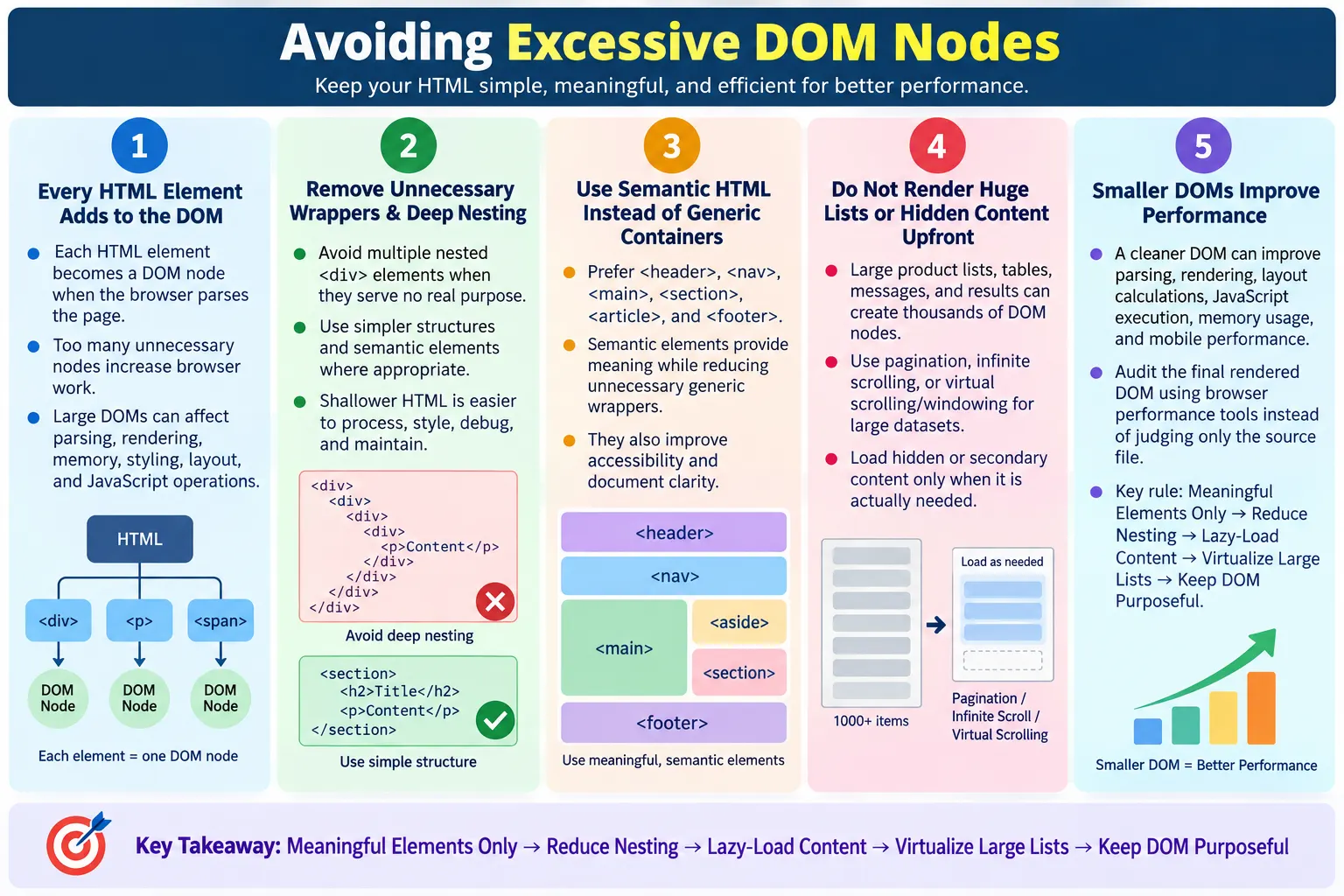
Avoiding Excessive DOM Nodes means keeping the Document Object Model as small and efficient as possible by reducing unnecessary HTML elements. Every HTML element becomes a DOM node when the browser parses the page. A page with a clean structure gives the browser less work to do. A page with thousands of unnecessary nodes, repeated wrappers, hidden sections, and deeply nested layouts forces the browser to spend extra time parsing, styling, laying out, painting, and updating the page.
The DOM is not just an abstract developer concept. It is the structure the browser actually uses to represent and interact with the page. JavaScript queries the DOM. CSS selectors apply to the DOM. Layout calculations operate on the DOM. Accessibility trees are influenced by the DOM. Search engines and testing tools also depend on the document structure. When the DOM becomes unnecessarily large, many parts of the web platform become slower or harder to manage.
Optimizing the DOM helps improve page rendering speed, browser performance, Core Web Vitals support, JavaScript execution, memory usage, and maintainability. A smaller DOM is usually easier to understand, easier to style, easier to test, and easier to debug. The goal is not to remove meaningful content or semantic structure. The goal is to remove waste: empty elements, unnecessary wrappers, excessive nesting, duplicate blocks, and hidden markup that does not need to exist at initial load.
What Is a DOM Node?
When a browser reads HTML, it converts the document into a structured object model called the DOM. In that model, each part of the document becomes a node. Elements such as <html>, <body>, <h1>, and <p> become element nodes. Text can become text nodes. Comments, attributes, and other document parts can also be represented in the browser's internal structures. This model allows scripts, styles, and browser features to interact with the page.
Example HTML:

<body>
  <h1>HTML Tutorial</h1>
  <p>Welcome</p>
</body>

DOM Tree:

Document
  ↓
html
  ↓
body
  ├── h1
  └── p
Each element is represented as a node in the DOM. The browser uses this tree to understand parent-child relationships, document order, styling targets, and layout structure. A simple tree is generally easier to process. A very large or deeply nested tree requires more work.
DOM nodes are necessary. A webpage cannot exist without structure. Headings, paragraphs, links, tables, forms, images, navigation, and semantic sections all require nodes. The problem is not DOM nodes themselves. The problem is excessive DOM nodes that add complexity without adding value.
What Is an Excessive DOM?
An excessive DOM contains too many nodes, often because of unnecessary HTML elements, repeated components, deep nesting, hidden content, large lists, or framework-generated wrappers. A page may look simple visually while still containing a surprisingly large DOM underneath. The user sees a clean card, but the browser may be managing many nested containers, icons, placeholders, hidden panels, and duplicate controls.
html
  ↓
body
  ↓
div
  ↓
div
  ↓
div
  ↓
div
  ↓
div
  ↓
div
  ↓
p
This structure is more complex than necessary when all those wrappers exist only to hold a paragraph. Sometimes containers are needed for layout, styling, state management, or component boundaries. But when wrappers are added automatically or copied without review, the DOM grows quickly. The page becomes heavier than it needs to be.
Excessive DOM size is not defined only by one fixed number. A simple article page and a complex data grid have different needs. A dashboard naturally has more nodes than a landing page. The practical question is whether the number and depth of nodes are justified by the user interface. If many elements do not provide content, structure, styling, accessibility, or behavior, they are candidates for removal.
Why Too Many DOM Nodes Are a Problem
Large DOM trees can lead to slower HTML parsing, slower rendering, increased memory consumption, slower JavaScript DOM operations, more expensive style recalculations, and longer layout times. Every node is something the browser may need to parse, store, style, measure, paint, and update. The browser is optimized, but unnecessary work is still work.
- Slower HTML parsing
- Slower rendering
- Increased memory consumption
- Slower JavaScript DOM operations
- More expensive style recalculations
- Longer layout and reflow times
HTML
  ↓
DOM Creation
  ↓
Large DOM
  ↓
More Processing
  ↓
Slower Rendering
A smaller DOM generally requires less work. This matters most on mobile devices, low-powered laptops, large single-page applications, e-commerce pages, dashboards, and pages with many repeated components. Performance problems may appear as slow scrolling, delayed clicks, long script tasks, layout jank, or slow test execution.
Large DOMs also create maintenance problems. Developers must understand more markup. CSS selectors may become more complex. Debugging layout issues takes longer. Automated tests may become slower or more fragile. A clean DOM is an engineering quality improvement as well as a performance improvement.
Example of Poor HTML
A common cause of excessive DOM nodes is unnecessary nesting. Developers may add containers for spacing, alignment, styling, or framework convenience, then never remove them when the design changes. Over time, a simple piece of content may become surrounded by many elements that serve no real purpose.
<div>
  <div>
    <div>
      <div>
        <div>
          <p>Hello World</p>
        </div>
      </div>
    </div>
  </div>
</div>
Five unnecessary <div> elements surround one paragraph. The browser parses them, stores them, applies styles to them, and includes them in layout calculations. The user gains nothing from the extra structure. The developer gains extra complexity. This is exactly the kind of markup that should be simplified.
Better:

<section>
  <p>Hello World</p>
</section>
The better version is simpler and easier to understand. The <section> element groups related content, and the paragraph contains the text. The markup communicates intent without a pile of generic wrappers. This is not only shorter; it is clearer.
Use Semantic HTML
Semantic HTML often reduces unnecessary containers while making the page easier to understand. Instead of using generic <div> elements for every part of the page, use elements that describe meaning: <header>, <nav>, <main>, <section>, <article>, <aside>, and <footer>. These elements give structure to the document and help developers, browsers, assistive technologies, and search engines understand the layout.
Instead of:

<div class="header">
<div class="menu">
<div class="content">

Use:

<header>
<nav>
<main>
Semantic HTML does not automatically reduce the DOM in every case, but it encourages purposeful markup. A real <main> element can replace a generic content wrapper. A real <nav> element can replace a generic menu container. When the element itself expresses meaning, fewer extra class names, comments, and wrapper elements may be needed.
Good semantic structure is not just a performance choice. It improves accessibility and maintainability. Screen reader users can navigate landmarks. Search engines can interpret page hierarchy. Developers can scan the document and understand the major regions quickly. Reducing excessive DOM nodes should support meaning, not remove it.
Avoid Empty Elements
Empty elements add nodes without adding visible content or meaningful structure. They often remain after design experiments, copied templates, removed content, or incomplete features. Examples include empty <div>, <span>, and <p> elements. If they serve no layout, scripting, accessibility, or placeholder purpose, they should be removed.
Bad:

<div></div>
<span></span>
<p></p>
Some empty elements are intentional. A JavaScript mount point may start empty. An ARIA live region may be empty until a message appears. A decorative element may be styled through CSS. These cases require judgment. The rule is not "every empty element is wrong." The rule is "every empty element should have a reason."
During review, empty elements are easy to search for and inspect. Removing purposeless empty elements reduces DOM size and makes the document cleaner. It also prevents future developers from wondering whether those elements are important.
Reduce Deep Nesting
Deep nesting means elements are placed inside many layers of parent elements. Some nesting is natural: lists contain list items, tables contain rows and cells, forms contain controls, and sections contain headings and paragraphs. Excessive nesting happens when many layers exist only for layout or historical reasons. Deep structures are harder to read and can be more expensive for styling and layout.
Bad:

<div>
  <div>
    <div>
      <div>
        <div>
          <h1>HTML</h1>
        </div>
      </div>
    </div>
  </div>
</div>

Better:

<header>
  <h1>HTML</h1>
</header>
Shallower structures are generally easier for browsers to process and easier for developers to maintain. CSS becomes simpler because selectors do not need to target elements buried inside many layers. JavaScript becomes simpler because element relationships are easier to understand. Accessibility review becomes simpler because meaningful landmarks and headings are closer to the surface.
Modern CSS layout tools such as Flexbox and Grid often reduce the need for extra wrappers. Older layouts sometimes required many containers to achieve alignment. Today, many of those wrappers can be removed by using better CSS. This is a practical way to improve DOM size without changing the visible design.
Avoid Wrapper Divs
Wrapper divs are not always bad. They can provide layout constraints, spacing, grid boundaries, or component grouping. The problem is unnecessary wrapper divs. A wrapper should have a real purpose. If a wrapper exists only because a template was copied or because a previous design required it, it may be safe to remove.
Bad:

<div class="wrapper">
  <div class="container">
    <div class="content">
      <p>HTML</p>
    </div>
  </div>
</div>

Better:

<main>
  <p>HTML</p>
</main>
Only add wrapper elements when they provide a real layout or styling purpose. If a page section needs a maximum width, one container may be reasonable. If a component needs a grid, a wrapper may be needed. But three or four wrappers around every small piece of content can create unnecessary DOM weight.
When reviewing wrappers, ask what each layer does. Does it control width? Does it group content semantically? Does it support a real CSS rule? Does JavaScript depend on it? If the answer is no, the wrapper may be unnecessary.
Large Lists
Large lists are one of the most common causes of excessive DOM size. Rendering thousands of products, search results, table rows, chat messages, notifications, or log entries at once can create thousands of DOM nodes. Even if the HTML is generated quickly, the browser still needs to manage the resulting DOM.
10,000 Products
  ↓
10,000 DOM Nodes
Better approaches include pagination, infinite scrolling, and virtual scrolling. Pagination divides content into separate pages or result sets. Infinite scrolling loads additional items as the user scrolls. Virtual scrolling, also called windowing, renders only the visible items plus a small buffer, even when the dataset contains thousands of items.
- Pagination
- Infinite scrolling
- Virtual scrolling or windowing
These techniques keep the active DOM much smaller. Users can still access large datasets, but the browser does not need to render everything at once. For dashboards, tables, and product lists, this can make a major difference.
Lazy Loading Content
Lazy loading content means loading content only when needed. Instead of adding every possible section to the DOM during initial load, the page starts with visible and important content. Additional items are fetched or rendered as the user scrolls or interacts. This keeps the initial DOM smaller and reduces startup work.
Products 1-20
  ↓
Scroll
  ↓
Products 21-40
Lazy loading is useful for long article images, product grids, comments, recommendations, review sections, maps, videos, and related content. The first view becomes faster because the browser is not forced to build nodes for everything on the page immediately.
Lazy loading should still be accessible and reliable. Important content should not be hidden in a way users or search engines cannot reach. The page should handle loading failures gracefully. If content is essential, it may need crawlable links or pagination rather than only scroll-triggered loading.
Remove Hidden Elements
Hidden elements can create a large DOM even when the page looks simple. A page may contain hidden menus, hidden tabs, hidden modals, hidden templates, hidden forms, and hidden content sections. Some hidden elements are necessary for interaction. Others are unused or could be generated only when needed.
Bad:

<div style="display:none">
  Huge Content
</div>
If content is never needed immediately, consider generating or fetching it only when required. For example, a modal that contains a huge form may not need to exist in the DOM until the user opens it. A hidden tab panel with thousands of rows may be better loaded on demand. A set of old hidden templates may be removable entirely.
The key is to distinguish necessary hidden UI from unnecessary hidden bulk. Hidden does not mean free. If it is in the DOM, the browser still stores it and may include it in style calculations and DOM queries.
Browser Rendering Impact
Large DOMs affect the browser rendering pipeline. The browser parses HTML into the DOM, parses CSS into the CSSOM, combines them into a render tree, calculates layout, and paints pixels. More nodes mean more potential work during styling, layout, and painting. If JavaScript changes the DOM or styles, the browser may need to recalculate affected parts of the page.
HTML
  ↓
DOM
  ↓
CSSOM
  ↓
Render Tree
  ↓
Layout
  ↓
Paint
Large DOMs can also make layout changes more expensive. If a script adds a class, changes dimensions, or inserts content, the browser may need to recalculate styles and layout for many nodes. The larger and more complex the tree, the more careful developers need to be with dynamic updates.
This is why performance tools often warn about excessive DOM size. The warning is not about markup aesthetics. It is about measurable work that can affect rendering, responsiveness, and memory usage.
JavaScript Performance
DOM operations become more expensive as the DOM grows. JavaScript that queries, updates, or traverses the DOM has more work to do when the page contains many nodes. A simple selector may be fast on a small page but slower on a huge page. Repeated queries inside loops can become especially expensive.
document.querySelectorAll("div");Searching through a huge DOM typically requires more work than searching a small one. XPath selectors in testing tools can also become slower when they evaluate against a very large document. Event delegation, caching references, limiting query scope, and reducing DOM size all help.
JavaScript performance is also affected by DOM updates. Adding one item is usually cheap. Adding thousands of items one by one can be expensive. Better approaches include batching updates, using document fragments, virtualizing lists, or rendering only what the user can see.
Performance Benefits
A smaller DOM helps with faster parsing, faster rendering, faster layout calculations, lower memory usage, faster JavaScript execution, and better mobile performance. These benefits are practical. Users may experience smoother scrolling, quicker interactions, less jank, and faster page startup.
- Faster parsing
- Faster rendering
- Faster layout calculations
- Lower memory usage
- Faster JavaScript execution
- Better mobile performance
Mobile performance is especially important because mobile devices may have less processing power and memory. A DOM that feels acceptable on a developer's laptop may perform poorly on a budget phone. Keeping the DOM efficient makes the page more inclusive across devices.
SEO Benefits
A well-structured DOM can contribute to faster page loading, better Core Web Vitals support, improved crawl efficiency, and easier content understanding. Search engines do not rank pages simply because they have fewer DOM nodes. The benefits come primarily through better performance, clearer structure, and improved user experience.
- Faster page loading
- Better Core Web Vitals support
- Improved crawl efficiency
- Easier content understanding
Clean semantic DOM structure also helps crawlers identify headings, navigation, main content, links, images, and sections. A bloated DOM filled with hidden content and repeated wrappers can obscure the content hierarchy. Clear structure supports both users and crawlers.
Best Practices
Best practices for avoiding excessive DOM nodes are straightforward but require discipline. Use semantic HTML. Remove unnecessary wrapper elements. Reduce deep nesting. Remove empty elements. Lazy-load non-critical content. Use pagination or virtualization for large datasets. Keep the DOM as simple as practical. Avoid rendering hidden content that is not needed.
- Use semantic HTML
- Remove unnecessary wrapper elements
- Reduce deep nesting
- Remove empty elements
- Lazy-load non-critical content
- Use pagination or virtualization for large datasets
- Keep the DOM as simple as practical
- Avoid rendering hidden content that is not needed
These practices should be applied during design, development, and review. It is easier to prevent DOM bloat than to clean it after a large application has already grown. Component libraries and templates should be reviewed for unnecessary wrappers because repeated components multiply small inefficiencies many times.
How to Audit DOM Size
Auditing DOM size starts with inspecting the rendered page, not only the source file. The final DOM may include server-rendered HTML, client-side components, injected widgets, advertisements, modals, menus, and dynamically generated content. A page can look clean in the source file but become large after scripts run. Browser developer tools help reveal the real rendered structure that users and automation tools interact with.
Chrome DevTools and Lighthouse can identify DOM size warnings and show rendering costs. The Elements panel helps developers inspect nesting and repeated wrappers. The Performance panel can reveal layout, style recalculation, and scripting costs. The Memory panel can help when pages become heavy after long sessions. These tools are more useful than guessing because they show where the browser spends time.
A practical audit should ask several questions. Are there many empty nodes? Are there large hidden sections? Are thousands of list items rendered at once? Are components adding multiple wrappers for every small item? Are tables rendering every row even when only a few rows are visible? Are old template fragments still present? These questions quickly identify areas where DOM size can be reduced without changing the visible experience.
After identifying a problem, fix the cause rather than only the symptom. If a product grid renders too many cards, consider pagination or virtualization. If a component library adds unnecessary wrappers, adjust the component. If hidden content is creating thousands of nodes, load it on demand. If a copied template contains obsolete sections, remove them. DOM optimization is most effective when it simplifies the actual page structure.
Common Mistakes
Too many wrapper divs are one of the most common mistakes. Developers add containers for every layout layer even when CSS could handle the layout with fewer elements. Rendering huge tables is another problem. Thousands of rows should not be created at once if only a small portion is visible. Large hidden content is also expensive because hidden elements still exist in the DOM.
Bad:

<div>
  <div>
    <div>
      <div>
Deep component nesting is common in modern frontend frameworks. Components are useful, but every component may add wrappers. A page can become deeply nested even when each component looks harmless alone. Another mistake is ignoring DOM size because the page looks simple visually. Visual simplicity does not guarantee structural simplicity.
Selenium Perspective
Automation testers may notice that very large DOMs slow element searches, increase page interaction times, make XPath evaluation slower, and increase test execution time. A test suite that runs quickly on a clean page may become slow and flaky on pages with excessive DOM size. Element lookup strategy matters more when the DOM is large.
List<WebElement> elements =
driver.findElements(By.tagName("div"));

System.out.println(elements.size());
Selenium can count elements, inspect structure, and reveal symptoms such as slow lookups or interactions. However, performance profiling tools such as Chrome DevTools and Lighthouse are better suited for measuring DOM size and rendering impact. Selenium verifies behavior; performance tools explain cost.
Testers can still raise useful concerns. If a page has thousands of unnecessary nodes or if selectors are slow because of deeply nested markup, that is a quality issue. Clean DOM structure helps both users and test automation.
Common Interview Questions
What is a DOM node? A DOM node is an object representing an HTML element, text, attribute, or other part of a webpage in the browser's Document Object Model.
Why should DOM size be minimized? A smaller DOM improves rendering speed, JavaScript performance, memory usage, maintainability, and mobile performance.
What causes an excessive DOM? Common causes include unnecessary wrapper elements, deep nesting, large lists, hidden content, duplicate elements, and framework-generated wrappers.
How can DOM size be reduced? DOM size can be reduced by using semantic HTML, removing unnecessary elements, reducing nesting, lazy-loading content, and using pagination or virtualization for large datasets.
Does a large DOM affect SEO? Not directly. However, a large DOM can slow page performance and negatively affect Core Web Vitals and user experience, which can indirectly influence SEO.
How does a large DOM affect Selenium? Large DOMs can make element lookups and interactions slower because the browser and WebDriver have more nodes to process.
Comparison Table
| Optimized DOM | Excessive DOM |
|---|---|
| Few purposeful elements | Thousands of unnecessary nodes |
| Shallow hierarchy | Deep nesting |
| Semantic HTML | Many generic wrapper <div> elements |
| Faster rendering | Slower rendering |
| Better JavaScript performance | Slower DOM operations |
| Easier to maintain | More complex to maintain |
Interview-Ready Answer
Avoiding Excessive DOM Nodes means minimizing unnecessary HTML elements to keep the Document Object Model small and efficient. Every HTML element becomes a DOM node, and a large DOM increases browser processing during parsing, styling, layout, painting, and JavaScript execution. Best practices include using semantic HTML, reducing deep nesting, removing unnecessary wrapper elements and empty tags, lazy-loading non-critical content, and using pagination or virtualization for large datasets.
A strong answer should also mention that fewer DOM nodes do not automatically mean better content. The goal is to remove unnecessary nodes while keeping meaningful structure, accessibility, and functionality. A smaller, cleaner DOM improves performance, memory usage, maintainability, test execution, and indirectly supports SEO through better page speed and Core Web Vitals.
One-Line Insight
A clean, lightweight DOM lets the browser spend more time rendering your content and less time processing unnecessary HTML.