<aside> Element
Introduction
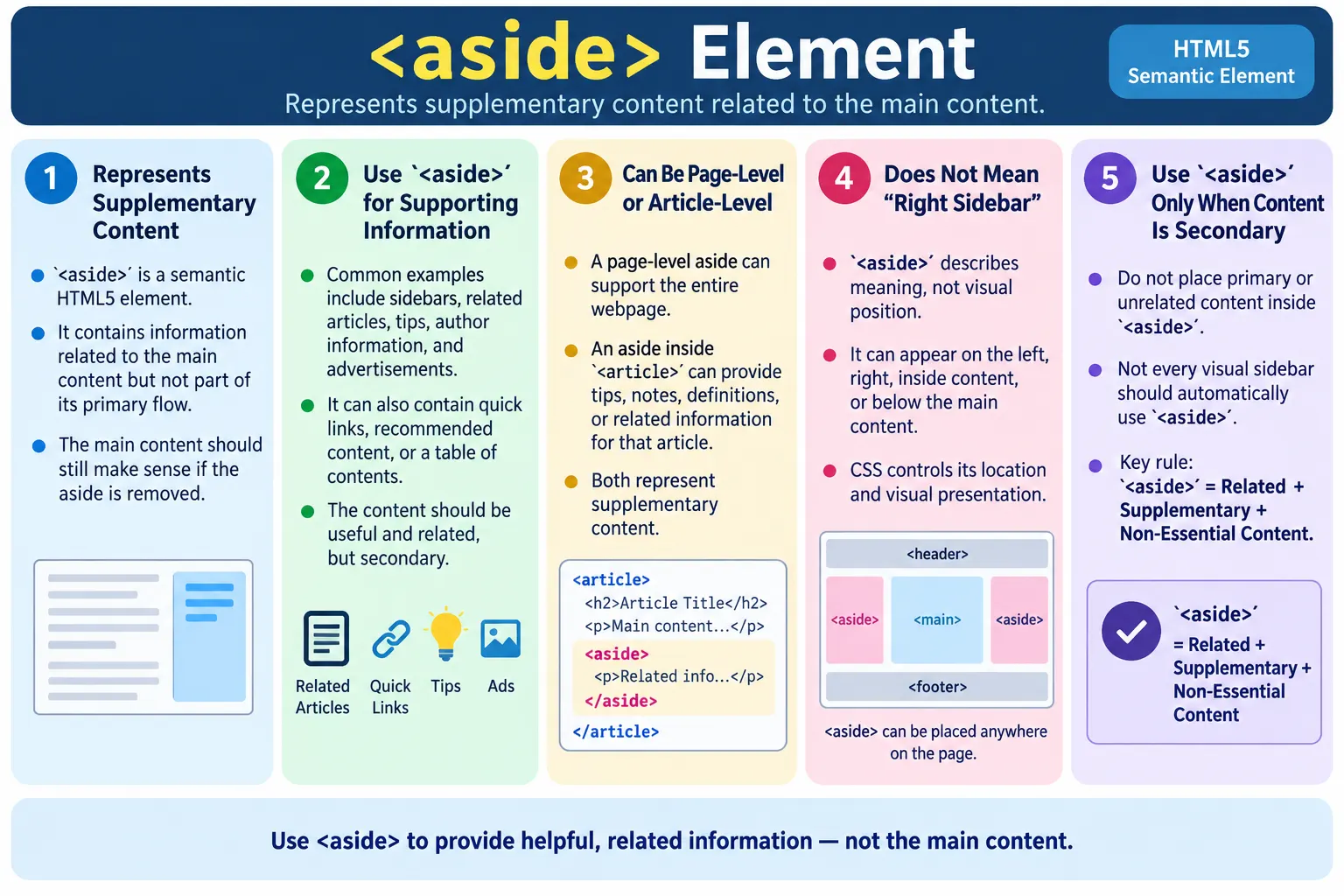
The <aside> element is a semantic HTML5 element used to represent content that is related to the main content but is not part of its primary flow. It is designed for supplementary or secondary information. The content inside an aside supports the surrounding content, gives additional context, points users to related resources, or provides helpful extra information, but the main content should still make sense without it.
This distinction is important. A webpage may have a tutorial, article, product description, documentation page, or course lesson as its primary content. Alongside that primary content, the page may show related tutorials, recommended posts, author information, quick facts, advertisements, tips, notes, or a table of contents. Those supporting blocks are often good candidates for <aside>.
The <aside> element helps developers express page structure more accurately. It also helps browsers, screen readers, search engines, and testing tools distinguish primary content from supporting content. Instead of treating every block as a generic <div>, semantic HTML gives each major region a meaningful role.
Common examples of aside content include sidebars, related articles, author biographies, advertisements, quick links, tips and notes, table of contents blocks, popular posts, recommended products, reference links, glossary notes, and supporting navigation. The key idea is relationship: the aside should be connected to the page or article, but it should not be required for understanding the core message.
What Is the Aside Element?
The <aside> element represents content that is indirectly related to the surrounding content. Its syntax is simple.
<aside>
  ...
</aside>
Think of an aside as a side note in a book. You can read the main chapter without the side note, but the side note may provide useful extra explanation, background, warning, definition, or related reference. The side note is related, but it is not the main flow of the chapter.
The same concept applies to webpages. If a tutorial explains HTML forms and a side box recommends "CSS Forms" and "JavaScript Validation," that side box supports the tutorial without being part of the tutorial's main explanation. That side box can be represented with <aside>.
The aside element does not dictate where the content appears visually. It may appear on the left, right, top, bottom, or within the article flow depending on CSS. Its semantic role is supplementary content, not a specific visual position.
Why Use Aside?
Before HTML5, developers commonly represented sidebars and supporting blocks with generic containers.
<div class="sidebar">
  ...
</div>
This works for layout, but it does not tell the browser anything about the meaning of the content. The class name may suggest that the element is a sidebar, but class names are primarily developer-defined hooks for CSS and JavaScript. They do not provide the same semantic value as a real HTML element.
Using <aside> clearly identifies the content as supporting or complementary.
<aside>
  ...
</aside>
This improves readability for developers because the markup directly communicates intent. It improves accessibility because assistive technologies may expose aside content as a complementary landmark. It also helps search engines and other tools understand that the content is not the central topic of the page but is related supporting material.
Semantic HTML is not about replacing every div. It is about choosing meaningful elements where meaning exists. If a block is truly supplementary to the main content, <aside> provides a better semantic choice than a generic <div>.
What Belongs Inside an Aside?
An aside commonly contains related tutorials, recommended products, popular posts, advertisements, author profile information, quick facts, external resources, table of contents links, sidebar navigation, definitions, warnings, notes, or related links. These items are useful, but they are not the primary content.
Related Articles
  |
Popular Tutorials
  |
Advertisement
For example, on a page about semantic HTML, an aside might contain links to lessons about <header>, <nav>, <main>, and <article>. Those links support the reader's learning path, but the current lesson does not depend on them.
On a product page, an aside might contain recommended accessories, warranty details, shipping notes, or related products. On a news article, it might contain author details, related articles, or a brief fact box. On a documentation page, it might contain a table of contents or version notes.
The best test is to ask: if this content were removed, would the primary content still make sense? If yes, and the removed content is still related, <aside> may be appropriate.
Basic Example
A simple aside can contain a heading and a list of related links or topics.
<aside>
  <h2>Related Courses</h2>
  <ul>
    <li>CSS</li>
    <li>JavaScript</li>
    <li>React</li>
  </ul>
</aside>
In the browser, users may see a small related-courses block.
Related Courses

• CSS
• JavaScript
• React
The block supports the current page by suggesting related courses. It does not replace the main course content. This makes it a strong use case for aside.
Main Content with Aside
A common layout places the primary article and the aside inside the main area. The article contains the main content. The aside contains related information.
<main>
  <article>
    <h2>HTML Forms</h2>
    <p>HTML forms collect user input.</p>
  </article>

  <aside>
    <h3>Related Tutorials</h3>
    <ul>
      <li>CSS Forms</li>
      <li>JavaScript Validation</li>
    </ul>
  </aside>
</main>
The structure can be understood as main content, article, and related tutorials.
Main Content
  |
Article
  |
Related Tutorials
This structure is common in tutorial websites. The article explains the topic, and the aside helps the reader discover nearby topics. The page remains meaningful even if the aside is removed.
Page-Level Aside
An aside can represent a page-level sidebar. In this case, the aside supports the whole page rather than one specific article or paragraph.
<body>
  <header>
    ...
  </header>

  <main>
    ...
  </main>

  <aside>
    Popular Courses
  </aside>

  <footer>
    ...
  </footer>
</body>
This page-level aside might appear as a sidebar next to the main content. It might contain popular courses, recent tutorials, ads, related links, or newsletter signup prompts. Its content relates to the site or page, but it is not the primary article content.
Whether the aside appears before or after the main element in source order depends on layout and accessibility decisions. Visual position can be controlled with CSS. The semantic role remains supplementary content.
Article-Level Aside
An aside can also belong to a specific article. In that case, the aside gives extra information that relates directly to that article.
<article>
  <h2>HTML Tables</h2>
  <p>...</p>

  <aside>
    <h3>Tip</h3>
    <p>Use tables only for tabular data.</p>
  </aside>
</article>
The tip relates specifically to the article. It is useful, but the article can still be understood without it. This is exactly the type of content <aside> is designed for.
Article-level asides are useful for tips, warnings, definitions, author notes, related examples, pull quotes, or small explanation boxes. They can improve learning without interrupting the primary flow too much.
Aside as a Complementary Landmark
In accessibility terms, an aside can be exposed as complementary content. This means assistive technologies may communicate that the content supports the main content but is not the main content itself.
Main Content
  |
Complementary Information
This distinction helps screen reader users understand the page structure. Instead of encountering a generic block of links or notes, they can recognize that the block is supplementary. On large pages, this can improve navigation and reduce confusion.
For best results, give meaningful aside content a clear heading. A heading such as "Related Tutorials," "Author Bio," "Quick Tip," or "Popular Articles" tells all users what the aside contains. Headings also make the content easier to navigate by keyboard and screen reader shortcuts.
Browser Workflow
When the browser reads the HTML, it identifies the aside element as supplementary content, creates the DOM, applies styles, and renders the page.
Read HTML
  |
<aside>
  |
Identify supplementary content
  |
Render page
The browser does not automatically place the aside on the side of the screen. The name "aside" refers to meaning, not layout. CSS decides whether the aside appears as a sidebar, inline note, card, callout, or bottom content block.
Accessibility Benefits
The <aside> element improves accessibility by giving supplementary content a semantic role. Screen readers can recognize it as complementary information, and users can better understand that it is related but not essential to the main content.
For accessibility, the quality of the content and structure still matters. An aside should usually have a heading. Links inside an aside should have descriptive text. If the aside contains navigation, a nested <nav> with an accessible label can be helpful. If the aside contains ads, it should not interrupt the main reading flow in a confusing way.
Accessibility also depends on source order and focus order. If an aside contains many links before the main content in source order, keyboard users may need to tab through many secondary links before reaching the article. In such cases, source order, skip links, and responsive behavior need careful planning.
SEO Benefits
Search engines analyze page structure to understand which parts of a page are central and which parts are supporting. The <aside> element helps communicate that a block contains supporting information rather than the primary topic.
This does not mean aside content is ignored. Related links, author information, and supporting references can still be valuable. The semantic signal simply helps clarify page organization. Search engines can better distinguish the primary article from repeated sidebar content or supplementary recommendations.
Semantic structure alone does not guarantee ranking improvements. SEO depends on content quality, relevance, performance, internal linking, metadata, usability, and many other factors. However, semantic HTML supports a cleaner page structure and can make content easier to interpret.
Aside with Navigation
An aside may contain secondary navigation when that navigation supports the current page. A common example is a table of contents.
<aside>
  <nav aria-label="Article contents">
    <ul>
      <li><a href="#intro">Introduction</a></li>
      <li><a href="#forms">Forms</a></li>
    </ul>
  </nav>
</aside>
This is appropriate because the navigation supports the current article. The aside provides a secondary navigation tool, while the main article remains the primary content.
Another example is a course sidebar. The main content may show the current lesson, while the aside contains lesson links. If the sidebar supports the course page, <aside> with nested <nav> can be a good semantic structure.
Aside for Related Articles
Related articles are one of the most common uses of aside. On a tutorial page about semantic HTML, related articles might include lessons on <header>, <nav>, <main>, and <article>.
<aside>
<h2>Related Articles</h2>
<ul>
<li><a href="html-header.html"><header> Element</a></li>
<li><a href="html-nav-element.html"><nav> Element</a></li>
<li><a href="html-main.html"><main> Element</a></li>
</ul>
</aside>The related links are useful for learning, but the reader can understand the current article without opening them. That makes them supplementary.
Aside for Author Information
Author information can also be placed in an aside when it supports an article but is not part of the article's main argument or explanation.
<aside>
  <h2>About the Author</h2>
  <p>SoftwareTips4U publishes tutorials on testing, automation, and web development.</p>
</aside>
This type of aside is common on blogs, documentation sites, and educational websites. It helps users understand who wrote the content without interrupting the primary content flow.
Aside for Tips and Notes
Small tips, notes, warnings, definitions, and reminders can be represented using aside when they are related to nearby content but not essential to the main explanation.
<aside>
  <h3>Tip</h3>
  <p>Use semantic elements for meaning and CSS for styling.</p>
</aside>
This works well in tutorials because side notes can help beginners without forcing advanced readers to stop. The content is useful, but the main explanation remains complete without it.
Aside for Advertisements
Advertisements are often placed in sidebars or supporting content areas. If an advertisement is related to the surrounding page layout but not part of the main content, it can be placed inside an aside.
However, ads should be handled carefully. They should not mislead users, interrupt accessibility, or appear as if they are part of the main article. Clear separation, labeling, and responsible placement matter. From a semantic point of view, aside helps indicate that the ad block is supplementary rather than primary content.
Styling Aside
The <aside> element can be styled with CSS like any other element.
aside {
  background: #f5f5f5;
  padding: 20px;
  border-left: 4px solid gray;
}
This style might create a callout box with a light background and a left border. A different layout might place the aside as a right sidebar using CSS grid or flexbox. The semantic role does not depend on the visual layout.
It is common for desktop layouts to show aside content in a sidebar and mobile layouts to move it below the main content. This is a visual decision. The HTML still communicates that the content is supplementary.
Layout Does Not Define Meaning
One common misunderstanding is thinking that every sidebar must be an aside. That is not always true. A sidebar can be a layout column, a navigation menu, a filter panel, an ad column, or a supplementary content area. The visual position alone does not determine the correct semantic element.
If the sidebar contains supplementary information related to the main content, <aside> is appropriate. If it contains primary controls for the application or a generic layout wrapper, a different element may be better. For example, a dashboard filter panel might be a form or navigation region rather than an aside, depending on its purpose.
The rule is simple: choose <aside> because the content is supplementary, not because it appears on the side.
Real-World Tutorial Page Example
A SoftwareTips4U tutorial page can use an article for the main lesson and an aside for recommended tutorials.
<main>
  <article>
    <h2>HTML Semantic Elements</h2>
    <p>Learn about semantic HTML.</p>
  </article>

  <aside>
    <h3>Recommended Tutorials</h3>
    <ul>
      <li>HTML Forms</li>
      <li>CSS Basics</li>
      <li>JavaScript DOM</li>
    </ul>
  </aside>
</main>
The recommended tutorials support the main lesson but are not part of it. This is a clean semantic structure. The article remains the primary content, and the aside gives users useful next steps.
Real-World Documentation Example
Documentation pages often use aside for quick reference panels, version notes, or table of contents blocks.
<main>
  <article>
    <h1>API Authentication</h1>
    <p>This guide explains how authentication works.</p>
  </article>

  <aside>
    <h2>On This Page</h2>
    <nav aria-label="On this page">
      <ul>
        <li><a href="#tokens">Tokens</a></li>
        <li><a href="#headers">Headers</a></li>
      </ul>
    </nav>
  </aside>
</main>
The table of contents helps users navigate the documentation page, but the documentation itself remains in the article. This type of pattern is common in technical documentation websites.
How Aside Fits Into Page Layout
The <aside> element is often discussed as if it always means a visual sidebar, but that is only one possible layout. In HTML, meaning and appearance are separate responsibilities. The HTML element communicates what the content is, while CSS decides where it appears. An aside might appear on the right side of a desktop page, below the article on a mobile page, inside a collapsible panel, or within a grid layout. Its semantic meaning remains the same in all of those cases: it is supplementary content.
This distinction matters because many learners think that an element becomes an aside only when it is placed to the side. That is not correct. The word aside comes from the idea of supporting information, not from a fixed screen position. A small note inside an article can be an aside even if it appears in the middle of the content column. A related-links block at the bottom of a page can also be an aside if it supports the main lesson. The question is not "Is it visually on the side?" The better question is "Is this content related but secondary?"
For example, a tutorial page may show the main lesson first and place recommended lessons after the article on mobile screens. On desktop, the same recommended lessons may move into a right-hand sidebar. The HTML does not need to change. The same <aside> can be styled differently by CSS depending on screen size.
<main class="lesson-layout">
  <article>
    <h1>HTML Forms</h1>
    <p>The main tutorial content appears here.</p>
  </article>

  <aside>
    <h2>Related Lessons</h2>
    <ul>
      <li><a href="html-input-types-overview.html">Input Types</a></li>
      <li><a href="html-label-accessibility.html">Labels and Accessibility</a></li>
    </ul>
  </aside>
</main>
In this example, the article remains the primary content, and the aside remains supporting content. CSS can place the aside next to the article, below it, or inside a responsive drawer. The semantic relationship is stable even when the visual presentation changes.
Good Aside Content vs Bad Aside Content
A good aside has a clear relationship to the content around it. If the page teaches HTML forms, a good aside might contain related lessons about labels, validation, input types, or accessibility. It may also contain a short tip explaining a form mistake, a quick checklist, or a table of contents for the same lesson. These items help the reader, but they are not required to understand the main article.
Bad aside content is either unrelated or too important to be secondary. A random advertisement can be an aside if the site treats advertisements as secondary page content, but unrelated informational content should be used carefully. A weather widget on an HTML tutorial page is probably unrelated. A complete explanation of the main topic should not be placed in an aside because users and assistive technologies may interpret it as supporting information rather than primary content.
One practical way to decide is to remove the aside mentally and read the page again. If the page still communicates its main purpose clearly, the content may be suitable for an aside. If the page becomes incomplete, confusing, or loses a necessary explanation, the content probably belongs in the main article instead.
Another useful test is to ask whether the aside content should be read before the main content. If it must be read first, it is probably not supplementary. If it can be read after, skipped, or used as a helpful reference, it is more likely to be a good aside.
Aside and Reading Order
Reading order is an important part of building usable pages. Sighted users often scan a page visually and decide whether to read a sidebar. Screen reader users, keyboard users, search engines, and automated tools depend more heavily on document order. If an aside appears before the article in the HTML, it may be encountered before the main lesson even if CSS displays it on the right side.
For most tutorial pages, the main content should usually appear before the aside in the HTML source. This allows users to reach the primary lesson first. The aside can still be visually positioned beside the article through CSS. This approach keeps the document logical and avoids forcing users through long lists of recommendations or advertisements before they reach the content they came for.
<main>
  <article>
    <h1>Main Tutorial</h1>
    <p>Primary content appears first in the document.</p>
  </article>

  <aside>
    <h2>Recommended Reading</h2>
    <p>Supplementary content appears after the article in source order.</p>
  </aside>
</main>
There are exceptions. A small page-level table of contents may appear before the article because it helps users navigate the current page. Even then, it should be concise and clearly labeled. The goal is not to follow a rigid rule, but to preserve a logical reading experience.
Aside in Responsive Design
Responsive design often changes how asides appear. On wide screens, an aside may sit beside the main article. On smaller screens, it may stack below the article. On very small screens, it may become collapsible. These layout changes are normal, but they should not change the meaning of the content.
A common responsive design mistake is moving the aside above the main content on mobile devices simply because it is easier in CSS. This can create a poor experience when the aside contains long link lists, advertisements, or promotional content. A user who opens a tutorial on a phone should not have to scroll through a large recommendation block before reaching the lesson. The aside should support the main content, not delay access to it.
When an aside contains a table of contents, placing it near the top may be useful because it helps navigation. When it contains related posts or ads, placing it after the article is usually better on mobile. The correct design depends on the role of the aside. Semantic HTML helps define the role, while responsive CSS decides the presentation.
.lesson-layout {
  display: grid;
  gap: 24px;
}

@media (min-width: 900px) {
  .lesson-layout {
    grid-template-columns: minmax(0, 1fr) 280px;
    align-items: start;
  }
}
This CSS can place the article and aside in two columns on larger screens while keeping a simple stacked layout on smaller screens. The markup remains meaningful, and the layout adapts without changing the document structure.
Naming and Labeling Asides
An aside should usually have a heading. The heading tells users what kind of supplementary content they are entering. Headings such as Related Tutorials, On This Page, Author Bio, Quick Tip, Recommended Reading, Popular Articles, or Sponsored Content are clearer than a generic heading such as More or Information.
When a page has multiple asides, headings become even more important. A screen reader user may navigate by landmarks and headings. If every aside has a clear heading, the user can decide which supplementary region is useful. Without headings, the page may still technically use semantic elements, but the experience becomes less clear.
In some cases, an aria-label or aria-labelledby can help identify the aside. This is useful when the aside needs a specific accessible name. However, a visible heading is usually better because it benefits all users, not only assistive technology users.
<aside aria-labelledby="related-lessons-heading">
<h2 id="related-lessons-heading">Related Lessons</h2>
<ul>
<li><a href="html-section.html"><section> Element</a></li>
<li><a href="html-article.html"><article> Element</a></li>
</ul>
</aside>This structure gives the aside a clear purpose. It also helps testers verify that the region is not just present visually, but understandable in the document structure.
Aside in Blogs, Tutorials, and E-Commerce
In a blog, an aside commonly contains author details, related posts, category links, newsletter signup forms, and popular articles. These items are useful, but the blog post itself remains the primary content. A reader can understand the article without subscribing to the newsletter or reading the author profile.
In a tutorial website, an aside may contain a course navigation menu, related lessons, quick revision notes, prerequisites, common mistakes, or interview questions. These supporting blocks can improve learning because they give readers a path to continue. They should still be carefully separated from the main lesson so the structure remains clean.
In e-commerce, an aside might show filters, recommended products, recently viewed items, or promotional offers. Not every e-commerce sidebar is automatically an aside. Product filters are sometimes central to the shopping task, depending on the page. Recommended products are more clearly supplementary. This shows why the decision depends on meaning, not appearance.
In documentation, an aside can hold version notes, warnings, compatibility notes, table of contents links, or related API references. Documentation pages often benefit strongly from well-structured asides because users jump between primary instructions and supporting references frequently.
Decision Checklist
Before using <aside>, ask whether the content is related to the main content. If the answer is no, it should probably not be an aside. Ask whether the main content remains understandable without it. If the answer is yes, the content may be supplementary. Ask whether the content needs a heading. In most real pages, the answer should be yes because headings improve scanning and accessibility.
Also ask whether the aside contains navigation. If it does, consider placing a <nav> inside the aside and giving it a useful label. Ask whether the aside will interrupt the reading order on mobile devices. If it does, adjust the source order or responsive layout. Finally, ask whether the content is being placed inside an aside only because it needs a gray background or a border. If the reason is purely visual, use CSS on an appropriate element instead.
This checklist helps avoid the two biggest problems with <aside>: underusing it when content really is supplementary, and overusing it for every visual sidebar. Good semantic HTML sits between those extremes. It uses the right element when the meaning is right.
Common Mistakes
A common mistake is using <aside> for main content. For example, placing a complete tutorial inside an aside is incorrect.
<aside>
  Complete Tutorial
</aside>
The tutorial is primary content and belongs inside <main>, <article>, or another appropriate content structure.
Another mistake is using aside for unrelated content. For example, a weather forecast on a semantic HTML tutorial page usually does not belong in an aside unless it is somehow relevant to the content. Supplementary content should still be related.
<aside>
  Weather Forecast
</aside>
Developers also sometimes replace every sidebar with <aside>. This is not always correct. Use aside only when the sidebar contains supplementary content. A generic layout column without meaningful supporting information may simply be a <div>.
Missing headings are another issue. A heading makes the purpose of the aside clear.
<aside>
  <p>Related links</p>
</aside>
A better structure is:
<aside>
  <h2>Related Links</h2>
  <p>...</p>
</aside>
Finally, avoid using aside purely for styling. If the goal is only to create a gray box, use a <div> unless the content is actually supplementary.
Aside vs Article
The difference between <aside> and <article> is the difference between supporting content and independent content. An article is a standalone piece. An aside supports another piece.
<aside> |
<article> |
|---|---|
| Supplementary content | Independent content |
| Supports the main content | Primary standalone content |
| Often displayed as a sidebar or note | Often displayed as a blog post or tutorial |
| Not essential for understanding the page | Can be understood on its own |
If the content can be copied and still makes full sense as a complete piece, it may be an article. If it supports nearby content but is not complete primary content, it may be an aside.
Aside vs Section
The difference between <aside> and <section> is also important. A section groups related content under a theme. An aside contains supplementary content related to the main content or surrounding content.
For example, a tutorial article may have sections for Introduction, Syntax, Examples, and Best Practices. Those are part of the main article flow. A related-links box next to the tutorial is not part of that flow; it supports the article. That related-links box is better represented as an aside.
Aside vs Nav
An aside may contain navigation, but aside and nav do not mean the same thing. The <nav> element represents navigation links. The <aside> element represents supplementary content. When an aside contains a table of contents or supporting navigation, it can include a nested nav.
<aside>
  <nav aria-label="Related lessons">
    ...
  </nav>
</aside>
This structure communicates both ideas: the block is supplementary, and the links inside it are navigation.
Complete Example
The following complete example shows a page with a header, main content, article, aside, and footer.
<!DOCTYPE html>
<html>
<head>
  <title>SoftwareTips4U</title>
</head>
<body>
  <header>
    <h1>SoftwareTips4U</h1>
  </header>

  <main>
    <article>
      <h2>HTML Semantic Elements</h2>
      <p>Learn semantic HTML from beginner to advanced.</p>
    </article>

    <aside>
      <h3>Popular HTML Tutorials</h3>
      <ul>
        <li>HTML Basics</li>
        <li>HTML Forms</li>
        <li>HTML Tables</li>
      </ul>
    </aside>
  </main>

  <footer>
    <p>© 2026 SoftwareTips4U</p>
  </footer>
</body>
</html>
This structure separates the site header, primary article, supporting aside, and footer. Each region has a clear semantic purpose.
Selenium Perspective
Selenium can locate the aside element by tag name.
WebElement aside =
driver.findElement(
    By.tagName("aside"));
Related tutorial links inside the aside can be located with a CSS selector.
List<WebElement> links =
driver.findElements(
    By.cssSelector("aside a"));
Automation testers commonly verify sidebar visibility, related links, advertisements, author information, accessibility landmarks, responsive layout, and whether the aside moves appropriately on smaller screens.
Testing should also confirm that aside content does not block the primary content. On mobile screens, sidebars often move below the main content. That behavior should be tested because poor responsive layout can make supplementary content appear before the main article or create confusing reading order.
Testing Checklist
When testing pages that use aside elements, verify that the aside is visible where expected, contains the correct heading, includes accurate related links, does not contain primary page content, and remains usable on mobile devices. Check that links navigate to the right pages and that advertisements or recommendations do not overlap the main content.
Accessibility checks should include keyboard navigation, screen reader landmark behavior, heading structure, and focus order. If the aside contains navigation, verify that the nested navigation has a meaningful label when needed.
Common Interview Questions
What is the purpose of the <aside> element? It represents supplementary content related to the main content but not essential to understanding it.
What type of content belongs inside an <aside>? Related articles, sidebars, advertisements, author information, tips, quick links, and supporting navigation are common examples.
Can an <aside> appear inside an <article>? Yes. It can contain supplementary information specific to that article, such as notes or tips.
Is <aside> part of the main content? No. It complements the main content but is not part of its primary flow.
Does <aside> improve accessibility? Yes. It creates a complementary landmark that helps assistive technologies distinguish supporting information from the main content.
Should every sidebar be an aside? No. Use <aside> only when the sidebar contains supplementary content. A purely structural layout column may be a <div>.
Interview-Ready Answer
The <aside> element is a semantic HTML5 element used for supplementary content that is related to the main content but not essential to understanding it. It is commonly used for sidebars, related articles, advertisements, author biographies, tips, quick facts, and supporting navigation. An <aside> can appear at the page level as a sidebar or inside an <article> to provide additional information about that specific article. Using <aside> improves document structure, accessibility, and helps browsers and search engines distinguish supporting content from the primary content.
One-Line Insight
<aside> contains helpful extra information; it supports the main content without being the main content itself.