<article> Element
Introduction
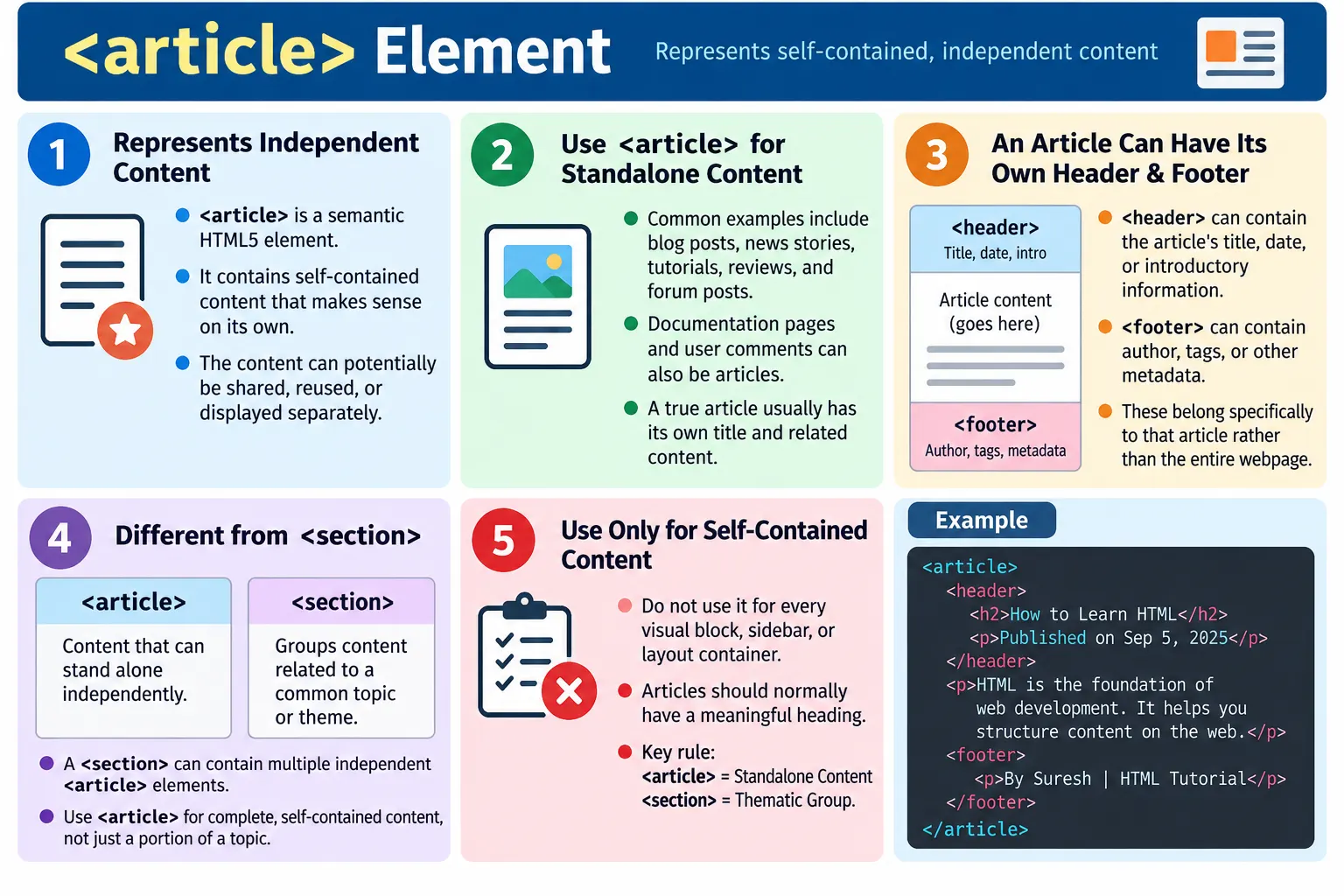
The <article> element is a semantic HTML5 element used to represent independent, self-contained content. The content inside an article should be meaningful on its own, even if it is removed from the surrounding webpage, shared separately, syndicated, reused, or displayed in another context.
Examples of article content include blog posts, news articles, forum posts, product reviews, documentation pages, user comments, tutorials, magazine articles, knowledge base articles, and other complete pieces of content. In each case, the content has its own subject and can be understood without depending heavily on the rest of the page.
The <article> element helps browsers, assistive technologies, search engines, developers, and automated tests recognize that a block of content is a standalone composition. It gives meaning to the structure instead of using a generic container such as <div>.
What Is the Article Element?
The <article> element represents a self-contained composition that could stand alone. Its syntax is simple.
<article>
  ...
</article>
Think of an article as a newspaper article. A newspaper contains many pieces, but each article has its own title, content, and meaning. You can cut out one article and still understand it separately from the rest of the newspaper.
The same idea applies in HTML. If a piece of content can be independently read, distributed, or reused, <article> may be the correct element.
Why Use Article?
Before HTML5, developers often used generic containers for posts and independent content.
<div class="post">
  ...
</div>
This is functional for styling and layout, but the browser cannot determine from the element itself that the content is an independent article. The meaning depends on a class name.
Using <article> clearly identifies the content as a standalone unit.
<article>
  ...
</article>
This improves document structure and makes the content easier to understand for developers, tools, search engines, and assistive technologies.
Characteristics of an Article
A true article should usually have its own title, be understandable by itself, be reusable or shareable, and contain related information. It often includes content such as an author, publish date, category, summary, body text, and footer information.
Title
  |
Content
  |
Author
  |
Publish date
Not every content block is an article. A sidebar, button group, navigation menu, or random layout container should not be marked as an article. The content must be independent enough to make sense on its own.
Basic Example
A simple article may contain a heading and paragraph.
<article>
  <h2>What Is HTML?</h2>
  <p>HTML is the standard markup language for web pages.</p>
</article>
In the browser, users see the article title and text.
What Is HTML?
HTML is the standard markup language...
This content can be read independently. Even if it appears in a list of tutorials, a blog feed, or a search result card, it still has its own meaning.
Real-World Examples of Articles
Common examples of article content include blog posts, news stories, tutorials, product reviews, forum questions, user comments, magazine articles, release notes, documentation pages, and knowledge base entries. Each can be understood without reading all surrounding content.
A blog homepage may contain several articles, each representing one post. A product page may contain customer reviews, each review as a separate article. A discussion page may contain the main post and each comment as an article. A tutorial site may treat each tutorial page as an article because it is a self-contained piece of educational content.
Browser Workflow
When the browser reads the HTML, it identifies the <article> element as independent content, creates the DOM, and renders the page.
Read HTML
  |
<article>
  |
Identify independent content
  |
Create DOM
  |
Render page
The article element does not force a specific visual layout. CSS controls the design. The semantic value comes from the HTML structure.
Article with Header and Footer
An article can have its own <header> and <footer>. The article header introduces the article, and the article footer provides closing information such as author, tags, or related metadata.
<article>
  <header>
    <h2>HTML Forms</h2>
    <p>Published: July 15, 2026</p>
  </header>

  <p>Forms allow users to submit data...</p>

  <footer>
    Written by John
  </footer>
</article>
This structure is meaningful because the header and footer belong to the article, not necessarily to the entire page.
Article
  |
Header
  |
Content
  |
Footer
Multiple Articles
A page can contain multiple articles. This is common on blog indexes, news pages, tutorial listings, documentation portals, and product review sections.
<main>
  <article>
    <h2>HTML</h2>
  </article>

  <article>
    <h2>CSS</h2>
  </article>

  <article>
    <h2>JavaScript</h2>
  </article>
</main>
Each article is independent. A user can read one article without needing the others.
Article 1
  |
Article 2
  |
Article 3
Article Inside a Section
An article can appear inside a section. The section groups related content, while each article represents one independent item inside that group.
<section>
  <h2>Latest Tutorials</h2>

  <article>
    <h3>HTML Basics</h3>
  </article>

  <article>
    <h3>CSS Basics</h3>
  </article>
</section>
Here, the section groups latest tutorials. Each article is one tutorial. The section provides the category, and the articles provide standalone content items.
Nested Articles
Articles can contain nested articles when the nested content is also independent. A common example is user comments inside a blog post.
<article>
  <h2>Blog Post</h2>
  <p>Main content...</p>

  <article>
    <h3>Comment by Alice</h3>
    <p>Great article!</p>
  </article>
</article>
The blog post is an article, and the comment can also be treated as an article because it is a self-contained user contribution.
Blog post
  |
Comment
Article vs Section
The difference between <article> and <section> is independence. A section groups related content under a common theme. An article represents content that can stand alone.
<section>
  <h2>Programming</h2>

  <article>
    <h3>HTML</h3>
  </article>

  <article>
    <h3>CSS</h3>
  </article>
</section>
The section groups programming-related content. Each article is an independent content item inside that group.
Section
  |
Groups articles
  |
Each article independent
Accessibility Benefits
Screen readers can recognize articles as distinct regions or content blocks. This helps users navigate between articles efficiently, especially on pages with many posts, comments, cards, or news items.
Article
  |
HTML Basics
  |
Content
When articles have clear headings, users can move through the page by heading or region and understand where each independent content item begins.
SEO Benefits
Search engines can use semantic structure to understand that each article represents a separate piece of content. This is particularly useful for blogs, news websites, documentation, tutorials, knowledge bases, and review pages.
The <article> element alone does not guarantee better rankings, but it contributes to a clearer content structure. Combined with strong headings, useful content, metadata, and good internal linking, it supports better page interpretation.
Styling Articles
The article element can be styled with CSS like any other HTML element.
article {
  border: 1px solid #ccc;
  padding: 20px;
  margin-bottom: 20px;
}
CSS controls appearance, while <article> provides semantic meaning. A card-like layout can still be semantic if each card represents independent content.
Real-World Example
A SoftwareTips4U blog page can contain multiple article elements, each representing a separate post.
<main>
  <article>
    <header>
      <h2>What Is HTML?</h2>
      <p>Published on July 15, 2026</p>
    </header>

    <p>HTML is the foundation of web development.</p>

    <footer>
      Author: SoftwareTips4U
    </footer>
  </article>

  <article>
    <header>
      <h2>What Is CSS?</h2>
      <p>Published on July 20, 2026</p>
    </header>

    <p>CSS styles web pages.</p>

    <footer>
      Author: SoftwareTips4U
    </footer>
  </article>
</main>
Each blog post is a separate article. Each has its own title, metadata, content, and author information.
Common Mistakes
A common mistake is using <article> for every section of a page. A sidebar, navigation block, layout wrapper, or simple visual card is not automatically an article.
<article>
  Sidebar
</article>
A sidebar is usually better represented by <aside>.
<aside>
  ...
</aside>
Another mistake is confusing article with section. Use section when grouping related content. Use article when the content is independent and self-contained.
Missing headings are also a problem. An article should normally have a heading so users and assistive technologies can identify it.
<article>
  <p>Content</p>
</article>
A better structure is:
<article>
  <h2>Article Title</h2>
  <p>Content</p>
</article>
Do not choose <article> because of appearance. Choose it because the content is self-contained.
Complete Example
The following complete document shows an article with its own header and footer inside the main content.
<!DOCTYPE html>
<html>
<head>
  <title>SoftwareTips4U Blog</title>
</head>
<body>
  <header>
    <h1>SoftwareTips4U</h1>
  </header>

  <main>
    <article>
      <header>
        <h2>HTML Forms</h2>
        <p>Published: July 2026</p>
      </header>

      <p>HTML forms collect user input.</p>

      <footer>
        Author: SoftwareTips4U
      </footer>
    </article>
  </main>

  <footer>
    © 2026 SoftwareTips4U
  </footer>
</body>
</html>
This example separates the site header, main content, article-level metadata, and page footer clearly.
Selenium Perspective
Selenium can locate all article elements on a page.
List<WebElement> articles =
driver.findElements(
    By.tagName("article"));
Automation can also read the article title.
String title =
driver.findElement(
    By.tagName("h2"))
    .getText();

System.out.println(title);
Automation testers commonly verify the number of articles, article titles, published dates, author information, content visibility, and accessibility landmarks. Semantic article markup makes these checks easier to reason about.
Comparison Table
<article> |
<section> |
|---|---|
| Independent, self-contained content | Groups related content |
| Can stand alone | Usually depends on surrounding content |
| Often shared or syndicated | Organizes content into topics |
| Common for blogs, news, tutorials | Common for chapters and categories |
Common Interview Questions
What is the purpose of the <article> element? It represents independent, self-contained content that can stand alone.
What types of content should use <article>? Blog posts, news articles, tutorials, forum posts, reviews, documentation, and user comments are common examples.
What is the difference between <article> and <section>? An article is self-contained and meaningful on its own, while a section groups related content under a common theme.
Can an article contain its own header and footer? Yes. Each article may have its own <header> and <footer>.
Can articles be nested? Yes. For example, user comments inside a blog post can be nested article elements.
Interview-Ready Answer
The <article> element is a semantic HTML5 element used to represent independent, self-contained content that can be understood on its own. It is commonly used for blog posts, news articles, tutorials, product reviews, documentation, and forum posts. An article typically has its own heading and may include its own header and footer. Unlike a <section>, which groups related content, an <article> represents a complete piece of content that can be reused or distributed independently.
One-Line Insight
<article> is for content that makes sense by itself, even if it is copied, shared, or viewed outside the original webpage.