Anchor Security (noopener, noreferrer)
Introduction
Links are one of the most useful features of HTML, but they can also create security and privacy concerns when they open new tabs or windows. The concern usually appears when an anchor tag uses target="_blank". This value tells the browser to open the linked page in a new browsing context, commonly a new tab. That behavior can be convenient for external links, documentation, PDFs, and reference pages, but it should be configured carefully.
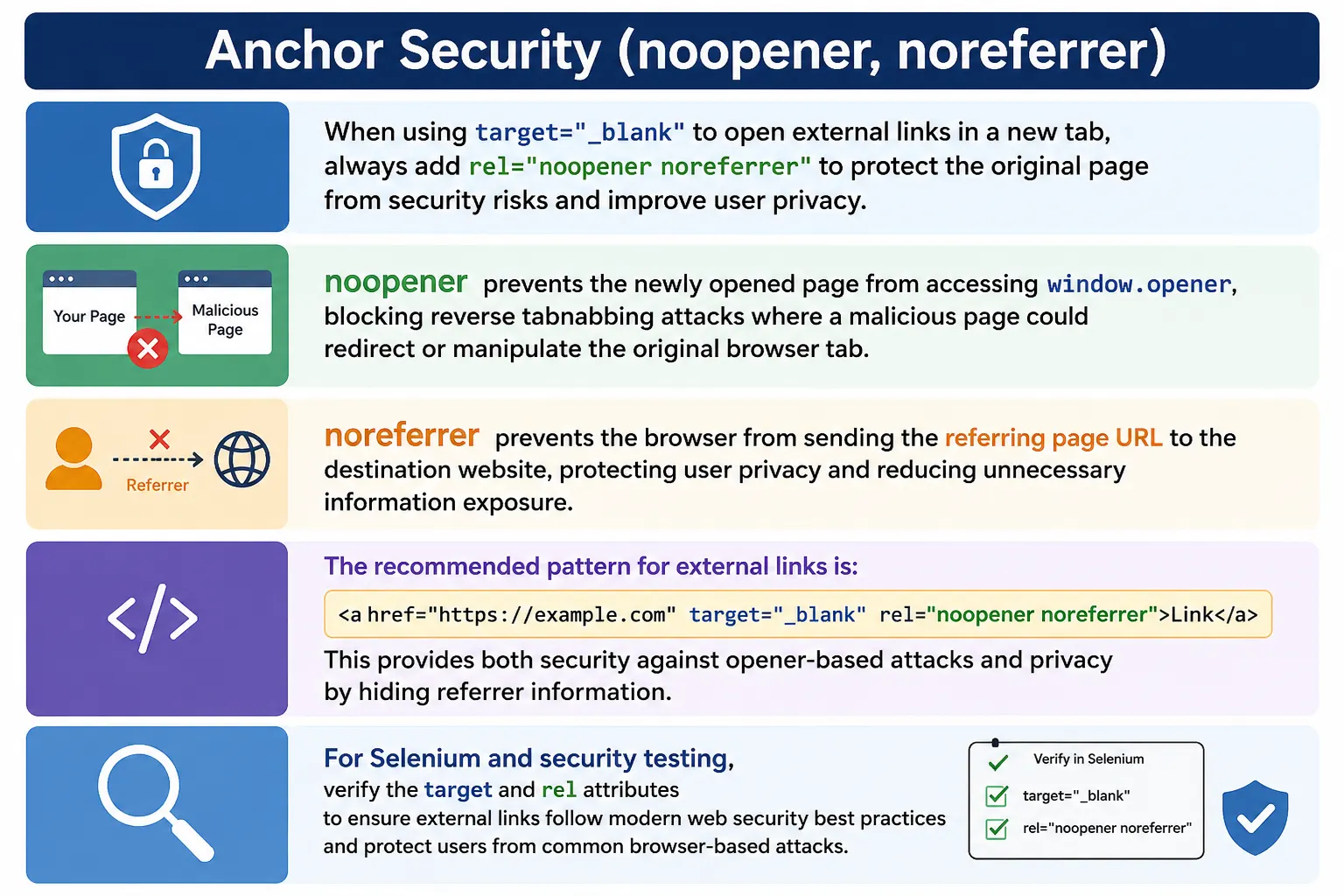
When a new tab is opened without the correct security attributes, the newly opened page may be able to access information about the original page that opened it. In older browser behavior and in some contexts, this happens through the JavaScript property window.opener. A malicious page can abuse that relationship to redirect or manipulate the original tab. This attack is commonly called reverse tabnabbing.
To reduce these risks, HTML supports the rel attribute values noopener and noreferrer. These values are commonly used together with external links that open in a new tab. The modern best-practice pattern looks like this:
<a href="https://example.com"
   target="_blank"
   rel="noopener noreferrer">
  Visit Website
</a>
This pattern protects the original website from opener-based attacks and protects user privacy by preventing the destination site from receiving the referring page URL.
Why Anchor Security Matters
At first, a link that opens in a new tab may look harmless. The user clicks a link, the new tab opens, and the original page remains available. This behavior is often useful. For example, a tutorial page may open official documentation in a new tab so that the learner can keep the tutorial open. A product page may open a PDF manual in a new tab. A blog post may open an external source without moving the reader away from the current article.
The issue is not the new tab itself. The issue is the relationship between the original page and the newly opened page. Consider this link:
<a href="https://example.com"
   target="_blank">
  Open Website
</a>
When clicked, the current page opens a new tab. Without protective attributes, the newly opened page may receive a reference to the original page. If the destination is trusted, this may not seem worrying. But links can point to third-party websites, user-generated content, shortened URLs, ads, compromised pages, or domains that may change ownership later. Security best practices should not depend only on trust.
The Problem: window.opener
When a page opens another page, JavaScript may expose a relationship through window.opener. The new page can use window.opener to reference the page that opened it. In simple terms, the new tab may be able to point back to the original tab.
Original Page
       ↓
Opens New Page
       ↓
New Page Gets Reference To Original Page
This reference can be dangerous because the opened page may attempt to change the original page's location. If a malicious site can redirect the original tab to a fake login page, the user may think they are still interacting with the original website. This is the heart of reverse tabnabbing.
What Is window.opener?
window.opener is a JavaScript property that can reference the page that opened the current browser window or tab. If SoftwareTips4U opens a new external page using target="_blank", that external page may be able to access window.opener and find a reference to the original SoftwareTips4U tab.
window.openerIn a risky situation, window.opener may point back to the original page. In a protected situation using rel="noopener", the value should be null, meaning the opened page does not have that connection.
Why Is This Dangerous?
A malicious page can use the opener reference to redirect the original tab. For example, it could run code similar to this:
window.opener.location = "https://fake-login-page.com";The result is that the original tab changes location without the user clearly realizing what happened. The user may return to the original tab and see what looks like a login page. If the fake page imitates the original website, the user may enter credentials. This is why reverse tabnabbing is dangerous. It uses user trust in the original tab against them.
Reverse Tabnabbing Attack
Reverse tabnabbing is an attack where a newly opened page manipulates the page that opened it. The flow is simple but effective.
User Opens External Link
          ↓
New Tab Opens
          ↓
Malicious Site Loads
          ↓
Malicious Site Uses window.opener
          ↓
Original Tab Redirected
          ↓
Fake Login Page Appears
The user may believe the fake login page belongs to the original website because it appears in the original tab. The attack is especially concerning when users are logged into sensitive systems, dashboards, banking sites, admin panels, or internal applications.
Example Vulnerable Link
A vulnerable external link opens a new tab without protective rel values.
<a href="https://unknown-site.com"
   target="_blank">
  Open Site
</a>
The problem is not visible in the browser. The link may work normally. But from a security perspective, opener access may be allowed. Good security often means preventing problems before they are visible.
What Is noopener?
noopener is a rel value that prevents the newly opened page from accessing window.opener. It breaks the relationship between the original page and the new page.
<a href="https://example.com"
   target="_blank"
   rel="noopener">
  Example
</a>
Without noopener, the new page may have window.opener available. With noopener, the new page should see window.opener as null.
Without noopener:
New Page → window.opener available

With noopener:
New Page → window.opener = null
The security benefit is clear: the opened page cannot manipulate the original page through opener access. This prevents the core mechanism behind reverse tabnabbing.
Performance Benefit of noopener
noopener can also improve performance. Without it, the browser may maintain a relationship between the original tab and the new tab. With noopener, the tabs can be more independent. This can reduce unnecessary coupling between browsing contexts and may help the browser manage resources more efficiently.
The performance benefit is not usually the main reason to use noopener, but it is a useful additional advantage. The primary reason remains security.
What Is noreferrer?
noreferrer is another rel value. It prevents the browser from sending the HTTP Referer header to the destination website. The Referer header normally tells the destination site where the visitor came from.
<a href="https://example.com"
   target="_blank"
   rel="noreferrer">
  Example
</a>
If a user is on https://softwaretips4u.com and clicks an external link, the destination may normally receive a request containing the referring URL.
GET / HTTP/1.1
Host: example.com
Referer: https://softwaretips4u.com
With noreferrer, the browser does not send that Referer header. The destination site does not receive the source page URL through the normal header.
Privacy Benefit of noreferrer
The privacy benefit of noreferrer is that it hides the source website from the destination site. This can be useful when linking to third-party websites, protecting user privacy, preventing referral tracking, or avoiding unnecessary leakage of page URLs.
This matters when a URL contains meaningful path information. For example, a source page URL may reveal article topics, internal route names, campaign parameters, or user workflow context. Hiding the referrer can reduce that information exposure.
Additional Security Benefit of noreferrer
Most modern browsers treat rel="noreferrer" as also implying noopener. In practice, this means noreferrer often blocks window.opener and hides the Referer header. However, developers commonly use both values together because it makes the intent explicit and easy to review.
<a href="https://example.com"
   target="_blank"
   rel="noopener noreferrer">
  Visit Example
</a>
This pattern says clearly: do not give opener access, and do not send referrer information.
Using Both Together
The recommended pattern for external links that open in a new tab is to use both noopener and noreferrer.
<a href="https://example.com"
   target="_blank"
   rel="noopener noreferrer">
  Visit Example
</a>
The benefits are practical. There is no opener access, so reverse tabnabbing risk is reduced. There is no referrer leakage, so privacy is improved. The browser may also handle the new tab more independently.
Think of the values this way: noopener protects the original website, and noreferrer protects user privacy. Together, they provide stronger protection when opening external pages in new tabs.
Other rel Values
The rel attribute supports many values, and not all of them are security-focused. Examples include nofollow, sponsored, and ugc. These values are often related to search engine guidance and link classification.
<a href="https://example.com" rel="nofollow">Example</a>
<a href="https://example.com" rel="sponsored">Sponsored Link</a>
<a href="https://example.com" rel="ugc">User Link</a>
For anchor security with new tabs, the most important values are noopener and noreferrer. Other rel values may be added when they match the link's meaning, but they do not replace opener protection.
Real-World Example
A common unsafe version looks like this:
<a href="https://github.com"
   target="_blank">
  GitHub
</a>
A better version adds the security and privacy values.
<a href="https://github.com"
   target="_blank"
   rel="noopener noreferrer">
  GitHub
</a>
This is the industry-standard approach for external links that open in a new tab.
Internal Links
Internal navigation usually does not require rel="noopener noreferrer" because internal links normally open in the same tab and do not use target="_blank".
<a href="about.html">
  About
</a>
No additional security attributes are needed for this basic internal link. If an internal link intentionally opens in a new tab, the risk is lower because the destination is same-site, but teams may still apply consistent rules depending on their security standards.
Accessibility Considerations
Security attributes protect the browser relationship, but accessibility is also important. Opening a new tab unexpectedly can confuse users, especially screen reader users, keyboard users, and users who may not notice that a new browsing context was created.
A good link tells users what will happen.
<a href="guide.pdf"
   target="_blank"
   rel="noopener noreferrer">
  User Guide (opens in new tab)
</a>
A weaker link opens a new tab without warning.
<a href="guide.pdf"
   target="_blank">
  User Guide
</a>
The secure attributes are necessary for security, but clear link text helps users understand the navigation behavior.
Browser Support
Modern browsers support noopener and noreferrer, including Chrome, Edge, Firefox, and Safari. Browser behavior has also improved over time, and some browsers apply safer defaults in certain cases. Even so, adding explicit rel="noopener noreferrer" remains a clear and portable best practice.
Explicit markup is also easier for code reviewers, security scanners, and automated tests to verify. A team does not have to depend on browser-specific assumptions if the HTML states the intended protection directly.
Common Mistakes
The most common mistake is using target="_blank" without security attributes.
<a href="https://example.com"
   target="_blank">
  Example
</a>
This may allow window.opener access. The better version is:
<a href="https://example.com"
   target="_blank"
   rel="noopener noreferrer">
  Example
</a>
Another mistake is assuming that every internal link needs these attributes. Usually, a normal internal link such as <a href="contact.html"> does not need them. The key trigger is opening a new tab, especially to an external website.
A third mistake is focusing only on security and forgetting user experience. If a link opens a new tab, the link text should make that behavior clear when appropriate.
Security Checklist
When using target="_blank", ask whether the link is external. If it is external, rel="noopener noreferrer" should almost always be added. If the link is internal, consider whether opening a new tab is necessary. If the user should stay in the same site flow, normal same-tab navigation is usually better.
| Question | Recommended Action |
|---|---|
Does the link use target="_blank"? | Review security attributes |
| Is the link external? | Add rel="noopener noreferrer" |
| Does the link open a new tab? | Consider warning users in link text |
| Is it normal internal navigation? | Use same-tab behavior when possible |
Selenium Perspective
From a Selenium testing perspective, anchor security can be validated by checking the target and rel attributes. A test can read the target value of a link.
String target =
driver.findElement(By.linkText("Google"))
      .getAttribute("target");
The expected output for a new-tab link is:
_blankThe test can also verify the rel value.
String rel =
driver.findElement(By.linkText("Google"))
      .getAttribute("rel");
The expected value should include:
noopener noreferrerThis kind of validation is useful in UI automation, security audits, content checks, and regression testing for pages with many external links.
Comparison Table
| Feature | noopener | noreferrer |
|---|---|---|
Blocks window.opener | Yes | Yes, in most browsers |
| Prevents Reverse Tabnabbing | Yes | Yes |
| Hides Referer Header | No | Yes |
| Improves Privacy | No | Yes |
| Improves Security | Yes | Yes |
Common Interview Questions
A common interview question is: why is target="_blank" considered risky? The answer is that it can allow access to window.opener, which can enable reverse tabnabbing attacks.
Another common question is: what does noopener do? It prevents the newly opened page from accessing the original page through window.opener. What does noreferrer do? It prevents the browser from sending the HTTP Referer header to the destination website.
Interviewers may also ask what reverse tabnabbing is. It is an attack where a newly opened page redirects or manipulates the original page using window.opener. The recommended way to open external links in a new tab is to use target="_blank" together with rel="noopener noreferrer".
Interview-Ready Answer
When using target="_blank", the rel="noopener noreferrer" attribute should be added for security and privacy. noopener prevents the newly opened page from accessing the original page through window.opener, protecting against reverse tabnabbing attacks. noreferrer prevents the browser from sending the referring page URL to the destination website, improving user privacy.
Key Takeaway
Anchor security matters whenever links open external pages in new tabs. A simple external link can create opener and referrer concerns if it uses target="_blank" without protective values. Adding rel="noopener noreferrer" is a small change that provides meaningful protection.
Use noopener to protect the original website from opener-based manipulation. Use noreferrer to protect user privacy by hiding the referring URL. Use both together for modern external new-tab links.
One-Line Insight
Whenever you use target="_blank" for external links, pair it with rel="noopener noreferrer" to protect both the website and the user.