Accessibility Interview Questions
Introduction
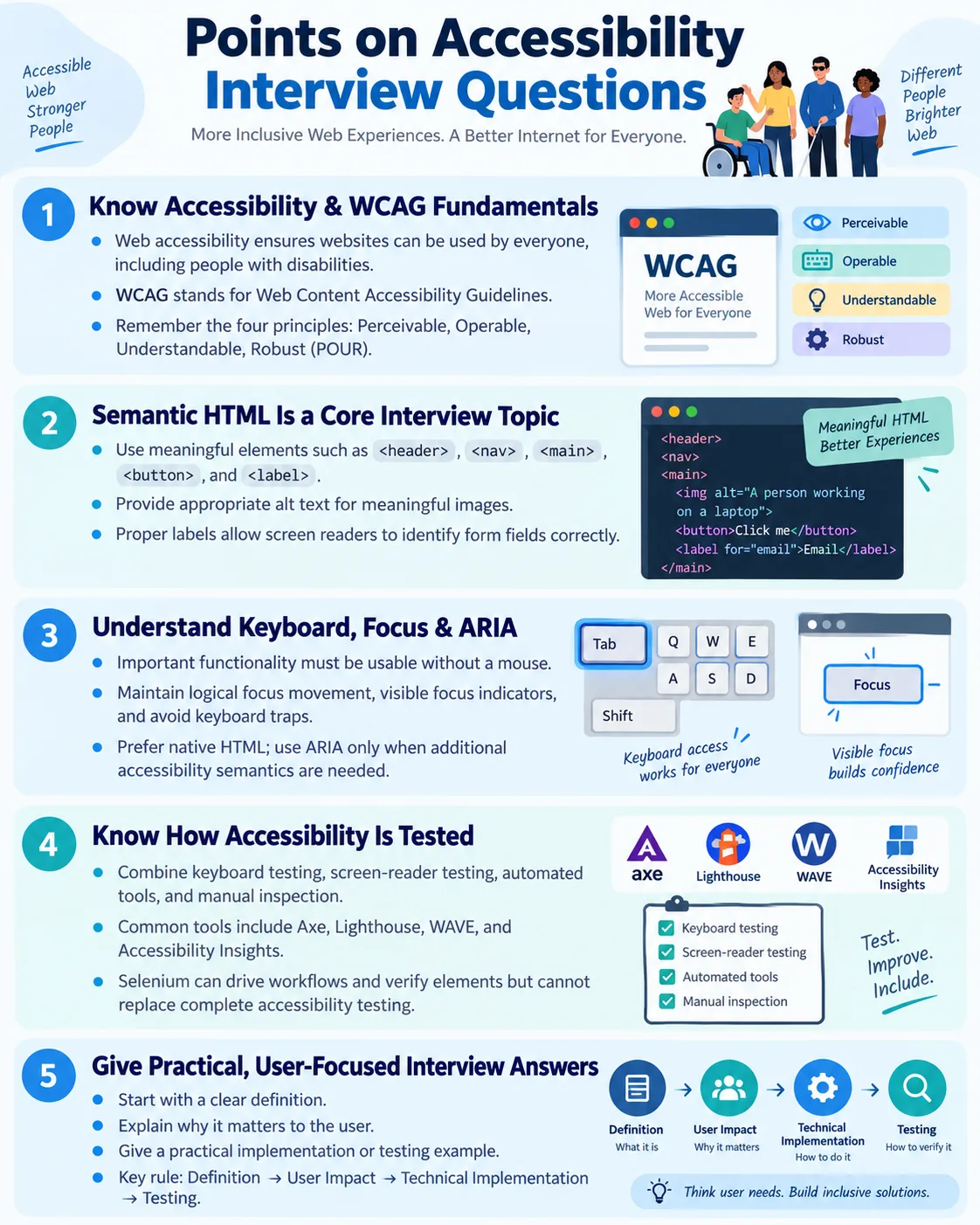
Accessibility is an important topic in modern web development and software testing. Interviewers often ask accessibility questions to evaluate whether a candidate understands HTML semantics, WCAG guidelines, keyboard navigation, screen readers, ARIA, accessible form design, color contrast, focus management, and accessibility testing. These questions are common for frontend developers, QA engineers, automation testers, UI developers, SDET candidates, product engineers, and anyone working on user-facing web applications.
A strong accessibility interview answer should do more than define terms. It should connect the technical detail to the user impact. For example, saying that labels are important is correct, but a stronger answer explains that labels allow screen readers to announce the purpose of form fields and help all users understand what information is required. Similarly, saying that keyboard navigation is required is useful, but a better answer explains that many users cannot use a mouse and must be able to complete the same tasks with a keyboard.
This article presents common accessibility interview questions with flowing explanations and interview-ready answers. It covers basic accessibility, WCAG, semantic HTML, screen readers, keyboard navigation, ARIA, accessible forms, color contrast, HTML5 accessibility, accessibility testing, Selenium automation, advanced concepts, and scenario-based questions. The goal is to help you answer with clarity, confidence, and practical reasoning.
Basic Accessibility Questions
What is Web Accessibility? Web Accessibility is the practice of designing and developing websites so that everyone, including people with disabilities, can perceive, understand, navigate, and interact with web content effectively. It ensures that users who rely on screen readers, keyboards, screen magnifiers, voice control, captions, or other assistive technologies can access content and complete tasks.
Why is accessibility important? Accessibility makes websites usable for everyone, supports users with disabilities, improves general usability, helps meet legal and organizational accessibility requirements, improves SEO, and strengthens the overall user experience. Accessibility also benefits mobile users, older users, users with temporary injuries, and people using websites in difficult environments such as bright sunlight or noisy places.
What does WCAG stand for? WCAG stands for Web Content Accessibility Guidelines. It is the international standard developed by the W3C for creating accessible web content. WCAG provides recommendations that help teams make websites and web applications accessible to people with a wide range of disabilities.
What are the four WCAG principles? The four principles are Perceivable, Operable, Understandable, and Robust. They are commonly remembered as POUR. Perceivable means users can perceive the information. Operable means users can operate the interface. Understandable means users can understand content and interactions. Robust means content works with browsers, assistive technologies, and future tools.
What is the most common WCAG compliance level? Level AA is the most commonly adopted accessibility compliance level for public websites. Level A covers minimum requirements, Level AA covers a practical and widely expected standard, and Level AAA is the highest level but is not always realistic for every type of content.
HTML Accessibility Questions
Why is semantic HTML important? Semantic HTML gives meaning to webpage elements, helping browsers, search engines, and assistive technologies understand the page structure. Elements such as <header>, <nav>, <main>, and <footer> create meaningful regions. Headings create a document outline. Buttons and links communicate expected interaction. This structure helps users navigate and understand the page.
<header>
<nav>
<main>
<footer>
Why should <div> not be used for everything? A <div> is a generic container. It has no built-in semantic meaning. Semantic elements such as <header>, <nav>, <main>, <button>, and <label> provide meaningful structure and built-in accessibility behavior. Using <div> for everything often creates extra work and accessibility risk.
Why is the alt attribute important? The alt attribute provides a text alternative for meaningful images so screen readers can describe them to users who cannot see the image. For example, a logo image can use alt text that identifies the company or website.
<img src="logo.png" alt="Company Logo">When can alt="" be used? An empty alt attribute can be used for decorative images that convey no meaningful information. It tells assistive technologies to ignore the image. This prevents screen reader users from hearing unnecessary decorative content.
Why should every form field have a label? Labels identify the purpose of form controls and allow screen readers to announce them correctly. A field without a label may be announced only as "edit text," leaving the user unsure what to enter.
<label for="email">Email</label>
<input id="email" type="email">
Screen Reader Questions
What is a screen reader? A screen reader is assistive software that converts webpage content into speech or Braille for users who are blind, have low vision, or benefit from audio output. It helps users read text, navigate headings, use forms, activate buttons, and understand page structure.
How do screen readers read a webpage? Screen readers read the DOM and accessibility tree, not the visual appearance of the webpage. The browser creates an accessibility representation from HTML, ARIA, and other information. Screen readers use that structure to announce roles, names, states, headings, links, controls, landmarks, and text.
Name some popular screen readers. Common screen readers include NVDA, JAWS, VoiceOver, Narrator, TalkBack, and Orca. NVDA and JAWS are common on Windows. VoiceOver is built into macOS and iOS. TalkBack is used on Android. Narrator is built into Windows.
A strong interview answer should mention that screen readers depend heavily on semantic HTML. If a page uses proper headings, labels, landmarks, buttons, links, and tables, the screen reader experience is much clearer. If the page is built from generic elements with missing labels and weak structure, the experience becomes confusing.
Keyboard Accessibility Questions
Why is keyboard navigation important? Many users cannot use a mouse and rely entirely on the keyboard to navigate websites. This includes screen reader users, people with motor disabilities, users with temporary injuries, and power users who prefer keyboard shortcuts. Every important action should be possible without a mouse.
What is a keyboard trap? A keyboard trap occurs when users can move focus into a component but cannot move it out using only the keyboard. Dialogs, menus, popups, embedded widgets, and custom controls can accidentally create keyboard traps. Users should always have a way to continue navigating or close the component.
What does the Tab key do? The Tab key moves keyboard focus to the next focusable element. Shift + Tab moves focus backward. Enter usually activates links and buttons, while Space activates buttons and checkboxes. Arrow keys are used in radio groups, menus, sliders, and other composite widgets.
What is focus management? Focus management ensures keyboard focus moves logically during interactions such as opening dialogs, displaying validation errors, navigating dynamic content, or changing views in Single Page Applications. Good focus management helps users always know where they are and where keyboard input will go next.
Why should focus indicators never be removed? Visible focus indicators help keyboard users identify the currently focused element. Removing focus outlines without providing an equally visible replacement makes keyboard navigation difficult or impossible.
ARIA Questions
What does ARIA stand for? ARIA stands for Accessible Rich Internet Applications. It is a set of attributes that provides additional accessibility information to assistive technologies, especially for custom UI components and dynamic content.
Why is ARIA used? ARIA provides additional information for assistive technologies when native HTML does not provide enough semantics. It can define roles, states, and properties such as role="dialog", aria-expanded, aria-selected, and aria-describedby.
Should ARIA replace semantic HTML? No. Native semantic HTML should always be the first choice. ARIA should supplement HTML when needed, not replace it. A real <button> is better than <div role="button"> because the native button already includes role, keyboard support, and browser behavior.
What is an ARIA role? An ARIA role identifies the purpose of an element, such as button, navigation, dialog, main, alert, tab, or tabpanel. It helps assistive technologies interpret the element. However, adding a role does not automatically add keyboard behavior or visual behavior.
What is the first rule of ARIA? The first rule is to use native HTML elements whenever possible instead of replacing them with ARIA roles. If a native element provides the semantics and behavior you need, use it.
Form Accessibility Questions
Why should placeholder text not replace labels? Placeholder text disappears when users type, may have low contrast, and is not a substitute for a visible associated label. Labels remain available, identify the field, and help screen readers announce the purpose of the control.
Why use <fieldset> and <legend>? They group related form controls and provide context for screen reader users. This is especially important for radio buttons and checkboxes where each option has its own label but the group also needs a question or category.
Why use correct input types? Correct input types improve validation, accessibility, and user experience, especially on mobile devices. For example, type="email" helps browsers validate email format and may show a more useful mobile keyboard.
A good form accessibility answer should include labels, correct input types, clear instructions, meaningful validation messages, logical focus order, keyboard support, and both client-side and server-side validation. It should also mention that error messages should explain what is wrong and how to fix it.
Color and Contrast Questions
What is color contrast? Color contrast is the difference between foreground and background colors that makes content readable. It commonly applies to text and background, icons and background, buttons and surrounding colors, and focus indicators.
What is the minimum contrast ratio for normal text? The WCAG minimum contrast ratio for normal text is 4.5:1. Large text generally requires at least 3:1. Non-text UI components such as icons, buttons, and form control boundaries also need sufficient contrast.
Should color alone communicate information? No. Important information should not be communicated only through color. Use text, icons, patterns, or other indicators in addition to color. For example, an error should include an error message, not only a red border.
Interviewers ask color contrast questions because visual accessibility is easy to overlook. A strong answer should mention low vision, color blindness, mobile sunlight conditions, and WCAG contrast ratios.
HTML5 Accessibility Questions
Why is <main> important? The <main> element identifies the primary content of the page. It allows screen reader users and keyboard users to skip repetitive navigation and move directly to the main content area.
Why is the lang attribute important? The lang attribute tells browsers and screen readers the language of the document, helping with pronunciation and language-specific processing.
<html lang="en">Why are headings important? Headings create a logical document outline and allow screen reader users to navigate quickly between sections. Headings should be used for structure, not merely for visual size.
Accessibility Testing Questions
How do you test accessibility? Accessibility testing should combine keyboard testing, screen reader testing, automated accessibility tools, and manual inspection. No single method is enough. Automated tools can detect many common issues, but human testing is needed for usability, context, keyboard flow, and screen reader experience.
Name some accessibility testing tools. Common tools include Axe, Lighthouse, WAVE, Accessibility Insights, and Browser DevTools accessibility features. These tools can detect missing labels, missing alt text, contrast issues, ARIA problems, landmark problems, and other common violations.
Can automated tools find every accessibility issue? No. Automated tools identify many common problems, but manual testing is still required for keyboard navigation, screen reader usability, focus management, content clarity, and overall user experience. Tools can say an image has alt text, but they cannot always judge whether the alt text is meaningful.
Selenium and Accessibility Questions
Can Selenium perform accessibility testing? Selenium can automate user interactions, but it is typically combined with tools such as Axe or Lighthouse to detect accessibility issues. Selenium is useful for driving the application into states such as opened dialogs, validation errors, expanded menus, or submitted forms, then running an accessibility scan.
What accessibility items can Selenium verify? Selenium can verify form labels, alt text, heading hierarchy, keyboard navigation, focus management, presence of accessibility attributes, dialog behavior, skip links, and visible validation messages. It can also inspect the active element to confirm focus movement.
A strong answer should avoid claiming that Selenium alone validates all accessibility. Selenium is a browser automation tool. Accessibility testing usually requires accessibility engines, keyboard checks, manual review, and sometimes screen reader testing in addition to Selenium-driven workflows.
Advanced Questions
What is an accessibility tree? The accessibility tree is a browser-generated representation of a webpage that assistive technologies use to understand content and UI elements. It includes roles, names, states, and relationships. Screen readers rely on this information rather than only visual appearance.
Why is semantic HTML better than div soup? Semantic HTML provides meaningful structure for browsers, search engines, and assistive technologies. Div soup is excessive use of generic <div> elements without meaningful structure. It may look correct visually, but assistive technologies receive less useful information.
What are landmark elements? Landmarks identify major regions of a webpage. Examples include <header>, <nav>, <main>, <aside>, and <footer>. They allow screen reader users to navigate efficiently between page regions.
Scenario-Based Questions
A screen reader says "Edit Text" without a name. What is the problem? The input field is likely missing an associated <label> or another accessible name. The fix is to add a visible label connected with for and id, or another valid accessible naming method where appropriate.
Users cannot see which element is selected when pressing Tab. Why? The focus indicator has probably been removed or is not sufficiently visible. The fix is to provide a strong visible focus style that works across backgrounds and component states.
A website works perfectly with a mouse but not with a keyboard. Is it accessible? No. Keyboard accessibility is a fundamental WCAG requirement. Every important function should be usable without a mouse.
When should you use ARIA? Use ARIA only when native HTML cannot provide the required semantics or behavior. ARIA is useful for custom widgets and dynamic states, but native HTML should be the first choice.
How can you improve an inaccessible form? Add labels, use semantic HTML, choose correct input types, provide clear validation messages, support keyboard navigation, maintain logical focus order, group related controls, and ensure error messages are associated with fields.
Rapid-Fire Interview Questions
| Question | Short Answer |
|---|---|
| What is accessibility? | Making websites usable by everyone. |
| What does WCAG stand for? | Web Content Accessibility Guidelines. |
| What are the four WCAG principles? | POUR. |
| What is semantic HTML? | HTML with meaningful elements. |
| What is a screen reader? | Software that reads webpage content aloud or outputs it to Braille. |
| What is ARIA? | Accessibility attributes for assistive technologies. |
| Should ARIA replace HTML? | No. |
| Why use alt text? | To describe meaningful images. |
| What is keyboard navigation? | Operating a website using only the keyboard. |
| What is focus management? | Controlling where keyboard focus moves. |
| What is a keyboard trap? | Focus cannot leave a component using the keyboard. |
| What is tabindex? | Controls keyboard focus behavior. |
| Why are labels important? | They identify form fields. |
| What is the normal text contrast ratio? | 4.5 : 1. |
| Can automated tools detect every issue? | No. |
Top Questions to Remember
The top accessibility interview questions usually include: What is Web Accessibility? What is WCAG? What are the POUR principles? Why is semantic HTML important? What is a screen reader? What is ARIA, and when should it be used? Why is keyboard navigation important? What is focus management? Why is the alt attribute important? How do you test accessibility?
These questions cover the foundation. If you can answer them with examples and user impact, you will be able to handle most beginner and intermediate accessibility interview discussions. The strongest candidates explain not only the rule, but also the reason behind the rule.
How to Answer Accessibility Questions
A good interview answer has three parts. First, define the concept clearly. Second, explain why it matters to users. Third, give a practical example. For example, if asked about labels, say that labels identify form fields, explain that screen readers announce labels so users know what to enter, and show a simple <label> and <input> example.
Avoid answers that sound purely theoretical. Accessibility is practical. Interviewers want to know whether you can apply it while building or testing real pages. Mention keyboard testing, screen reader behavior, automated tools, semantic HTML, and WCAG where relevant.
Also avoid saying that accessibility is only for disabled users. Accessibility supports disabled users directly, but it also improves usability for mobile users, older users, users with temporary limitations, and people in challenging environments. This broader understanding shows maturity.
Common Mistakes in Interviews
One common mistake is saying that ARIA makes everything accessible. ARIA can help, but incorrect ARIA can make accessibility worse. Native semantic HTML should be used first. Another mistake is claiming that automated tools detect all accessibility issues. They do not. Manual testing is still required.
Another weak answer is focusing only on visual design. Contrast matters, but accessibility also includes structure, keyboard navigation, forms, media, dynamic content, focus, screen readers, and user workflows. Strong candidates understand accessibility as an end-to-end quality concern.
Some candidates also forget user impact. If you explain only the code but not the user problem, the answer feels incomplete. Always connect the technical solution to the person it helps.
How to Structure Strong Answers
Accessibility answers become stronger when they follow a clear pattern. Start with the definition, then explain the user impact, then mention the technical implementation, and finally describe how you would test it. This format works for most accessibility questions because it shows that you understand both the concept and the practical delivery.
For example, if asked about keyboard navigation, you can say: keyboard navigation means users can operate the website without a mouse. It matters because many users rely on keyboards or assistive technologies. Technically, we support it by using native controls, maintaining logical tab order, keeping focus indicators visible, and avoiding keyboard traps. We test it by completing key workflows using only Tab, Shift + Tab, Enter, Space, Arrow keys, and Esc.
This style of answer is much better than a one-line definition. It shows user empathy, HTML knowledge, WCAG awareness, and testing discipline. Interviewers usually want to know whether you can apply accessibility in real work, not only repeat definitions.
Developer-Focused Interview Guidance
For frontend developer interviews, expect questions about semantic HTML, ARIA, focus management, keyboard support, and custom components. Interviewers may ask how you would build an accessible modal, tab component, dropdown, form, or navigation menu. They may also ask when to use native HTML and when ARIA is appropriate.
A strong developer answer should emphasize native elements first. Use <button> for actions, <a> for navigation, <label> for form fields, and landmarks for page structure. If a custom component is required, explain that you must implement role, name, state, keyboard behavior, focus management, and testing. This shows that you understand ARIA is not a shortcut.
Developers should also mention dynamic content. Modern applications update without full page reloads. When a route changes, a modal opens, validation errors appear, or search results load, focus and announcements may need to be handled. Accessibility is not only static HTML; it also includes JavaScript behavior.
Tester-Focused Interview Guidance
For QA and SDET interviews, expect questions about how accessibility is tested. A strong answer should include automated tools, keyboard testing, screen reader checks, manual inspection, and workflow validation. Do not say that one tool is enough. Accessibility testing requires layers.
You can explain that automated tools such as Axe, Lighthouse, WAVE, and Accessibility Insights detect many common issues, including missing labels, missing alt text, contrast failures, invalid ARIA, and landmark problems. Then explain that manual testing is still needed for keyboard usability, focus flow, meaningful alt text, screen reader experience, and whether users can complete the task.
For Selenium, explain that Selenium can drive the application into states and verify DOM attributes, but it is usually combined with accessibility tools. Selenium can open dialogs, submit forms, reveal error messages, move focus, and then run scans. This is a mature and realistic answer for automation roles.
Product and UX Interview Guidance
For product, UX, or UI design interviews, accessibility questions may focus on inclusive design, contrast, focus states, content clarity, form guidance, error recovery, and how accessibility fits into the design process. A strong answer should show that accessibility starts before development.
Designers should define accessible color palettes, readable typography, visible focus states, error states, disabled states, and responsive behavior. They should avoid relying only on color to communicate meaning and should provide clear labels and instructions. Product owners should include accessibility in acceptance criteria and prioritize defects that block core workflows.
When answering from a UX perspective, connect accessibility to task success. A form is not accessible only because it looks simple. It is accessible when users can understand fields, correct errors, navigate controls, and submit successfully using their preferred input method or assistive technology.
Modal Dialog Scenario
A common scenario question is: how would you make a modal dialog accessible? A good answer begins with focus management. When the modal opens, focus should move into the dialog, usually to the dialog heading or first meaningful control. While the modal is open, keyboard focus should remain inside the modal. The user should be able to close it using a visible close button and often Esc. When the modal closes, focus should return to the element that opened it.
The dialog should also have an accessible name, usually through a heading connected with aria-labelledby. The role may be dialog for a custom modal. Background content should not be interactive while the modal is active. The content should be keyboard accessible and screen reader users should understand the dialog context.
A strong testing answer says you would test the modal with keyboard navigation, verify focus enters and returns correctly, check that focus does not escape accidentally, confirm the close behavior, and run an accessibility scan. For critical dialogs, you would also perform screen reader testing.
Form Error Scenario
Another common question is: a user submits a form with errors; what should happen for accessibility? The answer should mention clear error messages, field association, focus guidance, and preservation of user input. The error should explain what is wrong and how to fix it. It should not rely only on color.
For short forms, focus can move to the first invalid field. For long forms, focus may move to an error summary that lists all errors and links to the fields. Error messages can be associated with inputs using aria-describedby. Required fields should be identified before submission, and the form should not clear valid user input when errors occur.
This scenario tests whether the candidate understands that accessibility is about recovery, not only prevention. Users must be able to correct mistakes independently.
Custom Button Scenario
Interviewers may ask whether this is enough: <div role="button">Save</div>. The correct answer is no. The role tells assistive technologies that the element is intended to be a button, but it does not automatically provide focusability, keyboard activation, disabled behavior, form behavior, or visual focus styling.
The best solution is usually to use a real <button>. If a custom element is unavoidable, it needs tabindex="0", keyboard handling for Enter and Space, a visible focus indicator, an accessible name, and behavior that matches a button. This question is a classic way to test whether candidates understand the limits of ARIA.
Image Alternative Text Scenario
An interviewer may ask how to write alt text for different images. The answer should depend on context. A meaningful image needs alt text that communicates its purpose. A logo might use the company name. A product image might describe the product. A chart may need a short alt plus a longer text explanation or data table. A decorative image should use alt="" so assistive technologies can skip it.
The mistake is thinking that every image needs long descriptive text. The correct approach is to ask what information the image provides in context. Alt text should give the user the same essential meaning, not necessarily describe every pixel.
Accessibility Testing Workflow Answer
If asked to explain your accessibility testing workflow, describe a layered approach. First, review semantic HTML structure: headings, landmarks, forms, labels, buttons, links, tables, language, and image alternatives. Second, test keyboard navigation by completing main workflows without a mouse. Third, run automated tools such as Axe or Lighthouse. Fourth, perform screen reader checks for important flows. Fifth, review content clarity, error messages, contrast, and responsive states.
For automation, mention that accessibility scans can be integrated into CI pipelines and Selenium tests. However, also state that CI checks do not replace manual testing. This balanced answer shows practical experience and avoids overclaiming.
Accessibility Defect Prioritization
Interviewers may ask how to prioritize accessibility bugs. The best answer is based on user impact and workflow importance. Defects that block users from logging in, checking out, submitting forms, navigating the site, or accessing key content are high priority. Defects in shared components are also important because they affect many pages.
Lower priority does not mean unimportant. A minor heading issue may not block a task, but many small issues can create a poor experience. Teams should track accessibility debt, but critical barriers should be handled like serious functional defects.
Real-World Accessibility Mindset
The strongest interview answers show a real-world mindset. Accessibility is not only about passing a tool. It is about users completing tasks. A page with zero automated violations can still be difficult to use if the keyboard order is confusing, the content is unclear, or screen reader announcements do not make sense.
A mature candidate understands that accessibility belongs in design, development, testing, and maintenance. It should be included in acceptance criteria, component libraries, design reviews, code reviews, automated checks, manual testing, and release decisions. Accessibility is ongoing quality work.
When you answer interview questions, show that you understand prevention as well as detection. Using semantic HTML from the start, choosing accessible components, writing clear content, and testing workflows early prevents many defects before they reach production.
Interview-Ready Summary
Accessibility interview questions typically focus on semantic HTML, WCAG principles, screen readers, keyboard navigation, ARIA, accessible forms, color contrast, focus management, and accessibility testing. A strong candidate should understand that accessibility is built primarily through semantic HTML, enhanced only when necessary with ARIA, validated against WCAG guidelines, and verified using both automated tools and manual testing with keyboards and assistive technologies.
One-Line Insight
In accessibility interviews, demonstrate not only what features exist, but also how they improve the experience for users who rely on assistive technologies.