Accessibility & Alt Text
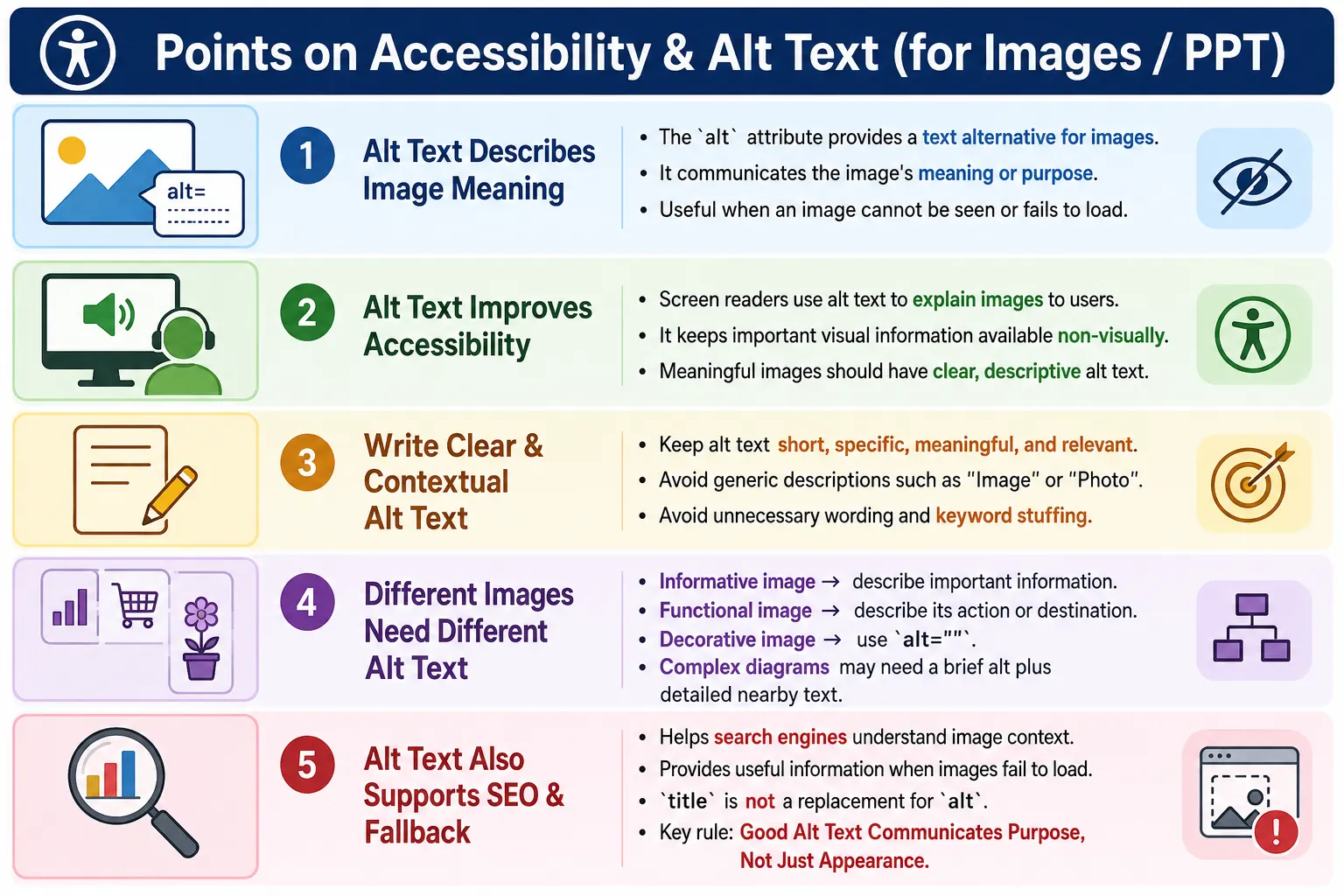
Introduction
The alt attribute, also called alternative text, is one of the most important attributes of the HTML <img> element. It provides a text alternative for an image when the image cannot be seen, loaded, or understood visually. Although it looks like a small part of image markup, it has a large effect on accessibility, user experience, search engine understanding, and the overall quality of a webpage.
Images communicate information. A product image shows what is being sold. A chart explains a business trend. A logo identifies a brand. An icon may represent a button action. A course thumbnail may tell users what topic a card belongs to. If a user cannot see the image, or if the image fails to load, that information can disappear unless the page provides a useful text alternative.
Alt text solves this problem by describing the meaning or purpose of the image. A simple example looks like this:
<img src="dog.jpg"
     alt="Golden Retriever Playing in a Park">
This markup does more than display an image. It also provides meaningful fallback information. Screen readers can announce the description, browsers can show it when the image fails, and search engines can use it as one signal to understand the image.
What Is Alt Text?
Alt text is a short textual description that explains the meaning or purpose of an image. It is written inside the alt attribute of the <img> tag. The basic syntax is simple:
<img src="image.jpg"
     alt="Description">
The browser uses this description when the image cannot be displayed. Assistive technologies use it when users need non-visual access to the image. Search engines may also read it to understand the image in the context of the page.
Good alt text should not be treated as a random label. It should answer a practical question: what information would a user miss if this image disappeared? The answer depends on the role of the image. A photo, a logo, a chart, an icon, and a decorative divider do not all need the same kind of alternative text.
Why Alt Text Is Needed
Not every user can see images. Some users rely on screen readers, Braille displays, voice assistants, or text-only browsing environments. Some users may have low vision. Some may browse with images disabled. Others may be on slow connections where images fail or load late. A broken image link can also prevent the visual content from appearing.
Alt text ensures that important information remains available even when the image itself is unavailable. It supports accessibility for users with visual impairments, improves fallback behavior when image loading fails, and helps search engines understand image content. It also makes the page more robust because the page does not rely only on pixels to communicate meaning.
Without alt text, an important image can become invisible from an information perspective. A user may hear only "image" from a screen reader. A broken image may show no useful fallback. A search engine may have less context about what the image represents. These problems are easy to prevent by writing meaningful alt text.
How Screen Readers Use Alt Text
Screen readers convert page content into speech or Braille output. When a screen reader encounters an image, it uses the image's accessible text alternative to explain the image to the user. If the image has useful alt text, the user receives meaningful information.
<img src="mountain.jpg"
     alt="Snow-covered mountain during sunrise">
A screen reader may announce:
Image
Snow-covered mountain during sunrise
Without the alt attribute, the screen reader may announce only that an image exists or may provide little useful information.
<img src="mountain.jpg">ImageThis is not helpful if the image is meaningful. The user knows there is an image, but does not know what the image communicates. Proper alt text bridges that gap.
Broken Image Example
Alt text is also useful when an image fails to load. A missing file, incorrect path, network issue, or server problem can prevent an image from appearing. When alt text is present, the browser may display the alternative text in place of the missing image.
<img src="missing.jpg"
     alt="Company Logo">
If the image fails to load, the text "Company Logo" may be displayed instead of the image. This fallback is not as visually rich as the image, but it still communicates the purpose of the missing content.
This matters in real projects. A product image may fail because of a CDN issue. A user profile picture may fail because the file was deleted. A chart may fail because the image path changed. Alt text keeps the page understandable when these failures happen.
Accessibility Benefits
The main reason to write alt text is accessibility. Alt text helps blind users, users with low vision, screen reader users, and users in text-only browsing environments. It gives image content a text representation so that the information is not locked inside a visual-only format.
Accessibility is not only about compliance. It is about making the same information available to more users. If a course card uses an image to show that the course is about HTML, the alt text can communicate that topic. If an image button sends users to the shopping cart, the alt text can explain the action. If a chart shows sales growth, the alt text or nearby explanation can communicate the key result.
Good alt text also reduces confusion. A screen reader user should not need to guess whether an image is decorative, informative, or interactive. The markup should make that purpose clear.
SEO Benefits
Search engines cannot interpret image pixels in the same direct way humans do. They use several signals to understand images, including the filename, alt text, captions, surrounding content, structured data, and the page topic. Alt text is one useful signal because it describes the image in human-readable language.
<img src="html-course.jpg"
     alt="HTML Beginner Course">
This tells search engines that the image relates to an HTML beginner course. It can support image search visibility and help the page's content make more sense. However, alt text should not be abused for keyword stuffing. The main goal is still to provide a meaningful text alternative for users.
Accessible alt text and SEO-friendly alt text often overlap because both depend on relevance and clarity. A clear description helps users first, and that same clarity helps search engines understand the content.
Good Alt Text
Good alt text is short, clear, specific, meaningful, and relevant to the page context. It describes the image in a way that helps the user understand why the image is present.
<img src="laptop.jpg"
     alt="Silver laptop on a wooden desk">
This is better than a vague label because it tells the user what is actually shown. If the image appears in an article about remote work setups, the description supports the surrounding content. If the same image appears in a product listing, the alt text may need to identify the product more directly.
Context matters. The same image can need different alt text depending on its purpose. A photo of a laptop may be decorative in one place, informative in another, and functional if used as a link to a product page.
Poor Alt Text
Poor alt text is vague, repetitive, irrelevant, or overloaded with keywords. Examples such as alt="Image" and alt="Photo" do not tell the user anything useful.
<img src="laptop.jpg"
     alt="Image">
<img src="laptop.jpg"
alt="Photo">These descriptions tell the user that an image exists, which the assistive technology may already announce. They do not explain what the image means. A better description would identify the visible content or purpose.
Another poor pattern is using filenames as alt text. A filename like img001.jpg is not meaningful to users. The alt text should describe the image, not repeat internal file naming.
Keyword Stuffing
Keyword stuffing is a common mistake in alt text. Developers or content writers sometimes try to force SEO keywords into the alt attribute, but this creates a poor accessibility experience and can look spammy.
<img src="html.jpg"
     alt="HTML HTML HTML HTML Tutorial HTML Course HTML Training">
This is difficult to understand and unpleasant for screen reader users. It also fails to describe the image naturally. A better version is clear and human-readable:
<img src="html.jpg"
     alt="Student learning HTML in a web browser">
The better version still contains relevant meaning, but it communicates naturally. Good alt text should serve users first. SEO should benefit from that clarity, not replace it.
Decorative Images
Some images provide no informational value. Examples include decorative borders, background ornaments, abstract patterns, visual dividers, and purely decorative icons. These images should not be announced by assistive technologies because they add noise without adding meaning.
<img src="divider.png"
     alt="">
An empty alt attribute tells assistive technologies to ignore the image. This is different from omitting the alt attribute. Omitting it may cause a screen reader to announce the filename or simply announce that an image exists. Using alt="" intentionally communicates that the image is decorative.
Decorative images should be silent. Meaningful images should be described. This distinction is one of the most important principles in accessible image markup.
Functional Images
Some images act as buttons or links. In these cases, the alt text should describe the function, not merely the appearance. If an image of a home icon links to the homepage, the user needs to know what the link does.
<a href="index.html">
  <img src="home.png"
       alt="Home">
</a>
If a cart icon links to the shopping cart, the better alt text is usually the action or destination.
<a href="cart.html">
  <img src="cart.png"
       alt="View shopping cart">
</a>
The phrase "shopping cart icon" describes the picture, but "View shopping cart" describes the function. For interactive images, function is usually more useful than appearance.
Informative Images
Informative images communicate content that is relevant to the page. This may include photos, charts, diagrams, screenshots, product images, and educational visuals. The alt text should communicate the important information.
<img src="chart.png"
     alt="Sales increased by 25 percent in 2025">
This description communicates the message of the chart, not just the fact that a chart exists. That is useful because the main value of the image is the information it contains.
For simpler informative images, a short description may be enough. For complex information, alt text may need support from nearby text.
Complex Images
Complex images include infographics, maps, charts, diagrams, architecture drawings, and process flows. A short alt text may not be enough to fully explain them. The alt text should provide a brief summary, and the detailed explanation should appear nearby in the page content or in linked documentation.
<img src="network-diagram.png"
     alt="Network architecture diagram">
This alt text identifies the image, but users may still need the details. If the diagram shows client, server, database, and API relationships, that explanation should be available in surrounding text. Alt text should not become a long essay, but the page should not hide essential information inside an image alone.
Images Containing Text
Images that contain important text need special care. If the image is a sale banner, event announcement, certificate, or screenshot with important text, the alt text should include the key message.
<img src="sale-banner.png"
     alt="50 percent off all courses until Friday">
If the text in the image is decorative and repeated nearby as real HTML text, the image may be decorative. But if the image is the only place where the message appears, the alt text must communicate that message.
As a best practice, important text should usually be real HTML text rather than embedded only inside images. Real text is easier to resize, translate, search, copy, and read with assistive technologies.
Icons and Logos
Icons can be informative, functional, or decorative depending on context. A search icon inside a button may need alt text or an accessible label that says "Search". A decorative star icon used only for visual styling may use empty alt text.
<img src="search-icon.svg"
     alt="Search">
<img src="decorative-star.svg"
alt="">Logos usually identify a brand. A common pattern is to use the brand name as the alt text.
<img src="logo.svg"
     alt="SoftwareTips4U Logo">
If a logo is also a link to the homepage, the alt text may be the brand name or the homepage destination depending on the site pattern. The main goal is that the link remains understandable when read without the image.
Alt Text vs Title
The alt attribute and the title attribute serve different purposes. Alt text provides accessibility and fallback content. The title attribute may provide optional tooltip information in some browsers, but it is not a replacement for alt text.
<img src="book.jpg"
     alt="HTML Programming Book"
     title="Available in Paperback">
In this example, the alt text identifies the image. The title adds optional extra information. Users should not need the title to understand the image. Many users may never see or hear the title reliably, so essential information belongs in alt text or visible page content.
Alt Text vs File Name
The file name and alt text are not the same thing. A descriptive filename can help organization and SEO, but it does not replace alt text. A filename may be technical, abbreviated, or irrelevant to users.
<img src="img001.jpg"
     alt="img001">
This is not helpful. A better version describes the image:
<img src="html-course.jpg"
     alt="Student learning HTML">
The filename can support the page, but the alt text should be written for people.
Writing Effective Alt Text
To write effective alt text, ask a few simple questions. What is shown in the image? Why is the image included? What information would a user miss if the image disappeared? Is the image decorative, informative, or functional?
<img src="teacher.jpg"
     alt="Instructor explaining HTML concepts on a whiteboard">
This description is useful because it identifies both the subject and the action. It avoids unnecessary words and focuses on the meaning. Effective alt text is not always about describing every visual detail. It is about communicating the right information for the page context.
When Alt Text Can Be Empty
Use alt="" only when the image is decorative, redundant, or purely visual. If an image repeats information already provided next to it, empty alt text may be appropriate because announcing the same information twice can be annoying.
<img src="divider.png"
     alt="">
Do not omit the alt attribute entirely. An intentionally empty alt attribute is a meaningful accessibility decision. A missing alt attribute is usually an error for meaningful images and can produce poor screen reader behavior.
Common Mistakes
The first common mistake is missing alt text entirely.
<img src="logo.png">A better version includes a meaningful description:
<img src="logo.png"
     alt="Company Logo">
Another common mistake is starting every description with "image of" or "picture of". This is usually unnecessary because screen readers often announce the image role already.
Bad:
alt="Image of a cat"

Better:
alt="White cat sleeping on a sofa"
Some writers describe irrelevant details. Long, emotional, or overly decorative descriptions can make the experience worse. If the page only needs to communicate "blue sky with white clouds", there is no need to write a long poetic description.
Another frequent mistake is forgetting functional purpose. If an image is inside a link or button, describe what it does. A cart icon inside a link should say "View shopping cart", not just "Shopping cart icon".
Accessibility Workflow
A practical workflow for alt text starts with meaning. First, ask whether the image has meaning. If it does, write descriptive alt text. If it is decorative, use an empty alt attribute. If it is functional, describe the action. If it is complex, provide a short summary and add detailed explanation nearby.
Image
  ↓
Has Meaning?
  ↓
Yes
  ↓
Write Descriptive Alt Text
  ↓
Screen Reader Reads Description
This workflow prevents two common extremes: describing every decorative image and ignoring meaningful images. Both create accessibility problems. The right decision depends on the image's purpose.
Real-World Example
A course thumbnail can combine accessibility, SEO, and performance when written well:
<img
src="html-course.webp"
alt="HTML Beginner Course with Code Examples"
loading="lazy">
This image has meaningful alt text, uses a modern image format, and uses lazy loading if it appears below the fold. The alt text explains the image purpose clearly. The filename is descriptive. The lazy loading attribute improves performance when appropriate. This is the kind of practical markup expected in modern HTML pages.
Selenium Perspective
From a Selenium testing perspective, automation teams can validate that important images have meaningful alt text. This does not replace human accessibility review, but it can catch obvious issues such as missing or empty alt attributes on meaningful images.
WebElement image =
driver.findElement(By.tagName("img"));

String alt =
image.getAttribute("alt");
A simple check can verify that alt text exists:
if(!alt.isEmpty())
{
    System.out.println("Alt text present");
}
Automation can also check specific images by locator and compare expected alt text. For example, a logo image may be expected to have a brand name. A search icon button may need accessible text that communicates the action. Automated checks should be combined with manual judgment because not every empty alt is wrong and not every non-empty alt is good.
Common Interview Questions
A common interview question is: what is the purpose of the alt attribute? The answer is that it provides alternative text for accessibility, fallback content, and helps search engines understand image content.
Another question is: is alt required? While an image can technically display without it, every meaningful image should have an alt attribute. Decorative images should use alt="". Interviewers may also ask what good alt text should contain. It should contain a concise, meaningful description of the image or its purpose.
Should decorative images have alt text? They should use an empty alt attribute so assistive technologies skip them. Is title a replacement for alt? No. The title attribute provides optional tooltip information; it does not replace accessible alternative text.
Comparison Table
| Image Type | Recommended alt |
|---|---|
| Informative Image | Meaningful description |
| Logo | Company or brand name |
| Functional Image | Describe the action, such as Search or View shopping cart |
| Decorative Image | alt="" |
| Chart or Diagram | Brief summary plus nearby detailed explanation if needed |
| Image with Text | Include the important text shown in the image |
Interview-Ready Answer
The alt attribute provides a text alternative for an image. It allows screen readers to describe images to visually impaired users, provides fallback text if an image cannot load, and helps search engines understand image content. Meaningful images should always have descriptive alt text, while purely decorative images should use an empty alt="" so assistive technologies ignore them.
Key Takeaway
Alt text is not just an SEO field and not just a technical requirement. It is part of how a webpage communicates information to users who cannot see the image or who cannot load it. Good alt text should be meaningful, concise, contextual, and user-focused.
The best approach is to decide the purpose of the image first. If the image communicates information, describe that information. If it performs an action, describe the action. If it is purely decorative, use an empty alt attribute. This simple decision process leads to more accessible and professional HTML.
One-Line Insight
Good alt text does not describe pixels; it communicates the information or purpose the image provides.