Absolute vs Relative URLs
Introduction
One of the most important concepts in HTML linking is understanding the difference between absolute URLs and relative URLs. Every time a webpage links to another page, loads an image, imports a stylesheet, runs a JavaScript file, submits a form, or connects to an API, a URL is involved. If the URL is written correctly, the browser can find the resource. If it is written incorrectly, the link breaks, the image fails to load, the CSS does not apply, or the script does not run.
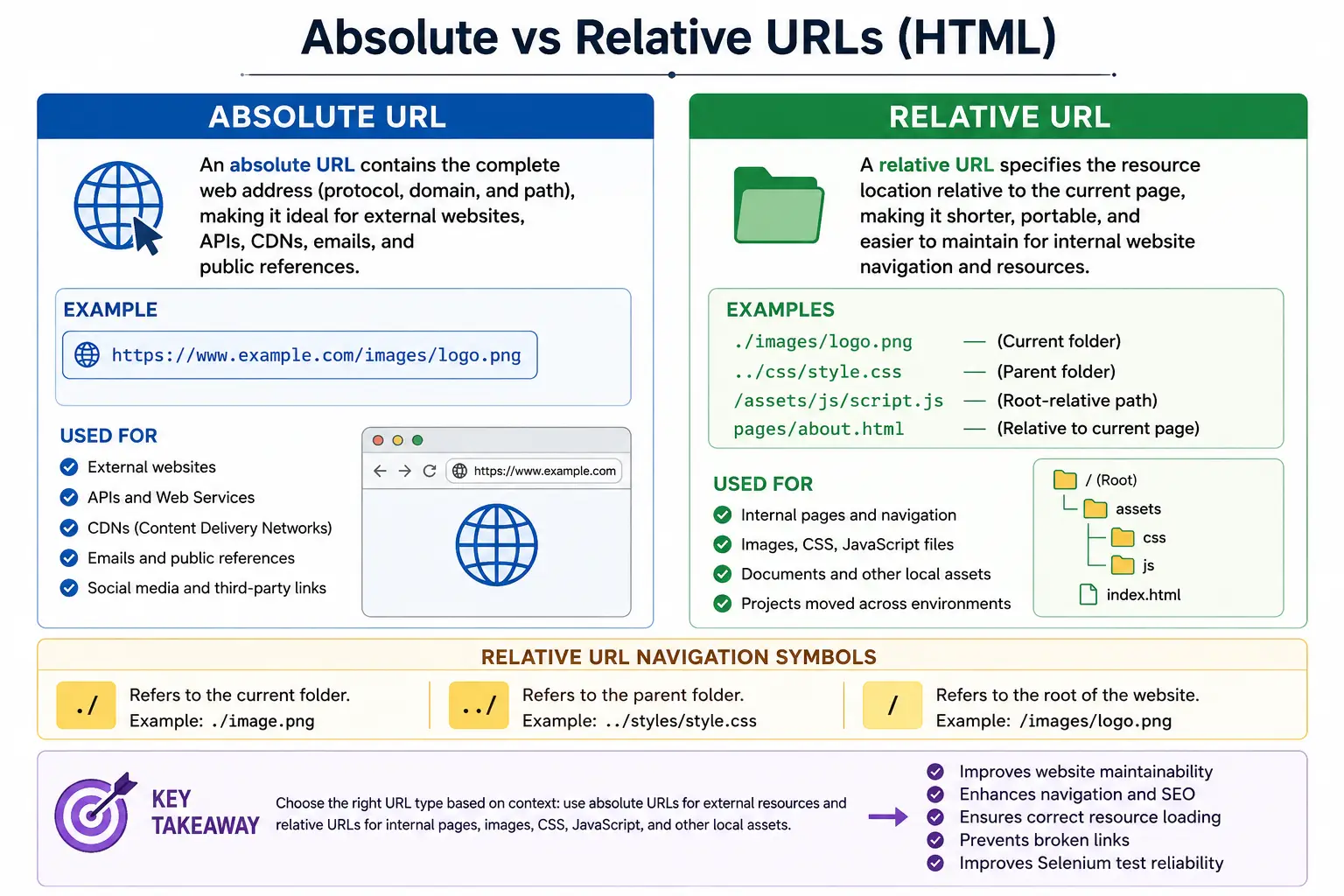
Absolute and relative URLs are both valid ways to point to resources, but they solve different problems. An absolute URL gives the browser the complete address of a resource. A relative URL gives the browser a path that must be resolved from the current page location. Choosing between them affects website navigation, portability, maintainability, deployment, testing, and SEO consistency.
Beginners often think URLs are only used inside anchor tags, but they appear throughout HTML. The <a> tag uses URLs for navigation, <img> uses URLs for images, <link> uses URLs for CSS files, <script> uses URLs for JavaScript files, and forms can use URLs for submission targets. Because URLs are everywhere, understanding absolute and relative paths is a core web development skill.
What Is a URL?
A URL, or Uniform Resource Locator, is the address of a resource on the web. A resource can be an HTML page, image, CSS file, JavaScript file, PDF, video, API endpoint, or any other file or service that a browser can request.
https://www.softwaretips4u.com/html/tutorial.htmlThis URL tells the browser where to find a specific resource. It includes the protocol, the domain, the folder path, and the file name. When the browser receives a URL, it uses that information to locate and request the resource.
There are two main types of URLs that HTML developers use regularly: absolute URLs and relative URLs. The difference is whether the complete address is provided or whether the browser must calculate the destination based on the current document location.
What Is an Absolute URL?
An absolute URL contains the complete address of a resource. It includes enough information for the browser to locate the resource without needing to know where the current page is located. A typical absolute URL includes the protocol, domain, optional folder path, and file name.
<a href="https://www.softwaretips4u.com/html/tutorial.html">
  HTML Tutorial
</a>
This link points to a full address. No matter where the current page is located, the browser knows the exact destination. That is the main strength of absolute URLs: they are independent of the current page path.
Structure of an Absolute URL
An absolute URL can be broken into meaningful parts.
https://www.softwaretips4u.com/html/tutorial.html| Part | Meaning |
|---|---|
https:// | Protocol |
www.softwaretips4u.com | Domain |
/html/ | Folder path |
tutorial.html | File name |
Because everything is included, the browser does not need to infer the domain or folder. It can use the complete resource location directly.
Characteristics of Absolute URLs
The first characteristic of an absolute URL is completeness. It contains the full resource location. The second characteristic is independence. It works regardless of the current page location. The third characteristic is that it includes a domain, such as https://google.com or https://softwaretips4u.com.
For example, if the current page is https://softwaretips4u.com/index.html, the following link always points to the same contact page.
<a href="https://softwaretips4u.com/contact.html">
  Contact
</a>
The browser does not need to combine this path with the current page location. The full address is already available.
Advantages of Absolute URLs
The biggest advantage of absolute URLs is that they work everywhere. A full link such as https://softwaretips4u.com/about.html points to the same resource whether it appears on the homepage, a blog post, an email template, a PDF, or a page hosted on another domain.
<a href="https://softwaretips4u.com/about.html">
  About
</a>
Absolute URLs are also required when linking to external websites. If a page links to Google, GitHub, YouTube, a CDN, or another domain, the link should be absolute.
<a href="https://www.google.com">
  Google
</a>
Another advantage is that absolute URLs remove ambiguity. The browser receives the complete path. This can be useful in syndicated content, RSS feeds, emails, API responses, sitemaps, canonical URLs, and external references.
Disadvantages of Absolute URLs
The main disadvantage of absolute URLs is that they are longer. A link such as https://softwaretips4u.com/courses/html.html is more verbose than courses/html.html. This may not matter for a few links, but it can make large documents more repetitive.
Absolute URLs can also be harder to maintain for internal website links. If a site changes from softwaretips4u.com to softwaretips4u.net, every hardcoded absolute internal link may need to be updated. The same issue can occur when moving a site between staging, development, and production domains.
For this reason, developers often prefer relative URLs for internal navigation and reserve absolute URLs for external resources or cases where the full address is necessary.
What Is a Relative URL?
A relative URL specifies a resource location relative to the current page. It does not include the protocol or domain. Instead, the browser calculates the final destination based on where the current document is located.
<a href="about.html">
  About
</a>
If the current page is https://softwaretips4u.com/index.html, this relative URL resolves to https://softwaretips4u.com/about.html. The browser uses the current page's domain and folder as the starting point.
How Relative URLs Work
Relative URLs work by giving the browser directions from the current document. If the link says about.html, the browser looks for about.html in the same folder as the current page. If the link says courses/html.html, the browser looks for a folder named courses under the current folder and then looks for html.html inside it.
Current page:
https://softwaretips4u.com/index.html

Relative link:
about.html

Resolved destination:
https://softwaretips4u.com/about.html
This makes relative URLs short and convenient, especially for internal website resources.
Characteristics of Relative URLs
Relative URLs are shorter because they omit the protocol and domain. They depend on the current page location because the browser must calculate the final destination. They are commonly used for internal pages, images, CSS files, JavaScript files, and other resources within the same website.
For example, about.html is shorter than https://softwaretips4u.com/about.html. But its meaning changes depending on where the current page is located. That is why understanding folder structure is essential when using relative paths.
Same Folder Example
If files are in the same folder, the relative path can use only the target file name.
Project:
index.html
about.html
contact.html
<a href="about.html">
About
</a>This link points to about.html in the same folder as the current page. This is the simplest relative URL pattern.
Child Folder Example
If the target file is inside a child folder, include the folder name followed by the file name.
Project:
index.html
courses/
  html.html
<a href="courses/html.html">
HTML Course
</a>From index.html, the browser enters the courses folder and opens html.html.
Parent Folder Example
If the current page is inside a folder and the target file is in the parent folder, use .. to move up one folder.
Project:
index.html
courses/
  html.html
If the current page is courses/html.html and the link must go back to index.html, the relative path is:
<a href="../index.html">
  Home
</a>
The symbol .. means go up one folder. This is one of the most important relative path concepts.
Current and Parent Folder Symbols
The current folder symbol is .. It means the current directory. A link such as ./about.html points to about.html in the current folder.
<a href="./about.html">
  About
</a>
The parent folder symbol is ... It means move to the parent directory.
<a href="../contact.html">
  Contact
</a>
These symbols are small, but they are essential for navigating folder structures correctly.
Root-Relative URLs
A root-relative URL starts with a leading slash. It tells the browser to start from the website root, not from the current folder.
<a href="/courses/html.html">
  HTML Course
</a>
If the current page is https://softwaretips4u.com/blog/post1.html, the root-relative URL above resolves to https://softwaretips4u.com/courses/html.html. The browser ignores the current folder /blog/ and starts from the domain root.
Root-relative URLs are useful in websites where pages live in many different folders but need consistent links to shared resources such as CSS, images, scripts, or main navigation pages.
Browser Resolution Process
When a browser sees a relative URL, it combines it with the current page location. If the current page is https://softwaretips4u.com/pages/about.html and the relative URL is contact.html, the browser calculates the destination as https://softwaretips4u.com/pages/contact.html.
Current page:
https://softwaretips4u.com/pages/about.html

Relative URL:
contact.html

Browser calculates:
https://softwaretips4u.com/pages/contact.html
This is why relative links can break when a file is moved to a different folder. The same relative path may resolve differently from a new location.
Absolute vs Relative Example
Sometimes an absolute URL and a relative URL can reach the same page. If the current page is https://softwaretips4u.com/index.html, both examples below can point to the About page.
<a href="https://softwaretips4u.com/about.html">
  About
</a>
<a href="about.html">
About
</a>The first one tells the browser the full destination. The second tells the browser how to find the destination from the current page.
Usage in Images, CSS, and JavaScript
URLs are not limited to anchor tags. Images use URLs in the src attribute. An image can use an absolute URL:
<img src="https://site.com/logo.png" alt="Logo">Or it can use a relative URL:
<img src="images/logo.png" alt="Logo">Stylesheets also use URLs. An absolute stylesheet URL may point to a full external location:
<link rel="stylesheet"
      href="https://site.com/css/style.css">
A relative stylesheet URL points to a file inside the current site:
<link rel="stylesheet"
      href="css/style.css">
JavaScript files follow the same idea.
<script src="https://site.com/js/app.js"></script><script src="js/app.js"></script>When to Use Absolute URLs
Use absolute URLs when linking to external websites, different domains, APIs, CDNs, third-party resources, canonical references, or content that may be used outside the current website context. Examples include links to Google, GitHub, YouTube, documentation sites, CDN libraries, and external API endpoints.
<a href="https://github.com">
  GitHub
</a>https://cdn.example.com/library.jsAbsolute URLs are also useful in emails, RSS feeds, XML sitemaps, and shared content because the resource must work without relying on the current page location.
When to Use Relative URLs
Use relative URLs for internal pages and resources within the same website. They are common for pages such as about.html, images such as images/logo.png, CSS files such as css/style.css, and JavaScript files such as js/app.js.
Relative URLs make internal links shorter and easier to maintain. If the domain changes, many internal relative links will continue to work because they do not include the domain name. This is especially useful during local development, staging deployments, and production releases.
SEO Considerations
Both absolute and relative URLs can work for SEO. Search engines can crawl either style if the links resolve correctly. The most important factors are consistency, correctness, crawlability, and avoiding broken links.
For internal navigation, relative URLs are common and perfectly acceptable. For canonical URLs, Open Graph metadata, RSS feeds, and sitemaps, absolute URLs are often preferred or required because they identify a complete public address. Avoid mixing URL styles unnecessarily in ways that make maintenance confusing.
Common Mistakes
A common mistake is writing the wrong relative path. For example, the folder may be named images, but the link uses imag.
<a href="imag/logo.png">
  Logo
</a>
If the actual folder is images, the path is broken. Another common mistake is forgetting to move up to the parent directory. If the current page is courses/html.html, a link to the root index.html usually needs ../index.html, not simply index.html.
<a href="../index.html">
  Home
</a>
Another mistake is using absolute URLs for every internal page. This can make maintenance harder when domains change or when the same site is deployed across development, staging, and production environments.
Selenium Perspective
From a Selenium perspective, URL resolution is important because browsers often expose resolved absolute URLs even when the original HTML used a relative URL. For example, the HTML may contain href="about.html", but Selenium's getAttribute("href") may return the full resolved URL.
String url =
driver.findElement(By.linkText("About")).getAttribute("href");
The returned value may be https://softwaretips4u.com/about.html. This is normal because the browser resolves the relative path. Testers should be aware of this behavior when writing assertions. Sometimes it is better to assert that the URL ends with /about.html rather than expecting the exact original source value.
Comparison Table
| Feature | Absolute URL | Relative URL |
|---|---|---|
| Contains Domain | Yes | No |
| Contains Protocol | Yes | No |
| Works Independently | Yes | Depends on current page |
| Best for External Links | Yes | No |
| Best for Internal Links | Usually no | Yes |
| Easier Maintenance | Usually no | Yes for internal resources |
Common Interview Questions
A common interview question is: what is an absolute URL? The answer is that an absolute URL is a complete URL containing the protocol, domain, and path. An example is https://softwaretips4u.com/about.html.
Another common question is: what is a relative URL? A relative URL is resolved relative to the current page. For example, about.html points to a file named about.html in the current folder.
Interviewers may ask which URL type is commonly used for internal pages. Relative URLs are commonly used for internal pages because they are shorter and easier to maintain. They may also ask which URL type is required for external websites. Absolute URLs are used for external websites because the browser needs the full destination.
Another frequent question is: what does ../ mean? It means move to the parent directory. This is used when the target resource is located one folder above the current page.
Interview-Ready Answer
An absolute URL contains the complete resource address including protocol, domain, and path, whereas a relative URL specifies a location relative to the current document. Absolute URLs are commonly used for external resources, different domains, CDNs, and complete public references. Relative URLs are preferred for internal website navigation and local resources because they are shorter, portable, and easier to maintain.
Key Takeaway
Absolute URLs tell the browser the full destination. Relative URLs tell the browser how to find the destination from the current location. Both are useful, but they should be chosen deliberately. Use absolute URLs when the resource is outside the current site or must be fully explicit. Use relative URLs for internal resources when portability and maintainability matter.
Understanding URL resolution prevents broken links, missing images, unloaded CSS, failed scripts, and incorrect navigation. It also helps developers write cleaner HTML and testers create more reliable validations.
One-Line Insight
Absolute URLs tell the browser the full destination; relative URLs tell the browser how to find the destination from the current location.