Abbreviations & Citations
Introduction
Modern web pages contain many shortened terms, technical acronyms, book names, article names, movie titles, research references, and quoted sources. A normal reader may understand these details from context, but HTML documents should not depend only on visual appearance or human guesswork. Good HTML gives meaning to content. That meaning helps browsers, assistive technologies, search engines, developers, and automated tests understand what each piece of text represents.
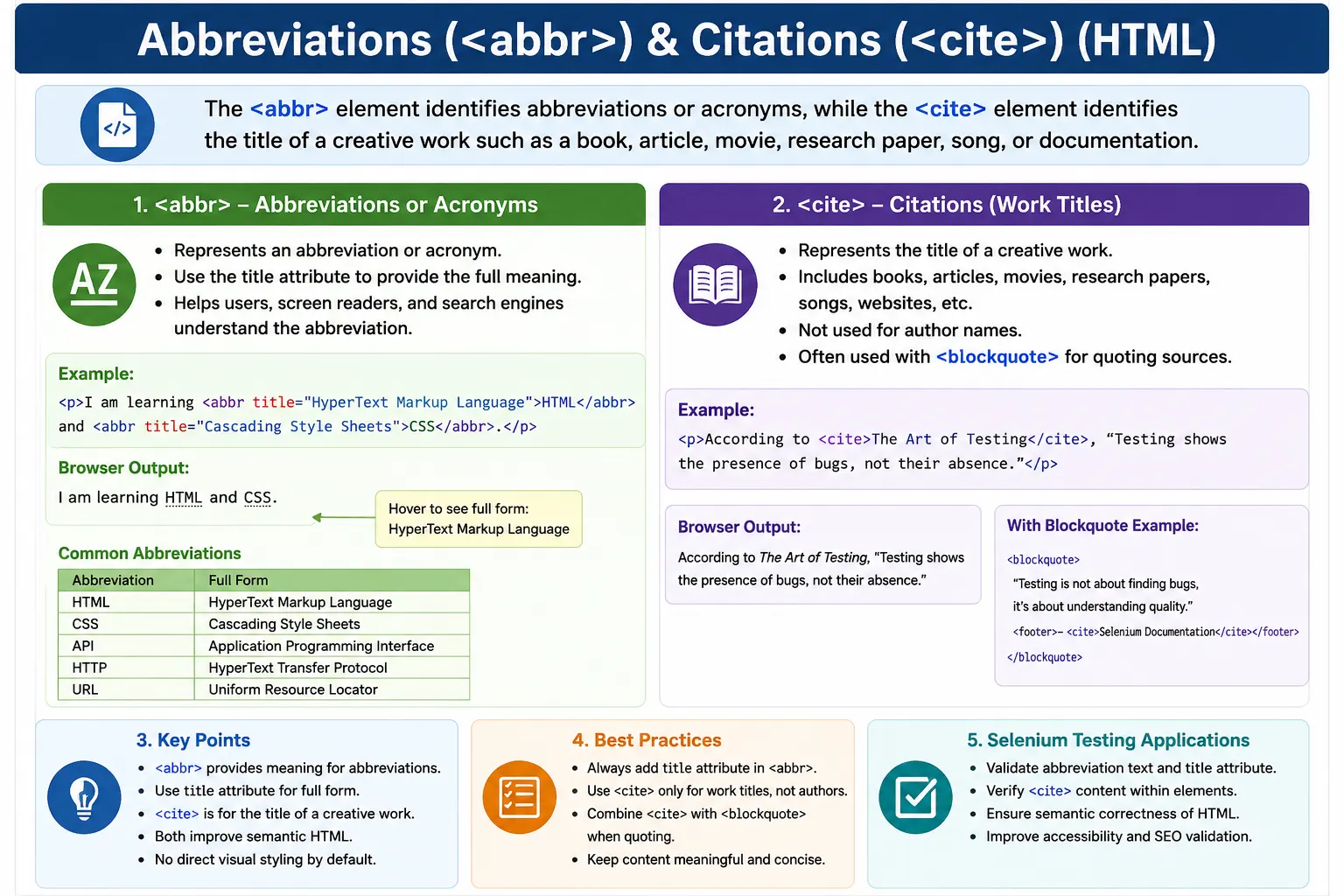
HTML provides semantic elements that help identify abbreviations, acronyms, references, citations, and titles of works. The two primary elements used for these purposes are <abbr> and <cite>. The <abbr> element is used when a shortened term such as HTML, CSS, API, URL, WHO, or NASA appears in content. The <cite> element is used when the title of a creative work is being referenced, such as a book, movie, article, research paper, song, or documentation title.
These elements may look small, but they are important in professional HTML. They improve accessibility because assistive technologies can understand abbreviations and titles more clearly. They improve content clarity because readers can discover the full meaning of shortened terms. They support semantic HTML because the markup describes the role of the text instead of only changing its appearance. They can also support SEO by giving search engines additional context about technical terms and referenced works.
Why Use Semantic Elements?
Consider a sentence such as: HTML was created by Tim Berners-Lee. A human reader with web development knowledge understands that HTML is an abbreviation for HyperText Markup Language. But if the page contains only plain text, the browser has no special information about that word. It sees the letters H, T, M, and L like any other text. The same problem occurs with book titles, article titles, and movie names. If a page says that someone read Clean Code, the browser does not automatically know that Clean Code is the title of a work.
Semantic tags solve this problem by adding meaning. When an abbreviation is wrapped in <abbr>, the document communicates that the text is a shortened form. When a book title is wrapped in <cite>, the document communicates that the text is the title of a cited work. The user may see almost the same visual output, but the document structure becomes much richer.
This is the central idea behind semantic HTML. HTML should describe content, not merely display it. CSS can handle appearance, but HTML should explain what the content means. Using <abbr> and <cite> correctly is a practical example of this principle.
Abbreviations
An abbreviation is a shortened form of a word or phrase. Web content uses abbreviations constantly. Technical tutorials mention HTML, CSS, JS, API, URL, HTTP, REST, JSON, SQL, DOM, and many other shortened terms. Business and educational pages may mention organizations such as WHO, NASA, UN, or ISO. Without explanation, these terms may be difficult for beginners, non-native speakers, or users with limited domain knowledge.
The <abbr> element represents an abbreviation or acronym. It tells the browser that the visible text is a shortened form. The most useful version of this element includes the title attribute, which stores the full meaning of the abbreviation.
<abbr>HTML</abbr>This markup identifies HTML as an abbreviation, but it does not provide the full form. A more informative version includes the title attribute.
<abbr title="HyperText Markup Language">
HTML
</abbr>
Now the markup tells the browser that the visible abbreviation HTML stands for HyperText Markup Language. In many browsers, when a user hovers over the abbreviation, the full form may appear as a tooltip. The exact behavior depends on the browser and device, but the semantic value exists in the HTML either way.
Basic Syntax of <abbr>
The basic syntax places the abbreviation between the opening and closing <abbr> tags. The full meaning is commonly placed inside the title attribute.
<abbr title="Full Meaning">
Abbreviation
</abbr>
A practical sentence might look like this:
<p>
Learn <abbr title="HyperText Markup Language">HTML</abbr> today.
</p>
The visible output is simple: Learn HTML today. But the document now contains extra meaning. A user who hovers over HTML may see HyperText Markup Language. A screen reader may use the title information depending on its settings. A developer reading the markup understands that HTML is intentionally marked as an abbreviation.
Common Uses of <abbr>
The <abbr> element is common in technical writing. For example, API stands for Application Programming Interface, HTTP stands for HyperText Transfer Protocol, and REST stands for Representational State Transfer. These terms are familiar to experienced developers but may be unclear to beginners. Marking them with <abbr> improves clarity without interrupting the flow of the sentence.
<abbr title="Application Programming Interface">API</abbr>It is also useful for organizations and standards bodies.
<abbr title="World Health Organization">WHO</abbr>Technical standards and protocols are another good use case.
<abbr title="HyperText Transfer Protocol">HTTP</abbr>Even measurements can be marked when the full form is useful.
<abbr title="Kilometer">km</abbr>The goal is not to wrap every familiar abbreviation on every page. The goal is to provide helpful expansion where the reader may benefit from it, especially the first time a term appears.
The title Attribute
The title attribute is the most commonly used attribute with <abbr>. It contains the full form or expansion of the abbreviation. For example, the abbreviation CSS can be expanded as Cascading Style Sheets.
<abbr title="Cascading Style Sheets">
CSS
</abbr>
When the user hovers over CSS, many desktop browsers may display Cascading Style Sheets as a tooltip. This can be convenient, but developers should not rely only on hover tooltips for critical information. Tooltips may not be available on touch devices, and different assistive technologies handle the title attribute differently. For very important terms, it can be better to define the abbreviation in visible text the first time it appears and still use <abbr> for semantic support.
A strong writing pattern is to introduce the full term first, followed by the abbreviation. For example: HyperText Markup Language (<abbr title="HyperText Markup Language">HTML</abbr>) is the standard markup language for webpages. After that, the page can use HTML normally.
Accessibility Benefits of <abbr>
Abbreviations can be confusing when read aloud. Some abbreviations are pronounced as words, while others are spelled letter by letter. Screen readers may read HTML as H T M L, API as A P I, or NASA as a word. When the full form is provided through title, assistive technologies may be able to expose the expansion to users, depending on the reader and settings.
<abbr title="HyperText Markup Language">
HTML
</abbr>
This markup can help users understand that HTML means HyperText Markup Language rather than treating it as unexplained letters. Accessibility is not only about users with disabilities. Clear expansion also helps beginners, readers from different fields, and users who are learning technical vocabulary.
SEO Benefits of <abbr>
Search engines try to understand page content. An abbreviation such as API may have a clear meaning in a programming article, but providing the full form gives additional context. The markup below communicates both the visible acronym and the expanded phrase.
<abbr title="Application Programming Interface">
API
</abbr>
This does not mean that adding <abbr> will automatically improve rankings. SEO depends on many factors. But semantic markup supports content clarity, and clear content is easier for both humans and machines to understand. In educational tutorials, documentation, glossaries, and technical articles, using <abbr> is a clean way to connect acronyms with their meanings.
Best Practices for <abbr>
The most important best practice is to include the title attribute when the expansion is useful. Without it, the element still identifies the term as an abbreviation, but users do not receive the full meaning from the markup.
<abbr title="World Wide Web">WWW</abbr>A weak version would omit the expansion.
<abbr>WWW</abbr>Another best practice is to use <abbr> for abbreviations that may be unfamiliar, important, technical, or domain-specific. Terms such as REST, API, DOM, JSON, and CI/CD may be obvious to experienced engineers but not to beginners. In tutorials, training content, and documentation, expanding such terms helps the reader.
It is also wise to avoid overusing <abbr>. If a very common term appears dozens of times, marking every instance may add unnecessary noise. Usually, marking the first important occurrence is enough.
Citations
A citation refers to a work being referenced. In HTML, the <cite> element is used to identify the title of a creative work. A creative work can be a book, movie, research paper, article, song, poem, painting, website, specification, or other named work. The key idea is that <cite> identifies the title of the work, not every kind of reference text.
For example, Atomic Habits is the title of a book. The Pragmatic Programmer is the title of a book. Inception is the title of a movie. Clean Code is the title of a book. These titles can be marked with <cite> when referenced in HTML content.
<cite>Atomic Habits</cite>Browsers usually render citations in italics by default. This visual style is helpful, but the element's purpose is semantic. It tells the browser that the text is the title of a work.
Basic Syntax of <cite>
The syntax of <cite> places the title of a work between the opening and closing tags.
<cite>
Title of Work
</cite>
A common sentence might look like this:
<p>
I recently read <cite>Atomic Habits</cite>.
</p>
The browser will usually display Atomic Habits in italic style. However, the better reason to use <cite> is that it identifies Atomic Habits as the title of a referenced work.
Common Uses of <cite>
The <cite> element is useful in many types of content. In developer education, it may be used for books such as <cite>The Pragmatic Programmer</cite> or <cite>Clean Code</cite>. In film articles, it may be used for titles such as <cite>Inception</cite>. In academic or research writing, it may be used for papers, journals, or article titles.
<cite>The Pragmatic Programmer</cite><cite>Inception</cite><cite>Deep Learning</cite><cite>Modern Web Development</cite>Songs and creative works can also be cited with this element.
<cite>Imagine</cite>The common thread is that the element identifies the title of a work. It should not be used just because text should appear italic. If the goal is only visual styling, CSS is the correct tool.
Semantic Meaning of <cite>
The <cite> element communicates that the enclosed text is the title of a work. This is different from ordinary italic text. For example, <em> communicates emphasis, <i> communicates an alternate voice or offset text, and <cite> communicates a citation title. These elements may look similar by default, but they do not mean the same thing.
Using <cite> correctly helps readers and tools distinguish between a title, an emphasized word, and normal text. This is especially useful in educational material, bibliographies, book recommendations, documentation pages, research summaries, and articles that refer to multiple sources.
<cite> With <blockquote>
The <cite> element is often used near <blockquote> when a quotation needs attribution. The quote itself belongs inside <blockquote>, and the cited work or source title can be identified with <cite>.
<blockquote>
Code is like humor.
When you have to explain it,
it is bad.
</blockquote>

<p><cite>Cory House</cite></p>
This example reflects a common pattern, but there is an important detail: <cite> is intended for titles of works. In real-world pages, authors' names are often styled near quotes, but strictly speaking, the cited title is the best fit for <cite>. If the page is naming a book, article, speech, or source document, <cite> is appropriate. If it is naming only a person, plain text or another suitable structure may be more accurate.
<cite> vs <q>
The <cite> and <q> elements are related to references, but they do different jobs. The <q> element identifies quoted text. The <cite> element identifies the title of a work. A quote is the words being repeated. A citation is the source title being referenced.
<cite>Clean Code</cite>This identifies a work title.
<q>Write simple code.</q>This identifies quoted text. They can be used together in the same sentence when both meanings are needed.
<p>
In <cite>Clean Code</cite>,
the author emphasizes <q>readable code</q>.
</p>
Accessibility Benefits of <cite>
Assistive technologies can benefit from semantic identification of work titles. When <cite> is used properly, the document communicates that a phrase is not just a styled word but the title of a book, movie, article, song, or other work. This helps users understand references more clearly, especially in longer content where several sources may be discussed.
Like many semantic elements, <cite> is not a magic accessibility solution by itself. It works best as part of a well-structured document that uses headings, paragraphs, lists, quotes, links, and citations correctly. But it is still a meaningful improvement over styling titles with generic spans or italics alone.
Real-World Example
A simple article recommending a book can use <cite> to identify the title clearly.
<article>
  <h2>Book Recommendation</h2>

  <p>
    One of the best books for developers is
    <cite>Clean Code</cite>.
  </p>
</article>
A technical tutorial can use <abbr> and <cite> together. For example, a page might explain an abbreviation while also referencing a source document or book title.
<p>
The <abbr title="Document Object Model">DOM</abbr>
is explained in detail in
<cite>DOM Standard</cite>.
</p>
This markup is compact but meaningful. It identifies DOM as an abbreviation and DOM Standard as the title of a referenced work.
Common Mistakes
One common mistake is using <cite> for author names instead of work titles. For example, using <cite>Robert Martin</cite> is usually not the best choice if Robert Martin is being referenced as a person. If the title of the work is Clean Code, then the correct cited text is <cite>Clean Code</cite>.
<!-- Avoid this when naming only a person -->
<cite>Robert Martin</cite>
<!-- Better when naming the work -->
<cite>Clean Code</cite>Another common mistake is omitting the title attribute from <abbr> when the expansion is important.
<!-- Weak because no expansion is available -->
<abbr>API</abbr>
<!-- Better -->
<abbr title="Application Programming Interface">
API
</abbr>Developers also sometimes use <cite> just because they want italic text. This is incorrect. If the text is not the title of a work, use CSS or another semantic element that matches the meaning. Visual styling should not decide the HTML element.
Selenium Perspective
From a Selenium automation perspective, semantic elements are useful because they create predictable structure. If a tutorial page, glossary, article, or documentation page requires abbreviations to be marked correctly, Selenium tests can locate <abbr> elements and validate their visible text or title attributes.
driver.findElement(By.tagName("abbr"));A test can also verify that a specific abbreviation has the correct expansion.
WebElement abbreviation = driver.findElement(By.tagName("abbr"));
String fullForm = abbreviation.getAttribute("title");
Similarly, <cite> elements can be located when validating referenced titles on content-heavy pages.
driver.findElement(By.tagName("cite"));In real automation projects, a more specific CSS selector is usually better than a broad tag-name locator. Still, understanding these elements helps testers verify not only the visible text but also the semantic correctness of the page.
Comparison Table
| Feature | <abbr> | <cite> |
|---|---|---|
| Purpose | Abbreviation or acronym | Title of a work |
| Common Attribute | title | None required |
| Accessibility Benefit | Provides abbreviation expansion | Identifies cited work titles |
| Default Styling | Usually normal text | Usually italic |
| Example | HTML, CSS, API | Clean Code, Inception |
Common Interview Questions
A common interview question is: what is the purpose of <abbr>? The answer is that it represents an abbreviation or acronym. It is commonly used with the title attribute to provide the full form.
Another common question is: which attribute is commonly used with <abbr>? The answer is title. It usually contains the expanded meaning of the abbreviation, such as HyperText Markup Language for HTML.
Interviewers may also ask about <cite>. The purpose of <cite> is to identify the title of a creative work, such as a book, movie, article, research paper, song, or similar work. Browsers usually render citations in italics by default.
Another useful question is whether <cite> can be used with <blockquote>. Yes, it is often used near block quotations to identify the title of the quoted work or referenced source. However, it should represent the title of a work, not merely a person's name.
Interview-Ready Answer
The <abbr> element is used for abbreviations and acronyms, typically with a title attribute that contains the full form. The <cite> element is used to identify the title of a creative work such as a book, movie, article, research paper, or song. Both elements provide semantic meaning, improve accessibility, and make content clearer for readers, browsers, search engines, and assistive technologies.
Key Takeaway
Use <abbr> when a shortened term needs semantic identification or expansion. Use the title attribute when the full meaning is helpful to readers. Use <cite> when referencing the title of a creative work, not simply when text should appear italic.
Both elements are small but valuable parts of semantic HTML. They make content more meaningful without changing the visible structure dramatically. They are especially useful in tutorials, documentation, articles, reviews, academic writing, glossaries, and technical content.
One-Line Insight
Use <abbr> for shortened terms and <cite> for titles of books, articles, movies, and other creative works.