What Is Git?
Introduction
In modern software development, applications are rarely built by a single developer working alone. Most software projects involve teams of developers, testers, DevOps engineers, business analysts, and other stakeholders collaborating over weeks, months, or even years. As applications evolve, code changes continuously. New features are added, bugs are fixed, configurations are updated, and documentation is improved. Managing all these changes efficiently would be nearly impossible without a proper version control system.
This is where Git becomes indispensable. Git is one of the most important tools in the software industry and is considered a fundamental skill for developers, automation testers, DevOps engineers, and software professionals. Whether you are developing a Java application, creating a Selenium automation framework, building APIs, managing infrastructure, or maintaining documentation, Git plays a central role in tracking changes and enabling collaboration.
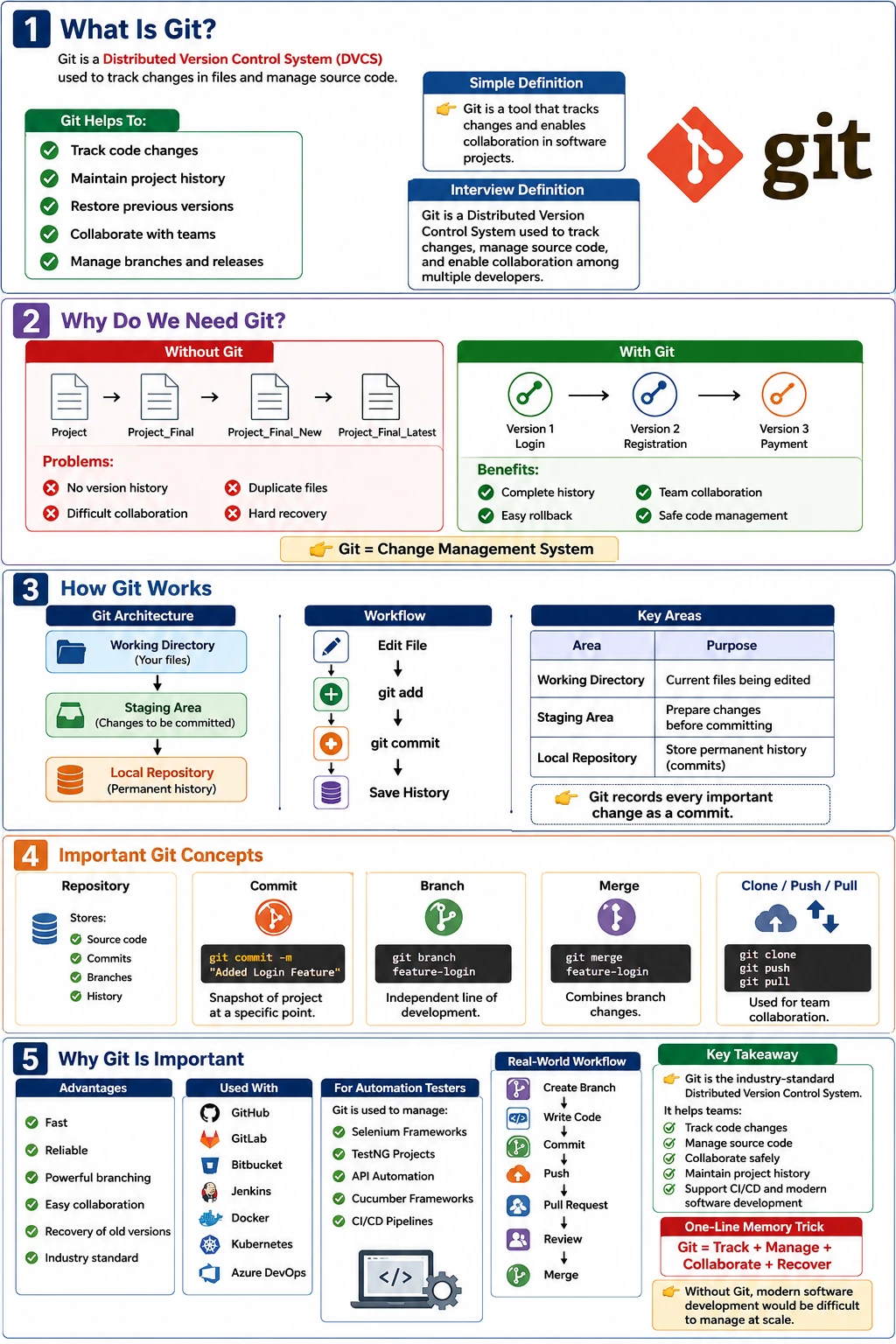
Git is a Distributed Version Control System (DVCS) that allows teams to manage source code efficiently, track every modification, collaborate safely, recover previous versions, and maintain a complete history of project development. Today, Git is the industry standard for version control and is used by organizations ranging from startups to large enterprises.
Understanding Git is not simply about learning commands such as git add, git commit, or git push. It is about understanding how software teams manage change, collaborate at scale, and maintain quality throughout the software development lifecycle. This article explores Git in depth, including its purpose, architecture, workflow, advantages, and real-world applications.
What Is Git?
Git is a Distributed Version Control System designed to track changes in files and coordinate work among multiple developers. It records modifications made to project files over time, allowing teams to revisit previous versions, compare changes, merge contributions, and maintain a complete development history.
A simple definition often used in interviews is:
Git is a Distributed Version Control System used to track changes in files, manage source code, and enable collaboration among multiple developers.
Unlike ordinary file storage systems, Git remembers every significant change made to a project. Each saved version becomes part of the project's history, making it possible to understand how the software evolved over time.
Git allows users to:
- Track modifications
- Restore previous versions
- Compare file changes
- Collaborate with team members
- Create independent development branches
- Merge work safely
- Maintain complete project history
Without Git, managing software projects would be significantly more difficult, especially as teams and applications grow in complexity.
The History of Git
Git was created in 2005 by Linus Torvalds, the creator of the Linux operating system. The Linux kernel project involved thousands of contributors worldwide, and the existing version control solutions at the time did not meet the project's requirements.
Linus Torvalds needed a system that was:
- Fast
- Reliable
- Distributed
- Secure
- Scalable
As a result, Git was designed with performance and collaboration as core priorities.
Since its release, Git has become the dominant version control system across the software industry. It is used in virtually every technology domain, including:
- Web development
- Mobile applications
- Enterprise software
- Cloud computing
- DevOps
- Test automation
- Open-source projects
Its widespread adoption has made Git one of the most valuable skills for technology professionals.
Understanding the Need for Git
To appreciate Git's value, consider how software development would work without version control.
Imagine a developer creating a login feature.
Day 1
public class Login {
    public void login() {
        System.out.println("Login Success");
    }
}
Day 5
The code is modified:
public class Login {
    public void login() {
        System.out.println("User Login Success");
    }
}
Without Git:
- The original version may be lost
- No record exists of what changed
- No information shows who made the change
- Restoring earlier versions becomes difficult
With Git:
- Every modification is recorded
- Previous versions remain available
- Changes are traceable
- Collaboration becomes safe and organized
Git transforms software development from a risky process into a controlled and manageable workflow.
Why Git Is Used
The primary purpose of Git is to manage change.
Software evolves constantly. Features are added, requirements change, defects are corrected, and performance improvements are introduced.
Git helps organizations manage these changes through several key capabilities.
Tracking Changes
Git records every modification made to project files.
Consider a software project evolving through multiple versions:
Version 1 → Login Feature
Version 2 → Registration Feature
Version 3 → Payment Feature
Git stores all versions while maintaining relationships between them. Developers can compare versions and understand exactly what changed.
Collaboration
Modern software development is a team effort.
Different developers may work on separate modules simultaneously.
For example:
Developer A → Login Module
Developer B → Payment Module
Developer C → Search Module
Git enables each developer to work independently while eventually combining their changes into a unified codebase.
Recovery
Mistakes are inevitable.
Suppose a faulty change introduces an application crash:
public void login() {
    throw new RuntimeException();
}
Git allows teams to revert quickly to a stable version.
This capability significantly reduces risk during development and deployment.
Historical Record
Git preserves complete project history.
It records:
- Who made the change
- When the change occurred
- What was changed
- Why the change was made
This historical information becomes invaluable during debugging, audits, and maintenance activities.
What Git Can Manage
Git is not limited to source code.
It can track virtually any text-based file.
Examples include:
- Java source files
- Selenium automation projects
- TestNG configurations
- Cucumber feature files
- API automation scripts
- HTML documents
- CSS files
- JavaScript applications
- YAML configurations
- Documentation files
A project tracked by Git might look like:
Project
 ├── Login.java
 ├── Register.java
 ├── testng.xml
 ├── pom.xml
 └── README.md
Git monitors changes across the entire project structure.
Understanding Version Control
Before understanding Git deeply, it is important to understand version control itself.
Version control is the practice of managing changes to files over time.
Without version control, many teams resort to manual backups:
Project
Project_Final
Project_Final_New
Project_Final_Updated
Project_Final_Latest
This approach creates several problems:
- Confusion
- Duplicate files
- Storage waste
- No meaningful history
- Difficult collaboration
Git replaces this chaos with a structured history system.
Instead of creating multiple folders, Git maintains all versions internally while presenting a clean project structure.
Git Architecture
Git operates using three primary areas.
Working Directory
       ↓
   Staging Area
       ↓
 Local Repository
Understanding these areas is essential because almost every Git command interacts with one of them.
Working Directory
The Working Directory contains the files currently being edited.
For example:
Login.javaWhen a developer modifies a file, the changes exist first in the Working Directory.
Staging Area
The Staging Area acts as a preparation zone.
Developers explicitly choose which modifications should become part of the next commit.
Example:
git add Login.javaThe selected changes move into the staging area.
This allows precise control over what gets committed.
Local Repository
The Local Repository stores permanent project history.
Example:
git commit -m "Added Login Feature"Each commit becomes a snapshot representing the project's state at a specific moment.
What Makes Git Distributed?
Git is classified as a Distributed Version Control System.
This is one of its most important characteristics.
Traditional version control systems relied heavily on a central server.
Git takes a different approach.
Every developer receives a complete copy of the repository.
Developer A → Full Repository

Developer B → Full Repository

Developer C → Full Repository
Each copy contains:
- Complete history
- All commits
- All branches
- Repository metadata
This allows developers to continue working even without internet access.
Core Git Terminology
To use Git effectively, several terms must be understood.
Repository
A repository, often called a repo, is the storage location containing project files and Git history.
A repository includes:
- Source code
- Commit history
- Branches
- Tags
- Configuration
Commit
A commit represents a snapshot of project changes.
Example:
git commit -m "Added Login Feature"Each commit records:
- Files changed
- Author
- Timestamp
- Commit message
Commits form the backbone of Git history.
Branch
A branch is an independent line of development.
Example:
git branch feature-loginBranches allow developers to build features without affecting the main codebase.
Merge
Merge combines changes from different branches.
Example:
git merge feature-loginAfter review and validation, feature branches are merged into the main branch.
Clone
Clone creates a local copy of a repository.
Example:
git clone repository-urlDevelopers typically begin working by cloning a repository.
Push
Push uploads local commits to a remote repository.
Example:
git pushThis shares work with the rest of the team.
Pull
Pull downloads updates from a remote repository.
Example:
git pullThis ensures local code stays synchronized with team changes.
Real-World Selenium Automation Example
Consider a Selenium automation framework being developed by a QA team.
Developers may work on different components:
Developer A → LoginTest.java

Developer B → CheckoutTest.java

Developer C → APIValidationTest.java
A typical workflow looks like:
Create Branch
      ↓
Write Code
      ↓
Commit Changes
      ↓
Push Changes
      ↓
Pull Request
      ↓
Code Review
      ↓
Merge to Main
Git manages every step of this lifecycle.
Without Git, coordinating multiple contributors would become extremely difficult.
Advantages of Git
Git offers numerous advantages that explain its widespread adoption.
Speed
Most Git operations occur locally.
This makes actions such as commits, branching, and history viewing extremely fast.
Reliability
Git maintains complete project history and protects against accidental loss.
Powerful Branching
Creating and switching branches is simple and efficient.
This encourages experimentation and parallel development.
Collaboration
Multiple developers can work simultaneously without overwriting each other's changes.
Recovery
Previous versions can be restored quickly.
Open Source
Git is free and supported by a large global community.
Industry Standard
Virtually every software company uses Git or Git-based workflows.
Git in Modern Software Development
Today, Git is deeply integrated into the entire software development lifecycle.
It works alongside tools such as:
- GitHub
- GitLab
- Bitbucket
- Jenkins
- Maven
- Docker
- Kubernetes
- Azure DevOps
Git serves as the foundation for:
- Continuous Integration (CI)
- Continuous Delivery (CD)
- Code Reviews
- Release Management
- DevOps Pipelines
Modern development teams rely on Git not only for version control but also as a central collaboration platform.
Why Git Is Important for Automation Testers
Automation engineers often assume Git is only for developers.
This is incorrect.
Test automation frameworks are software projects and require the same level of version control.
Automation engineers use Git to:
- Manage Selenium frameworks
- Maintain API automation suites
- Track TestNG configurations
- Collaborate with team members
- Support CI/CD execution
- Review automation code changes
In enterprise environments, Git knowledge is considered mandatory for QA automation roles.
Interview Perspective
A common interview question is:
What is Git?
A concise answer would be:
Git is a Distributed Version Control System used to track changes in files, manage source code, maintain project history, and enable collaboration among multiple developers.
A stronger real-world answer would be:
Git is an industry-standard Distributed Version Control System that allows teams to manage source code efficiently through repositories, commits, branches, merges, and remote synchronization while maintaining complete project history and enabling safe collaboration.
Conclusion
Git has fundamentally transformed how software is developed, maintained, and delivered. It provides a structured and reliable way to track changes, manage source code, collaborate with teams, recover previous versions, and maintain complete project history. Created by Linus Torvalds in 2005, Git has evolved into the most widely used version control system in the world and has become a foundational skill for developers, testers, DevOps engineers, and software professionals.
Whether building a Java application, developing a Selenium automation framework, creating REST APIs, or managing cloud infrastructure, Git provides the tools necessary to work efficiently and safely. Its support for branching, merging, distributed development, and complete history tracking makes it indispensable in modern software engineering.
In a single sentence:
Git is the industry-standard Distributed Version Control System that enables teams to track changes, collaborate efficiently, manage source code, and preserve the complete history of software projects.