Writing Business-Readable Scenarios
Business-readable scenarios describe system behavior in the language of the business without exposing UI actions, technical steps, or implementation details.
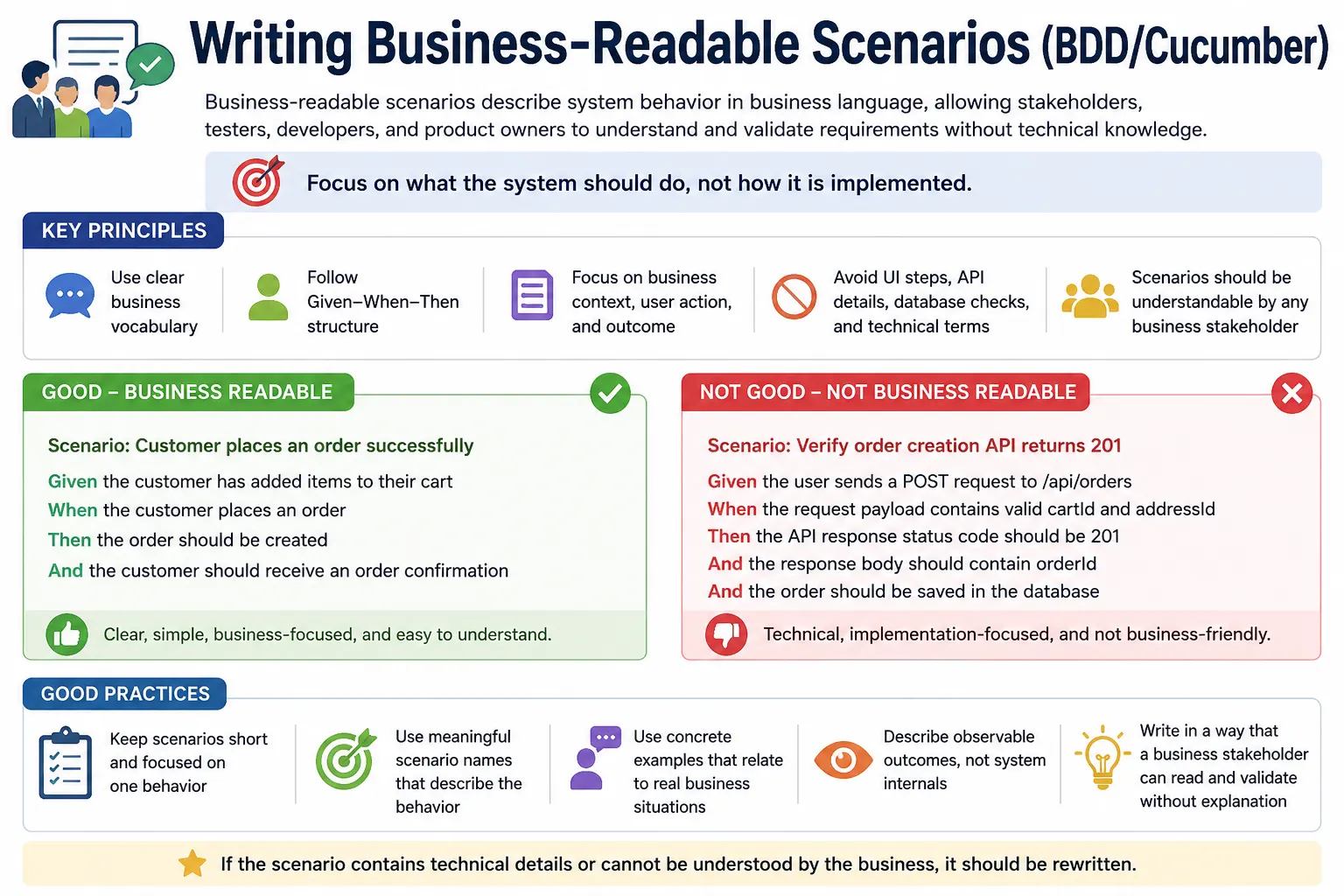
Writing Business-Readable Scenarios: Full Explanation
Writing business-readable scenarios is one of the most important skills in Behavior Driven Development. BDD is not successful merely because a team uses Cucumber, Gherkin, or automation. It is successful when the scenarios become a shared language between business stakeholders, testers, developers, and automation engineers. A business-readable scenario expresses behavior in a way that a non-technical stakeholder can understand, review, and validate without needing to know browser actions, locators, database queries, framework code, or implementation details.
The purpose of a scenario is not to document every click. It is to describe how the system should behave in a meaningful situation. A good scenario reads like a small business example. It starts with a clear context, describes an action that matters, and states an observable outcome. The scenario should help the team agree on what the product must do before implementation begins. It should also remain useful later as living documentation and regression protection.
Business-readable scenarios are difficult to write at first because many testers are trained to think in terms of manual steps. They naturally write "click the button," "enter the value," "select the dropdown," and "verify the message." Those details may be needed in automation code, but they are not the main value of Gherkin. Gherkin should express intent. The step definitions, page objects, APIs, and framework utilities can handle the mechanics.
Why Business Readability Matters
Business readability matters because BDD is built on collaboration. If only automation engineers can understand the scenarios, the team is not practicing true BDD. The feature files become technical test scripts written in English-like syntax. They may execute, but they do not improve shared understanding. The business cannot validate them, product owners cannot rely on them as acceptance criteria, and developers may miss the real intent behind the behavior.
When scenarios are business-readable, they prevent requirement misinterpretation. A product owner can read a scenario and say whether it matches the expected behavior. A business analyst can confirm whether the terminology is correct. A tester can identify missing cases. A developer can understand what must be implemented. This shared understanding reduces rework because misunderstandings are caught before or during development rather than after release.
Business-readable scenarios also improve living documentation. A feature file should not require a separate explanation document to make sense. If a new team member opens the feature file months later, the scenarios should reveal how the system behaves. Clear scenario language makes the automated suite valuable beyond execution. It becomes a readable record of business behavior.
Business Language vs Technical Language
Business language uses the terms that stakeholders use to describe the domain. In an e-commerce system, those terms may include customer, cart, coupon, checkout, order, refund, shipment, and invoice. In a banking system, they may include account, balance, transfer, beneficiary, transaction, limit, and statement. In an insurance system, they may include policy, claim, premium, coverage, and approval. Business-readable scenarios should use this vocabulary consistently.
Technical language describes implementation details. Terms such as database row, API endpoint, HTTP status code, XPath, CSS selector, WebDriver, JSON payload, table insert, and response body may be important to automation, but they are usually not the language of business behavior. If a scenario says "Then HTTP status code should be 200," a technical tester may understand it, but a business stakeholder may not know whether the order was placed, the payment was accepted, or the customer received confirmation.
This does not mean technical validation is unimportant. It means technical validation belongs at the right layer. Step definitions, API tests, unit tests, integration tests, and lower-level automation can check technical details. The Gherkin scenario should express the business result. For example, "Then the order should be successfully placed" communicates the outcome, while the automation behind it can verify status code, database record, confirmation number, and response data.
Focus on What, Not How
The central rule of business-readable scenario writing is to focus on what the system does, not how the automation performs it. A scenario should describe behavior from the user's or business perspective. It should not describe every UI interaction needed to trigger that behavior. If the scenario becomes a list of clicks and fields, it is probably too procedural.
For example, "Given I click the username field, And I type admin, And I click the password field, And I type password, When I click the login button" is not a strong BDD scenario. It exposes UI mechanics and makes the feature file fragile. A better version is "Given the user has valid credentials, When the user logs in, Then the user should be authenticated." The second version expresses intent and leaves implementation details to automation code.
This distinction makes scenarios more stable. If the login button changes position, if the field label changes, or if login is implemented through single sign-on, the business behavior may remain the same. A business-readable scenario can remain valid even when UI details change. A UI-script scenario must be rewritten whenever the interface changes.
Scenario Names as Business Documentation
Scenario names are part of the documentation. They appear in feature files, reports, failure logs, and team discussions. A strong scenario name should describe the business outcome being validated. It should be specific enough to identify the behavior and readable enough for non-technical stakeholders.
Good names include "Payment fails with insufficient balance," "Password reset link expires after 24 hours," "Admin can approve user accounts," and "Customer receives confirmation after successful order placement." These names communicate behavior and expected outcome. They help a reader understand the scenario before reading the steps.
Weak names include "Verify login," "TC_01_Login," "Click submit button," and "Validate page." These names sound like test cases or implementation actions. They do not explain the business behavior. If a report says "TC_01_Login failed," the impact is unclear. If it says "Successful login with valid credentials failed," the impact is immediately understandable.
Given Should Express Business Context
The Given step should describe the starting condition of the scenario in business terms. It should answer what must already be true before the action occurs. A good Given step might say "Given the customer has an active account" or "Given the user has valid credentials." These statements express meaningful context. They do not explain how the automation creates that state.
A weak Given step often describes technical setup. "Given I open the browser," "Given I navigate to the login page," or "Given I wait for the page to load" are usually not business context. They may be necessary in automation, but they are not the behavior being specified. The step definition can open the browser, navigate, wait, create data, or call APIs behind the scenes.
Keeping Given steps business-readable helps scenarios stay focused. Readers should not have to scan technical setup before reaching the behavior. If a scenario needs many Given steps, the team should ask whether some setup can be expressed at a higher level or moved into Background, hooks, or helper code.
When Should Represent One Business Action
The When step should describe the main action or event that triggers the behavior. A strong scenario usually has one clear When. This keeps the scenario focused on one behavior. If a scenario has many When steps, it may be testing several behaviors at once. That makes it harder to understand and harder to debug when it fails.
Examples of good When steps include "When the user logs in," "When the customer places the order," "When the admin approves the account," and "When the user requests a password reset." These steps describe meaningful business actions. They do not list the mechanics of clicking buttons or typing into fields.
If the action requires several UI operations, the step definition can handle them. The scenario does not need to expose every interaction. The purpose of the When step is to tell the story of the behavior, not to provide Selenium instructions. This is where many teams must shift their mindset from procedural testing to behavior specification.
Then Should State an Observable Business Outcome
The Then step should define what should happen as a result of the action. It must be observable and meaningful. A vague Then step such as "Then the system should work correctly" is not useful because it does not say what correctness means. A technical Then step such as "Then verify record is inserted in DB" may be useful in automation, but it may not communicate business value.
A better Then step states the business result. "Then the user should see the dashboard," "Then the order should be placed successfully," "Then the transfer should be declined," or "Then the customer should receive a confirmation email" are clear outcomes. They are visible, verifiable, and understandable.
Behind the scenes, automation may verify multiple technical facts to support that outcome. It may check a database record, an API response, a UI message, an email queue, or an audit log. But the Gherkin step should express what matters to the business. This keeps the scenario readable and durable.
One Behavior per Scenario
A business-readable scenario should usually validate one behavior. This improves clarity, maintainability, and reporting. If a scenario combines login, profile update, password change, order placement, and logout, it becomes a long workflow rather than a focused behavior example. When it fails, the team may not know which behavior caused the failure without further investigation.
Separate scenarios are often better. "Successful login with valid credentials" can be one scenario. "Successful logout" can be another. "User updates profile information" can be another. Each scenario has a clear purpose and a clear expected outcome. Reports become easier to read because each failure points to a specific behavior.
This does not mean end-to-end scenarios are never useful. Some business workflows need to validate complete journeys. But even then, the scenario should have a clear business purpose. Long workflows should be used intentionally, not as a default style for every test.
Use Examples Instead of Explanations
BDD is example-driven. Instead of explaining a rule in abstract language, scenarios should show concrete examples of the rule. A statement such as "the system should validate password strength" is vague. A scenario showing that passwords shorter than eight characters are rejected is concrete. Another scenario showing that a strong password is accepted completes the understanding.
Concrete examples reduce ambiguity. People may interpret abstract rules differently. One person may think password strength means length only. Another may include special characters. Another may include previous password history. Scenarios make these expectations visible and discussable.
Examples also support automation. A concrete scenario can be executed. A vague explanation cannot. This is why "Then the system should behave correctly" is weak, while "Then the user should receive a confirmation email" is strong. The second statement gives the team something observable to validate.
Keep Scenarios Short and Focused
Short scenarios are easier to read, review, automate, and maintain. A useful guideline is three to seven steps, with one clear When and one clear outcome. This is not a rigid rule, but it helps teams avoid procedural scripts. If a scenario becomes long, it may be covering too much behavior or exposing too many implementation details.
Long scenarios often hide multiple expectations. They may contain several actions, several assertions, and multiple business paths. When such a scenario fails, the failure message may not reveal the root cause clearly. Short scenarios make failures more precise. They also make reports more meaningful because each scenario title maps to one behavior.
If a scenario feels too long, split it. If it needs many setup steps, consider whether some setup belongs in Background or a higher-level Given. If it contains many expected results, consider whether each result represents a separate behavior. Scenario length is often a symptom of design quality.
Avoid Test Case Language
Many teams accidentally write Gherkin as a test case format. They use words like verify, validate, assert, test, check, and TC_001. These words may be familiar to testers, but they often weaken business readability. BDD scenarios should describe product behavior, not the testing activity itself.
For example, "Then verify dashboard is displayed" is test-language. "Then the user should see the dashboard" is business-readable. "Scenario: TC_01_Login" is test-management language. "Scenario: Successful login with valid credentials" is behavior language. The difference may seem small, but it affects how stakeholders read the file.
Removing test case language helps feature files become living documentation. The scenario should sound like a behavior the product supports, not like a command to a tester. The automation still performs verification, but the Gherkin remains focused on the user's outcome.
Avoid Selenium Steps Written in English
A common anti-pattern is writing Selenium code in English. Steps such as "When I click the login button," "And I enter text in username field," "And I wait for two seconds," and "Then I verify element is displayed" are usually signs that the feature file is too technical. It may run, but it does not provide the collaboration value of BDD.
Selenium and other automation tools should live behind the step definitions. The feature file should not expose locators, waits, browser mechanics, page-object names, or internal automation flows. If the team later changes from Selenium to another tool, the business-readable scenarios should not need major changes. Only the automation implementation should change.
This separation improves maintainability. Gherkin describes behavior. Step definitions implement behavior. Page objects interact with the UI. Test utilities handle setup. When each layer has a clear purpose, the framework is easier to maintain and the feature files remain readable.
Use Background Carefully
Background can help business readability by removing repeated common context, but it can also hurt readability if it hides critical assumptions. A Background step such as "Given the user is logged in" may be helpful when every scenario in the feature requires a logged-in user. But if a scenario's outcome depends on a specific account state, that state should usually appear inside the scenario.
The reader should not need to constantly scroll to Background to understand why a scenario behaves a certain way. Background should contain true shared context, not scenario-specific meaning. If removing the Background makes the scenario impossible to understand, the Background may be hiding too much.
Use Background to reduce repetition, but prefer clarity over compactness. In business-readable Gherkin, a little repetition is acceptable if it makes scenarios self-explanatory. The goal is understanding, not the shortest possible file.
Review Scenarios with Stakeholders
The strongest test of business readability is stakeholder review. Ask a product owner, business analyst, or domain expert to read the scenarios without technical explanation. If they can understand the behavior and confirm whether it is correct, the scenarios are likely business-readable. If they ask what a step means, why a technical term appears, or what outcome is expected, the scenario should be improved.
This review should happen before implementation when possible. BDD is most valuable when scenarios guide development, not when they are written after the feature is already built. Early review catches requirement gaps, unclear rules, missing edge cases, and wrong assumptions.
Stakeholder review also builds trust. When business users see that scenarios reflect their language and rules, they are more likely to treat the feature files as useful documentation. That trust is a major benefit of writing business-readable scenarios.
Business-Readable Does Not Mean Non-Technical Testing Is Ignored
Some teams misunderstand business-readable scenarios and think technical validation should disappear. That is not the point. Technical validation still matters. API response codes, database records, logs, event messages, security headers, and backend state may all be important. The question is where those checks belong.
Business-readable Gherkin should express the business result. The automation behind the step can perform technical checks to support that result. For example, "Then the order should be successfully placed" can verify UI confirmation, API status, database order record, payment status, and email notification if needed. The scenario remains readable while the automation remains thorough.
This layered approach keeps the feature file useful to stakeholders and keeps the framework strong for testers and developers. It is not a choice between business clarity and technical rigor. A good BDD framework provides both by putting each concern in the right place.
Practical Bad vs Good Transformation
Consider a bad scenario named "Login test" with steps that say the user enters valid username, enters valid password, clicks submit, and verifies that the dashboard page is displayed. This scenario may be understandable to a tester, but it is procedural and UI-focused. It describes input actions more than business behavior.
A better version is "Scenario: Successful login with valid credentials." The steps can say, "Given the user has valid credentials," "When the user logs in," and "Then the user should see the dashboard." This version is shorter, clearer, and focused on behavior. It tells the business story without exposing automation mechanics.
The improved scenario is also more resilient. If the UI changes from a submit button to a sign-in link, the scenario can remain the same. Only the step definition implementation needs to change. This is the practical value of business-readable Gherkin.
Interview-Ready Understanding
In interviews, business-readable scenarios should be explained as scenarios written in domain language so business stakeholders can understand and validate them. They focus on behavior and outcomes, not UI actions, technical assertions, locators, database checks, or automation details. They are central to BDD because they enable collaboration and living documentation.
A strong answer should mention that good scenarios use clear names, Given for business context, When for business action, and Then for observable business result. Each scenario should validate one behavior, stay short, and avoid test case language such as verify, assert, or TC_001. Technical checks can still happen inside step definitions.
A practical example is transforming "When I click submit" into "When the user places the order," or transforming "Then HTTP status code should be 200" into "Then the order should be successfully placed." These examples show that business-readable scenarios focus on what the system does for the user, not how the automation checks it.
Consistency of Terminology
Business-readable scenarios depend on consistent terminology. If one scenario says customer, another says user, another says client, and another says account holder for the same role, readers may wonder whether these are different concepts. In some domains they may be different, and in others they may be accidental synonyms. Consistency prevents confusion.
Teams should align scenario language with domain vocabulary. If the product uses the term "beneficiary" for a saved transfer recipient, the scenarios should use beneficiary instead of random alternatives such as receiver, payee, or contact unless those terms have distinct meanings. This consistency helps business stakeholders trust the scenarios and helps automation engineers create reusable step definitions.
A shared glossary can help larger teams. It does not need to be complex. Even a short list of preferred domain terms can prevent inconsistent feature files. When scenarios use consistent language, they become easier to search, review, and maintain.
Maintaining Business Readability Over Time
Scenarios often start clean but become less readable as features evolve. New conditions are added, steps are copied, technical workarounds appear, and old terminology remains after the product changes. Maintaining business readability requires regular review. Feature files should be treated as living assets, not one-time automation input.
When a scenario is changed, the team should ask whether the name still matches the behavior, whether the steps still use business language, and whether the scenario still validates one outcome. If new technical details were added for automation convenience, they should be moved into step definitions or helper code. If a scenario has grown too long, it may need to be split.
This maintenance habit keeps BDD valuable. A suite full of old, procedural, inconsistent scenarios may still execute, but it no longer supports collaboration. The long-term value of BDD depends on keeping scenarios readable as the product and automation framework mature.
Final Practical Guidance
The simplest test for a business-readable scenario is to ask whether a business stakeholder can validate it without explanation. If the answer is yes, the scenario is likely written at the right level. If the stakeholder needs to understand selectors, status codes, database tables, or framework behavior, the scenario is too technical. If the stakeholder cannot tell what outcome is expected, the scenario is too vague.
Good business-readable scenarios are short, concrete, and written in domain language. They describe the user's context, the meaningful action, and the expected result. They avoid unnecessary implementation details and avoid test-management naming. They are designed for conversation first and automation second, even though they can be automated effectively.
This is the heart of BDD. The feature file should help the team agree on behavior before code is written, validate the behavior after code is built, and document the behavior as the system evolves. Business readability is what makes all three possible.
1. What Does “Business-Readable” Mean?
A business-readable scenario is written in domain language that business stakeholders understand, without exposing UI actions, technical steps, or implementation details.
A business user should be able to:
- Read the scenario
- Understand the behavior
- Validate whether it matches expectations
Without technical explanation.
2. Why Business-Readable Scenarios Matter
Business-readable scenarios:
- Prevent requirement misinterpretation
- Enable true collaboration (BA, QA, Dev)
- Act as acceptance criteria
- Become trusted living documentation
- Reduce rework and defect leakage
If business cannot read your scenarios, BDD is failing.
3. Core Principles for Writing Business-Readable Scenarios
Principle 1: Focus on Behavior, Not UI
Describe what the system does, not how the user clicks.
Bad (UI-driven):
Given I click the login button
When I enter username and password
Then I click submit
Good (Behavior-driven):
Given the user has valid credentials
When the user logs in
Then the user should be authenticated
Principle 2: Use Business Vocabulary
Use terms the business already uses.
Bad:
Then HTTP status code should be 200Good:
Then the order should be successfully placedTechnical validation belongs in step definitions, not Gherkin.
Principle 3: One Behavior per Scenario
Each scenario should validate a single business outcome.
Bad:
Scenario: Login and logoutGood:
Scenario: Successful login
Scenario: Successful logout
Principle 4: Write from the User’s Perspective
Scenarios should reflect real user intent.
Good:
As a registered user
I want to reset my password
So that I can regain access to my account
4. Recommended Scenario Structure
Scenario: <Clear business outcome>
  Given <business context>
  When <business action>
  Then <business result>
Keep steps:
- Short
- Declarative
- Outcome-focused
5. Naming Scenarios Correctly
Scenario names are part of documentation.
Good names:
- Payment fails with insufficient balance
- Password reset link expires after 24 hours
- Admin can approve user accounts
Bad names:
- Verify login
- TC_01_Login
- Click submit button
6. Use Examples, Not Explanations
BDD relies on examples.
Bad (vague):
Then the system should behave correctlyGood (concrete):
Then the user should receive a confirmation email7. Keep Scenarios Short
Ideal length:
- 3–7 steps
- One When
- Few Givens
- Clear Then
If it becomes long → split scenarios.
8. Avoid Technical & Test Language
Avoid:
- Database
- API endpoints
- Element locators
- Framework names
- Validation words like “verify”, “assert”
Bad:
Then verify record is inserted in DBGood:
Then the order should be stored successfully9. Use Background Carefully
Background should:
- Contain true common context
- Never hide critical assumptions
If a scenario is unclear without the background, reconsider.
10. Review with Business Stakeholders
A good validation exercise:
Ask the BA/PO to read scenarios without explanation.
If they ask questions:
- Rewrite the scenario
11. Common Anti-Patterns
- Writing Selenium steps in English
- Long, procedural scenarios
- Multiple behaviors in one scenario
- Technical assertions in Gherkin
- Overusing Scenario Outline
12. Example: Bad vs Good Scenario
Bad:
Scenario: Login test
  Given user enters valid username
  When user enters valid password
  Then dashboard page is displayed
Good:
Scenario: Successful login with valid credentials
  Given the user has valid credentials
  When the user logs in
  Then the user should see the dashboard
13. Checklist for Business-Readable Scenarios
Before finalizing, check:
- Can a non-technical person understand it?
- Does it describe behavior, not steps?
- Is the outcome clear and observable?
- Is terminology consistent?
- Is it short and focused?
14. Interview-Ready Summary
- Business-readable scenarios are the heart of BDD
- They use business language, not technical steps
- Focus on what, not how
- Each scenario validates one behavior
- Enables collaboration and living documentation
15. Golden Rule
If a business stakeholder cannot validate a scenario, it is not BDD.