Scenario Outline
The Scenario Outline keyword is used to define data-driven behavior in Gherkin. It allows the same scenario logic to be executed multiple times with different sets of input data.
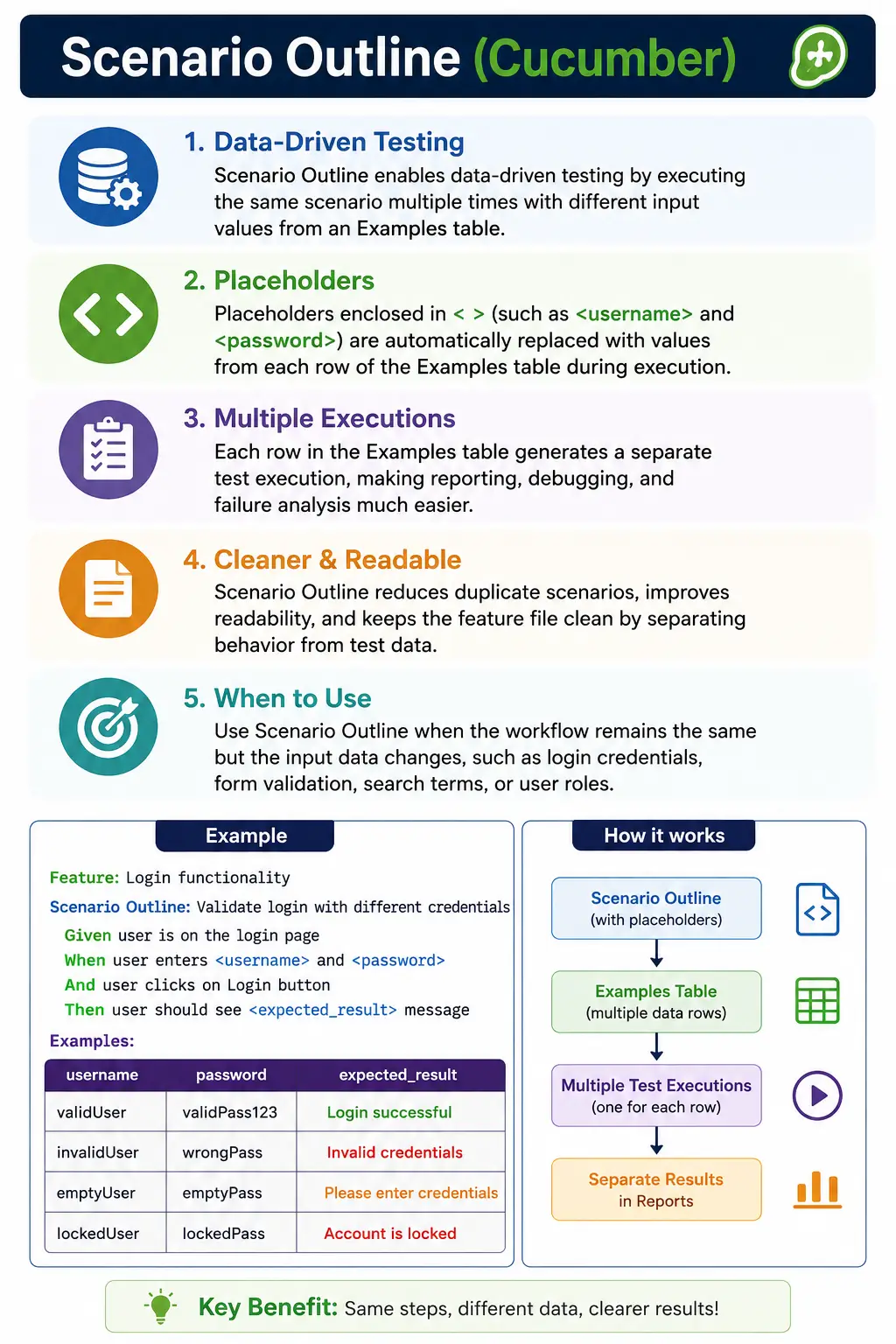
Scenario Outline in Cucumber: Full Explanation
A Scenario Outline is one of the most practical features in Cucumber because it solves a common problem in test design: the same behavior often needs to be validated with multiple sets of data. In a real application, a feature rarely works for only one input. A login screen must handle different users. A registration form must accept many valid values and reject many invalid values. A search page must work for different search terms. A payment page may behave differently for different cards, payment methods, countries, currencies, or user roles. If every data variation is written as a separate scenario, the feature file becomes repetitive and difficult to maintain. Scenario Outline provides a clean way to describe the behavior once and run it repeatedly with different examples.
In Gherkin, the Scenario Outline keyword represents a scenario template. The steps describe the behavior, but some values are replaced with placeholders. These placeholders are written inside angle brackets, such as <username>, <password>, <email>, or <expectedResult>. The actual values come from the Examples table written below the scenario outline. During execution, Cucumber reads each row of the Examples table and substitutes the placeholder values into the scenario steps. Each row becomes a separate scenario execution internally.
This design is important because it keeps the feature file readable while still supporting data-driven testing. The behavior stays visible in plain language. The data also stays visible in a structured table. Business analysts, testers, developers, and automation engineers can review the same feature file and understand what behavior is being checked and which examples are being used. That is the real value of Scenario Outline in a BDD workflow.
Scenario Outline should not be viewed merely as a shortcut for writing fewer lines. Its real purpose is to express repeated behavior clearly. When used well, it makes feature files cleaner, easier to review, and easier to maintain. When used poorly, it can make feature files cryptic, overloaded, and difficult for non-technical stakeholders to understand. The difference depends on whether the outline is used for the same behavior with meaningful data variations or misused to combine many different behaviors into one table.
Why Scenario Outline Exists
Without Scenario Outline, teams often create duplicate scenarios. Consider a login feature where admin, manager, and normal user credentials must be checked. If the flow is exactly the same for all users, writing three separate scenarios creates unnecessary repetition. Each scenario would say that the user opens the login page, enters username and password, clicks login, and verifies the dashboard. Only the data changes. If the step wording needs to be updated later, the change must be repeated in multiple places. If one scenario is missed, the feature file becomes inconsistent.
Scenario Outline removes that duplication by separating the behavior from the data. The behavior appears once in the scenario outline. The data appears in the Examples table. If the wording of the flow changes, only one scenario outline needs to be updated. If a new user type must be added, one new row can be added to the Examples table. This gives the team a more maintainable specification.
It also improves consistency. Copy-pasted scenarios often drift over time. One scenario may use "user clicks login button" while another says "user submits login form." One may validate the dashboard while another only checks the URL. These differences may be intentional, but often they are accidental. With Scenario Outline, every data row follows the same sequence of steps, so the validation is consistent across all examples.
Another benefit is reporting clarity. Cucumber does not treat all rows as one hidden loop inside a step. Instead, it expands the Scenario Outline into separate scenario executions. If there are five rows in the Examples table, Cucumber runs five generated scenarios. If one row fails, the report can identify the failing data row. This is much easier to debug than a manual loop inside one step definition where the report only says that a single scenario failed.
How Scenario Outline Works Internally
When Cucumber reads a Scenario Outline, it first identifies the placeholders in the step text. A placeholder is any name enclosed in angle brackets. Then it reads the Examples table and maps each column name to the placeholder with the same name. For each row, it creates one executable scenario by replacing placeholders with the values from that row. The resulting step text is then matched against step definitions.
For example, suppose the step says that the user enters "<username>" and "<password>". If the Examples row contains username as admin and password as admin123, Cucumber generates a scenario step that says the user enters "admin" and "admin123". The step definition does not receive the literal text <username>. It receives the substituted value from the Examples table. This is why the step definition can be written with parameters such as {string} in Cucumber Java.
Each generated scenario is independent. This means the setup, action, and validation should be complete for every row. A common mistake is assuming that one row can depend on a previous row. That is not a good approach. A Scenario Outline should be designed so that each Examples row can run on its own. Independent execution supports parallel testing, reliable reporting, and easier failure analysis.
The Examples table is not just a technical data source. It is part of the specification. Therefore, it should be written with the same care as the scenario steps. The values should be meaningful, the column names should be clear, and the number of rows should be reasonable. A Scenario Outline with a huge Examples table may technically work, but it may no longer be a good BDD artifact.
Understanding Placeholders
Placeholders are the connection between the scenario steps and the Examples table. They must be written clearly and consistently. If the scenario uses <username>, the Examples table must have a username column. If the table has userName but the step uses username, the mismatch can cause confusion or execution failure depending on the implementation and tooling. Clear naming prevents unnecessary debugging.
Good placeholder names describe the business meaning of the value. For example, <username>, <password>, <userRole>, <country>, <paymentMethod>, and <expectedMessage> are readable. Weak names such as <value1>, <data>, <x>, and <input> force the reader to keep looking back at the table to understand the scenario. In BDD, readability matters. The feature file should be understandable without requiring mental decoding.
Placeholders can appear in Given, When, Then, And, and But steps. They can also appear in the scenario outline title in many Cucumber implementations, though teams should be careful with that. Putting data values in the title can make reports easier to scan, but it can also make titles noisy. In most cases, the scenario name should describe the behavior, and the Examples table should describe the data.
Because placeholders are substituted into plain text steps, they should be surrounded by quotes when the values represent strings. For example, writing the user enters "<username>" is clearer than writing the user enters <username>. Quoted values also tend to match step definitions more predictably when using string parameters.
Examples Table as Living Documentation
The Examples table is one of the reasons Scenario Outline is valuable for living documentation. It shows concrete examples of the behavior. Instead of saying only that invalid login should fail, the table can show which invalid combinations matter. Instead of saying that email validation should occur, the table can show valid and invalid email examples. These examples help the team discuss rules more clearly.
A good Examples table is not necessarily a complete dataset. It is a set of representative examples. In BDD, feature files should communicate behavior. They should not become exhaustive test-data repositories. If a validation rule has hundreds of possible input combinations, only the most meaningful examples may belong in the feature file. Additional exhaustive checks can be handled through lower-level automated tests or external data-driven tests.
The table should also stay focused. If one Scenario Outline is about login validation, the table should contain login-related values. It should not mix browser names, environment names, unrelated roles, and UI themes unless those values are directly part of the behavior being specified. Mixing unrelated data makes the feature file harder to understand and can create meaningless combinations.
When the table becomes large, wide, or hard to read, that is a signal to refactor. The team can split one outline into multiple outlines, group data using multiple Examples blocks, move technical configuration outside Gherkin, or write separate scenarios for different behaviors. The goal is clarity, not compactness at any cost.
Good Use Cases for Scenario Outline
Scenario Outline is ideal when the flow is stable and the data changes. Login is the classic example. The user opens the login page, enters credentials, clicks the login button, and sees a result. Different usernames and passwords can be tested using the same flow. If the expected outcome is also represented in the table, the same outline can cover successful and unsuccessful results, provided the validation step remains readable.
Form validation is another strong use case. A field such as email, phone number, postal code, quantity, age, or password may need to be checked with multiple values. If the behavior is the same, a Scenario Outline keeps the validation examples organized. For example, the same step can enter an email value and verify whether the expected validation message appears.
Payment methods can also fit Scenario Outline when the checkout flow is the same for each method. For example, card, wallet, net banking, and cash-on-delivery may be examples if they share the same expected behavior. But if each payment method opens a completely different screen and follows different rules, separate scenarios may be better.
User roles are another useful area. If admin, manager, and viewer users should all access a dashboard using the same flow, a Scenario Outline can show those role examples clearly. If each role has different permissions and different expected pages, separate scenarios or separate outlines may be more readable.
When Scenario Outline Becomes a Problem
Scenario Outline becomes a problem when it is used to hide complexity. A common anti-pattern is using one outline to test many different behaviors by adding a large expected result column. For example, if one row expects a dashboard, another expects an error message, another expects an account lock, another expects an OTP challenge, and another expects a password reset page, the outline may be combining too many behaviors. The feature file becomes compact, but the business meaning becomes unclear.
Another problem is using Scenario Outline for pure technical configuration. For example, running the same scenario on Chrome, Edge, and Firefox is often important for automation, but the browser may not be part of the business behavior. In many frameworks, cross-browser execution belongs in the test runner, CI pipeline, or configuration layer rather than the Gherkin feature file. Feature files should describe what the system should do, not every technical environment in which automation should run.
Overusing Scenario Outline can also reduce readability. Sometimes three separate scenarios are easier to understand than one outline with many columns. BDD is not a code-golf exercise. The shortest feature file is not always the best feature file. The best feature file is the one that communicates behavior clearly and supports useful automation.
Scenario vs Scenario Outline
A normal Scenario describes one concrete example. It is direct, simple, and easy to read. It is suitable when the behavior is best explained through one example or when each example has unique steps. A Scenario Outline describes a pattern of behavior with multiple examples. It is suitable when the same step sequence should be executed for several data rows.
The difference can be summarized like this: Scenario is fixed-example behavior, while Scenario Outline is data-driven behavior. Scenario usually produces one execution. Scenario Outline produces one execution per Examples row. Scenario is often more readable for a single case. Scenario Outline is more maintainable for repeated variations of the same case.
Choosing between them requires judgment. If the Examples table makes the behavior easier to understand, use Scenario Outline. If the table makes the behavior harder to understand, use separate scenarios. The decision should be based on communication, maintainability, and execution clarity.
Naming a Scenario Outline Well
The title of a Scenario Outline should describe the behavior, not the data. A title such as "User login attempts" is usually better than "Login with admin, user, and invalid credentials." The details belong in the Examples table. The title should help the reader understand the purpose of the outline before reading the table.
Good names are short, behavior-focused, and business-readable. They avoid implementation details. They also avoid listing every parameter value. If the title becomes long because the outline covers too many cases, that is a sign that the outline may need to be split.
For example, "User login attempts" is a better title than "Login with valid and invalid users using username and password." The first title states the behavior. The second title mixes behavior, data categories, and implementation detail. Clear names make reports easier to scan and feature files easier to maintain.
Multiple Examples Blocks
Cucumber allows multiple Examples blocks under one Scenario Outline. This is useful when the same behavior has meaningful groups of data. For example, valid users and invalid users can be grouped separately. Premium users and standard users can be grouped separately. Domestic and international addresses can be grouped separately. The grouping helps readers understand why the rows exist.
Multiple Examples blocks should not be used to combine unrelated behaviors. If each group has a different business rule, separate scenario outlines may be clearer. If the same behavior is being exercised and the grouping simply improves readability, multiple Examples blocks can be useful.
In reporting, multiple Examples blocks can also make failures easier to interpret because the failed row belongs to a named group. This is helpful in larger test suites where a single outline may contain several categories of representative data.
Step Definitions and Scenario Outline
In automation code, Scenario Outline values are usually received as parameters in step definition methods. For example, a step that says the user enters "<username>" and "<password>" can be matched with a Cucumber expression that accepts two strings. The step definition then uses those values to interact with the application.
This pattern keeps feature files clean and step definitions reusable. The feature file does not need to know how Selenium locates the username field or password field. The step definition handles that. The feature file only describes the user behavior and the example data.
Step definitions should not contain unnecessary conditional logic based on every possible example value. If the method has many if-else branches based on the Examples table, the outline may be too broad. The same step should behave consistently. If different rows require completely different automation behavior, the feature design should be reviewed.
Common Mistakes in Scenario Outline
One common mistake is using too many columns in the Examples table. Wide tables are hard to read on screens, hard to review in pull requests, and easy to break. If a table contains many fields, consider whether the step is too low-level or whether the test should use a data table or external data source instead.
Another mistake is mixing positive and negative cases when the workflow differs. If valid login leads to a dashboard and invalid login shows an error, one outline may still be acceptable if the validation is clean and simple. But if invalid login triggers lockout, captcha, OTP, or security warnings, separate outlines may communicate the behavior better.
A third mistake is using vague placeholder names. Columns named input, value, data, and result do not explain the business meaning. Descriptive names like username, password, email, quantity, expectedMessage, and userRole are easier to understand and maintain.
Another frequent mistake is treating Scenario Outline as a replacement for proper test design. Scenario Outline reduces duplication, but it does not decide which examples matter. The team must still choose meaningful data based on requirements, business rules, risks, and boundary conditions.
Best Practices for Scenario Outline
Use Scenario Outline when the same test flow needs to run with different data. This is the central best practice. If the test flow changes, do not force it into one outline. Separate behavior deserves separate scenarios. Clear behavior is more valuable than a smaller number of lines.
Keep Examples tables concise and readable. A small table with carefully selected examples is usually more useful than a large table with every possible variation. Feature files are communication tools as well as automation inputs. They should be readable during refinement, review, and debugging.
Use meaningful placeholder names. The table should tell a story. A reader should be able to understand what each column represents without asking the automation engineer. This is especially important when feature files are reviewed by business analysts or product owners.
Keep business logic in the step definitions and data in the Examples table. The feature file should not become a technical script. It should describe what the user does and what outcome is expected. The code should handle how the browser is automated, how elements are located, and how assertions are performed.
Avoid very large Examples tables. If extensive datasets are required, consider external data sources, API-level tests, unit tests, or separate data-driven automation outside the BDD layer. Scenario Outline is excellent for representative examples, not always for massive data coverage.
Interview Perspective
In interviews, Scenario Outline is often discussed because it tests whether a candidate understands data-driven testing in Cucumber. A strong answer should say that Scenario Outline is used when the same scenario needs to run multiple times with different data. It uses placeholders inside angle brackets, and the data comes from the Examples table. Each row in the Examples table creates one scenario execution.
A good interview answer should also mention when not to use it. Candidates should explain that Scenario Outline is best for the same behavior with different data, not for combining unrelated behaviors. They should mention that too many columns, huge tables, and complex expected results are signs of poor design.
For real project experience, it helps to give examples such as login with multiple credentials, form validation, search products, country dropdown selection, date picker values, and email validation. It is also useful to explain that step definitions receive substituted values as parameters and use those values during automation.
Practical Summary
Scenario Outline enables data-driven behavior specifications in Cucumber. It reduces duplication, improves consistency, and keeps example data visible in the feature file. It works by replacing placeholders with values from the Examples table and executing the scenario once for each row.
The best Scenario Outlines are readable, focused, and behavior-driven. They use clear names, small Examples tables, and consistent validation logic. They avoid mixing unrelated behaviors or turning feature files into large data spreadsheets. Used properly, Scenario Outline is one of the cleanest ways to express repeated business behavior with different data variations.
Real Project Guidance
In a real project, the most important decision is not whether Scenario Outline can be used, but whether it should be used. Automation engineers sometimes try to convert every repeated test into a Scenario Outline because it looks efficient. That can create feature files that are technically compact but difficult for the team to understand. A better approach is to ask whether the examples communicate a business rule. If the examples help explain the rule, they belong in the feature file. If they are only technical test data, they may belong in another layer of the automation framework.
For example, a small login outline showing successful access for admin and standard users may be valuable because it documents supported user roles. A huge login outline with fifty usernames may not add business clarity. It may only increase execution time and maintenance effort. In that case, a smaller Scenario Outline can document the behavior, while additional data coverage can be handled through service-level tests, unit tests, or external test data in the automation layer.
Teams should also review Scenario Outlines during pull requests. Reviewers should check whether the outline name is business-readable, whether the placeholders are meaningful, whether the Examples table is small enough to scan, and whether each row belongs to the same behavior. If a reviewer cannot explain the purpose of each row, the table probably needs cleanup. This review discipline prevents feature files from becoming messy over time.
Another useful habit is to keep positive and negative behavior separate when the expected result has different meaning. Successful login and invalid login may look similar, but they often represent different business rules. Successful login proves that authorized users can access the system. Invalid login proves that unauthorized access is blocked. Keeping them separate can make reports clearer and failures easier to interpret.
Scenario Outline works best when it supports shared understanding. It should help testers think clearly, help developers automate consistently, and help business stakeholders see meaningful examples. When it reaches that balance, it becomes more than a data-driven testing feature. It becomes a readable specification of how the application should behave across important data variations.
Quick Reference Notes
1. What Is a Scenario Outline?
The Scenario Outline keyword is used to define data-driven behavior in Gherkin.
It allows the same scenario logic to be executed multiple times with different sets of input data.
A scenario outline answers:
- How should the system behave for different data variations of the same behavior?
2. Why Scenario Outline Is Needed
Without Scenario Outline, you would need to write multiple similar scenarios that differ only in data.
Scenario Outline:
- Eliminates duplication
- Improves readability
- Ensures consistent behavior validation across inputs
3. Basic Syntax
Scenario Outline: <Behavior description>
  Given <precondition using "<parameter>">
  When <action using "<parameter>">
  Then <expected outcome "<parameter>">
Examples:
  | param1 | param2 |
  | value1 | value2 |
4. Parameter Placeholders
- Parameters are enclosed in angle brackets < >
- Values come from the Examples table
Example:
Scenario Outline: Login attempts
  Given the user enters "<username>" and "<password>"
  Then login should be "<result>"
5. Examples Table
The Examples section provides test data sets.
Example:
Examples:
  | username | password | result  |
  | user1    | pass123  | success |
  | user2    | wrong    | failure |
Each row represents one scenario execution.
6. Execution Behavior
- One scenario outline + N example rows
- Cucumber generates N scenarios internally
- Each scenario runs independently
Example:
- 3 rows = 3 test executions
7. When to Use Scenario Outline
Use Scenario Outline when:
- Behavior is identical
- Input data varies
- Validation logic remains same
Examples:
- Login with multiple credentials
- Form validation
- Payment methods
- User roles
8. When NOT to Use Scenario Outline
Avoid using it when:
- Behavior changes based on data
- Expected outcomes differ significantly
- Scenarios become hard to read
Rule of thumb:
If you need many Then conditions, split into multiple scenarios.
9. Scenario vs Scenario Outline
| Scenario | Scenario Outline |
|---|---|
| Single example | Multiple examples |
| Fixed data | Data-driven |
| Simple | Efficient for variations |
| One execution | Multiple executions |
10. Naming Best Practices
Scenario outline names should:
- Describe the behavior, not the data
- Avoid mentioning parameter values
Good:
Scenario Outline: User login attemptsBad:
Scenario Outline: Login with valid and invalid users11. Multiple Examples Tables
You can use multiple Examples blocks.
Example:
Examples: Valid users
Examples: Invalid users
Useful for grouping related data sets.
12. Common Mistakes
- Overusing scenario outline
- Too many columns in examples table
- Mixing unrelated data
- Complex expected results
- Using outline for UI variations
13. Best Practices
- Keep examples tables small and meaningful
- Prefer clarity over compactness
- Use descriptive column names
- Separate behavior changes into different scenarios
- Review with BA for readability
14. Interview-Ready Summary
- Scenario Outline enables data-driven testing
- Uses <parameter> placeholders
- Executes once per examples row
- Reduces duplication
- Best for same behavior, different data