Scenario Granularity
1. What Is Scenario Granularity?
Scenario granularity is the level of detail and scope covered by a single BDD scenario. It defines how small or large the behavior is that the scenario validates. In practical Cucumber work, this means deciding whether one scenario should cover a complete business outcome, a small rule, an edge case, or a broad user journey. The decision matters because BDD scenarios are not only automation scripts. They are also a communication tool, a review artifact, and a form of living documentation for the product.
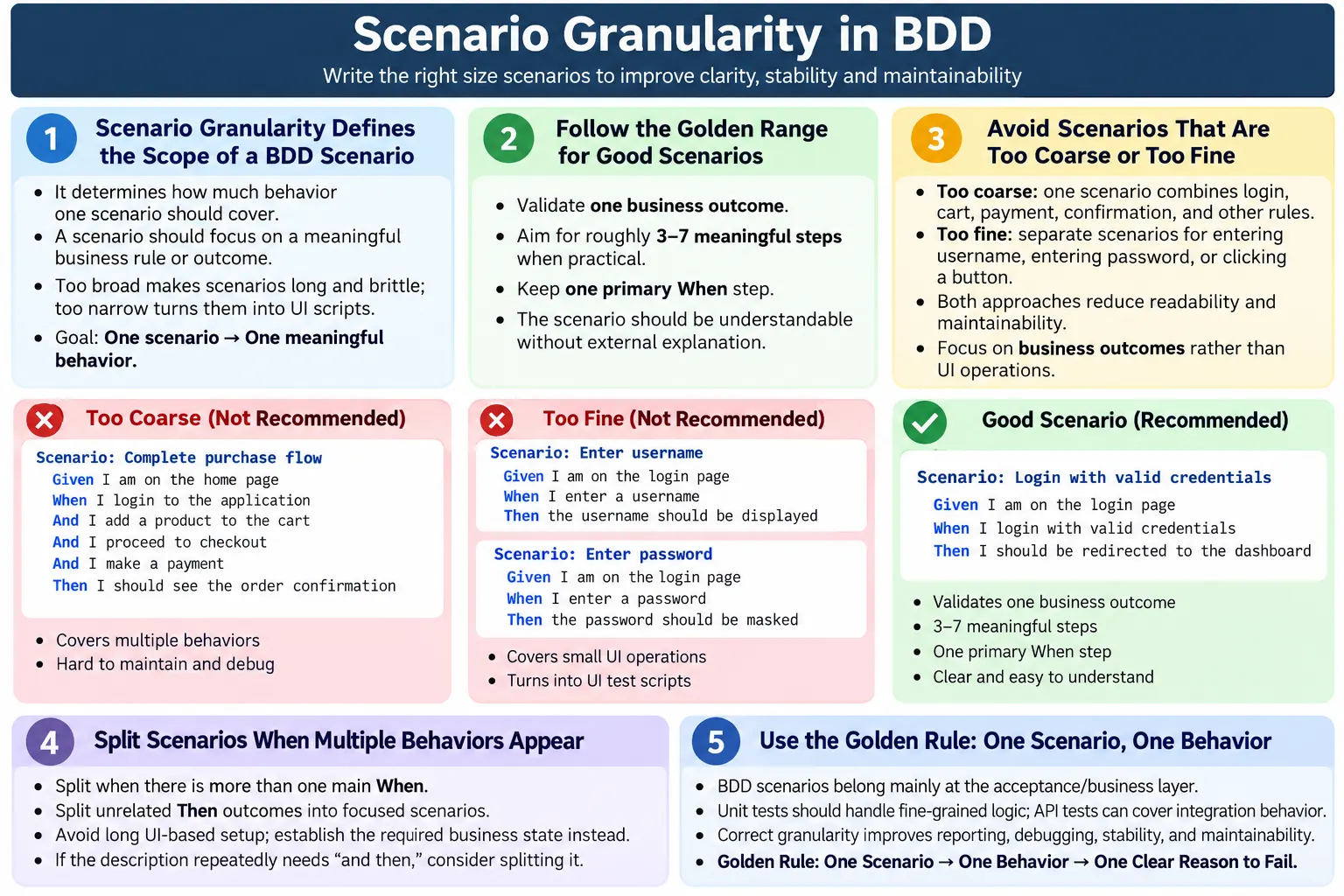
At its core, scenario granularity answers one question: how much behavior should one scenario cover? If the scenario covers too much, it becomes long, brittle, and hard to diagnose. If it covers too little, it becomes a collection of UI operations rather than meaningful business behavior. Good granularity sits between these extremes. It is detailed enough to prove one business rule or outcome, but not so detailed that the scenario reads like a click-by-click test script.
In BDD, a scenario should explain behavior in language that the business can understand. That does not mean the scenario must avoid all technical words, but it should focus on what the system does for the user or business. For example, "User receives an order confirmation after successful payment" is a business behavior. "User clicks the submit button" is only a UI action. The first statement explains value. The second statement explains a mechanical interaction.
Correct scenario granularity is essential for readability, maintainability, and execution stability. Readability improves because each scenario has a clear purpose. Maintainability improves because scenarios are easier to update when requirements change. Execution stability improves because scenarios avoid unnecessary UI steps and long dependency chains. A well-granular scenario has one strong reason to exist and one clear reason to fail.
2. Why Scenario Granularity Matters
Poor granularity is one of the main reasons BDD suites become difficult to maintain. Many teams start with clean feature files, simple scenarios, and good collaboration between business, development, and testing. Over time, however, scenarios may become longer and more technical. Teams add more steps, more validations, more setup, and more UI details. Eventually, the feature files stop helping conversations and start behaving like plain-English automation scripts.
When granularity is too broad, a single scenario may validate several behaviors at once. A scenario named "User completes purchase flow" may include login, product search, cart updates, shipping address selection, coupon validation, payment, confirmation email, and invoice generation. If this scenario fails, the team knows something is wrong, but the failure does not clearly identify which business behavior is broken. The report is technically true but diagnostically weak.
When granularity is too fine, scenarios become disconnected from business value. A feature file may contain scenarios such as "User enters username", "User enters password", and "User clicks login button." These actions may be necessary for automation, but they are not strong BDD scenarios. A stakeholder does not usually need a scenario proving that a user can type into a field. The meaningful behavior is that a registered user can sign in, or that an invalid user is blocked.
Poor granularity creates several practical problems. It leads to long, brittle scenarios, difficult maintenance, unclear intent, slow execution, and hard-to-diagnose failures. It also creates confusion during reviews because different people may believe the same scenario validates different things. A product owner may see a business rule, while an automation engineer knows the scenario also depends on several pages, data states, and external systems.
Proper granularity produces better acceptance criteria, faster feedback, stable automation, and useful living documentation. When a scenario validates one outcome, the title communicates intent, the Given steps set only the necessary context, the When step describes the main action, and the Then step confirms the expected result. If the scenario fails, the team can quickly understand which behavior needs attention.
- Long, brittle scenarios are usually a sign of too much behavior in one place.
- Too many tiny UI scenarios usually indicate that the feature file is written at the wrong level.
- Clear business outcomes make reports and failures more useful.
- Good granularity keeps BDD readable for both technical and non-technical readers.
3. Ideal Granularity: The Golden Range
There is no fixed number of steps that makes every scenario correct, but there is a useful golden range. A well-designed scenario usually validates one business outcome, contains around three to seven meaningful steps, has one primary When step, and can be understood without external explanation. This is a guideline rather than a rule, but it helps teams notice when a scenario is drifting toward either extreme.
The most important part of the golden range is "one business outcome." A scenario should prove one thing that matters. "Successful order placement" is a business outcome. "Invalid coupon is rejected" is a business outcome. "Account is locked after repeated failed login attempts" is a business outcome. These examples are specific enough to test, but broad enough to be meaningful.
Having one primary When step keeps the scenario focused. The When step represents the action that triggers the behavior under test. If a scenario has several When steps, it often contains several behaviors. For example, "When the user logs in", "When the user updates the address", and "When the user places the order" are three different actions. They may be part of one journey, but they likely deserve separate scenarios unless the purpose is a limited smoke check of the complete journey.
A scenario should also be understandable without a separate explanation. The reader should not need to open a test case management tool, inspect automation code, or ask the author what the scenario means. This does not mean the scenario must include every implementation detail. It means the business intent should be clear from the scenario name and steps.
- Validate one business outcome.
- Use roughly three to seven meaningful steps when possible.
- Keep one primary When step.
- Write steps that make sense without external explanation.
4. Too Coarse vs Too Fine Granularity
Too Coarse: The Overloaded Scenario
A scenario is too coarse when it tries to cover many behaviors in one flow. The classic example is a broad scenario such as "User completes purchase flow." This sounds useful because it reflects a real user journey, but it often hides several independent business rules. Login, cart behavior, payment validation, order creation, inventory update, and confirmation can all fail independently. When they are placed in one scenario, the report becomes less actionable.
Overloaded scenarios are also expensive to maintain. When a page changes, a data rule changes, or an external service becomes unstable, the whole scenario may fail even if the business rule under review is unrelated. Teams then spend time debugging long flows instead of addressing focused failures. Over time, the suite becomes slower and less trusted.
A broad purchase scenario likely hides several behaviors:
- Login and user session creation.
- Cart creation and cart update rules.
- Payment validation and payment authorization.
- Order confirmation and notification behavior.
Too Fine: The Over-Split Scenario
A scenario is too fine-grained when it describes tiny technical actions rather than behavior. Scenarios such as "User clicks login button", "User enters username", and "User enters password" are usually too small. They describe UI operations, not business outcomes. They may belong inside automation code, but they rarely deserve separate BDD scenarios.
Over-split scenarios make reports noisy. A report with many tiny passing scenarios may look detailed, but it does not necessarily prove meaningful behavior. A failure may say that a button could not be clicked, but it does not explain which business capability is affected. The feature file becomes a low-level script written in Gherkin instead of living documentation.
Very fine scenarios are also fragile because they depend heavily on the current UI design. If the login page changes from separate fields to a single sign-in component, the business behavior may remain the same, but UI-step scenarios become outdated. Good BDD scenarios should survive reasonable UI changes because they describe system behavior, not screen mechanics.
5. Right Level of Granularity: A Good Example
A good scenario expresses one complete business outcome without unnecessary interaction detail. It gives enough context to understand the rule, performs one meaningful action, and verifies one expected result. Consider the following example:
Scenario: Successful order placement
  Given the user has items in the cart
  And the user provides valid payment details
  When the user places the order
  Then the order should be confirmed
This scenario is effective because it is business-readable and automation-friendly. It does not describe every click on the checkout page. It does not split cart, payment, and confirmation into meaningless UI fragments. Instead, it establishes the state, performs the important action, and verifies the outcome. A product owner can review it, a tester can reason about coverage, and an automation engineer can implement it using UI, API, or service-level setup depending on the framework strategy.
The scenario has one clear purpose: confirm that a user can place an order when valid conditions are present. If it fails, the team knows which business behavior is affected. There may still be different technical causes, but the business signal is clear. This is the value of correct granularity.
Good granularity does not mean removing every detail. If the behavior depends on a specific payment type, user role, country, coupon, or account condition, that detail should be included. The key is to include details that affect the business rule and avoid details that only describe mechanical interaction.
6. Granularity and Behavior Types
Different behavior types often need different levels of granularity. A happy path is usually medium-grained because it describes a normal successful outcome. A negative scenario is often smaller because it focuses on one rejected condition. An edge case should usually be focused because the unusual boundary itself is the behavior. A critical end-to-end flow may be medium-grained for smoke or release confidence, but it should still avoid becoming a mega scenario.
| Behavior Type | Recommended Granularity |
|---|---|
| Happy Path | Medium |
| Negative Scenario | Small |
| Edge Case | Small |
| End-to-End Critical Flow | Medium |
| UI Interaction | Avoid |
For example, "Registered user signs in successfully" is a medium-grained happy path. "Sign in is rejected for a locked account" is a smaller negative scenario. "Transfer is rejected when the amount exceeds the daily limit" is a focused rule scenario. "User clicks the continue button" should not usually be a BDD scenario because the button click is only an implementation detail.
Critical end-to-end flows can still have value. A team may keep a small number of high-value end-to-end scenarios for smoke testing, release readiness, or production confidence. The key is not to use broad UI scenarios as the only place where every rule is validated. Detailed logic should live at lower levels of the test pyramid when possible.
7. When to Split a Scenario
Teams should split a scenario when it contains more than one primary When step, multiple unrelated Then outcomes, long setup that dominates the scenario, or different business rules that deserve separate discussion. Splitting is not about making scenarios short for appearance. It is about preserving a clear relationship between scenario title, action, and expected result.
Multiple When steps are one of the strongest warning signs. If a scenario says the user adds an item, applies a coupon, selects shipping, and places an order, it may be validating several behaviors. Each action may have its own rules and failure reasons. In that case, separate scenarios often provide cleaner documentation and better reports.
Multiple unrelated Then outcomes also indicate that the scenario may be too broad. A scenario that verifies order confirmation, email delivery, inventory reduction, loyalty points, and invoice creation might be useful as one business process check, but it is usually too heavy for regular acceptance coverage. Each outcome can fail independently, so each may deserve a focused scenario or a lower-level test.
Long setup is another clue. If the Given section requires many UI steps, the scenario may be using workflow setup instead of business-state setup. Instead of describing every action required to prepare a cart, a scenario can say, "Given the user has eligible items in the cart." The automation can create that state efficiently behind the step.
- Split when there is more than one main When.
- Split when the scenario verifies unrelated Then outcomes.
- Split when setup hides too much behavior.
- Split when different business rules apply.
A simple rule of thumb is this: if the scenario description needs "and then", consider splitting it. For example, "User logs in and then updates address and then places an order" is probably three behaviors. The final decision depends on context, but the phrase is a useful review signal.
How to Rewrite an Overloaded Scenario
When a scenario is too large, the best fix is not always to delete steps randomly. A better approach is to identify the business rules hidden inside the flow. Start by reading the scenario title and asking what it really promises to validate. Then review each Then statement and each important action. If the scenario verifies order confirmation, coupon discount, payment success, inventory update, and email notification, those are likely separate outcomes. Each outcome can become its own scenario or move to a more appropriate test layer.
For example, a large checkout scenario can be rewritten into focused scenarios such as "Valid coupon reduces the order total", "Expired coupon is rejected at checkout", "Successful card payment confirms the order", and "Order confirmation email is sent after purchase." These scenarios are easier to read, easier to automate, and easier to debug. They also allow the team to run only the relevant scenarios when a specific business rule changes.
While rewriting, avoid turning the scenario into many tiny UI checks. The goal is not to split every click into a separate scenario. The goal is to separate meaningful outcomes. A good rewrite keeps the feature file business-centered while making the automation more stable behind the scenes.
How to Raise Tiny UI Scenarios to Business Level
When scenarios are too small, the fix is usually to combine related UI actions into one meaningful behavior. If a feature file contains separate scenarios for entering a username, entering a password, clicking login, and seeing the dashboard, the team should step back and ask what business behavior those actions support. The answer is usually successful sign in. The small UI scenarios can become steps inside one scenario: "Given the user is on the login page, When the user signs in with valid credentials, Then the user should see the dashboard."
This style makes the feature file easier to understand and less sensitive to design changes. If the login form later changes, the business scenario can remain the same. Only the automation code behind the step needs to change. This is one of the main benefits of BDD when it is written at the right level.
8. Scenario Granularity vs Test Pyramid
Scenario granularity should be understood together with the test pyramid. BDD scenarios are most valuable at the acceptance or business layer. They describe behavior that stakeholders care about. They are not the best place to validate every branch of application logic, every field-level validation, or every UI detail. Fine-grained logic is better covered by unit tests. Integration behavior can often be covered by API tests. A small number of end-to-end UI scenarios can validate the most important user journeys.
When teams ignore the test pyramid, Cucumber suites often become overloaded. Every rule, edge case, message, permission, layout check, and workflow variation gets pushed into browser scenarios. This makes execution slow and fragile. It also makes granularity harder because the feature files are forced to carry too much testing responsibility.
A healthier approach is to decide which layer should own each type of validation. Unit tests validate calculations and small decision branches. API tests validate service contracts and data rules. BDD scenarios validate acceptance behavior. End-to-end UI tests validate only the flows that truly need browser confidence. This separation keeps BDD scenarios meaningful and maintainable.
- Use BDD scenarios for acceptance and business behavior.
- Use unit tests for fine-grained logic.
- Use API tests for integration behavior.
- Avoid pushing every technical check into E2E UI scenarios.
Granularity in Real Projects
In real projects, scenario granularity is shaped by risk, release frequency, team maturity, and automation architecture. A startup with a small product may accept broader scenarios at first because the application has fewer rules. An enterprise product with many roles, integrations, compliance rules, and regional variations usually needs more disciplined scenario design. The more complex the product becomes, the more expensive poor granularity becomes.
Teams working on microservices or API-heavy systems often get better results by keeping BDD scenarios business-level and using API setup behind the scenes. For example, instead of opening many screens to create a customer account before testing an address rule, the automation can create the account through an API and then run the scenario at the point where the behavior matters. This keeps the scenario readable and reduces execution time.
Agile teams also benefit from reviewing granularity during story refinement. Before automation begins, the team can discuss whether each acceptance criterion has clear examples. If an example covers too many rules, it can be split before development starts. This prevents unclear scenarios from entering the codebase and reduces rework later.
9. Granularity and Reporting
Reporting is one of the strongest reasons to care about scenario granularity. A Cucumber report is useful only when scenario names and failures communicate meaningful information. If a scenario is scoped correctly, a failure tells the team which behavior is broken. If the scenario is too broad, the report becomes vague. If the scenario is too small, the report becomes noisy.
A failed scenario named "Invalid coupon is rejected at checkout" gives a clear signal. The team knows which rule needs investigation. A failed scenario named "User completes checkout flow" gives a weaker signal because the cause could be login, cart, address, coupon, payment, confirmation, or an external service. A failed scenario named "User clicks apply button" is also weak because it describes an interaction rather than an outcome.
Proper granularity improves clear pass/fail signals, actionable reports, and root-cause analysis. The scenario does not need to identify the exact technical cause by itself, but it should identify the affected behavior. This helps triage meetings, release decisions, and stakeholder communication.
- Clear scenario scope creates clearer reports.
- Focused failures are easier to triage.
- Business-readable results help non-technical stakeholders.
- Stable scenario names support better trend analysis over time.
Granularity and Flaky Tests
Scenario granularity also affects flakiness. Long scenarios usually touch more pages, more data, more services, and more timing conditions. Every extra dependency increases the chance of failure for a reason unrelated to the behavior under test. This is why large UI scenarios often fail intermittently. The scenario may be correct, but a loading delay, stale element, external service response, or test data conflict can break the run.
Focused scenarios reduce this risk. They still need good waits, stable locators, reliable data, and clean automation design, but they expose fewer moving parts in a single execution. When failure scope is smaller, maintenance is easier. A focused scenario can often be fixed by updating one step definition, one data setup path, or one assertion. A mega scenario may require investigation across the whole application journey.
10. Common Granularity Mistakes
One common mistake is writing one scenario per user story. A user story may contain several acceptance criteria, and each acceptance criterion may contain several examples or rules. Treating the whole story as one scenario usually creates a large scenario that hides important behavior. A better approach is to write scenarios around specific outcomes and rules.
Another mistake is writing one scenario per UI step. This often happens when teams convert manual test cases directly into Gherkin. Manual test cases often include detailed instructions for a human tester. BDD scenarios should not duplicate that style. They should describe behavior, while automation code handles the interaction detail.
Mixing multiple rules in one scenario is also common. A registration scenario may check required fields, duplicate email, password strength, email format, and successful account creation in one flow. These are different rules. They should usually be split into focused scenarios or represented through a scenario outline if they follow the same pattern.
Overusing Background can hide complexity. Background is helpful for common context, but it should not become a place to bury half the scenario. If readers must combine a long Background with a long scenario to understand what is happening, readability suffers. Background should establish simple context, not hide important behavior.
- One scenario per user story, which is often too big.
- One scenario per UI step, which is often too small.
- Mixing multiple rules in one scenario.
- Overusing Background to hide complexity.
- Writing mega scenarios that are slow and hard to diagnose.
11. Practical Review Checklist
A simple review checklist can improve scenario quality during backlog refinement, three-amigos discussions, test design reviews, and automation reviews. For each scenario, ask whether it validates one outcome. If it validates several outcomes, split it. Ask whether it can fail for only one primary business reason. If many unrelated failures are possible, the scenario is probably too broad.
Ask whether the business can understand the scenario easily. If the scenario is full of clicks, fields, locators, screens, and technical operations, it may need to be raised to a behavior level. Ask whether the scenario remains valid if the UI changes. If a reasonable design change makes the scenario conceptually obsolete, the scenario may be too coupled to implementation.
Also compare the scenario title with the steps. Sometimes the title is business-focused, but the steps are mechanical. A scenario named "User signs in successfully" should not read like a list of field clicks. The steps should support the business story, not expose every automation action.
- Does it validate one outcome?
- Can it fail for only one primary reason?
- Can business understand it easily?
- Is it still valid if UI changes?
If the answer is no, adjust the granularity. Adjustment may mean splitting a large scenario, merging tiny UI scenarios, moving detailed checks to API or unit tests, or replacing long UI setup with direct business-state setup.
12. Interview-Ready Summary
In interviews, scenario granularity is usually tested through examples. A strong answer should explain that scenario granularity defines how much behavior one BDD scenario covers. One scenario should validate one clear business outcome. Overly large scenarios are hard to maintain and debug. Overly tiny scenarios are often UI-driven and low value. Correct granularity improves readability, automation stability, execution speed, reporting clarity, and long-term maintainability.
A concise interview answer can be: "Scenario granularity is the scope of behavior covered by one BDD scenario. A good scenario validates one business outcome, has one main When, and uses a small number of meaningful steps. If it combines multiple rules, split it. If it describes only a click or field entry, rewrite it at the business behavior level."
You can strengthen the answer by connecting it to the test pyramid. BDD scenarios should sit mainly at the acceptance layer. Unit tests should cover fine-grained logic, and API tests should cover integration behavior where possible. This shows that you understand scenario writing as part of a complete test strategy, not only as a Gherkin formatting exercise.
- Scenario granularity defines how much behavior one scenario covers.
- One scenario should validate one business outcome.
- Avoid overly large or tiny scenarios.
- Correct granularity improves stability and clarity.
- Good granularity is essential for scalable BDD frameworks.
13. Golden Rule
The golden rule is simple: one scenario, one behavior, one clear reason to fail. This rule keeps scenarios readable, maintainable, and useful as living documentation. It prevents feature files from becoming overloaded end-to-end scripts and also prevents them from becoming tiny UI-operation checklists.
When writing or reviewing a scenario, always ask what behavior the scenario proves. If the answer contains several unrelated behaviors, split it. If the answer is only a click, field entry, or screen action, raise the scenario to a meaningful outcome. If the scenario can be understood by a business reader and automated reliably by the technical team, the granularity is likely close to the right level.
Scenario granularity is not just a writing preference. It affects collaboration, automation design, reporting, debugging, and release confidence. Teams that master granularity write better feature files, build more stable Cucumber suites, and create documentation that remains useful long after the sprint is complete.