Rule Keyword
The Rule keyword is used to group related scenarios under a specific business rule within a feature.
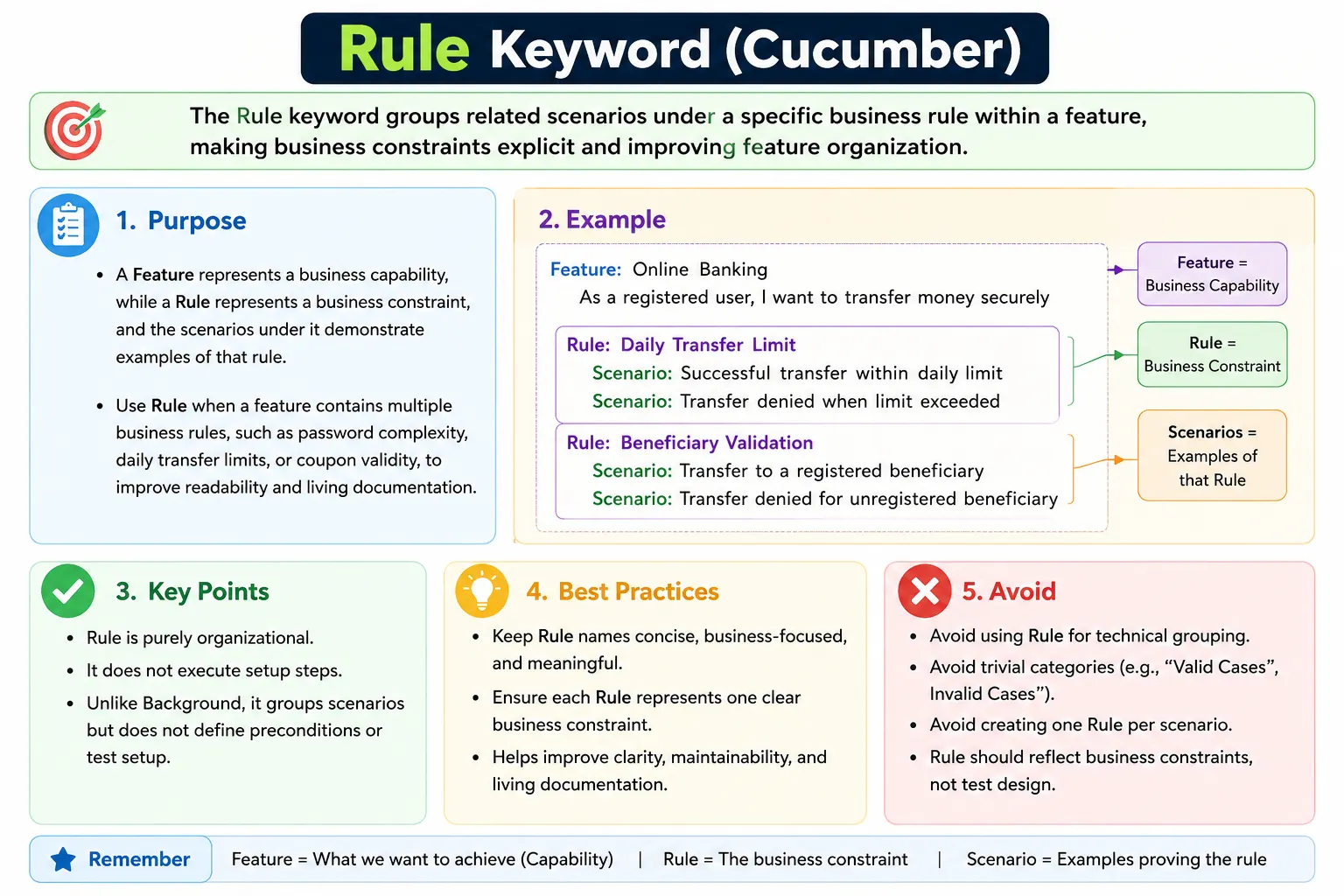
It answers: What business constraint or rule governs these scenarios?
Rule improves structure, readability, and intent clarity, especially in large features.
Rule Keyword in Cucumber: Full Explanation
The Rule keyword in Gherkin is used to organize scenarios around a specific business rule inside a Feature. It gives structure to feature files that contain multiple constraints, policies, validations, or decision rules. While the Feature describes a broader business capability, the Rule explains the condition or constraint that governs a group of scenarios. This makes the business logic visible instead of leaving it implied across many individual examples.
In Behavior Driven Development, scenarios are not just test scripts. They are examples of expected behavior. But when a feature grows, scenarios can become difficult to interpret if they are listed one after another without grouping. A password reset feature may contain rules about password length, password complexity, expired reset links, reused reset links, and account lock behavior. Without Rule, all scenarios may appear in one flat list. With Rule, each group can clearly show the business rule being demonstrated.
The Rule keyword is optional, but it is powerful when used with purpose. It improves readability, traceability, reporting, and living documentation. It helps stakeholders understand not only what scenarios exist, but why they exist. A well-written Rule tells the reader which business constraint is being validated by the scenarios below it.
Why the Rule Keyword Matters
The Rule keyword matters because business behavior is often governed by rules. A banking system may have withdrawal limits, transfer limits, authentication rules, account status restrictions, and fraud checks. An e-commerce system may have discount rules, return rules, shipping rules, and inventory rules. A healthcare system may have eligibility rules, appointment rules, privacy rules, and authorization rules. Scenarios exist because these rules must be validated.
When rules are not named explicitly, readers have to infer them from the scenarios. This works when a feature has only a few scenarios, but it becomes difficult when the feature grows. A flat list of twenty scenarios may be technically valid, but it can be hard to understand the structure of the business logic. Rule creates a middle layer between Feature and Scenario. It says, "These scenarios belong together because they illustrate this business rule."
This improves communication. Product owners can review rules and confirm whether they match the intended business constraints. Testers can identify missing examples under each rule. Developers can understand why certain behavior is required. Automation reports become easier to navigate because failures appear under meaningful business sections.
Rule as a Mid-Level Structure
Feature, Rule, and Scenario operate at different levels. The Feature is the broad capability. The Rule is the business constraint or principle within that capability. The Scenario is a concrete example that demonstrates the rule. This hierarchy gives feature files a clearer shape, especially when the feature covers more than one business condition.
For example, "Feature: Password Reset" is a capability. Inside it, "Rule: Password must meet complexity requirements" is a constraint. Scenarios under that rule can show weak password rejection, strong password acceptance, missing special character rejection, and minimum length validation. Another rule in the same feature could be "Rule: Reset links expire after a configured time." Scenarios under that rule can show valid link usage and expired link rejection.
This mid-level structure prevents scenarios from floating without explanation. It also prevents the Feature name from becoming too broad or overloaded. The Feature remains the capability, and the Rules explain the meaningful business divisions inside that capability.
Rule Is Organization, Not Setup
It is important to understand that Rule is not a setup mechanism. It does not run before scenarios. It does not create data. It does not define preconditions. Rule is structural. It organizes scenarios and communicates the business logic that connects them. This is different from Background, which defines common preconditions for scenarios.
A common mistake is confusing Rule with Background. Background answers, "What context must exist before each scenario runs?" Rule answers, "What business constraint do these scenarios demonstrate?" For example, "Given the user is logged in" may belong in Background if all scenarios require a logged-in user. "Rule: Transfers cannot exceed the daily limit" is a business rule that groups scenarios about transfer limits.
This distinction matters because mixing structure and setup creates confusion. Rule should not contain steps. It is a heading-like structure followed by scenarios. Background contains Given steps that execute. Rule improves understanding. Background prepares context. They can both appear in the same feature file, but they serve different purposes.
Where Rule Fits in a Feature File
The Rule keyword appears inside a Feature. In modern Gherkin, a feature file can contain a Feature, an optional Background, optional Rule blocks, and scenarios or scenario outlines. A Rule block can contain scenarios that belong to that rule. Some tools and versions also support Background inside Rule, but teams should verify support in their Cucumber version and use the structure consistently.
The common mental model is simple: Feature is the top-level capability, Rule is a business grouping within the feature, and Scenario is the executable example. This structure supports natural reading. A stakeholder can first read the feature name, then the rule name, then the examples under that rule. The file becomes more like organized business documentation than a flat list of test cases.
For best readability, Rule blocks should be placed where they help the reader follow the logic. If a feature has multiple rules, each rule should group related scenarios. If the feature has only two or three simple scenarios, Rule may not add value. The keyword is optional, and optional structure should be used only when it improves clarity.
Rule Names Should Use Business Language
A Rule name should express a business constraint in language that stakeholders understand. It should not be a technical grouping such as "Rule: UI validations" or "Rule: API response checks" unless the feature itself is technical and the audience expects that language. A better rule name describes what must be true from the business perspective.
Good rule names include "Password must be at least 8 characters," "Only active accounts can transfer funds," "Coupons cannot be applied after expiry," "Premium members receive free shipping," and "Users cannot book appointments in the past." Each name communicates a business rule. It explains why the scenarios exist.
Weak rule names are vague or implementation-focused. "Rule: Validation," "Rule: Error cases," "Rule: Button behavior," and "Rule: Backend logic" do not explain the business constraint clearly. The reader still has to inspect the scenarios to understand the rule. If the Rule name does not make the business logic more visible, it is not doing its job.
When Rule Improves Readability
Rule improves readability when a feature contains several groups of scenarios that are clearly governed by different constraints. For example, a checkout feature may have scenarios for discount eligibility, shipping cost calculation, payment authorization, and order confirmation. Listing all of these scenarios without grouping can make the file long and difficult to scan. Rule can separate the groups.
Rule also helps when scenarios have similar names but different governing logic. In a password feature, several scenarios may involve rejection. One rejection may happen because the password is too short. Another may happen because it lacks a special character. Another may happen because it matches a previous password. Rule can show which business constraint each rejection belongs to.
This makes review easier. During refinement, a product owner can look at each Rule and ask whether the examples fully cover it. A tester can identify missing positive, negative, and boundary examples under each rule. A developer can understand which parts of implementation correspond to which business constraints. The file becomes easier to reason about.
When Rule Is Not Needed
Rule is not needed in every feature file. If a feature has only a few scenarios and the business logic is obvious, adding Rule may create unnecessary nesting. BDD feature files should be readable, not over-structured. Too much structure can make simple behavior feel complicated.
For example, a small feature with two scenarios for successful login and failed login may not need Rule. The Feature name "User Login" and scenario names may already communicate the behavior clearly. Adding rules such as "Rule: Valid credentials allow login" and "Rule: Invalid credentials deny login" may be technically correct, but it may not improve readability.
Rule should also be avoided when teams are using it only to categorize tests by technical type, such as smoke, regression, UI, API, or sprint number. Tags are better for execution grouping. Rule should represent business logic, not test management categories. If a Rule does not describe a business constraint, reconsider using it.
Rule vs Feature in Practice
The difference between Feature and Rule becomes clear when thinking about scope. A Feature should represent a business capability. A Rule should represent a constraint inside that capability. For example, "Feature: Funds Transfer" is a capability. "Rule: Transfers require sufficient balance" is a constraint. "Rule: Transfers cannot exceed daily limit" is another constraint.
If a Rule starts sounding like a complete capability, it may actually deserve its own Feature. For example, "Rule: User Registration" under "Feature: Account Management" may be too broad if registration has many scenarios of its own. It might be better as "Feature: User Registration." The boundary depends on the domain, but the principle is useful: Feature is a capability, Rule is a constraint within a capability.
This distinction keeps feature files organized. Features should not become giant containers for unrelated business areas. Rules should not become mini-features that contain too much scope. Good structure reflects the product domain clearly.
Rule vs Scenario in Practice
A Rule is broader than a scenario. It explains the business logic that multiple scenarios demonstrate. A Scenario is one concrete example of that rule. If a team creates one Rule for every Scenario, the Rule layer loses value. It becomes noise rather than structure.
For example, "Rule: Password must be at least 8 characters" can contain scenarios for seven characters rejected, eight characters accepted, and blank password rejected if blank is related to the same rule. But creating "Rule: Seven character password is rejected" for one scenario is too narrow. That rule is not a rule; it is an example.
The Rule should help group scenarios. If there is nothing to group, a rule may not be necessary. A good Rule usually has multiple scenarios or at least the potential for multiple scenarios. It represents the logic; scenarios represent the examples.
Rule and Acceptance Criteria
Rule can align closely with acceptance criteria. In many Agile teams, acceptance criteria describe business rules that a user story must satisfy. Those rules can often become Rule sections in Gherkin. This creates a clean relationship between backlog refinement, feature file structure, and executable scenarios.
For example, an acceptance criterion may state that a password must contain at least eight characters, one uppercase letter, one lowercase letter, one number, and one special character. The feature file may use a Rule such as "Rule: Password must satisfy complexity requirements." Scenarios under it can show weak and strong password examples. The Rule captures the acceptance criterion at a readable level.
This approach improves traceability. When acceptance criteria change, the related Rule and scenarios are easier to find. If the product owner changes the password length from eight to twelve characters, the corresponding Rule section can be updated. The feature file becomes a living reflection of current business rules.
Rule in Living Documentation
Living documentation is most useful when it is navigable. Feature names give top-level navigation, but large features may still be difficult to scan. Rule adds sub-sections that expose business logic. Reports can show which scenarios belong to which rule, giving stakeholders a clearer view of the system's behavior.
This is especially useful when failures occur. If a report shows that scenarios under "Rule: Coupons cannot be used after expiry" are failing, the business impact is clear. The team knows the issue relates to expired coupon handling. Without Rule, the failed scenarios may appear as isolated test names without a visible business grouping.
Rule therefore strengthens the documentation side of BDD. It turns business constraints into visible report sections. This helps product owners, testers, developers, and managers understand coverage and failures in language closer to the business domain.
Tags and Rule
Rule itself is generally not used as a tagging target in the same way scenarios are tagged. Tags can be applied at feature level or scenario level. Feature-level tags apply broadly, and scenario-level tags control individual scenarios. Teams should avoid expecting Rule to behave like an independently executable or taggable unit unless their specific tooling supports additional behavior.
If all scenarios under a Rule need the same execution category, teams may tag those scenarios individually or consider whether a feature-level tag is appropriate. However, the main purpose of Rule should remain documentation and structure, not execution filtering. Tags are the better tool for execution selection.
This separation keeps the feature file clear. Rule explains business logic. Tags manage execution and categorization. Mixing these responsibilities can make the suite harder to maintain.
Common Rule Anti-Patterns
One common anti-pattern is using Rule for technical grouping. A rule named "Rule: Selenium tests" or "Rule: API checks" does not describe business logic. It describes test implementation. Such grouping belongs in tags, folder structure, runner configuration, or documentation outside the feature behavior.
Another anti-pattern is creating one Rule per scenario. This adds visual noise without improving understanding. Rule should group related examples, not duplicate scenario names. If every Rule has only one scenario and no broader business constraint, the feature file may be over-structured.
A third anti-pattern is writing vague rule names. "Rule: Validation" does not explain the rule. "Rule: Email address must use a valid format" is clearer. The reader should understand the constraint from the Rule name itself. Rule names should be explicit enough to reduce ambiguity.
Review Checklist for Rule
When reviewing a Rule section, first ask whether the rule describes a real business constraint. If it does not, it may not belong. Next, check whether the scenarios under the Rule truly demonstrate that rule. If unrelated scenarios appear under the same Rule, the file should be reorganized.
Reviewers should also check whether the Rule name is clear and concise. It should not be too broad, too vague, or too technical. A good Rule name should make the purpose of the scenarios easier to understand. If the Rule name does not add clarity, it should be improved or removed.
Finally, check whether Rule is necessary. Some feature files are clearer without Rule. The goal is not to use every Gherkin keyword. The goal is to communicate behavior well. Rule should be used when it improves structure and readability.
Practical Example: Password Reset
Consider a password reset feature. It may contain several business rules. One rule could be that reset links expire after a configured time. Another rule could be that reset links can be used only once. Another rule could be that new passwords must meet complexity requirements. Each of these rules can group scenarios.
Under "Rule: Reset links expire after configured time," scenarios can verify that a valid link works before expiry and an expired link is rejected. Under "Rule: Reset links can be used only once," scenarios can verify first use succeeds and second use is denied. Under "Rule: Password complexity requirements," scenarios can verify weak password rejection and strong password acceptance.
This structure makes the feature file much clearer than a flat list of all password reset scenarios. The reader can see the business constraints directly. The scenarios become examples that support each rule.
Interview-Ready Understanding of Rule
In interviews, the Rule keyword should be explained as an optional Gherkin keyword used to group scenarios under a specific business rule inside a Feature. It improves readability and living documentation when a feature contains multiple business constraints. It does not execute steps and should not be confused with Background.
A strong answer should mention that Feature represents a business capability, Rule represents a business constraint, and Scenario represents an example of behavior. Rule should be named in business language, used only when it adds clarity, and avoided for technical grouping or unnecessary nesting.
A practical example is a password reset feature with a Rule such as "Password must be at least 8 characters." Scenarios under that Rule can show short password rejection and valid password acceptance. This demonstrates that Rule makes business logic explicit and organizes related scenarios.
Rule in Large Feature Files
Rule becomes especially valuable when a feature file grows beyond a handful of scenarios. In a small feature, the relationship between scenarios may be obvious. In a large feature, the reader needs structure. A flat list of scenarios forces the reader to mentally group them. Rule makes that grouping explicit. It tells the reader which scenarios belong to which business constraint.
For example, an insurance claim feature may contain scenarios for claim eligibility, document submission, fraud review, approval limits, and rejection reasons. These are all part of the claim capability, but they are not the same rule. Grouping them under Rule sections helps the reader understand the business model. It also helps the team discuss coverage. If the eligibility rule has only positive scenarios and no rejection scenarios, the gap becomes easier to notice.
In large teams, this structure reduces dependency on tribal knowledge. A new tester or developer can open the file and understand the major rules without asking the original author. That is the purpose of living documentation: the documentation should explain the system as it currently behaves. Rule makes that explanation more organized.
Rule and Maintainability
Maintainability is one of the main reasons to use Rule carefully. A feature file is not written once and forgotten. It changes as requirements change, defects are found, new scenarios are added, and old behavior is removed. If rules are named clearly, future changes are easier to place correctly. A new scenario can be added under the relevant Rule instead of being appended randomly at the bottom of the file.
Rule also helps when business logic changes. If a product owner changes the daily transfer limit rule, the team can go directly to the Rule that describes transfer limits and review the scenarios underneath. If the same scenarios were spread across the file without grouping, impact analysis would be harder. This is a practical benefit, not just a formatting preference.
However, maintainability can suffer if Rule is overused. Too many small Rule sections create visual clutter. If each Rule contains only one scenario and the rule name repeats the scenario name, the structure is not helping. Good maintainability comes from meaningful grouping, not from adding more headings.
Rule and Business Discussions
Rule can improve backlog refinement and requirement discussions. During refinement, the team can identify the main business rules for a feature before writing scenarios. This encourages better thinking. Instead of jumping directly into individual test cases, the team first asks what constraints govern the behavior. Once those constraints are known, scenarios can be written as examples of each rule.
This style of discussion is useful because business stakeholders often think in rules. A product owner may say that discounts cannot be combined, expired coupons must be rejected, premium customers get free shipping, or users cannot reset passwords with previously used passwords. These statements are rules. Gherkin Rule gives the team a natural place to capture them.
When the rule is explicit, disagreements become visible earlier. If a tester writes "Rule: Coupons cannot be combined" and the product owner says certain coupons can be combined, the team has found an important clarification before implementation. This is one of the strongest benefits of BDD: it exposes misunderstanding through examples and language.
Rule and Scenario Completeness
Rule can help teams assess whether scenario coverage is complete enough. Once a rule is named, the team can ask what examples are needed to prove it. For a rule about password minimum length, examples may include fewer than the minimum, exactly the minimum, and greater than the minimum. For a rule about daily transfer limits, examples may include below the limit, exactly at the limit, and above the limit.
This does not mean every possible value belongs in Gherkin. Feature files should show meaningful examples, not exhaustive data sets. But Rule helps the team choose examples intentionally. It prevents random scenario collection and supports test design techniques such as boundary value analysis and negative testing.
Scenario completeness should be judged by business risk and rule clarity. Some rules need only a few examples. Others need more because they are critical, complex, or historically defect-prone. Rule gives the team a place to reason about that coverage.
Rule and Automation Reports
Automation reports are easier to interpret when scenarios are grouped under meaningful Rule sections. A failed scenario under "Rule: Users cannot transfer more than their available balance" communicates business impact immediately. A failed scenario under a flat feature list may require more reading before the impact is understood.
Reports are not only for automation engineers. Product owners, managers, testers, and developers may review them. Rule can make reports more readable for non-technical stakeholders because it exposes the business logic behind the examples. This is especially useful in regression suites where failures need quick triage.
Good reporting depends on good naming. If rules are vague, reports remain vague. If rules are business-focused, reports become business-focused. The same Gherkin file supports both execution and communication, so the language should be chosen with both purposes in mind.
Final Practical Guidance
The best way to decide whether to use Rule is to ask whether the scenarios exist because of a specific business constraint. If yes, making that rule explicit can improve the feature file. If the scenarios are already clear without Rule, adding it may not be necessary. Rule is a tool for clarity, not a mandatory decoration.
Use Rule when it helps readers understand the business structure of a feature. Avoid it when it creates unnecessary nesting, repeats scenario names, or groups by technical concerns. Keep rule names concise, business-readable, and stable over time. Review Rule sections as the feature evolves so the structure continues to match the product behavior.
In mature BDD practice, Rule is not used to make feature files look sophisticated. It is used to make business logic explicit. That is the golden purpose of the keyword. If a reader can understand the feature faster because of the Rule, it is doing its job.
1. What Is the Rule Keyword?
The Rule keyword is used to group related scenarios under a specific business rule within a feature.
It answers:
- What business constraint or rule governs these scenarios?
Rule improves structure, readability, and intent clarity, especially in large features.
2. Why the Rule Keyword Exists
Without Rule:
- Features with many scenarios become flat and hard to read
- Business rules are implied but not explicit
- Reports lack business context
Rule makes business logic visible.
3. Basic Syntax
Feature: <Feature name>
Rule: <Business rule>
  Scenario: <Scenario name>
Example:
Rule: Password must be at least 8 characters4. Where Rule Fits in Feature File Structure
The correct hierarchy is:
Feature
  Background (optional)
  Rule (optional)
    Scenario / Scenario Outline
Rules appear inside a Feature and before Scenarios.
5. Example: Proper Rule Usage
Feature: Password Reset
Rule: Password complexity requirements
Scenario: Password with fewer than 8 characters
  Given the user enters a weak password
  Then the password should be rejected
Scenario: Password with special characters
  Given the user enters a strong password
  Then the password should be accepted
This clearly communicates why scenarios exist.
6. Rule vs Feature
| Feature | Rule |
|---|---|
| Business capability | Business constraint |
| High-level | Mid-level |
| One per file | Multiple per feature |
| Groups rules | Groups scenarios |
7. Rule vs Background
| Rule | Background |
|---|---|
| Organizes scenarios | Sets common preconditions |
| Structural | Behavioral setup |
| Improves readability | Reduces duplication |
Do not confuse organization with setup.
8. When to Use Rule
Use Rule when:
- Feature has multiple business constraints
- Scenarios fall into logical groups
- You want clearer documentation and reports
9. When NOT to Use Rule
Avoid Rule when:
- Feature has only a few scenarios
- Rules are obvious or trivial
- It adds unnecessary nesting
10. Tags with Rule
- Rule itself cannot be tagged
- Tags can be applied to scenarios inside a Rule
- Feature-level tags still apply
11. Common Mistakes
- Using Rule for technical grouping
- Creating one Rule per scenario
- Writing vague rule names
- Mixing multiple rules in one Rule block
12. Best Practices
- Name rules clearly and concisely
- Use business language
- Keep rules stable over time
- Align rules with acceptance criteria
- Review rules during refinement
13. Reporting & Living Documentation
In reports:
- Rules appear as sub-sections
- Business logic is clearly visible
- Stakeholders can navigate by rule
14. Interview-Ready Summary
- Rule groups scenarios by business constraint
- Improves readability and maintainability
- Optional but powerful for complex features
- Enhances living documentation
- Should be used sparingly and purposefully
15. Golden Rule
If scenarios exist because of a business rule, make that rule explicit.