Reusability in Gherkin
Reusability in Gherkin means writing steps and scenarios in a way that they can be used across multiple scenarios and features without duplication, while still remaining business-readable and behavior-focused. It is not about copying and pasting steps from one feature file to another. It is about designing stable, consistent, domain-level language that expresses the same business intent in the same way wherever that intent appears.
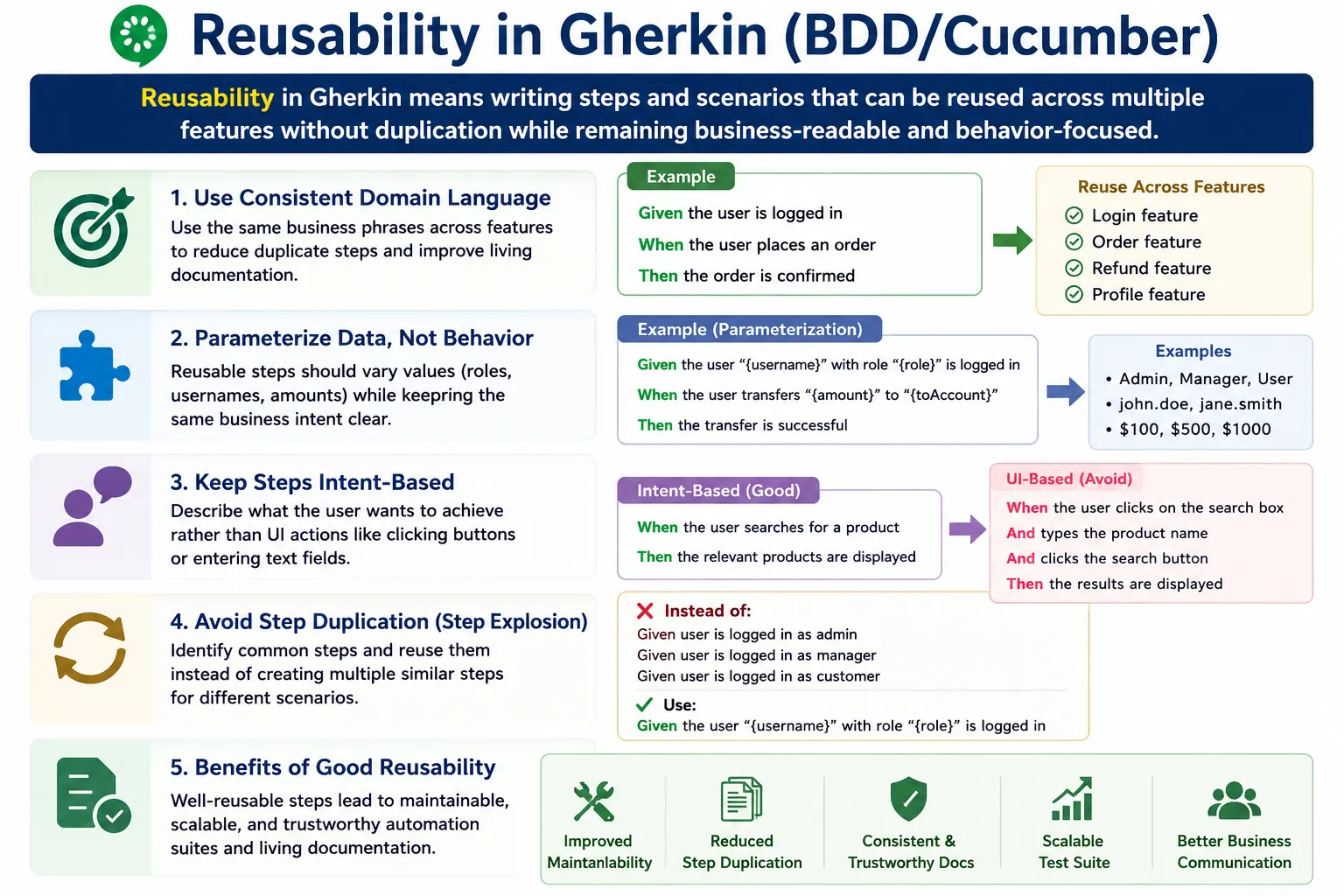
Good Gherkin reusability is a discipline. It requires shared vocabulary, clear scenario design, thoughtful parameterization, and separation between business language and automation implementation. When done well, it reduces duplicate step definitions, lowers maintenance effort, prevents step explosion, and improves the quality of living documentation. When done poorly, it creates confusing step libraries filled with slightly different phrases that mean the same thing.
What Reusability Means in Gherkin
Reusability in Gherkin starts with the wording of steps. If two scenarios describe the same behavior, they should generally use the same step phrase. For example, if the business action is login, the team should choose one preferred phrase such as "Given the user is logged in" or "When the user logs in" and reuse it consistently. The team should avoid randomly switching between "logs in," "signs in," "authenticates," "enters credentials," and "submits login details" unless those phrases mean genuinely different things in the domain.
Reusability does not mean making every step extremely generic. A step such as "When the user performs action" may be reusable everywhere, but it is useless as documentation. It hides the behavior. Good reusability balances reuse with meaning. A reusable Gherkin step should be broad enough to apply wherever the same business intent appears, but specific enough that a reader understands what behavior is being described.
The important idea is to reuse intent, not implementation. If a user checks out from a cart, the reusable intent may be "When the user proceeds to checkout." The implementation may involve clicking a button today, tapping a mobile control tomorrow, or calling an API in a service test. The Gherkin step remains stable because it describes the business action rather than the interface mechanics.
Why Reusability Matters
Reusability matters because Cucumber projects can become difficult to maintain when every scenario invents new wording. A small project may survive with inconsistent phrasing, but a large suite with hundreds of scenarios and many contributors can quickly become messy. Similar steps multiply, step definitions overlap, ambiguity increases, and maintenance becomes expensive. This is often called step explosion.
Good reusability reduces duplicate step definitions. If all scenarios use the same phrase for the same behavior, the automation layer can map that phrase to one step definition. When the implementation changes, the team updates one place instead of many. This reduces maintenance effort and lowers the chance of inconsistent behavior across tests.
Reusability also improves consistency in domain language. A feature file is not only an automation asset. It is documentation. If the same business concept is described with different words across features, readers may wonder whether the concepts are different. Standard language makes living documentation clearer and easier to trust.
Where Reusability Applies
Reusability exists at three levels. The first level is reusable step phrasing in Gherkin text. This is the language seen by business analysts, testers, developers, and product owners. The second level is reusable step definitions, where the Gherkin phrase is connected to automation code. The third level is reusable domain actions or helper methods in the automation framework, where the actual technical work is performed.
Gherkin reusability starts with consistent phrasing, but it should not stop there. A step definition should usually delegate work to reusable domain actions. For example, the step "Given the user is logged in" might call an authentication helper, test data builder, API client, or page object method. This keeps step definitions thin and prevents automation duplication.
These levels should remain separate. Gherkin should express business intent. Step definitions should connect intent to code. Domain actions should perform reusable technical operations. When these layers are mixed together, reusability suffers. Feature files become technical, step definitions become bloated, and helper code becomes inconsistent.
Use Domain Language, Not UI Language
The first principle of reusable Gherkin is to use domain language instead of UI language. UI language is tied to the current screen design. It mentions buttons, fields, pages, menus, and labels. Domain language is tied to the business behavior. It mentions orders, accounts, payments, profiles, approvals, transfers, and other business concepts. Domain language is more reusable because it changes less often than UI details.
A UI-specific step may look like this:
When the user clicks the "Checkout" buttonA more reusable domain-level step is:
When the user proceeds to checkoutThe second step remains meaningful even if the checkout button becomes a link, icon, mobile swipe, voice command, or API call. The business behavior is the same: the user proceeds to checkout. The automation can handle the current interface internally.
Standardize Vocabulary Across Features
Reusable Gherkin requires a shared vocabulary. Teams should agree on preferred terms for common actions, roles, entities, and outcomes. This shared vocabulary can be documented as a small domain dictionary or glossary. The goal is not bureaucracy. The goal is consistency. If the business calls the action "placing an order," the feature files should not randomly say "submitting purchase," "creating checkout," and "confirming buy."
Consistent vocabulary prevents duplicated step definitions. If one scenario says "Given the user logs in" and another says "Given the user signs in," Cucumber may treat them as different steps unless the implementation handles both. Over time, these small differences create unnecessary code. A standard phrase keeps the suite cleaner.
Vocabulary should be reviewed as the product grows. New features introduce new terms. Existing terms may become overloaded. A team should periodically ask whether the same business idea is being described in multiple ways. If so, the feature files and step definitions should be cleaned up before inconsistency spreads.
Parameterize Steps Carefully
Parameters make steps reusable when values vary but behavior remains the same. For example:
Given the user is logged in as a "<role>"This step can support roles such as customer, admin, manager, or support user if the login behavior is fundamentally the same. Parameterization prevents the team from writing separate step phrases for every role. It also makes scenario outlines and role-based examples easier to express.
However, over-parameterization is a common trap. A step such as "When the user performs '<action>'" is technically reusable but unclear. It hides the behavior inside the parameter. Another risky pattern is a single step that accepts many parameters and performs different logic depending on the values. That kind of step becomes difficult to understand, debug, and maintain.
Parameterize values, not unrelated behaviors. If two examples represent the same behavior with different data, parameterization is useful. If they represent different business rules, separate steps or scenarios are usually better. Clarity should guide reuse.
Keep Steps Intent-Based
Reusable steps should represent intent, not procedure. A procedural login setup may look like this:
Given the user enters username
And the user enters password
And the user clicks login
This is not ideal because it describes the mechanics of logging in. An intent-based reusable step is:
Given the user logs in with valid credentialsEven better, if the scenario is not about login behavior, it may simply say:
Given the user is logged inThe last version sets the business context without distracting from the scenario's main behavior. This makes it reusable across many features where authentication is required but not being tested directly.
Reusing Preconditions Without Overusing Background
Background can help remove duplication when every scenario in a feature needs the same context. However, teams sometimes overuse Background as a reuse mechanism. Large Background blocks hide important context and make scenarios harder to understand. Reusability should not come at the cost of clarity.
A better approach is to create reusable Given steps and use them where they are meaningful. For example:
Given the user is logged in
And the user has items in the cart
These steps can appear in many scenarios because they describe common business context. If the context is critical to understanding a scenario, keeping it inside the scenario is often better than hiding it in Background. The scenario remains self-explanatory.
Background should be short and truly common. Reusable steps should be clear and domain-level. This combination gives the team reuse without making feature files mysterious.
Scenario Outline for Reusable Variations
Scenario Outline supports reuse when behavior is the same and only data changes. Instead of writing many similar scenarios, the team can write one scenario outline with an examples table. This is useful for login attempts, role-based access, validation boundaries, supported payment methods, or repeated business examples where the structure is identical.
Scenario Outline: Login attempts
  Given the user provides "<username>" and "<password>"
  When the user attempts to log in
  Then access should be "<result>"
This avoids repeated scenarios with only minor data changes. However, Scenario Outline should be used carefully. If the examples table combines different business rules, the scenario becomes harder to read. If the table contains too many technical values, it becomes less useful as documentation. Use outlines when the behavior is truly the same and the data variations clarify the rule.
Avoiding Step Explosion
Step explosion is one of the biggest problems in Cucumber projects. It happens when the suite contains many steps that mean almost the same thing. For example, one feature says "user logs in," another says "user signs in," another says "user authenticates," and another says "user enters credentials and logs in." These may all represent the same behavior, but they create separate step definitions or matching complexity.
The solution is to choose one standard phrase and reuse it everywhere. This requires discipline during reviews. When someone adds a new step, the team should check whether an existing step already expresses the same intent. If it does, reuse the existing wording. If the new behavior is truly different, create a new step with a clear name.
Step explosion also occurs when teams write UI-driven steps. Every page has different buttons and fields, so UI steps multiply quickly. Domain-level steps reduce this problem because business actions are more stable and reusable than interface controls.
Reusability vs Readability
Reusability should never destroy readability. A step can be so generic that it becomes meaningless. For example:
When the user performs action "<action>"This may be reusable from an automation perspective, but it does not help readers understand behavior. It turns the scenario into a vague instruction container. The goal is not maximum reuse at any cost. The goal is reusable and readable Gherkin.
Sometimes two clear steps are better than one overly generic step. If two behaviors are meaningfully different, they should remain different in Gherkin. Reuse is valuable only when the same business intent is repeated. If the intent differs, forcing reuse can hide important distinctions.
Recommended Reusable Step Patterns
Common reusable preconditions include steps such as "Given the user is logged in," "Given the user has a valid account," and "Given the user has items in the cart." These steps describe stable business context and can be reused across many features. They are not tied to specific pages or implementation details.
Common reusable actions include "When the user places the order," "When the user updates their profile," and "When the user requests a password reset." These actions describe business intent. They are reusable because many scenarios may depend on the same user action while validating different outcomes or rules.
Common reusable outcomes include "Then the order should be confirmed," "Then access should be denied," and "Then the user should receive a confirmation email." These outcomes express observable business results. They are clearer and more reusable than technical assertions such as checking status codes or database rows directly in Gherkin.
Handling Reusability Across Features
Reusability becomes more important across features. Authentication, user accounts, cart setup, permissions, notifications, and common business states often appear in many parts of an application. If each feature file invents its own phrasing, the suite becomes inconsistent. Shared steps help connect features through common language.
A reusable step should be generic enough to apply across modules but specific enough to remain meaningful. "Given the user is logged in" is a good shared step because authentication context is common. "Given the user clicks the blue login button on the header" is too specific and too UI-driven. It will not remain stable across features or interface changes.
Cross-feature reusability should be supported by code organization. Step definitions and helper methods can be grouped by domain area, such as authentication, orders, payments, accounts, and notifications. This makes existing steps easier to find and reduces accidental duplication.
Common Mistakes
One common mistake is writing UI-driven steps that cannot be reused. These steps mention specific controls, page names, or layout details. They may work for one scenario but become fragile when reused elsewhere. Another mistake is creating too many similar phrases for the same behavior. This creates step explosion and makes the suite harder to maintain.
Overusing Background for reuse is another problem. If Background becomes long, scenarios become difficult to understand because important context is hidden. Over-parameterizing steps is also risky. A step with too many parameters or vague actions may be reusable technically but unreadable as documentation.
Teams also sometimes create "do something" steps that hide behavior. These steps may reduce automation code, but they weaken BDD. If a business stakeholder cannot understand the step, it is not a good reusable Gherkin step.
Best Practices for Reusable Gherkin
Maintain a shared vocabulary or glossary. Use intent-based step phrasing. Parameterize only where values vary while behavior remains the same. Prefer several clear business steps over one vague generic step. Review step usage regularly to remove duplicates. Keep Gherkin readable as documentation, not only executable as automation.
During code review or feature review, check whether new steps duplicate existing intent. If they do, reuse the existing phrase. If the existing phrase is unclear, improve it carefully and update related scenarios. Step reuse should be actively managed. It does not happen automatically in a growing project.
Keep step definitions thin and delegate technical work to reusable helper layers. This keeps the automation framework maintainable and prevents step definitions from becoming large procedural blocks. Reusable Gherkin and reusable automation design should support each other.
Reusability During Team Collaboration
Reusability is easier when the whole team collaborates on language. Business analysts help define domain terms. Testers identify repeated behavior across scenarios. Developers and automation engineers identify existing steps and implementation reuse opportunities. Product owners confirm whether terms match business meaning. Without this collaboration, each person may introduce different wording based on personal habit.
A short scenario review can prevent long-term maintenance problems. Before adding new Gherkin, the team can ask whether the scenario uses existing vocabulary, whether any step duplicates existing behavior, and whether parameterization is appropriate. These small checks keep the suite clean over time.
Reusability is not only an automation concern. It is a documentation concern. If the same concept appears in many forms, readers may assume there are different meanings. Consistent phrasing preserves shared understanding.
Refactoring Duplicate Steps
Reusability improves over time when teams actively refactor duplicate steps. In many projects, duplication appears gradually. One person writes "Given the user logs in," another writes "Given the user signs in," and another writes "Given the user is authenticated." At first, this may seem harmless. Later, the team discovers several step definitions doing nearly the same thing. This increases maintenance cost and creates inconsistent behavior.
Refactoring starts by identifying steps with the same intent. The team should choose the clearest domain-level phrase and update scenarios to use that phrase consistently. The duplicate step definitions can then be removed or redirected temporarily until the suite is cleaned up. This work should be done carefully, with tests run afterward, because step wording changes can affect many scenarios.
Step refactoring should be part of normal maintenance, not a rare cleanup event. Whenever a new feature adds steps, reviewers should check whether similar steps already exist. This keeps the suite from drifting back into duplication. A clean Gherkin library is easier to understand, easier to automate, and easier to trust.
Using a Domain Dictionary
A domain dictionary is a simple but powerful tool for reusable Gherkin. It defines the preferred words for common business concepts. For example, the dictionary may say that the team uses "logs in" instead of "signs in," "places an order" instead of "submits purchase," and "cart" instead of "basket." This prevents accidental vocabulary drift across features.
The dictionary does not need to be complicated. It can be a small shared document, a section in the project wiki, or guidance inside the test repository. The important part is that the team uses it during scenario writing and review. New terms should be added when new domain concepts appear. Old or confusing terms should be retired.
A domain dictionary also helps new team members. Instead of guessing which words to use, they can follow established vocabulary. This keeps feature files consistent even as the team grows. It also helps business stakeholders because the language in scenarios matches the language used in refinement and product discussions.
Layering Reuse in Automation Code
Reusable Gherkin works best when the automation code underneath is also layered properly. The feature file should not know how login, checkout, payment, or profile update is technically performed. The step definition should translate the Gherkin phrase into an automation action. That action should usually call a reusable page object, API client, service helper, or domain workflow.
For example, "When the user places the order" should not contain a long block of raw Selenium code inside the step definition. The step definition can call a reusable checkout workflow method. That method can use page objects or API helpers internally. This structure keeps step definitions readable and reduces duplication at the code level.
This layering also protects Gherkin from UI changes. If a button selector changes, the page object changes. If an API endpoint changes, the API client changes. The Gherkin step remains the same because the business action remains the same. This is the practical connection between reusable language and reusable framework design.
When Not to Reuse a Step
Reuse is valuable, but not every similar-looking step should be reused. If two steps use similar words but represent different business rules, forcing them into one reusable step can hide important meaning. For example, "the user is approved" may mean different things in a loan application, account registration, and document workflow. If the approval rules are different, the steps may need different wording or different domain context.
Another situation where reuse can be harmful is when a parameterized step becomes too powerful. A single step that handles many actions based on a parameter may reduce the number of step definitions, but it can make scenarios vague. Gherkin should remain readable. If reuse makes the scenario harder to understand, the reuse has gone too far.
The right question is not "Can this be reused?" The better question is "Does reuse preserve the same business intent clearly?" If the answer is yes, reuse the step. If the answer is no, write a separate clear step.
Review Workflow for Reusable Steps
A practical review workflow helps keep Gherkin reusable as the project grows. When a new scenario is added, reviewers should first check whether the business language matches the team's glossary. Next, they should check whether each step already exists with the same intent. If an existing step can be reused without changing meaning, the scenario should use that step. If no suitable step exists, the team can add a new one deliberately.
Reviewers should also check whether the step is behavior-focused. A new step that mentions a button, selector, endpoint, table, or low-level technical detail may create reuse problems later. It may be better to rewrite it in domain language before it enters the suite. Early review is cheaper than cleaning hundreds of duplicated steps later.
This review does not need to be slow. A small checklist is enough: does the step use domain language, does an equivalent step already exist, is parameterization appropriate, and is the step readable to business stakeholders? These checks protect both automation maintainability and living documentation quality.
Scaling Reusability in Large Cucumber Suites
Large Cucumber suites need stronger discipline because many people contribute scenarios. Without standards, each team or feature area may invent its own wording. Authentication steps, cart steps, payment steps, and profile steps may become inconsistent across modules. The suite may still run, but it becomes difficult to maintain and difficult to read.
Scaling reuse requires ownership. Some teams assign responsibility to QA leads, automation architects, or domain owners who review common step libraries. Others maintain shared step catalogs or searchable documentation. The method can vary, but the goal is the same: make it easy to find and reuse existing steps before creating new ones.
As the suite grows, teams should also watch for steps that become too broad. A step that started cleanly may accumulate many conditions and branches to support too many use cases. At that point, it may need to be split into clearer domain steps. Reusability should scale through clarity, not through overloaded steps.
Interview-Ready Summary
Reusability in Gherkin means using consistent, domain-level step phrasing so that the same business intent can be used across multiple scenarios and features without duplication. It reduces step explosion, improves maintainability, lowers automation effort, and makes living documentation more consistent.
A strong answer should mention that reusable Gherkin should use business language, not UI or procedural language. It should also explain that reusability must be balanced with readability. Overly generic steps may be reusable but poor documentation. Good steps are reusable because they express stable business intent.
A concise interview answer could be: Reusability in Gherkin is achieved by standardizing domain language, using intent-based steps, parameterizing carefully, and avoiding duplicate phrases for the same behavior. The goal is to reuse business intent, not implementation details.
Golden Rule
The golden rule is: reuse intent, not implementation. A reusable Gherkin step should describe a stable business action, context, or outcome. The implementation can change behind the step, but the business meaning should remain clear. When teams follow this rule, Cucumber feature files stay readable, automation stays maintainable, and living documentation stays trustworthy.