Happy Path Scenarios
A Happy Path scenario validates the primary successful flow of a business process when everything works as expected. The user provides valid input, the system is in a standard condition, no error occurs, and the intended business outcome is achieved. In BDD, the happy path answers a simple but important question: what should happen when the user follows the correct and expected path?
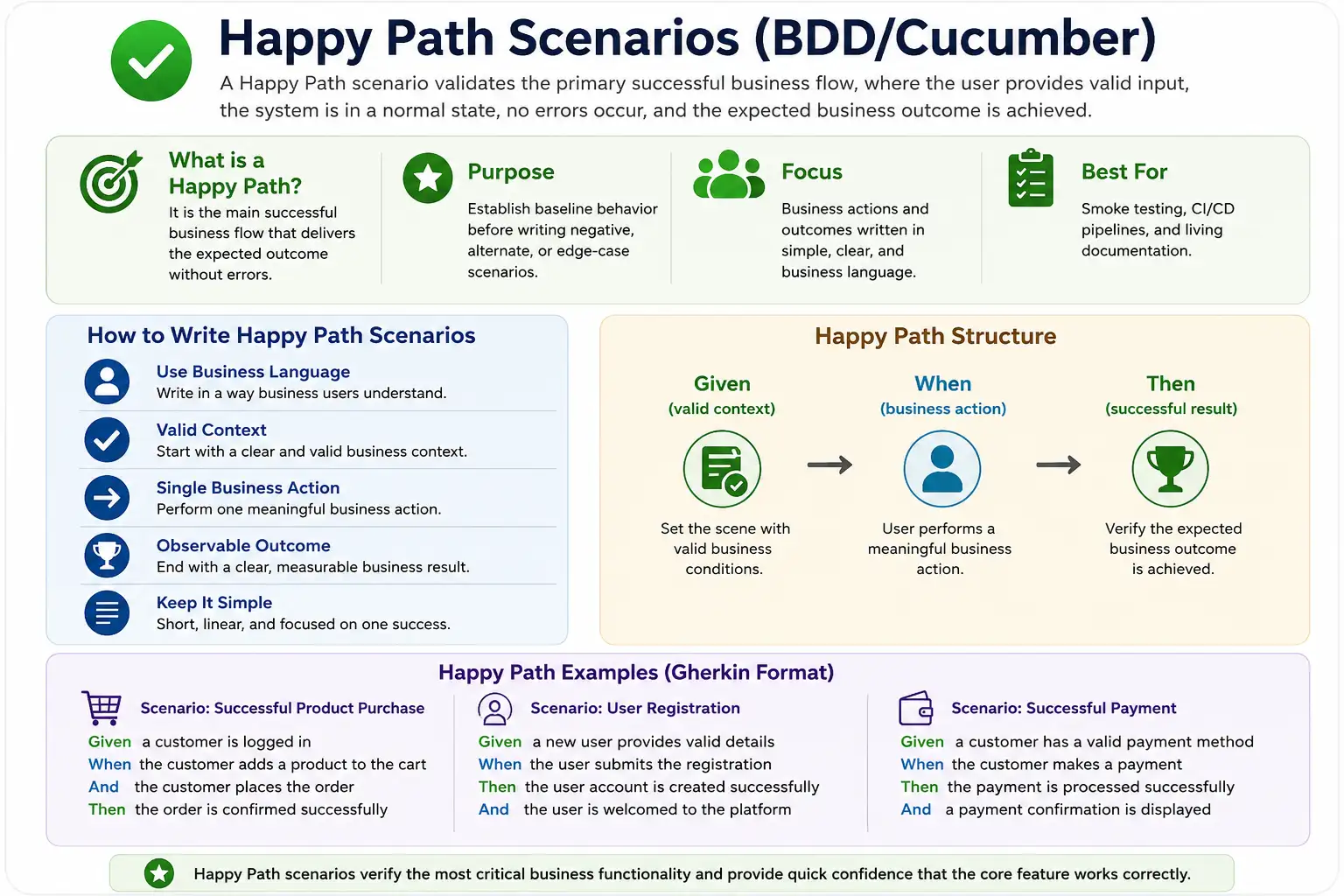
Happy path scenarios are often the first examples written for a feature because they define the baseline behavior. Before a team can discuss invalid input, edge cases, alternative flows, or exception handling, it must understand the successful flow. If the happy path is unclear, all other scenarios become harder to design because there is no stable reference point for what success means.
What Is a Happy Path Scenario?
A happy path scenario is a business-readable example of the main successful journey through a feature. It represents the normal way the feature is expected to work. For example, in an order placement feature, the happy path may describe a user who has items in the cart, provides valid payment details, places the order, and receives confirmation. There are no invalid cards, out-of-stock items, expired coupons, payment failures, or system errors in this scenario.
The purpose of the happy path is not to prove that every possible condition works. Its purpose is to capture the primary intended behavior. It provides the cleanest expression of the feature's value. When someone asks what the feature is supposed to do in the normal case, the happy path should answer that question clearly.
In BDD, a happy path should still be behavior-focused. It should not become a sequence of UI clicks or automation instructions. The scenario should describe the valid business context, the meaningful action, and the successful result. The step definitions can handle the technical details, but the Gherkin should stay at the business behavior level.
Why Happy Path Scenarios Matter
Happy path scenarios matter because they define the baseline acceptance behavior of a feature. They show the team what successful usage looks like. Product owners use them to confirm that the feature delivers the intended business value. Developers use them to understand the expected outcome. Testers use them as the starting point for test design. Automation engineers often use them as the first candidates for smoke or regression automation.
Without a clear happy path, negative and edge cases lack context. For example, before testing what happens when payment fails, the team must understand what happens when payment succeeds. Before testing invalid login, the team must understand successful login. Before testing cancellation restrictions, the team must understand the normal order lifecycle. The happy path creates the reference behavior from which all other scenarios are derived.
Happy paths also provide quick confidence. When a new build is deployed, the team often wants to know whether the core business flows still work. Happy path scenarios are ideal for this because they are simple, high-value, and representative of expected usage. If the happy path fails, deeper negative testing is less useful because the basic feature is already broken.
Characteristics of a Good Happy Path
A strong happy path scenario is simple, linear, behavior-focused, and business-readable. It follows the primary successful flow without mixing in optional features, exceptions, or recovery behavior. The setup is valid, the action is meaningful, and the result is clearly successful. Anyone on the team should be able to read the scenario and understand what business behavior is being described.
A good happy path is not UI-driven. It should not describe every button click, field entry, page movement, or technical validation. A UI-driven happy path may execute in automation, but it does not serve BDD well because it is too tied to implementation. Instead of saying "When the user clicks checkout and clicks submit," the scenario should say "When the user places the order." This expresses the business action.
A good happy path is also representative. It should reflect the most common or most important successful journey. If a feature has multiple successful flows, each may need its own scenario, but the first happy path should usually cover the standard business flow. It should not include rare options, advanced configurations, or special conditions unless those are the core behavior of the story.
Recommended Happy Path Structure
A clean happy path usually follows the standard Given, When, Then structure:
Scenario: <Successful business outcome>
  Given <valid business context>
  When <primary user action>
  Then <successful result>
The Given step describes valid business context. It sets up the normal condition required for success. The When step describes the primary user action. The Then step describes the successful business result. This structure keeps the scenario focused and prevents it from becoming a long procedural script.
As a practical guideline, use one main When step, minimal Given steps, and a clear observable Then step. Multiple Given steps are acceptable if they describe necessary valid context, but too much setup makes the scenario harder to read. Multiple Then steps may be acceptable if they describe closely related success outcomes, but too many results may indicate that the scenario is trying to validate more than one behavior.
Example of a Good Happy Path
A good happy path for order placement may look like this:
Scenario: Successful order placement
  Given the user has items in the cart
  And the user provides valid payment details
  When the user places the order
  Then the order should be confirmed
This scenario communicates intent, action, and success clearly. The context is valid: the user has items in the cart and valid payment details. The action is meaningful: the user places the order. The result is observable: the order is confirmed. The scenario does not mention clicking a checkout button, filling a specific form, calling a payment API, or checking a database row. Those technical details can live inside step definitions and automation code.
The scenario is also short enough to be reviewed by business stakeholders. A product owner can confirm whether the flow matches expected behavior. A tester can derive negative cases from it. A developer can understand the expected outcome. An automation engineer can implement the steps using the appropriate interface. This is what a happy path should achieve.
Bad Happy Path Examples
A common mistake is writing happy paths as UI scripts. For example:
Scenario: Place order
  Given I click add to cart
  When I click checkout
  Then I click submit
This example does not describe the business outcome. It describes a sequence of interactions. It also ends with another click instead of an observable result. A scenario should not finish by saying that the user clicked something. It should finish by saying what changed in the business state or what result the user should see.
Another mistake is overloading the happy path with optional features:
Scenario: Order placement with discounts, coupons, and loyalty pointsThis may be a useful scenario later, but it is not a clean baseline happy path. The first happy path should usually validate the simplest successful flow. Discounts, coupons, loyalty points, gift cards, split payments, and special delivery options can be covered in additional scenarios if they represent separate business rules.
When to Write Happy Path Scenarios
Happy path scenarios should be written early, ideally during backlog refinement or before development begins. This supports shift-left testing because the team clarifies expected behavior before code is written. When the happy path is agreed early, developers know what to build, testers know what to validate, and product owners can confirm whether the feature delivers the expected value.
Writing happy paths first also makes refinement discussions more productive. Once the primary successful flow is clear, the team can ask what could go wrong. What if the input is invalid? What if the user lacks permission? What if the payment fails? What if the item is unavailable? These questions lead naturally to negative scenarios, edge cases, and alternate flows.
Happy paths should also be reviewed whenever requirements change. If the primary behavior changes, the happy path must change too. Since the happy path is the baseline acceptance scenario, an outdated happy path can mislead developers, testers, and stakeholders. Living documentation is useful only when it reflects the current expected behavior.
Happy Path vs Negative Scenario
A happy path uses valid inputs, standard conditions, and expects success. A negative scenario uses invalid inputs, restricted conditions, or failure situations and expects rejection, error handling, or an alternate result. Both are important, but they serve different purposes. The happy path defines the normal behavior. Negative scenarios define how the system behaves when something is wrong.
| Happy Path | Negative Scenario |
|---|---|
| Valid inputs | Invalid inputs |
| Expected success | Expected failure |
| Primary flow | Alternate or error flow |
| Baseline behavior | Exception handling |
Always start with the happy path, then expand. This order matters because negative scenarios are easier to understand when the successful behavior is already known. For example, "payment is declined for insufficient balance" makes sense only after the team understands how successful payment should behave.
Happy Path and Automation Strategy
Happy path scenarios are often excellent candidates for early automation. They represent core successful behavior, are usually stable, and provide fast confidence when executed on every build. In many teams, happy path scenarios are tagged as smoke, critical, or regression candidates. They become part of the build-validation layer that tells the team whether the application is healthy enough for deeper testing.
However, automation should not distort the scenario wording. A happy path should not be written around what is easiest to automate. It should be written around what the business expects. The automation layer can handle the page interactions, API calls, data setup, and assertions. The feature file should remain business-readable.
Good automated happy paths are fast, reliable, and focused. If a happy path automation takes too long, depends on unstable data, or validates too many unrelated outcomes, it may become flaky and lose value. Keep the scenario clean and let supporting framework utilities manage setup and verification efficiently.
Happy Paths as Smoke Tests
Smoke testing checks whether the most important functionality is working well enough for further testing. Happy path scenarios naturally fit this purpose because they validate the core successful flows. If users cannot log in, place an order, submit a form, or complete a payment under normal conditions, the build is not ready for deeper validation.
In CI/CD pipelines, automated happy paths can quickly detect major breakages. A failed happy path does not always identify every detail of the problem, but it tells the team that the build is not healthy. This fast feedback helps prevent wasted manual testing on broken builds and allows developers to fix critical issues earlier.
Not every happy path must be a smoke test. Choose the flows that represent essential business value. Login, checkout, account creation, search, payment, booking, approval, and report generation may be smoke candidates depending on the application. The selection should be based on business risk and product usage.
Happy Paths and Living Documentation
Happy path scenarios are anchors for living documentation because they describe the standard behavior of a feature. A new team member can read the happy path and understand the feature's main purpose. A product owner can review it and confirm that the expected value is represented. A tester can use it as the base for coverage expansion. A developer can use it to understand the primary success flow.
For living documentation to remain useful, happy paths must stay clean and current. If they are filled with UI detail, technical checks, or outdated conditions, they become less trustworthy. A good happy path should survive normal implementation changes because it describes behavior, not mechanics.
Happy paths also help organize related scenarios. Once the baseline successful behavior is documented, edge cases and negative cases can be placed around it. This makes the feature file easier to navigate and helps readers understand how the rules relate to one another.
Common Mistakes with Happy Path Scenarios
One common mistake is mixing error handling into the happy path. A happy path should be clean. If the user provides invalid data or the system displays an error, that is no longer a happy path. Error behavior should be moved to a negative or alternate scenario. Keeping this separation makes scenarios easier to understand.
Another mistake is making happy paths too long. A scenario that includes login, profile update, order placement, cancellation, refund, and report verification is not a simple happy path. It may be an end-to-end journey, but it covers multiple behaviors. Long happy paths become harder to maintain and harder to debug when they fail.
Teams also sometimes duplicate happy paths with small data variations. If the behavior is the same, a Scenario Outline may be more appropriate, or the extra examples may not be needed at the BDD level. Avoid filling feature files with repetitive examples that do not clarify new behavior.
Best Practices for Happy Path Scenarios
Write one happy path for each key behavior. Use business language and avoid technical terms unless they are part of the business domain. Keep setup valid and minimal. Make the action meaningful. Make the outcome clear and observable. Review the happy path with the business analyst, product owner, tester, and developer before implementation begins.
Avoid optional features in the first happy path. If a user can place an order with or without a coupon, the clean happy path may avoid the coupon unless coupons are the feature being tested. Optional features can be added through separate scenarios. This keeps the primary behavior easy to read.
Keep happy path automation stable. Use reliable test data, avoid unnecessary dependency on unrelated systems where possible, and keep verification focused on the business outcome. If the happy path becomes flaky, the team loses trust in the automation. Since happy paths often run frequently, reliability matters.
Happy Paths During Backlog Refinement
Backlog refinement is one of the best times to identify happy path scenarios. During refinement, the team is still clarifying what the story means, which rules apply, and what outcome the business expects. A happy path example gives the conversation structure. Instead of discussing the feature in abstract terms, the team can discuss a concrete successful example.
For example, if the story is about password reset, the team can first define the happy path: a registered user requests a reset link, receives the link, creates a new password, and logs in successfully. Once this flow is clear, the team can ask follow-up questions. What if the email is not registered? What if the reset link expires? What if the new password does not meet policy? What if the link is used twice? The happy path opens the door to better negative and edge case discovery.
This is why happy paths are closely connected to acceptance criteria. They convert broad requirements into specific examples. A requirement may say "users can reset passwords," but the happy path explains what successful reset actually looks like. This reduces ambiguity before development begins and helps prevent rework after testing starts.
Happy Paths with Scenario Outline
Sometimes a happy path must be validated for multiple valid data combinations. In that case, Scenario Outline can be useful. For example, a login happy path may need to work for standard users, admin users, and support users. If the behavior is the same and only the role varies, a Scenario Outline can keep the feature file concise while still showing meaningful examples.
Scenario Outline: Successful login for active users
  Given the <role> has valid credentials
  When the user logs in
  Then the user should see the dashboard

Examples:
  | role          |
  | customer      |
  | administrator |
  | support user  |
The key is to keep the outline behavior-focused. The examples table should contain business-relevant data, not technical implementation details. If the table contains usernames, database IDs, internal flags, token values, or environment-specific data, the scenario may become harder for stakeholders to read. Data that is only needed for automation can usually be handled inside fixtures or test data builders.
Scenario Outline should not be used just to create dozens of similar examples. If the additional rows do not clarify different business conditions, they may belong in lower-level automated tests rather than BDD scenarios. Happy path examples should remain representative and meaningful.
Happy Path in Real Project Planning
In real projects, happy path scenarios often become the first measure of whether a feature is testable. If the team cannot write a clear happy path, it usually means the requirement is incomplete or misunderstood. A vague story such as "improve checkout" is not enough. The team needs to know what successful checkout means. Does it include payment? Does it include coupon handling? Does it include guest checkout? Does it include order confirmation? The happy path forces these decisions into the open.
Happy paths also help estimate testing effort. A simple happy path may require a small number of scenarios, while a feature with multiple successful flows may require broader coverage. For example, a payment feature may have successful credit card payment, successful wallet payment, successful store credit payment, and successful split payment. Each may be a different happy path if each represents a distinct business flow.
During sprint planning, the happy path can also help identify dependencies. If the happy path requires a working payment gateway, inventory service, notification system, or user account service, the team can plan environment and data needs early. This prevents testing from being blocked later because a required dependency was overlooked.
Happy Path and Definition of Done
Happy path validation often belongs inside the Definition of Done for user stories. A story should not be considered complete if its primary successful behavior has not been validated. The exact validation method may vary. It may be manual testing, automated BDD execution, API testing, or a combination. The important point is that the core successful flow must be proven before the team claims the story is done.
This does not mean the happy path is the only required testing. Negative scenarios, regression checks, and edge cases may also be required depending on risk. But the happy path is the minimum successful behavior. If it fails, the story is not functionally complete. That is why happy path scenarios are often treated as critical acceptance scenarios.
In Agile teams, this practice improves transparency. Developers, testers, and product owners can look at the happy path and agree whether the story's main value has been delivered. If there is disagreement, the scenario becomes a useful conversation tool. It reveals whether the team shares the same understanding of done.
Happy Path and Release Confidence
Happy path scenarios contribute directly to release confidence because they verify the flows that users and stakeholders usually care about first. A product may have many advanced rules, but if users cannot complete the primary successful journeys, the release is not healthy. For an e-commerce system, checkout must work. For a banking system, fund transfer must work. For a learning platform, course enrollment must work. These are not edge cases. They are the central reasons the product exists.
This is why happy paths are often included in release smoke suites and critical regression packs. They do not replace detailed testing, but they provide a fast signal. If the happy paths pass, the team can continue with deeper validation. If they fail, the team knows that the build needs immediate attention before more detailed testing can produce useful information.
Release confidence should still be realistic. A passing happy path does not prove that the feature is defect-free. It proves that the primary successful flow works under the tested condition. The team still needs negative scenarios, edge cases, compatibility checks, security checks, and regression coverage based on risk. Happy paths are the foundation of confidence, not the full structure.
Knowing the Boundary of a Happy Path
One of the harder skills in scenario design is knowing where the happy path ends. A happy path should remain focused on the standard successful flow. If a condition introduces a business rule variation, optional feature, exception, or alternate result, it may deserve a separate scenario. This keeps the happy path readable and prevents it from becoming a general-purpose test case.
For example, successful order placement with a normal payment method is a clean happy path. Successful order placement using a coupon is a valid successful scenario, but it may be better treated as a coupon rule scenario. Successful order placement with loyalty points may belong to a loyalty feature. Successful order placement after inventory reservation may belong to an inventory workflow. All are successful, but not all need to be part of the baseline happy path.
The practical question is: what is the simplest representative success flow for this behavior? That answer usually defines the happy path. Additional successful variations can be added only when they clarify a real rule or risk. This discipline keeps feature files clean and helps readers understand the main behavior before exploring variations.
Practical Review Questions
Before finalizing a happy path scenario, ask whether it describes a successful business outcome. If the scenario mainly lists clicks, field entries, or technical checks, rewrite it at the behavior level. Ask whether a business stakeholder can understand it without explanation. If not, simplify the language and remove implementation detail.
Ask whether the scenario is truly the primary flow. If it includes rare options, exceptions, or special conditions, split those into separate scenarios. Ask whether the Then step describes a clear result. If the scenario ends with another action instead of an outcome, it is incomplete.
Finally, ask whether the happy path would still make sense if the UI changed. If the answer is no, the scenario is probably too implementation-focused. The business outcome should remain meaningful even if the interface or technical implementation changes.
Interview-Ready Summary
A happy path scenario validates the primary successful behavior of a feature under normal conditions. It uses valid inputs, follows the intended flow, and expects a successful result. In BDD, the happy path is usually written first because it establishes the baseline acceptance behavior before negative and edge cases are added.
A strong happy path is simple, linear, behavior-focused, and readable by business stakeholders. It should use domain language, avoid UI and technical details, and describe one successful business outcome. Happy paths are often good candidates for early automation, smoke testing, and CI/CD validation because they quickly confirm whether core functionality is working.
A concise interview answer could be: A happy path scenario is a BDD scenario that validates the main successful flow of a feature when valid data and normal conditions are present. It defines the baseline behavior, supports acceptance criteria, and is usually written before negative scenarios because if the happy path fails, the feature is not ready.
Golden Rule
The golden rule is simple: if the happy path fails, nothing else matters. Negative scenarios, edge cases, and advanced flows are important, but they depend on the primary behavior working first. A feature that cannot complete its normal successful journey is not ready for deeper confidence.
Happy path scenarios are not basic because they are unimportant. They are basic because they are foundational. They define success, guide development, support automation, and anchor living documentation. When written well, they give the whole team a shared understanding of what the feature is supposed to do when everything works correctly.