Given / When / Then Keywords
Given–When–Then (GWT) is the core structure of BDD scenarios.
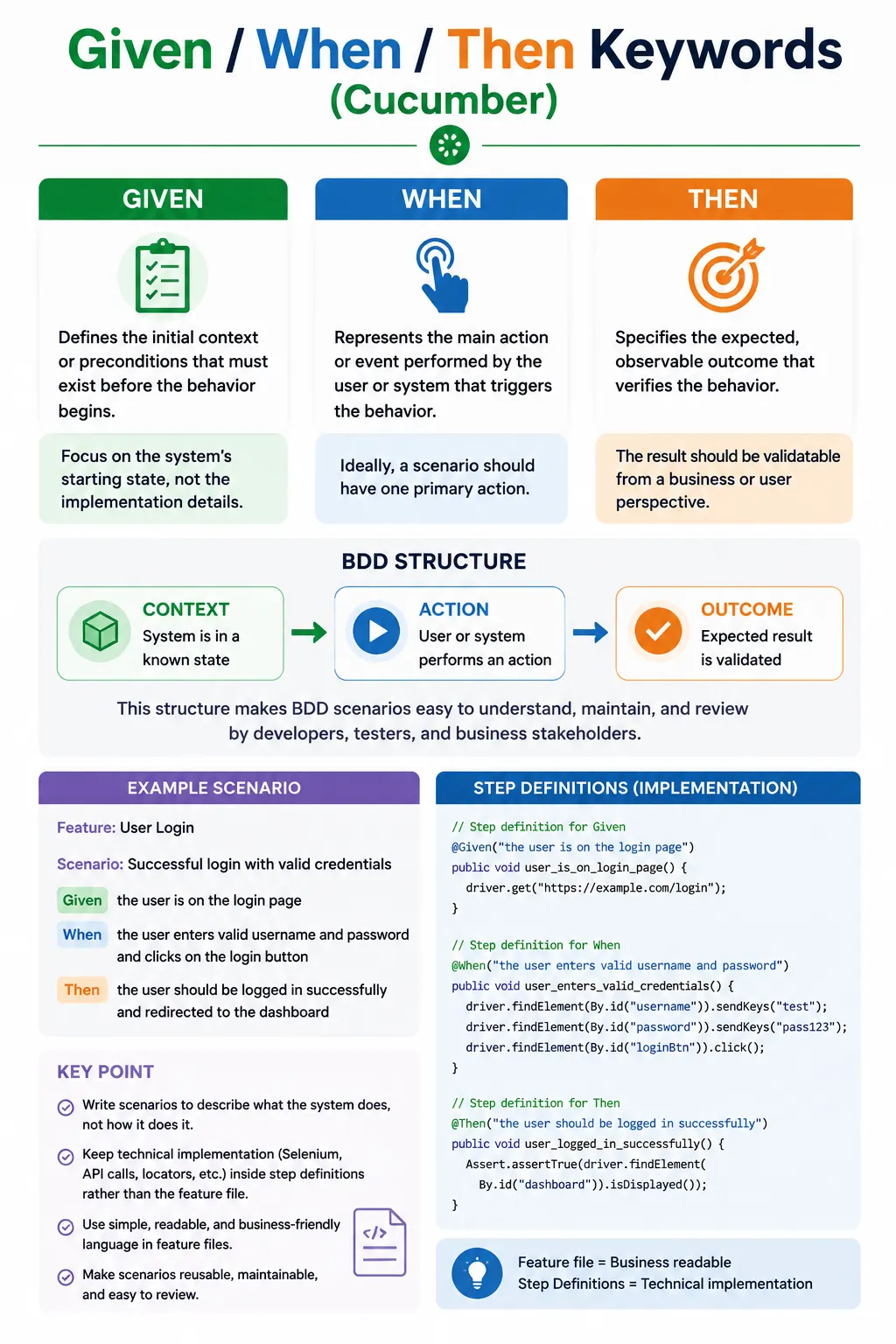
It enforces clarity, focus, and shared understanding by separating:
- Context (Given)
- Action (When)
- Outcome (Then)
This structure ensures scenarios describe behavior, not implementation.
Given / When / Then in Cucumber: Full Explanation
Given, When, and Then are the core keywords used to structure behavior-driven development scenarios in Gherkin. They are simple words, but they carry an important discipline. They separate a scenario into three clear parts: the context that already exists, the action that happens, and the outcome that should be observed. This structure helps teams write scenarios that describe business behavior rather than technical implementation.
In Cucumber, a scenario is not meant to be a script of every click, field, wait, and browser action. It is meant to describe how the system behaves from the user's or business perspective. Given-When-Then supports that goal by forcing the writer to think in terms of state, event, and result. A well-written scenario tells a clear story: given a meaningful starting condition, when a user or system performs an action, then a meaningful outcome should occur.
This pattern is valuable because it creates shared understanding. Business analysts can read the scenario and confirm the rule. Testers can identify test coverage and edge cases. Developers can understand expected behavior before implementation. Automation engineers can connect the plain-language steps to step definitions. Everyone works from the same behavioral description instead of separate interpretations.
The Given-When-Then structure is also useful because it reduces confusion. Without structure, feature files can become long procedural scripts. They may include browser actions, setup details, technical waits, database operations, and assertions mixed together. Such scenarios are difficult to read and hard to maintain. GWT keeps scenarios focused by giving each type of statement a specific purpose.
The Purpose of Given-When-Then
The main purpose of Given-When-Then is to express behavior clearly. Given describes context. When describes the triggering action. Then describes the expected outcome. This separation is the foundation of BDD scenario design. It helps writers avoid mixing setup, action, and assertion into one unclear sequence.
Given answers the question: what must already be true before the behavior occurs? It sets the initial state. When answers the question: what action or event triggers the behavior? It represents the important change or interaction. Then answers the question: what should happen as a result? It defines the observable result that proves the behavior.
This structure encourages business language. Instead of saying that the browser opens a URL, clicks a button, waits for a page, and reads a selector, the scenario should say that the user is logged in, places an order, and receives a confirmation. The automation code can handle the technical details in step definitions. The feature file should remain readable to people who care about product behavior.
Given-When-Then also helps teams identify scenario quality problems. If a scenario has many When steps, it may be testing too many actions at once. If a Given step performs an action, the setup may be unclear. If a Then step contains hidden technical checks that do not reflect a business outcome, the scenario may be implementation-driven. The structure acts as a guide for better scenario design.
Understanding the Given Keyword
The Given keyword defines the initial context or preconditions required for the behavior to occur. It describes what must already be true before the user or system performs the action. Given is about state, not the main behavior being tested. It prepares the scenario so that the When step can happen in a meaningful context.
Examples of good Given steps include "Given the user is registered", "Given the account balance is sufficient", and "Given the order exists". These steps describe a business state. They do not describe how the state is created. The step definition may create test data, call an API, open a page, or use a database setup behind the scenes, but the Gherkin step remains business-readable.
A weak Given step is one that describes low-level UI actions. For example, "Given I open the browser" or "Given I click the login link" is usually technical setup, not business context. A better version might be "Given the user is on the login page" or "Given the user is logged in", depending on the purpose of the scenario. The difference is important because feature files should not become Selenium scripts written in English.
Given steps should be minimal. Too many Given steps can make the scenario heavy and difficult to understand. If a scenario needs a long list of preconditions, it may be too broad, or some setup should be expressed at a higher level. The goal is to provide enough context for the behavior without overwhelming the reader.
Understanding the When Keyword
The When keyword describes the action or event that triggers the behavior. It is the central action of the scenario. A good When step should be written in business terms and should usually represent one main action. It answers the question: what action is being performed?
Examples of good When steps include "When the user submits the order", "When the payment is processed", and "When the user requests a password reset". These steps describe meaningful user or system actions. They do not list every click and input needed to perform the action. The step definition can handle the implementation details.
A common mistake is chaining multiple actions into one When step. For example, "When I click submit and enter details" is unclear because it combines multiple actions and may even put them in the wrong order. A better step is "When the user places the order" if the behavior is order placement. The details of entering information and clicking submit can be handled in the automation layer or expressed through separate steps only if they are meaningful to the business rule.
Only one main When is recommended in a scenario because a scenario should usually test one behavior. Multiple When steps can suggest that the scenario is doing too much. There are exceptions in complex flows, but as a general design rule, one When keeps the scenario focused. If two different actions need to be tested, the team should consider two scenarios.
Understanding the Then Keyword
The Then keyword defines the expected outcome or observable result. It answers the question: what should happen as a result of the action? A Then step should be verifiable. It should describe something the system displays, stores, sends, changes, creates, blocks, or confirms.
Examples of good Then steps include "Then the order should be confirmed", "Then the payment should be declined", and "Then the user should receive a confirmation email". These outcomes are meaningful and observable. They show what the business expects after the action occurs.
Then steps should focus on business results rather than hidden technical details. For example, "Then the API status code should be 200" may be appropriate in an API-focused scenario, but in a user-facing business scenario, a better outcome might be "Then the order should be saved successfully" or "Then the user should see the confirmation page." The right wording depends on the layer and purpose of the scenario.
Assertions generally belong in Then step definitions. Given steps prepare state, When steps perform actions, and Then steps verify outcomes. Keeping this separation makes step definitions easier to understand and reduces side effects. If a Given step contains assertions or a Then step performs major actions, the scenario may become confusing.
Using And and But Correctly
The And and But keywords improve readability by extending the previous keyword without changing the type of statement. If And follows Given, it acts like another Given. If And follows When, it acts like another When. If And follows Then, it acts like another Then. This allows scenarios to avoid repeating the same keyword too many times.
For example, "Given the user is logged in" followed by "And the user has admin privileges" expresses two related preconditions. The And step inherits the meaning of Given. Similarly, "Then the order should be rejected" followed by "But the inventory should remain unchanged" expresses an expected result and a negative expectation. But is often useful when describing something that should not happen.
And should not be used to hide a new behavior type. If the scenario moves from setup to action, use When. If it moves from action to outcome, use Then. A scenario should not use And in a way that makes the reader guess whether the line is setup, action, or validation. Readability is the reason these keywords exist.
Ordering Rules
A scenario should generally follow the order Given, When, Then. This order reflects a natural behavior story. First the context exists, then something happens, then a result is observed. Multiple Given steps are allowed when multiple preconditions are needed. Multiple Then steps are also allowed when the same action produces several observable outcomes. Only one main When is usually recommended.
Breaking the order can make scenarios harder to read. If a Then appears before a When, the reader sees an outcome before the action. If a Given appears after a When, setup is happening after behavior has already been triggered. Such patterns usually indicate poor scenario design. Keeping the order consistent helps feature files remain predictable.
That said, the goal is not rigid formatting for its own sake. The goal is clear behavior. If a scenario reads naturally and expresses one behavior clearly, it is likely well structured. If the reader has to mentally reorganize the steps to understand what is happening, the scenario should be rewritten.
Good vs Bad Scenario Writing
A bad scenario often describes UI scripting rather than behavior. For example, "Given I click login, When I enter username and password, Then I click submit" does not express a business outcome. It describes a sequence of interactions. It also incorrectly uses Given for an action and Then for another action. This makes the scenario confusing.
A better version is: "Given the user has valid credentials, When the user logs in, Then the user should be authenticated." This scenario expresses the business behavior. It tells the reader the context, the action, and the expected outcome. The step definition can handle opening the page, entering credentials, clicking the login button, and checking the dashboard.
The difference is not cosmetic. Behavior-driven scenarios are more stable because they are less tied to UI implementation. If the login button changes location or the page layout changes, the feature file may not need to change. Only the step definition may need an update. UI-driven scenarios are more brittle because they expose implementation details in the feature file.
Common Mistakes with Given-When-Then
One common mistake is using Given for actions. Given should describe an existing state. If the step says "Given the user clicks submit", it is probably wrong because clicking submit is an action. That belongs in When if it is the behavior being tested.
Another mistake is using multiple When steps for different actions. This often means the scenario is testing more than one behavior. A scenario that logs in, adds a product, applies a coupon, checks out, and logs out may be too broad. It may be better to split the flow into smaller scenarios or express the setup at a higher level.
Technical language is another problem. Steps such as "When the automation clicks xpath //button[1]" or "Then database flag should equal Y" may be useful for debugging, but they are not good business-facing Gherkin. The feature file should describe behavior in language that stakeholders can understand.
Long scenarios are also a warning sign. If a scenario has many Given, When, Then, And, and But lines, it may be trying to cover too much. Long scenarios are harder to read, harder to debug, and harder to maintain. Short, focused scenarios usually produce better living documentation.
Advanced Usage
Advanced use of Given-When-Then does not mean making scenarios complicated. It means using the keywords thoughtfully. Multiple Then steps can be appropriate when one action produces multiple meaningful outcomes. For example, after an order is rejected, the user may see a rejection message, and the inventory should remain unchanged. Both outcomes matter.
And can be used for compound preconditions. For example, "Given the user is logged in" and "And the user has admin privileges" are both context. But can be used for negative expectations, such as "Then the order should be rejected" and "But the inventory should remain unchanged." These keywords help the scenario read naturally while preserving structure.
Advanced usage also includes choosing the right abstraction level. A high-level business scenario may say "When the user places the order." A lower-level UI scenario may include more detail if the detail itself is important. The skill is knowing which level is appropriate for the purpose of the feature file.
Automation Perspective
In Cucumber automation, each Given, When, and Then step maps to a step definition. The step definition contains the implementation code, such as Selenium actions, API calls, database setup, or assertions. The feature file should remain clean, while the step definitions handle technical work.
For example, "Given user is on the login page" may map to a step definition that opens a URL. "When user enters valid username and password" may map to Selenium code that fills fields and clicks a button. "Then user should see the dashboard" may map to an assertion that checks the URL or a dashboard element. The feature file describes what matters; the code handles how it is done.
Step definitions should stay focused. A Given step definition should mostly set up state. A When step definition should perform the action. A Then step definition should verify the outcome. This keeps automation code aligned with the Gherkin structure and makes maintenance easier.
Real Project Guidance
In real projects, teams should agree on wording standards for Given, When, and Then. Consistent language prevents duplicate steps and keeps feature files readable. For example, if one file says "Given user is logged in" and another says "Given the customer has signed into the application", both may mean the same thing but create duplicate step definitions. A shared vocabulary helps avoid this problem.
Teams should also review scenarios for business readability. If a product owner cannot understand the scenario, it may be too technical. If an automation engineer cannot map the scenario to stable implementation, it may be too vague. Good Gherkin balances business clarity with automation practicality.
Given-When-Then should also support maintainability. A scenario should not need frequent changes because of small UI updates. If UI details are leaking into every step, the feature file becomes fragile. Keeping Gherkin behavior-focused allows step definitions and page objects to absorb many implementation changes.
Interview-Ready Understanding
In interviews, Given-When-Then is often used to check whether a candidate understands BDD beyond syntax. A strong answer should explain that Given sets the context, When triggers the action, and Then verifies the outcome. It should also mention that this structure improves readability, collaboration, and behavior-driven thinking.
A good candidate should also explain common mistakes, such as using Given for actions, writing multiple When steps, using technical language, creating long scenarios, and turning Gherkin into UI scripting. The golden rule is to describe what the system does, not how it does it.
Real examples make the answer stronger. Login, invalid login, product search, registration, logout, dropdown selection, alert handling, file upload, and shopping cart scenarios all demonstrate how Given-When-Then can structure practical automation flows while keeping the feature file readable.
Practical Example: Basic Login
A basic login scenario is one of the easiest ways to understand Given-When-Then. The Given step establishes that the user is on the login page. The When step performs the login action. The Then step verifies that the dashboard is visible. The scenario remains readable because it focuses on the business behavior rather than the Selenium implementation.
Feature: Login

Scenario: Valid Login
  Given user is on the login page
  When user enters valid username and password
  Then user should see the dashboard
The step definitions can contain the browser and element interaction details. The feature file does not need to mention locators, waits, or browser commands. That separation keeps the scenario easy for stakeholders to read and keeps technical implementation inside Java code.
@Given("user is on the login page")
public void openLoginPage() {
    driver.get("https://example.com/login");
}

@When("user enters valid username and password")
public void login() {
    driver.findElement(By.id("username")).sendKeys("admin");
    driver.findElement(By.id("password")).sendKeys("admin123");
    driver.findElement(By.id("loginBtn")).click();
}

@Then("user should see the dashboard")
public void verifyDashboard() {
    Assert.assertTrue(driver.getCurrentUrl().contains("dashboard"));
}
Practical Example: Invalid Login
An invalid login scenario shows how Then should verify an expected failure outcome. The behavior is not successful authentication; the behavior is rejection with a clear error message. This makes the scenario useful because it validates that the system protects access when credentials are wrong.
Scenario: Invalid Login
  Given user opens login page
  When user enters invalid credentials
  Then error message should be displayed
@Then("error message should be displayed")
public void verifyError() {
String message = driver.findElement(By.id("error")).getText();
Assert.assertEquals(message, "Invalid username or password");
}This is a good example of placing verification in the Then step. The assertion belongs to the outcome. The Given and When steps prepare and trigger the behavior, while the Then step confirms what the user should see.
Practical Example: Product Search
Product search is another clear example. The user starts on the home page, performs a search, and expects search results. The scenario does not need to describe the exact search box locator or button locator. Those details belong in the step definition or page object.
Scenario: Search Product
  Given user is on home page
  When user searches for "Laptop"
  Then search results should be displayed
@When("user searches for {string}")
public void searchProduct(String product) {
driver.findElement(By.id("search")).sendKeys(product);
driver.findElement(By.id("searchBtn")).click();
}This example also shows how step definitions can accept parameters. The product name is part of the behavior example, while the automation code handles how the search is performed.
Practical Example: Registration and Logout
Registration and logout scenarios show the same pattern. Given prepares the state, When performs the important action, and Then verifies the result. The wording should remain business-focused even if the automation behind the step is more detailed.
Scenario: User Registration
  Given user opens registration page
  When user enters registration details
  Then account should be created
@Then("account should be created")
public void verifyRegistration() {
Assert.assertTrue(
driver.getPageSource().contains("Registration Successful")
);
}Scenario: Logout
Given user is logged in
When user clicks logout
Then login page should appear@When("user clicks logout")
public void logout() {
driver.findElement(By.id("logout")).click();
}In a more business-readable style, the logout When step could also be written as "When the user logs out." The step definition can still click the logout button. This keeps the feature file less dependent on UI implementation.
Practical Example: Dropdown, Alert, Upload, and Cart
Given-When-Then can also express common UI automation situations such as dropdown selection, alert handling, file upload, and shopping cart validation. The important point is that each scenario should still describe behavior, not only technical actions.
Scenario: Select Country
  Given user opens registration form
  When user selects "India"
  Then India should be selected
@When("user selects {string}")
public void selectCountry(String country) {
Select select = new Select(driver.findElement(By.id("country")));
select.selectByVisibleText(country);
}Scenario: Delete Record
Given user clicks delete button
When confirmation alert appears
Then user accepts the alert@Then("user accepts the alert")
public void acceptAlert() {
driver.switchTo().alert().accept();
}Scenario: Upload Resume
Given upload page is opened
When user uploads "resume.pdf"
Then upload should be successful@When("user uploads {string}")
public void uploadFile(String file) {
driver.findElement(By.id("upload")).sendKeys("C:\\Files\\" + file);
}Scenario: Add Product
Given user opens product page
When user adds product to cart
Then cart count should become 1@Then("cart count should become 1")
public void verifyCart() {
String count = driver.findElement(By.id("cartCount")).getText();
Assert.assertEquals(count, "1");
}These examples are practical, but teams should still improve wording when necessary. For example, "Given user clicks delete button" is action-oriented and may be better as "Given a deletable record exists" if the click is part of the behavior being tested later. This is how testers refine Gherkin from basic automation wording into stronger BDD language.
Complete Given-When-Then Example
A complete login example may use multiple Given, When, and Then-related lines with And. The important rule is that And inherits the previous keyword. If And follows Given, it adds another precondition. If And follows When, it adds another action. If And follows Then, it adds another outcome.
Feature: Login

Scenario: Successful Login
  Given user launches the application
  And user is on login page
  When user enters username "admin"
  And user enters password "admin123"
  And user clicks Login button
  Then dashboard should be displayed
  And welcome message should be visible
This structure is acceptable when the related steps are easy to follow. However, if the When section becomes too long, the scenario may be too procedural. A higher-level step such as "When the user logs in with valid credentials" may be more readable if the field-level details are not important to the business rule.
Quick Reference Notes
1. Purpose of Given–When–Then
Given–When–Then (GWT) is the core structure of BDD scenarios.
It enforces clarity, focus, and shared understanding by separating:
- Context (Given)
- Action (When)
- Outcome (Then)
This structure ensures scenarios describe behavior, not implementation.
2. Given Keyword
What Given Represents
Given defines the initial context or preconditions required for the behavior to occur.
It answers:
- What must already be true before the action happens?
Examples
Given the user is registered
Given the account balance is sufficient
Given the order exists
Best Practices
- Describe state, not steps
- Avoid UI or technical setup
- Keep it minimal
Bad:
Given I open the browserGood:
Given the user is logged in3. When Keyword
What When Represents
When describes the single action or event that triggers the behavior.
It answers:
- What action is being performed?
Examples
When the user submits the order
When the payment is processed
When the user requests a password reset
Best Practices
- Only one main action
- Avoid chaining multiple actions
- Use business terminology
Bad:
When I click submit and enter detailsGood:
When the user places the order4. Then Keyword
What Then Represents
Then defines the expected outcome or observable result.
It answers:
- What should happen as a result of the action?
Examples
Then the order should be confirmed
Then the payment should be declined
Then the user should receive a confirmation email
Best Practices
- Outcome must be verifiable
- Avoid hidden technical checks
- Focus on business result
5. And / But Keywords
Purpose
And and But are used to:
- Improve readability
- Extend Given/When/Then without changing meaning
Example:
Given the user is logged in
And the user has admin privileges
Rules
- And inherits the previous keyword
- Do not use to introduce new behavior types
6. Ordering Rules
- A scenario should follow Given → When → Then
- Multiple Given or Then are allowed
- Only one When is recommended
7. Good vs Bad Scenario Example
Bad (UI-driven):
Given I click login
When I enter username and password
Then I click submit
Good (Behavior-driven):
Given the user has valid credentials
When the user logs in
Then the user should be authenticated
8. Common Mistakes
- Using Given for actions
- Multiple When steps
- Technical language
- Long scenarios
- UI scripting in Gherkin
9. Advanced Usage
- Multiple Then steps for multiple outcomes
- And for compound preconditions
- But for negative expectations
Example:
Then the order should be rejected
But the inventory should remain unchanged
10. Interview-Ready Summary
- Given sets context
- When triggers action
- Then verifies outcome
- Enforces behavior-driven thinking
- Improves readability and collaboration
11. Golden Rule (One Line)
Describe what the system does, not how it does it.