Comments in Feature Files
Comments in Gherkin are non-executable lines used to explain, clarify, or annotate feature files for human readers.
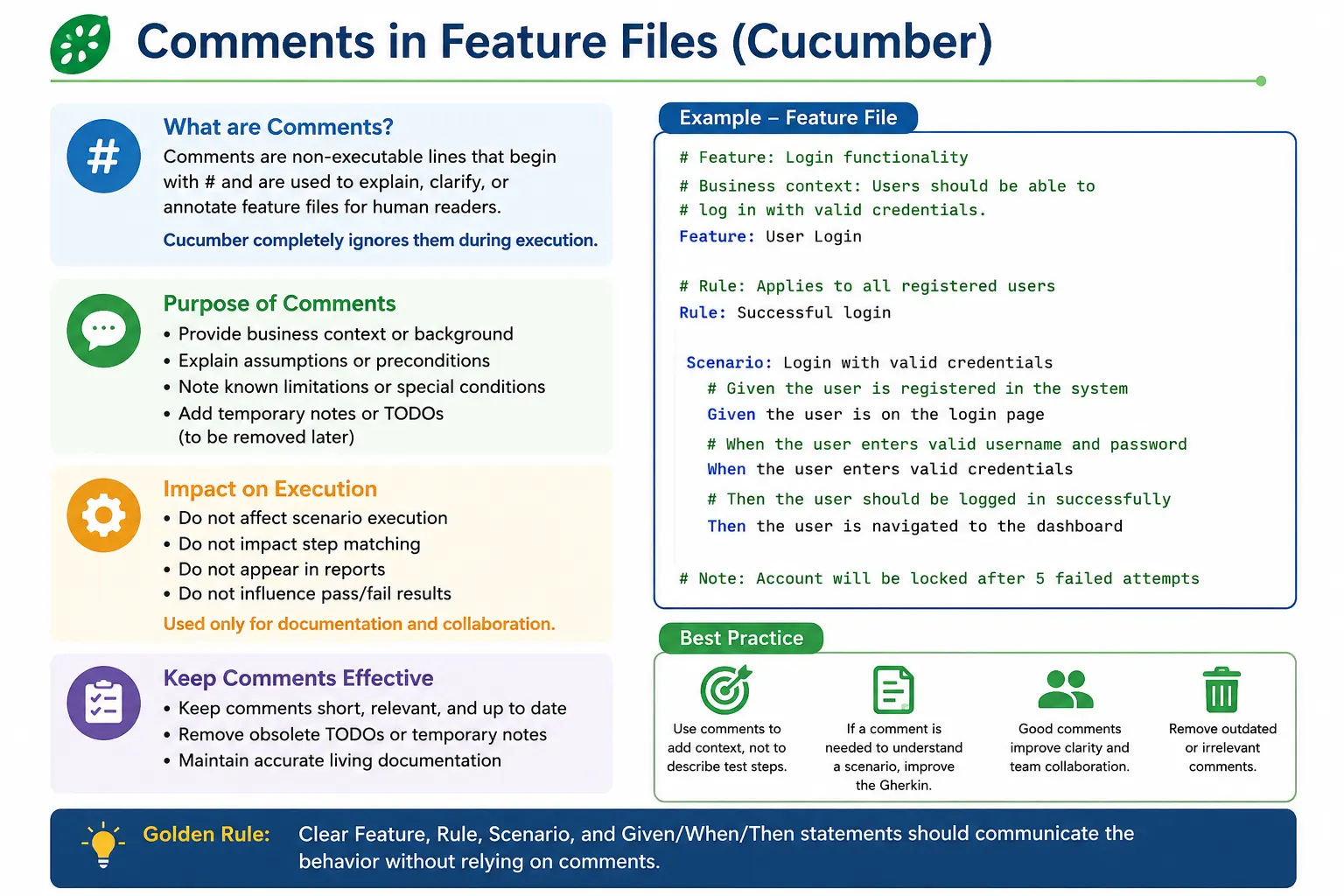
They are ignored by Cucumber during execution.
Comments in Feature Files: Full Explanation
Comments in Gherkin feature files are notes written for human readers. They are ignored by Cucumber during execution, which means they do not create steps, do not match step definitions, do not affect pass or fail status, and do not change how scenarios run. Their purpose is communication. A comment can explain context, document an assumption, highlight a temporary limitation, or help reviewers understand why something exists in the feature file.
Although comments are simple, they require judgment. A good comment can make a feature file easier to understand. A bad comment can hide poor writing, duplicate information, or become outdated. In Behavior Driven Development, feature files are expected to be readable by business analysts, testers, developers, automation engineers, and sometimes product owners. Because of that, comments should support clarity, not replace clarity.
The golden idea is straightforward: comments should help readers, but the Gherkin itself should still be understandable without heavy explanation. If a scenario needs a long comment to explain what it means, the scenario probably needs to be rewritten. Comments are useful for context, but they should not become a crutch for unclear Feature, Rule, Scenario, Given, When, or Then wording.
Why Comments Exist in Gherkin
Comments exist because feature files are not only executable specifications. They are also collaboration documents. Teams may need to record small notes that are helpful to readers but not part of executable behavior. For example, a team may want to note that a feature applies only to active subscriptions, that a known third-party limitation affects certain scenarios, or that an edge case will be added after a pending backend change.
Without comments, teams sometimes try to force every piece of explanation into Gherkin steps. That can make scenarios awkward. A short comment may be more appropriate for a temporary note or contextual warning. For example, a comment above a scenario can explain that the scenario applies only to a special business configuration. The scenario itself can then stay focused on behavior.
However, comments should remain secondary. The main specification should still be expressed through Feature names, Rule names, Scenario names, Background, Given, When, Then, Examples tables, and tags. Comments should clarify the specification, not become the specification.
Comment Syntax
Gherkin comments start with the hash symbol. Anything after the hash symbol on that line is treated as a comment. Cucumber ignores it when executing the feature file. A full-line comment may appear before a Feature, Rule, Scenario, Background, Examples table, or step. A comment can also appear between sections as a note for readers.
The syntax is intentionally simple. A line such as "# This feature validates login behavior" is a comment. It can help someone understand the purpose of the file, but it does not become part of the generated step execution. It is not matched with any step definition. It does not appear as a test step. It does not change the scenario result.
Because comments are ignored by execution, teams should not place critical executable instructions inside comments. If the system must validate a locked account, that behavior should be expressed as a scenario, not only as a comment saying locked account should be tested later. Comments are invisible to automation, so they cannot protect behavior from regression.
Where Comments Can Be Used
Comments can be used at the top of a feature file to explain broad context. For example, a feature file may begin with a short note saying that the scenarios apply to registered users only or that the feature covers the core authentication flow. This can be helpful when the Feature name alone does not capture a constraint that applies to the whole file.
Comments can also be placed before a scenario to explain an assumption or limitation. For example, a comment may say that email verification is assumed to be completed before the scenario begins. This can help readers understand why the scenario starts from a certain state. But if that assumption is essential to the behavior, it may be better expressed as a Given step rather than a comment.
Comments can appear near steps, but this should be done carefully. If a step is unclear and needs a comment, the step wording may need improvement. For example, if "When the user submits the form" requires a comment explaining which form and why, the step could be rewritten more clearly. The best feature files need fewer comments because the Gherkin language itself is clear.
Good Comments Add Context
A good comment adds context that would otherwise be awkward to place in the scenario. It may explain a business assumption, a known limitation, a temporary gap, or an external dependency. Good comments are short, relevant, and easy to remove when no longer needed. They do not repeat what the scenario already says.
For example, a comment such as "# Applies only to users with active subscriptions" can be useful above a premium content scenario if the feature file contains a broader subscription context. It tells the reader that the scenario is scoped to a particular business condition. Another useful comment might be "# Third-party payment sandbox returns fixed approval code in test environment." That note explains an environment-specific limitation without changing the business behavior being described.
Good comments also respect the reader's time. They do not state the obvious. A comment saying "# This step logs in the user" above "Given the user is logged in" adds no value. It only adds noise. Comments should explain why, assumption, scope, or limitation, not repeat what is already visible.
Bad Comments Hide Weak Gherkin
Bad comments often exist because the Gherkin is unclear. If a scenario name is vague, a comment may try to explain it. If a step is too technical, a comment may try to translate it. If the behavior is missing, a comment may describe what should have been written as a scenario. These comments do not solve the underlying problem. They only cover it temporarily.
For example, a comment such as "# Clicking submit button after entering values" above "When the user submits the form" is unnecessary if the step is already clear. If the step is not clear, it should be rewritten. A better step might be "When the user submits the registration form" or "When the customer confirms the order." The improvement should happen in the Gherkin, not in a comment.
Another bad pattern is using comments as placeholders for missing test coverage. A comment such as "# Need to test invalid password later" does not create a test. It does not fail when the behavior is broken. It can easily be forgotten. If the behavior matters, the team should create a scenario, mark it pending if needed, or track the work in the backlog. Comments are not a replacement for test design.
Comments vs Pending Scenarios
Comments and pending scenarios serve different purposes. A comment is a human-readable note ignored by execution. A pending scenario is a visible behavior specification that may not yet have implementation or step definitions. If the team knows a behavior should exist but has not implemented or automated it yet, a pending scenario is often better than a comment.
For example, if locked account login behavior is known but not yet implemented, writing "Scenario: Login with locked account" makes the intended behavior visible in the feature file. The team can leave step definitions pending, tag the scenario appropriately, or track it as future work. This is more concrete than a comment saying that locked account testing is needed later.
Comments are better for small notes, not planned behavior. A short note such as "# Implementation pending until account lock API is available" may be useful inside or above a pending scenario. But the scenario should carry the behavior. The comment should carry only the temporary explanation.
Comments and Living Documentation
Feature files often serve as living documentation. This means they should describe current system behavior in a readable way and stay aligned with execution. Comments can support living documentation when they clarify scope or assumptions. But they can also harm living documentation if they become outdated, misleading, or more detailed than the executable examples.
Because comments are ignored during execution, they can become stale without any test failure. A scenario may be updated, but an old comment may still describe previous behavior. This creates confusion. Unlike failing steps, stale comments do not automatically alert the team. They require review discipline.
For this reason, comments should be reviewed during feature file maintenance. If a comment no longer matches the scenario, remove or update it. If a TODO comment has been present for several months, decide whether it should become a backlog item, a pending scenario, or be deleted. Living documentation should stay trustworthy.
Comments and Automation Execution
Comments do not affect automation execution. They do not change step matching, data substitution, tags, hooks, Background execution, Scenario Outline expansion, or report status. This behavior is useful because teams can add explanatory notes without impacting automation. But it also means comments should never contain instructions that automation needs to follow.
If a scenario must run only under certain conditions, use tags, runner configuration, environment configuration, or proper feature organization. Do not rely on a comment such as "# Run only in QA environment." Automation will not obey that comment unless the framework has separate custom logic reading comments, which is not standard Cucumber behavior and is generally not a good design.
If a test requires specific data, express that data in Given steps, Examples tables, data tables, or setup code. Do not place required data only in comments. A comment can explain why data is used, but executable setup should be represented through actual Gherkin or automation code.
Comments and Code Review
Comments should be reviewed like any other part of a feature file. Reviewers should ask whether the comment adds value, whether it is still accurate, and whether the Gherkin could be improved instead. A comment that explains confusing wording may be a signal to rewrite the scenario. A comment that duplicates the scenario name should usually be removed.
During review, comments can reveal unfinished thinking. A note such as "# Need to confirm business rule" may be useful temporarily, but it should not be merged into a stable test suite without resolution unless the team intentionally tracks it. Otherwise, the feature file becomes a collection of unresolved questions.
Good review practice keeps comments short and intentional. If a comment explains a real limitation, it can stay. If it explains poor Gherkin, fix the Gherkin. If it represents missing behavior, create a scenario or backlog task. If it is outdated, remove it. This discipline keeps feature files clean.
Comments vs Tags
Comments and tags should not be confused. Tags are part of execution and organization. They can be used to filter scenarios, group tests, control hooks, or support reporting. Comments are not execution controls. They are notes. A comment saying "# smoke test" does not make a scenario part of the smoke suite. A tag such as @smoke does.
If the purpose is execution selection, use tags. If the purpose is human explanation, use comments. For example, @regression can identify a scenario as part of the regression suite. A comment can explain why the scenario is important if that context is not obvious. The two can coexist, but they serve different roles.
Using comments instead of tags leads to automation gaps. The runner cannot filter by ordinary comments. Reports cannot reliably categorize scenarios based on comments. Tags are the correct tool for test suite management.
Comments vs Feature Description
Gherkin allows descriptive text under the Feature line. This text is often better than comments for explaining broad feature intent. A feature description can explain the business goal, user value, or domain context in natural language. Since it belongs structurally under the Feature, it reads more naturally than several scattered comments.
For example, under "Feature: User Login," a description can explain that registered users need secure access to their account dashboard. This is better than placing multiple comments above scenarios to repeat the same idea. Use feature descriptions for stable, broad context. Use comments for short, local notes.
This distinction keeps feature files organized. Stable documentation belongs in descriptions and scenario wording. Temporary or local clarification can use comments. If a comment becomes permanent and important, consider whether it should be moved into the feature description, a Rule name, a Scenario name, or a Given step.
Managing TODO Comments
TODO comments are common, but they can become dangerous if unmanaged. A TODO comment is easy to write and easy to forget. Over time, feature files may accumulate notes about future edge cases, missing validations, pending refactoring, or open questions. If no one owns those TODOs, they become noise.
When a TODO represents real missing behavior, it should usually be tracked in the backlog or written as a pending scenario. A comment alone is not enough. If the TODO is minor and short-lived, it may be acceptable during active development, but it should be removed before the feature file is considered stable.
Teams can periodically search for TODO comments in feature files and review them. Some may become tasks. Some may become scenarios. Some may be obsolete and should be deleted. This small maintenance habit prevents comments from becoming a hidden backlog that no one manages.
Practical Example of Good Comment Usage
A good comment might appear at the top of a feature file: "# This feature covers core authentication flows for registered users." This tells the reader the scope of the feature. It is short and helpful. Another good comment might appear above a scenario: "# Applies only to users with active subscriptions." This clarifies scope when the scenario might otherwise be misunderstood.
A useful temporary comment might say "# TODO: Add expired token scenario after token expiry rule is finalized." This is acceptable during refinement or active development, but it should not remain forever. Once the rule is finalized, the team should add the scenario or remove the note.
The best comments are easy to remove when no longer needed. They do not carry the main behavior. They do not duplicate obvious steps. They support the reader without becoming the primary documentation.
Practical Example of Bad Comment Usage
A bad comment might say "# Click submit button after entering values" above "When the user submits the form." This comment adds no business value. It repeats or explains a step that should already be clear. If the form is unclear, the step should be improved to say which form is submitted and what business action is happening.
Another bad comment is "# Need to test invalid password scenarios later" with no scenario or backlog tracking. This creates the appearance of awareness but does not create coverage. A better approach is to write a pending scenario or create a tracked work item. Behavior that matters should not live only in a comment.
Technical instruction comments are also usually poor in Gherkin. A comment such as "# Wait for page to load before clicking next" belongs in automation logic, not a feature file. Feature files should describe behavior, while step definitions and framework code handle technical synchronization.
Interview-Ready Understanding of Comments
In interviews, comments in Gherkin should be explained as non-executable lines that start with the hash symbol and are ignored by Cucumber. They are used to add short clarification, business context, assumptions, or temporary notes for human readers. They do not affect execution, step matching, reports, tags, or scenario results.
A strong answer should also explain the caution: comments should be used sparingly and should not explain poor Gherkin. If a scenario needs a comment to be understood, the scenario should be improved. Comments should not replace pending scenarios, acceptance criteria, feature descriptions, or proper business-readable steps.
A practical example is a comment such as "# Applies only to active subscription users" above a premium content scenario. This adds useful scope. A bad example is a comment that explains a vague step or stores a missing test idea forever. This shows both syntax knowledge and real project judgment.
Comment Maintenance in Real Projects
Comment maintenance is important because comments can become outdated silently. A step that no longer exists will break execution, but an incorrect comment will not. This makes stale comments risky. They can mislead a new tester, confuse a product owner, or make a reviewer think a limitation still exists when it has already been resolved. Since Cucumber ignores comments, the team must maintain them manually.
A practical approach is to review comments whenever a feature file is changed. If a scenario is modified, any nearby comments should be checked. If a business rule changes, comments that mention the old rule should be updated or removed. If a TODO comment is found during review, the team should decide whether it still matters. Old comments should not remain just because they are harmless. Misleading information is not harmless in documentation.
Teams can also periodically search for comment markers in feature files. This is useful in large repositories. A quick review can reveal old TODOs, temporary notes, skipped assumptions, and technical comments that should be moved to code. Keeping comments clean improves trust in the feature files as living documentation.
Team Conventions for Comments
Teams should agree on simple conventions for comments in Gherkin. Without conventions, one person may use comments heavily, another may avoid them completely, and another may use them for technical automation notes. This inconsistency makes the suite harder to read. A small guideline can prevent confusion.
A useful convention might say that comments are allowed for short business context, temporary notes during active refinement, known external limitations, and assumptions that cannot be expressed cleanly in Gherkin. The same guideline might say that comments should not explain unclear steps, should not replace scenarios, should not contain browser or Selenium instructions, and should be removed when obsolete.
These conventions do not need to be complicated. The goal is consistency. When everyone follows the same expectation, feature files become easier to review and maintain. Comments then serve their intended purpose instead of becoming random notes scattered through the test suite.
Comments in Pull Requests
Pull requests are a good place to catch comment problems. Reviewers should treat comments as part of the specification. A comment that says "temporary workaround" should raise a question: temporary until when, and who owns it? A comment that explains a step should raise another question: can the step be rewritten more clearly? A comment that mentions missing behavior should raise a third question: should this be a pending scenario or backlog item?
Reviewing comments this way improves the entire feature file. It encourages writers to choose business-readable scenario names, clear Given-When-Then wording, and meaningful examples. It also prevents feature files from becoming storage for unresolved questions. A clean feature file should not need many explanatory comments because the structure and language should carry most of the meaning.
When a comment is accepted in a pull request, it should have a clear reason. It should help a future reader understand context that is not obvious from the scenario. If the reason is weak, remove the comment or improve the Gherkin. This is a simple but effective review habit.
Final Practical Guidance
The safest way to use comments is to ask whether the comment helps a human reader understand context without carrying executable behavior. If yes, it may be useful. If the comment explains what the step already says, it is probably noise. If the comment describes behavior that should be tested, write a scenario instead. If the comment describes automation mechanics, move that information to the automation code or framework documentation.
Comments should be short, intentional, and temporary unless they describe stable business context. They should not become a hidden backlog, a substitute for acceptance criteria, or a workaround for poor scenario writing. Used well, they make feature files easier to understand. Used poorly, they make living documentation less trustworthy.
The best Cucumber feature files usually contain few comments because the Feature, Rule, Scenario, Given, When, Then, and Examples sections are already clear. Comments should support that clarity only where needed. That balance is what makes comments useful in professional BDD practice.
1. What Are Comments in Gherkin?
Comments in Gherkin are non-executable lines used to explain, clarify, or annotate feature files for human readers.
They are ignored by Cucumber during execution.
2. Comment Syntax
- Comments start with the # symbol
- Anything after # on the same line is treated as a comment
Example:
# This feature validates login behavior3. Where Comments Can Be Used
Comments can appear:
- At the top of the feature file
- Before a Feature, Rule, Scenario, or step
- Inline (on their own line)
Example:
# Login feature for registered users
Feature: User Login
4. Purpose of Comments
Comments are used to:
- Explain business context
- Clarify intent of scenarios
- Add notes for future enhancement
- Reference known limitations or assumptions
- Improve readability for reviewers
They should never replace proper Gherkin wording.
5. Good Use Cases for Comments
5.1 Business Context
# Applies only to users with active subscriptions
Scenario: Access premium content
5.2 Clarifying Assumptions
# Assumes email verification is already completed
Given the user is logged in
5.3 Temporary Notes
# TODO: Add edge case for expired token6. Bad Use Cases for Comments
6.1 Explaining Poor Gherkin
If you need comments to explain steps, the steps are likely unclear.
Bad:
# Clicking submit button after entering values
When the user submits the form
The step should already be clear.
6.2 Replacing Missing Scenarios
Comments should not be used instead of writing scenarios.
Bad:
# Need to test invalid password scenarios laterBetter to write a pending scenario.
7. Comments vs Pending Scenarios
If behavior is known but not implemented:
- Prefer pending scenarios (without step definitions)
- Use comments only for short notes
Example:
Scenario: Login with locked account
  # Implementation pending
8. Comments and Execution
- Comments do not affect execution
- They do not appear in reports
- They do not impact step matching
Therefore, they should not carry critical information required to understand behavior.
9. Best Practices
- Keep comments short and relevant
- Use comments sparingly
- Do not duplicate scenario intent in comments
- Avoid technical explanations
- Remove outdated comments regularly
10. Common Mistakes
- Over-commenting
- Using comments to explain unclear steps
- Leaving obsolete TODOs
- Writing technical instructions
- Using comments as documentation replacement
11. Example: Proper Comment Usage
# This feature covers core authentication flows
Feature: User Login
  # Validates successful authentication
  Scenario: Successful login
    Given the user has valid credentials
    When the user logs in
    Then the user should see the dashboard
12. Interview-Ready Summary
- Comments start with #
- Ignored by Cucumber execution
- Used for clarification and context
- Should not explain poor Gherkin
- Use sparingly and maintain regularly
13. Golden Rule
If a comment is required to understand a scenario, the scenario needs improvement.