Background Keyword
The Background keyword is used to define common preconditions that apply to all scenarios within a feature file.
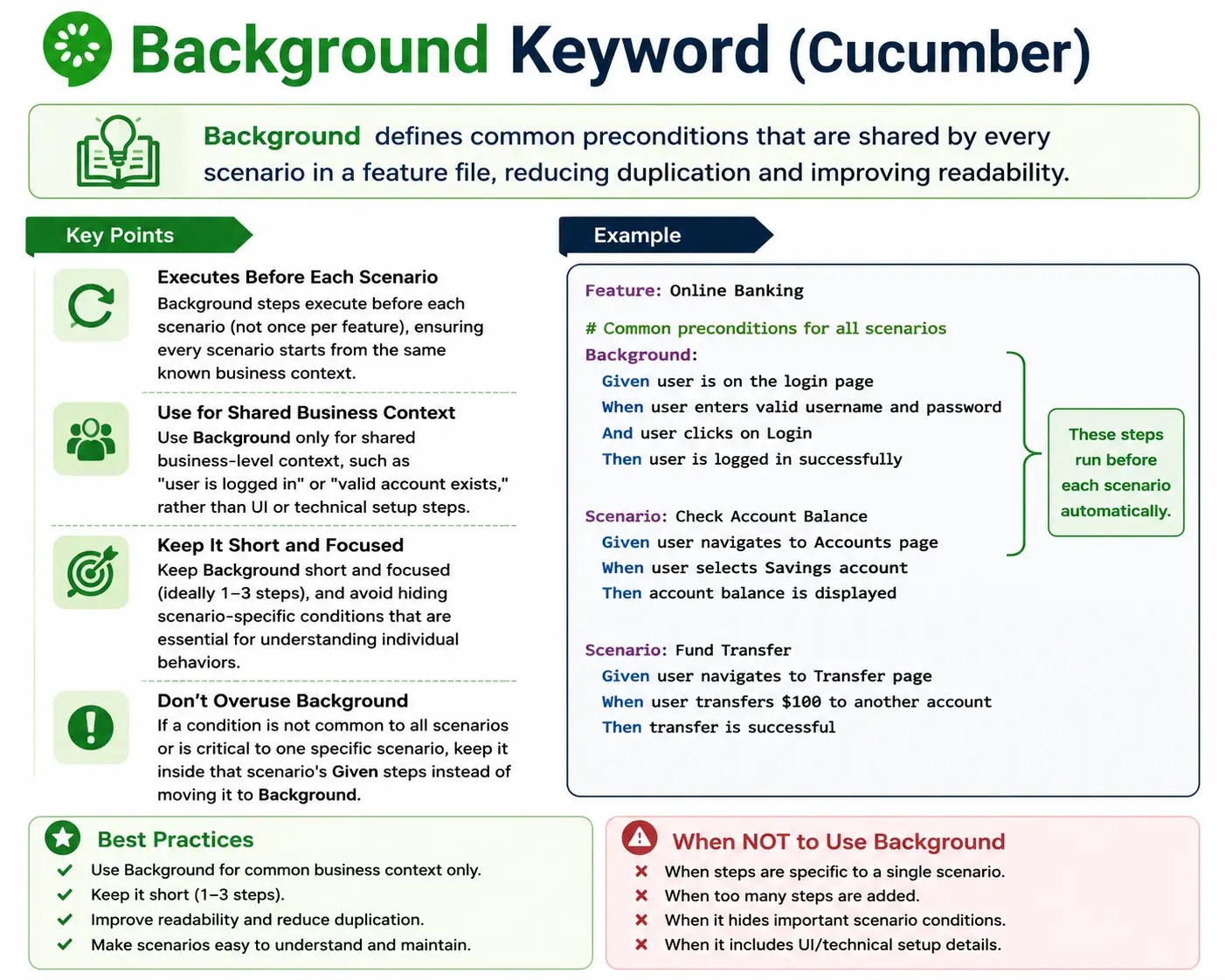
It answers: What context must exist before every scenario in this feature runs?
The steps in Background are executed before each scenario in the same feature.
Background Keyword in Cucumber: Full Explanation
The Background keyword in Gherkin is used to describe common starting context for every scenario in a feature file. It is one of the most useful but also one of the most easily misused keywords in Cucumber. When used carefully, Background removes unnecessary repetition and makes scenarios easier to read. When overused, it hides important information and makes scenarios harder to understand. The key is to remember that Background is not a place to store every setup step. It is a place to express shared business context that truly applies to all scenarios in the feature.
In Behavior Driven Development, feature files are meant to communicate behavior clearly. Each scenario should tell a small story about how the system behaves under certain conditions. Sometimes several scenarios in the same feature begin from the same state. For example, every scenario in a funds transfer feature may require that the user is logged in and has an active account. Repeating those same Given steps in every scenario can make the feature file noisy. Background solves this by allowing the shared context to be written once.
However, the convenience of Background should not be confused with a license to hide setup. If a reader must know a condition to understand a scenario, that condition may need to stay inside the scenario itself. Background is best for context that is obvious, stable, and common to every scenario. It supports readability only when it makes the scenarios cleaner without making their meaning incomplete.
Why Background Exists
Background exists because real feature files often contain repeated setup. Without Background, teams may copy the same Given steps across many scenarios. This creates duplication. Duplication makes feature files longer, harder to review, and harder to maintain. If the shared setup changes, every scenario must be updated. If one scenario is missed, the file becomes inconsistent.
For example, imagine a feature file for account management where every scenario begins with a registered user, an active account, and the user being signed in. If ten scenarios repeat those three Given steps, thirty setup lines appear before the actual behavior. The reader has to scan through repeated context before reaching the meaningful action and outcome. Background lets the writer move those common preconditions into one place.
The purpose is not only reducing lines. The deeper purpose is focus. Scenarios should focus on the behavior being specified. If common setup is repeated everywhere, the main behavior becomes harder to see. A short Background can clear away repeated context so each scenario highlights the action and expected result.
Background as Shared Business Context
The best Background steps describe shared business context. Business context means a state that is meaningful in the domain. Examples include "Given the user is logged in," "Given the customer has an active account," "Given the system is configured for US region," or "Given a valid policy exists." These statements are understandable to business stakeholders and establish a meaningful starting point.
Technical setup is different. Steps such as "Given I open the browser," "Given I maximize the window," "Given I wait for five seconds," or "Given I navigate to the login page" are usually automation details. They may be necessary in test code, but they do not describe business behavior. Putting them in Background turns the feature file into a technical script and weakens the BDD value.
Background should therefore answer a business question: what condition is common to all scenarios in this feature? If the answer is a technical action rather than a business state, it probably belongs in hooks, step definitions, page objects, test setup utilities, or framework configuration. Feature files should remain readable as behavior specifications.
How Background Executes
Background execution is simple but important to understand. The steps in Background run before every scenario in the same feature file. They do not run once for the whole feature. If a feature has five scenarios, the Background runs five times, once before each scenario. This behavior matters because each scenario should be independent and should start from a known state.
For example, if the Background creates an active account and signs in the user, that setup is performed before scenario one, again before scenario two, again before scenario three, and so on. This helps scenarios remain isolated. A scenario should not depend on changes made by a previous scenario. Independent execution supports parallel testing, reliable reports, and easier debugging.
Background runs before the scenario steps. Conceptually, it becomes part of the scenario's Given context. A reader should understand that every scenario begins with the Background conditions, even if they are not repeated inside the scenario text. This implicit nature is useful, but it is also why Background must stay short and clear. If too much is hidden in Background, scenarios become harder to interpret.
Background and Scenario Readability
Readability is the main reason to use Background. A good Background improves readability by removing repeated context that would otherwise distract the reader. A bad Background hurts readability by hiding information that is essential to understanding the scenario. The same keyword can improve or damage the feature file depending on how it is used.
Consider a funds transfer feature. If every scenario requires a logged-in user with an active account, placing those two steps in Background can be helpful. Then the scenario can focus on successful transfer, insufficient balance, invalid recipient, or daily limit exceeded. The reader can see the behavior differences more clearly because the repeated starting state is already known.
Now consider a scenario where the account balance is the key condition. If one scenario is about sufficient balance and another is about insufficient balance, hiding account balance setup in Background would be harmful. The balance is critical to understanding the behavior. It should stay in the scenario or be expressed clearly in each scenario. The rule is practical: shared context can go in Background, but behavior-defining context should remain visible.
Background vs Given Steps Inside Scenarios
Background and Given steps inside scenarios both describe preconditions, but their scope is different. Background applies to every scenario in the feature file. A Given inside a scenario applies only to that scenario. This distinction is important because not all preconditions are equally shared. Some are general feature context, while others define the specific behavior being tested.
If a condition is required for all scenarios and does not change the meaning of individual scenarios, Background may be appropriate. If a condition is specific to one scenario or changes the expected result, it should remain inside the scenario. For example, "Given the user is logged in" may be common Background. But "Given the account balance is below the transfer amount" should likely remain in the insufficient balance scenario because it explains why the transfer is declined.
This separation keeps scenarios self-explanatory. A reader should not have to constantly scroll to Background to understand the reason behind a scenario's outcome. Background should support the scenario, not become a hidden dependency that carries the main meaning.
Good Background Design
A well-designed Background is short, stable, and business-readable. Most good Background sections contain one to three steps. This is not a strict technical rule, but it is a useful guideline. If a Background grows to five, six, or ten steps, it often means the feature file is trying to hide too much setup. Long Background sections are difficult to remember while reading later scenarios.
Good Background steps also avoid unnecessary detail. "Given the user is logged in" is often better than listing every action required to log in. The step definition can handle the technical details. Similarly, "Given a valid customer account exists" is better than describing every field used to create the account unless those fields matter to the feature behavior.
Good Background design should also remain aligned with the Feature. If the feature is about funds transfer, the Background should establish common transfer context. If the feature contains scenarios that no longer share that context, the feature may need to be split or the Background may need to be removed. Background should evolve as the feature file evolves.
When Background Is Useful
Background is useful when every scenario in a feature genuinely starts from the same business state. Authentication is a common example. Many feature files require the user to be logged in before any behavior can occur. If login itself is not the behavior being tested, it may be reasonable to place "Given the user is logged in" in Background.
Another useful case is regional or configuration context. If every scenario in a tax calculation feature assumes the system is configured for a specific country or state, that setup may belong in Background. It prevents every scenario from repeating the same configuration statement. Similarly, if every scenario in a membership feature requires a valid membership account, Background can establish that state.
Background is also useful when repeated preconditions reduce clarity. If the repeated Given steps are not the focus of the scenario but appear in every scenario, moving them into Background can make the feature file more readable. The benefit should be visible: scenarios should become cleaner, not more mysterious.
When Background Should Be Avoided
Background should be avoided when preconditions differ across scenarios. If one scenario needs a logged-in user and another scenario needs a guest user, Background is not appropriate for login state. Using Background in that situation forces the file into an artificial structure and may require awkward override steps later. That is a sign the Background is wrong or the feature file needs to be reorganized.
Background should also be avoided when it hides important context. If the main reason a scenario passes or fails is located in Background, the scenario may become misleading. A reader should be able to understand the scenario's intent from the scenario itself. Background should not contain the key business rule that determines the outcome unless that rule is common and obvious across all scenarios.
Technical setup is another reason to avoid Background. Browser launch, URL navigation, driver configuration, waits, screenshots, database cleanup, and other framework operations usually belong outside Gherkin. Cucumber hooks, test runners, fixtures, and setup utilities are better places for technical setup. Background should not become a substitute for framework design.
Background and DRY Thinking
Many teams use Background because they want to follow the DRY principle, which means "Don't Repeat Yourself." Reducing duplication is valuable, but BDD feature files are communication artifacts. Sometimes repeating a condition inside a scenario is better because it improves clarity. In feature files, clarity is often more important than strict elimination of repeated lines.
For example, if two scenarios depend on different account states, repeating those account states inside each scenario is useful. It makes each scenario self-contained. Moving them to Background or trying to generalize them may reduce duplication but damage understanding. A feature file should be optimized for readers, not only for compactness.
The best mindset is "prefer clarity over DRY." Use Background when it makes the file clearer. Do not use Background only because repeated text feels inefficient. A few repeated business-readable Given steps may be better than a hidden setup that forces readers to remember context while interpreting every scenario.
Background with Tags
Tags and Background interact in a specific way. A Background cannot be tagged independently. Feature-level tags apply to the feature and its scenarios, and scenario-level tags apply to individual scenarios. Background steps execute as part of each scenario's setup, but they are not separately selected or skipped by scenario-level tags.
This means teams should not try to use Background as a conditional setup block for tagged scenarios. If only some scenarios need a certain setup, that setup should not be in Background. It should be placed inside those scenarios, moved into a separate feature file, or handled by appropriate hooks if it is truly technical setup. Background is common setup for all scenarios in the feature, not conditional setup for a subset.
Understanding this prevents confusion in execution. If a scenario is selected by a tag and it belongs to a feature with Background, the Background runs before that scenario. This is expected. The Background belongs to the scenario's context because it is part of the feature file.
Background vs Hooks
Background and hooks are often confused, but they serve different purposes. Background is written in Gherkin and is visible in the feature file. It should describe business-readable shared context. Hooks are automation-level setup or teardown methods that run before or after scenarios based on framework rules and optional tags. Hooks are written in code, not as business documentation.
Use Background when the setup is part of the story that business readers should understand. Use hooks when the setup is technical, such as opening a browser, creating a driver, clearing cookies, starting logs, taking screenshots on failure, resetting test state, or preparing framework-level resources. Mixing these responsibilities leads to unclear feature files and messy automation.
For example, "Given the user is logged in" can be Background because it is business context. The code behind that step may use an API or UI to create the logged-in state. But "Before every scenario, initialize WebDriver" should be a hook because it is technical setup. Keeping this boundary clean improves both readability and framework maintainability.
Background vs Background Data
Some teams try to place a large amount of test data setup in Background. This can become a problem. Background should establish context, not become a long data preparation script. If a scenario needs many records, roles, configurations, or states, the team should consider whether the setup can be expressed at a higher business level or moved into helper methods behind a clear step.
For example, "Given a customer has three unpaid invoices" is readable. Listing every invoice number, amount, due date, status, tax code, and database field in Background may be too much. If those details matter to every scenario, perhaps they need to be represented in a data table or a dedicated setup step. If they do not matter, they should be hidden behind a meaningful business phrase.
The goal is not to hide all data. The goal is to show the data that explains behavior and hide only the technical mechanics that do not improve understanding. Background should remain easy to read at a glance.
Practical Example: Funds Transfer
A funds transfer feature is a good example of proper Background usage. Most scenarios may require the user to be logged in and have an active account. Those conditions are common and not the main behavior under test. The scenarios can then focus on successful transfer, insufficient balance, invalid recipient, daily limit exceeded, or duplicate transfer prevention.
In this case, Background might contain "Given the user is logged in" and "And the user has an active account." The successful transfer scenario can then say that the user transfers money and the transfer should be successful. The insufficient balance scenario can add its own specific Given, such as "Given the account balance is lower than the transfer amount." That specific condition should remain in the scenario because it explains the expected decline.
This structure gives the best of both worlds. Common setup is not repeated everywhere, but scenario-specific meaning remains visible. The feature file stays clean and still communicates behavior clearly.
Practical Example: Bad Background Usage
A bad Background might contain steps such as "Given I open the browser," "And I navigate to the login page," "And I enter username," "And I enter password," and "And I click the login button." This is a UI script written in Gherkin. It may make automation run, but it does not communicate business behavior well. It also makes the feature file fragile because UI changes can affect the wording.
A better version would say "Given the user is logged in" if login is only setup. The details of how login occurs can be handled in the step definition. The automation may use UI login, API login, session injection, or test data setup. The feature file does not need to know. It only needs to express the business context.
This distinction is important for long-term maintenance. Feature files should stay stable when implementation details change. If the Gherkin is full of low-level UI setup, every UI redesign can force feature file changes even when business behavior remains the same.
Background and Feature File Organization
Background can reveal whether a feature file is organized correctly. If all scenarios naturally share the same Background, the feature file probably has a coherent scope. If only some scenarios need the Background and others do not, the file may contain multiple unrelated behaviors. In that case, splitting the feature file may improve clarity.
For example, if a file contains both guest checkout and registered user checkout scenarios, a Background that logs in the user will not fit all scenarios. The team could split the file into "Registered User Checkout" and "Guest Checkout," or keep login state inside the relevant scenarios. The correct choice depends on the domain and readability.
Background should not force unrelated scenarios to share context. The feature file structure should follow business meaning. If the Background feels awkward, the feature boundary may need review.
Review Checklist for Background
When reviewing Background, first ask whether every scenario truly needs it. If even one scenario does not need the setup, the Background may be wrong. Next, ask whether the Background is business-readable. If it contains browser actions, waits, locators, or technical setup, those details probably belong elsewhere.
Then ask whether the Background is short. A long Background is a warning sign. Readers should not need to remember a long setup block while reading every scenario. Also check whether Background hides any condition that is essential to understanding an individual scenario. If it does, move that condition back into the scenario.
Finally, review Background periodically as scenarios evolve. A Background that was useful when the file had three scenarios may become harmful after the file grows to ten scenarios with different needs. Feature files should be maintained as living documents, not frozen after the first version.
Interview-Ready Understanding of Background
In interviews, the Background keyword should be explained as a Gherkin keyword used to define common preconditions for all scenarios in a feature file. It runs before every scenario, not once per feature. It is mainly used to reduce repeated Given steps and keep scenarios focused on the behavior being tested.
A strong answer should also include caution. Background should be short, business-focused, and used only for true common context. It should not hide important scenario-specific assumptions, and it should not contain technical setup such as opening browsers or navigating pages. If the setup applies to only one or two scenarios, it should stay inside those scenarios.
A practical example is a funds transfer feature where every scenario starts with a logged-in user and an active account. Those conditions can be placed in Background. But if one scenario depends on insufficient balance, that condition should remain in the scenario because it explains the expected result. This shows that you understand both syntax and design judgment.
Background in Large Cucumber Suites
In small projects, Background may look like a minor convenience. In large Cucumber suites, it becomes a design decision that affects maintainability. A large suite may contain hundreds of feature files and thousands of scenarios. If Background is used consistently and carefully, it helps readers understand common context quickly. If it is used carelessly, it can make failures harder to diagnose because important setup is hidden away from the scenario body.
Large teams should therefore define simple conventions for Background. For example, a team may agree that Background should usually contain no more than three steps, should avoid UI navigation, and should be reviewed whenever new scenarios are added. These conventions reduce personal style differences and keep feature files predictable. Predictability matters when many people write and maintain the same suite.
Background should also be considered during refactoring. If a feature file starts with a clean Background but later gains scenarios that do not share the same context, the team should not force the old Background to remain. It may be better to split the file, remove the Background, or move some setup into scenario-specific Given steps. Maintaining Gherkin is similar to maintaining code: structure that was once clean can become unclear as the product evolves.
Debugging Scenarios That Use Background
When a scenario fails, Background steps are part of the execution path. A failure may occur in the Background itself before the scenario reaches its own When or Then steps. This is why Background steps should be stable and simple. If a Background step is flaky, every scenario in the feature becomes vulnerable to failure. One unstable setup step can make an entire feature file unreliable.
Debugging is easier when Background expresses high-level context and the implementation behind each step is well maintained. If "Given the user is logged in" fails, the automation code should provide clear logs or error messages explaining whether account creation failed, login failed, session setup failed, or the application was unavailable. The Gherkin can remain clean while the framework provides technical evidence.
Teams should also avoid hiding many different operations inside one vague Background step. A step such as "Given everything is ready" is not useful when it fails. A clearer step such as "Given the user has an active account" gives the reader and debugger a better clue. Good Background design improves both readability and troubleshooting.
Final Practical Guidance
The safest way to use Background is to ask three questions. First, does every scenario in this feature need this context? Second, is the context business-readable? Third, does moving it to Background make the scenarios easier to understand? If the answer to all three questions is yes, Background is probably a good fit. If any answer is no, the setup should remain in the scenario or move to another layer.
Background is valuable because it reduces repeated context, but it should never reduce understanding. Good BDD favors communication. A feature file should be readable months later by someone who did not write it. If Background helps that reader, use it. If Background forces that reader to scroll, remember hidden assumptions, or decode technical setup, avoid it. The keyword is simple, but using it well requires judgment.
1. What Is the Background Keyword?
The Background keyword is used to define common preconditions that apply to all scenarios within a feature file.
It answers:
- What context must exist before every scenario in this feature runs?
The steps in Background are executed before each scenario in the same feature.
2. Purpose of Background
Background exists to:
- Remove duplication across scenarios
- Improve readability
- Keep scenarios focused on behavior
- Centralize shared setup
3. Basic Syntax
Feature: <Feature name>
Background:
  Given <common precondition>
Scenario: <Scenario name>
  When <action>
  Then <outcome>
4. Execution Behavior
- Runs before every scenario
- Runs after feature-level tags
- Runs before scenario-level steps
- Runs once per scenario, not once per feature
5. Good Use Cases
Use Background when:
- Preconditions are identical for all scenarios
- The setup is business-level context
- Repetition reduces clarity
Examples of good background steps:
Given the user is logged in
Given the system is configured for US region
Given a valid account exists
6. Example: Proper Background Usage
Feature: Funds Transfer
Background:
  Given the user is logged in
  And the user has an active account
Scenario: Successful transfer
  When the user transfers money
  Then the transfer should be successful
Scenario: Insufficient balance
  When the user transfers money
  Then the transfer should be declined
This keeps scenarios clean and focused.
7. When NOT to Use Background
Avoid Background when:
- Preconditions differ across scenarios
- Setup is technical or UI-specific
- It hides important context
- Only one scenario needs the setup
Bad example:
Background:
  Given I open the browser
  And I navigate to login page
8. Background vs Given in Scenario
| Aspect | Background | Scenario Given |
|---|---|---|
| Scope | All scenarios | Single scenario |
| Visibility | Implicit | Explicit |
| Use | Shared context | Scenario-specific context |
Rule: If a condition is critical to understanding a scenario, keep it inside the scenario, not in Background.
9. Common Anti-Patterns
- Overusing Background
- Putting business rules in Background
- Hiding key behavior assumptions
- Long, complex Background blocks
- Mixing actions with context
10. Best Practices
- Keep Background short (1–3 steps)
- Use only for true common context
- Avoid UI or technical steps
- Review periodically as scenarios evolve
- Prefer clarity over DRY
11. Background with Tags
- Feature-level tags apply to Background
- Scenario-level tags do not change Background execution
- Background cannot be tagged independently
12. Interview-Ready Summary
- Background defines common preconditions
- Runs before every scenario in a feature
- Reduces duplication
- Must remain business-focused
- Overuse harms readability
13. Golden Rule
If removing the Background makes a scenario unclear, it does not belong in Background.