Avoiding UI-Driven Steps
1. What Are UI-Driven Steps?
UI-driven steps are Gherkin steps that describe screen-level actions directly in the feature file. They talk about clicking buttons, typing into fields, selecting dropdowns, opening pages, scrolling, hovering, or interacting with elements. These steps focus on how a user operates the interface instead of what behavior the system provides. In a Cucumber feature file, this distinction is important because BDD is designed to describe business behavior, not browser mechanics.
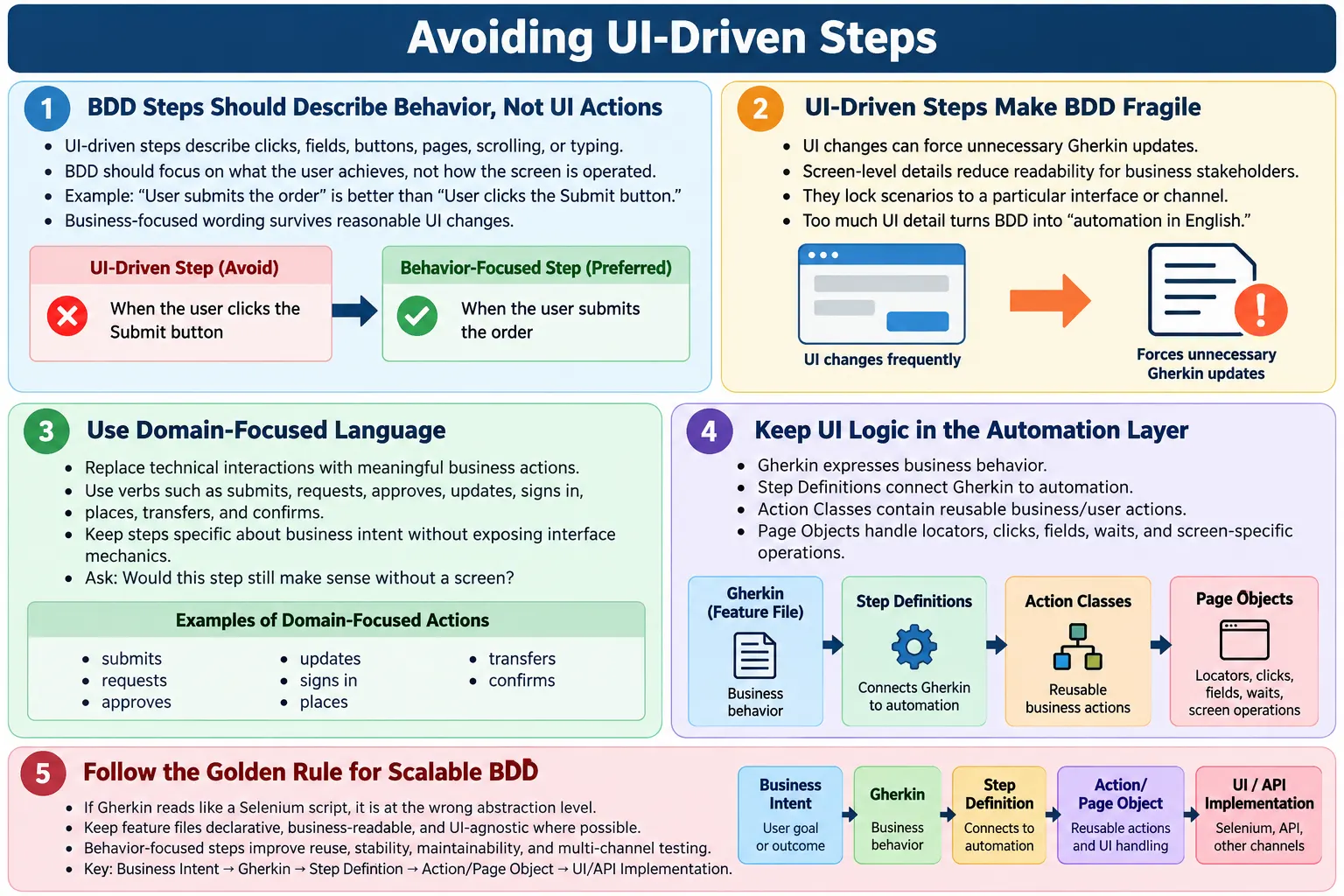
A UI-driven step often looks useful at first because it feels concrete. Everyone can picture a user clicking a login button or typing a password. The problem is that these steps describe implementation details rather than business intent. If a login page changes from a button to a single sign-on link, the business behavior may remain the same, but the UI-driven Gherkin becomes outdated. A behavior-focused step, on the other hand, can remain valid because it describes the outcome: the user signs in.
For example, the following scenario is written in a UI-driven style:
Given the user clicks the Login button
When the user enters username and password
Then the dashboard page is displayed
This scenario describes the visible interaction path, but it does not express the business behavior clearly. It tells the reader which controls are used, but not what capability is being validated. A better version would say that a registered user signs in successfully and is granted access to the dashboard. That wording is closer to the business rule and less dependent on a specific page design.
UI-driven steps are common when teams convert manual test cases directly into Gherkin. Manual test cases often need detailed instructions for a human tester. BDD scenarios need a different style. They should capture shared understanding between business, development, and testing. The automation code can still click, type, wait, and verify UI elements, but those mechanics should live below the Gherkin layer.
Why the Wording Changes the Purpose of the Scenario
The wording of a step influences how the team thinks about the scenario. If the step says "click the Login button", the discussion tends to move toward the screen, button label, locator, and page behavior. If the step says "signs in with valid credentials", the discussion moves toward the authentication rule, valid user state, expected access, and business outcome. Both versions may execute similar automation, but they create very different conversations.
This is why UI-driven wording is more than a cosmetic issue. It changes the ownership of the scenario. Business stakeholders can own behavior-focused language because it describes product capability. Automation engineers mostly own UI-driven language because it describes implementation. Good BDD should keep the shared language close to the product domain.
2. Why UI-Driven Steps Are a Problem
UI-driven steps create several long-term problems in BDD projects. The first problem is fragility. User interfaces change frequently. Labels are renamed, buttons move, forms are redesigned, navigation patterns change, and component libraries evolve. If the feature file mentions those UI details directly, every design change creates churn in the Gherkin. The scenarios become tightly coupled to the screen instead of the behavior.
The second problem is readability. Business users, product owners, and business analysts do not usually care about every click and field. They care about outcomes such as placing an order, approving a loan, resetting a password, generating a report, or rejecting an invalid transaction. When feature files are filled with UI actions, they become less useful during requirement discussions. The business must read through interface mechanics to understand the actual rule.
The third problem is that UI-driven steps lock scenarios to one channel. A behavior such as placing an order may be available through a website, mobile app, API, or back-office system. If the scenario says "When the user clicks the Checkout button", it assumes a web UI. If the scenario says "When the user places the order", the same behavior can be automated through UI, API, or another channel. This makes the scenario more reusable and future-proof.
UI-driven steps also increase maintenance cost. Step libraries grow with near-duplicate phrases like "clicks submit", "clicks continue", "clicks next", and "clicks save." These steps provide little domain value and often map to different UI implementations. As the suite grows, the team spends more time maintaining low-level wording than improving behavior coverage.
Most importantly, UI-driven steps turn BDD into "automation in English." The feature file becomes a Selenium script written with Given, When, and Then. This defeats one of the main purposes of BDD: creating a common language for behavior. A BDD scenario should survive reasonable UI redesigns because the business behavior should remain stable even when screens change.
- UI-driven steps break easily when the interface changes.
- They are harder for business readers to understand.
- They lock scenarios to a specific screen or channel.
- They increase step definition and page object churn.
- They turn BDD into automation instructions instead of behavior documentation.
How UI-Driven Steps Damage Living Documentation
Living documentation is valuable only when it explains what the system is expected to do. A feature file full of UI actions does not age well as documentation because it reflects the screen design at a particular moment. After a redesign, the behavior may still be correct, but the document reads like an outdated set of instructions. This creates distrust. People stop reading feature files because they no longer represent the product clearly.
Behavior-focused scenarios age better. A scenario that says "the customer requests a refund for an eligible order" remains meaningful even if the refund action moves from a button to a menu, a support workflow, or a mobile app screen. The implementation may change, but the behavior remains stable. This stability is what makes living documentation useful across releases.
3. Core Rule to Avoid UI-Driven Steps
A simple rule helps identify UI-driven steps: if a step mentions a button, field, page, textbox, dropdown, click, scroll, hover, or browser action, it is probably UI-driven. This rule is not perfect, but it is practical. It gives reviewers a quick way to detect when Gherkin is slipping from business language into implementation detail.
For example, "When the user clicks the Submit button" is UI-driven because it talks about a button and a click. "When the user submits the order" is behavior-focused because it talks about the business action. The automation behind the step may still click a button, call an API, or submit a form, but the feature file does not need to expose that detail.
The same idea applies to page names. "Then the Confirmation page is displayed" is more UI-specific than "Then the order should be confirmed." The confirmation page may be redesigned, replaced by a modal, or supported by an email notification. The business behavior is order confirmation, not the existence of a page with a particular name.
This rule is especially helpful during code reviews. Instead of debating every step subjectively, the team can ask whether the wording describes intent or interaction. If it describes interaction, move that detail into the step definition, page object, action class, or helper method.
Practical Review Questions for Step Language
During review, it helps to ask a few direct questions. Is this step understandable to a product owner? Does it describe an outcome or only an interaction? Would the same step still make sense in a mobile app? Could the same behavior be executed through an API? If the answer points back to a specific screen control, the step probably needs to be rewritten.
These questions keep reviews objective. The discussion is no longer about personal writing preference. It becomes a question of whether the feature file is describing behavior at the right level. This is especially useful when a team has both manual testers and automation engineers contributing to feature files.
4. Behavior-Focused Alternative
The behavior-focused alternative is to replace UI actions with business intent. A behavior-focused step tells the reader what the user is trying to achieve or what the system should provide. It does not expose the exact interface operation used to achieve it. This keeps the scenario readable, stable, and useful across implementation changes.
Compare the following examples:
When the user clicks the Submit buttonWhen the user submits the orderThe first step is about the interface. The second step is about the behavior. The difference is small in wording but large in impact. The second step communicates intent, supports different implementations, and keeps the scenario useful even if the submit button becomes a checkout link or an automatic submission flow.
Behavior-focused steps also make scenarios easier to discuss. A product owner can review "When the user submits the order" and confirm whether the behavior is correct. They do not need to approve button names or page mechanics. Testers and developers can then decide the best way to automate the behavior behind the step.
This does not mean steps should become vague. A step such as "When the user does the process" is too vague. Good behavior-focused steps are specific about domain intent. They use language from the product: submits the order, logs in, chooses a payment method, requests a refund, approves the claim, updates the shipping address, or receives confirmation.
Balancing Intent and Specificity
A common concern is that behavior-focused steps may become too high-level. That can happen if the team removes too much detail. The goal is not to make every step generic. The goal is to include the details that affect the business rule while hiding details that are only about the interface. "When the user chooses an eligible payment method" is specific and useful. "When the user selects the Visa option from the payment dropdown" is usually too UI-specific unless the dropdown behavior itself is under test.
Good BDD language is precise without being mechanical. It should tell the reader what condition, action, and result matter. It should not require the reader to know the exact screen layout. This balance takes practice, but once a team agrees on domain vocabulary, scenarios become much easier to write and review.
5. Common UI-Driven Keywords to Avoid
Certain words often indicate that a step is UI-driven. Words such as click, tap, enter, type, scroll, hover, browser, page, button, field, textbox, dropdown, and link usually belong in implementation code rather than Gherkin. These words describe how the automation interacts with the UI. BDD should describe what behavior is being validated.
There are exceptions, but the team should treat these words as review signals. If a step says "select payment method", it may be acceptable if choosing a payment method is a business concept. If it says "select value from payment dropdown", it is clearly UI-driven. The context matters. The goal is not to ban normal language, but to avoid exposing interface mechanics.
- click or tap
- enter or type
- select or choose when used in a UI-control context
- navigate to page
- open browser
- scroll or hover
- field, textbox, button, dropdown, modal, or link
These words usually belong in step definitions, page objects, or action classes. The feature file should stay at the level of intent. This separation keeps Gherkin clean and prevents the domain language from being polluted by automation details.
6. Where UI Logic Should Go
UI logic does not disappear when you avoid UI-driven steps. It simply moves to the correct layer. The Gherkin step should express intent, while the automation implementation handles the clicks, typing, waits, locators, and validations needed to perform that intent. This is a key design principle in scalable Cucumber frameworks.
Page Objects are a common place for UI details. A page object can know where the username field is, which button submits the form, what locator identifies an error message, and how to wait for the page to become ready. The feature file does not need to know any of that. It can simply say the user signs in with valid credentials.
Action classes or service classes can sit above page objects and express reusable business actions. For example, an action class may provide a method called placeOrder(), which internally navigates through checkout, confirms payment, and waits for confirmation. Step definitions can call these actions without exposing UI mechanics to Gherkin.
Step definitions are the bridge between Gherkin and automation code. They translate behavior language into executable actions. A well-designed step definition is readable and thin. It should not contain large blocks of locator logic directly. Instead, it should delegate to page objects, domain actions, API helpers, or fixtures.
- Page Objects should contain locators and screen-specific operations.
- Action classes should contain reusable user or business actions.
- Step definitions should connect Gherkin intent to automation implementation.
- Gherkin should express the behavior, not the browser mechanics.
7. Example: Refactoring a UI-Driven Scenario
Refactoring UI-driven scenarios is easier when you separate business meaning from screen mechanics. Consider this UI-driven version:
Scenario: Place order
  Given the user clicks add to cart
  When the user clicks checkout
  Then the order confirmation page is shown
This scenario is short, but it is still UI-driven. It talks about clicks and a page. It also hides the business context. Does the user have valid payment details? Are items already in the cart? What behavior is actually being validated? The title says "Place order", but the steps describe interface actions.
A behavior-focused version is clearer:
Scenario: Successful order placement
  Given the user has items in the cart
  When the user places the order
  Then the order should be confirmed
This version describes the business outcome. It does not care whether the user clicks a checkout button, calls an API, confirms through a modal, or uses a mobile screen. The automation can still perform UI actions behind the scenes, but the feature file remains stable and meaningful.
Refactoring is not just a wording exercise. It changes how the team thinks about coverage. The first scenario focuses on pages and controls. The second focuses on order placement as a capability. This shift is what makes BDD valuable.
8. UI-Driven Steps vs Domain-Driven Steps
Domain-driven steps use the vocabulary of the product or business area. They describe actions and outcomes in terms that stakeholders use naturally. UI-driven steps use the vocabulary of screens and controls. Both styles can execute automation, but only domain-driven steps create strong living documentation.
| UI-Driven | Domain-Driven |
|---|---|
| Click login button | Logs in |
| Enter username | Provides credentials |
| Select dropdown | Chooses payment method |
| See page | Receives confirmation |
Domain-driven wording is not automatically better if it becomes vague. "Does transaction" is not useful. "Transfers funds between eligible accounts" is useful because it describes the business behavior precisely. Good domain-driven steps are specific, readable, and stable.
9. When UI-Driven Steps Are Rarely Acceptable
There are a few cases where UI-driven wording may be acceptable, but they should be treated as exceptions. If the behavior being tested is truly a UI behavior, such as keyboard focus order, drag-and-drop behavior, responsive menu expansion, or tooltip display, the UI may be part of the requirement. In those cases, mentioning the UI can be reasonable because the interface behavior itself is the subject under test.
UI-driven wording may also appear in exploratory documentation or low-level UI component tests. However, those are not the same as business-level BDD scenarios. It is better to keep such tests isolated so they do not dilute the main feature files. A component test can validate a dropdown component. A BDD scenario should validate that the user chooses a payment method or selects a delivery option.
Even when UI-driven steps are acceptable, keep them narrow and intentional. Do not let one exception become the default style. The team should be able to explain why the UI detail matters to the behavior being validated.
- Exploratory notes may describe UI interaction, but they are not ideal BDD scenarios.
- Low-level UI component testing may need interface-specific wording.
- When UI behavior is the actual requirement, UI wording can be acceptable.
- Keep these cases isolated from business-level feature files.
10. How to Detect UI Leakage
UI leakage happens when interface details slip into business scenarios. It may start small with one button name or page reference, but it often grows. Soon the feature file contains locators, page names, browser actions, and technical navigation. Detecting UI leakage early prevents feature files from becoming difficult to maintain.
A useful question is: would this step still make sense without a screen? If the answer is yes, the step is probably behavior-focused. "When the customer updates the billing address" makes sense even if the action is performed through web, mobile, API, or back-office tooling. "When the customer clicks the billing address edit icon" does not.
Another question is: could this scenario be executed through an API? Not every scenario should be automated through an API, but if the behavior can be described independently of the UI, the wording is probably at the right level. This is a strong sign that the scenario captures business intent.
Finally, ask whether the business cares how the action is done. The business cares that an order is submitted, a payment is approved, a refund is requested, or a report is generated. It usually does not care which button was clicked unless the UI behavior itself is the requirement.
- Would this step still make sense without a screen?
- Could this scenario be executed via API or another channel?
- Does the business care how this is done?
- If the answer is no, rewrite the step at the behavior level.
11. Automation Benefits of Avoiding UI-Driven Steps
Avoiding UI-driven steps has major automation benefits. Behavior-focused steps can be reused across UI, API, mobile, and service-level automation. The same Gherkin phrase can remain stable while the implementation changes underneath. This allows teams to improve automation architecture without rewriting feature files constantly.
Behavior-focused steps also reduce step churn. When a button label changes, the feature file does not need to change if the business action remains the same. Only the page object or action method may need an update. This lowers maintenance cost and keeps reviews focused on behavior changes instead of UI wording changes.
Test stability improves because the team can choose the most reliable way to prepare state and execute behavior. Some steps can use APIs for setup, databases for fixtures, UI actions for user-visible behavior, or service calls for verification. The feature file remains clean because it does not prescribe the technical route.
Multi-channel testing also becomes easier. A scenario that says "When the user submits the order" can be implemented for web, mobile, or API contexts. A scenario that says "When the user clicks the checkout button" is locked to a screen. Behavior-focused language gives the framework more flexibility.
- Enable reuse across UI and API layers.
- Reduce feature file churn when the UI changes.
- Improve test stability by allowing better implementation choices.
- Support multi-channel testing across web, mobile, and APIs.
12. Common Mistakes
The most common mistake is converting manual test steps directly to Gherkin. Manual test cases often say things like "Click Login", "Enter username", "Enter password", and "Click Submit." If these steps are copied into a feature file, the result is not true BDD. It is a manual script written in Gherkin syntax.
Another mistake is over-splitting UI actions into many steps. A scenario with ten tiny UI actions may appear detailed, but it is often less readable. The reader has to reconstruct the business behavior from a list of mechanics. A better approach is to combine related UI actions into one intent-based step.
Encoding page names in steps is also risky. Page names change as products evolve. A confirmation may become a modal, a dashboard may become a workspace, and a checkout page may become a checkout flow. If the scenario is written around business outcomes, these design changes do not force unnecessary Gherkin rewrites.
Writing automation-first scenarios is another issue. Automation engineers may naturally think in terms of locators, waits, pages, and actions. That knowledge is valuable, but it belongs in the implementation layer. The feature file should be written for shared understanding first and automation second.
- Converting manual test steps directly to Gherkin.
- Over-splitting UI actions into many steps.
- Encoding page names and control names in scenarios.
- Writing automation-first scenarios instead of behavior-first scenarios.
13. Best Practices
The best practice is to use verbs that express intent. Instead of "clicks", use domain actions such as submits, requests, approves, rejects, updates, cancels, signs in, places, transfers, confirms, or chooses. These verbs describe behavior rather than mechanics. They also make scenario titles and reports more meaningful.
Hide UI details in implementation. Page Objects, action classes, and step definitions should handle locators, waits, clicks, field entry, browser navigation, and screen verification. The Gherkin layer should remain declarative. It should tell the automation what behavior to perform, not how to perform every low-level action.
Keep steps short and declarative. A step should not become a long sentence that includes several actions. If the step contains many clauses joined by "and then", it may be hiding multiple behaviors. Good steps are focused, readable, and aligned with the scenario title.
Review steps with business analysts or product owners. If they cannot understand the scenario or if they do not care about the details mentioned, the wording probably needs improvement. BDD works best when feature files can be reviewed by people outside the automation team.
Refactor UI-driven steps regularly. Feature files should evolve like production code. If old scenarios contain UI-heavy wording, clean them up when related work is touched. Over time, this reduces duplication and improves the shared language of the project.
- Use verbs that express domain intent.
- Hide UI details in step definitions and page objects.
- Keep steps short, declarative, and business-readable.
- Review wording with BA, PO, developers, and testers.
- Refactor UI-driven steps regularly as the product evolves.
14. Refactoring Pattern for Existing Feature Files
Many teams already have feature files with UI-driven steps. Refactoring them requires a practical process. Start by scanning for UI words such as click, enter, page, button, field, dropdown, and browser. These words identify candidates for review. Then group related UI actions and ask what business behavior they represent.
Next, rewrite the scenario using business intent. Do not worry first about whether the existing step definitions still match. The goal is to improve the language. After the scenario reads correctly, update or create step definitions that call the existing automation code. In many cases, the old page object methods can still be reused under the new behavior-focused step.
Finally, remove duplicate low-level steps where possible. If many scenarios use slightly different click or type steps, they can often be replaced by fewer domain steps. This makes the step library smaller and easier to maintain. A smaller step library with stronger domain language is usually better than a large library of generic UI actions.
15. Interview-Ready Summary
In interviews, avoiding UI-driven steps is a strong topic because it shows that you understand BDD beyond syntax. A good answer should explain that UI-driven steps describe how the user interacts with the screen, while BDD scenarios should describe what behavior the system provides. UI-driven steps reduce readability, increase maintenance, and make scenarios fragile when the UI changes.
You can say that UI logic belongs in step definitions, page objects, and action classes. Gherkin should express intent only. For example, instead of writing "When the user clicks the Submit button", write "When the user submits the order." This makes the scenario business-readable and allows the implementation to change without rewriting the feature file.
- UI-driven steps describe how, not what.
- They reduce readability and maintainability.
- BDD scenarios should be UI-agnostic where possible.
- UI logic belongs in step definitions and page objects.
- Avoiding UI-driven steps is critical for scalable BDD frameworks.
16. Golden Rule
The golden rule is simple: if your Gherkin looks like a Selenium script, it is wrong. Gherkin should not read like a list of clicks, fields, waits, and pages. It should read like a clear description of business behavior. The automation underneath may use Selenium, APIs, databases, fixtures, waits, and page objects, but the feature file should remain focused on intent.
When reviewing a scenario, ask what a business stakeholder would learn from it. If the answer is only that a user clicked a button or entered text, the scenario needs rewriting. If the answer is that a user placed an order, received confirmation, signed in, transferred funds, or was prevented from performing an invalid action, the scenario is much closer to proper BDD.
Avoiding UI-driven steps is not just about prettier language. It improves collaboration, reduces maintenance, supports better automation architecture, and keeps feature files valuable as living documentation. Teams that master this habit build BDD suites that remain useful even as the interface evolves.