Why CSS Is Critical for Modern Web Applications
Introduction
In the early days of the web, websites were primarily collections of text and hyperlinks. Their main purpose was to present information, and visual appearance was often an afterthought. As the internet evolved, user expectations changed dramatically. Modern users expect websites and applications to be visually appealing, responsive across devices, interactive, accessible, and fast. Meeting these expectations would be nearly impossible using HTML alone.
This is where Cascading Style Sheets (CSS) becomes essential. CSS is the technology responsible for transforming raw HTML structure into visually engaging and user-friendly interfaces. It controls colors, typography, layouts, spacing, responsiveness, animations, and much more. Today, CSS is not merely a styling tool—it is a core component of frontend engineering and plays a significant role in user experience, performance, accessibility, branding, and application success. The importance of CSS in modern web applications cannot be overstated.
Understanding why CSS is critical helps developers, testers, designers, and software engineers appreciate its role in building professional, scalable, and maintainable web applications.
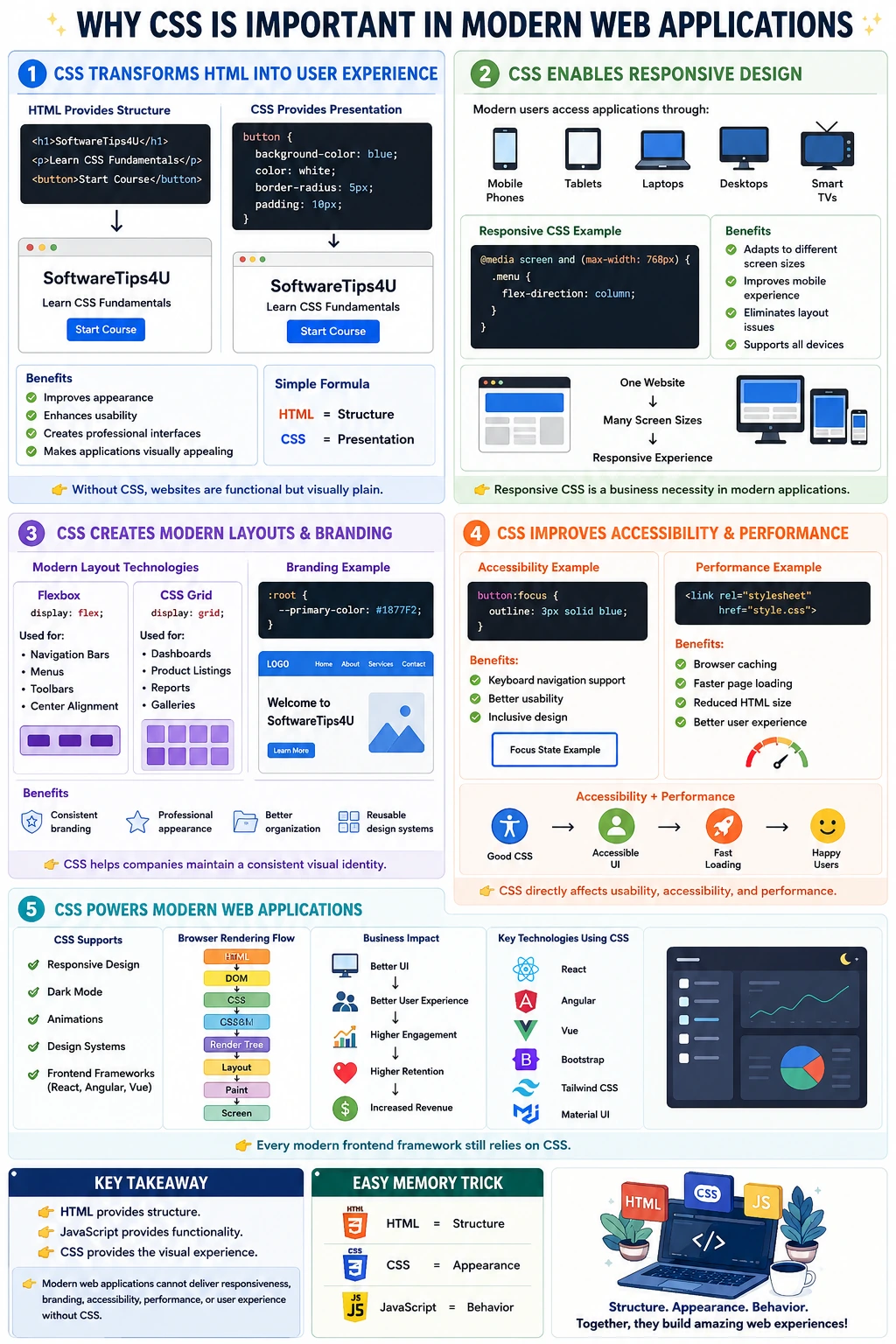
The Evolution of CSS in Modern Web Development
When HTML was first introduced, developers often mixed content and presentation together. Tags such as <font>, <center>, and various styling attributes were used directly within HTML documents. This approach quickly became difficult to maintain as websites grew larger.
CSS was introduced to solve this problem by separating presentation from structure. HTML became responsible for defining content and meaning, while CSS became responsible for visual appearance. This separation improved maintainability, reduced duplication, and enabled consistent styling across entire websites.
Over time, CSS evolved significantly. Modern CSS includes powerful features such as:
- Flexbox
- CSS Grid
- Custom Properties (Variables)
- Media Queries
- Animations
- Transitions
- Container Queries
- Advanced Selectors
These features transformed CSS from a simple styling language into a sophisticated system capable of powering complex user interfaces.
Today, every major web application relies heavily on CSS for presentation and user interaction.
CSS Transforms Structure into User Experience
At its core, HTML provides structure while CSS provides experience.
Consider a simple HTML page:
<h1>SoftwareTips4U</h1>

<p>Learn CSS Fundamentals</p>

<button>Start Course</button>
Without CSS, this content appears as plain text and a basic button. The functionality exists, but the visual appeal is minimal.
When CSS is applied:
button {
    background-color: blue;
    color: white;
    border-radius: 5px;
    padding: 10px;
}
The same button becomes visually attractive, easier to identify, and more pleasant to interact with.
This illustrates one of CSS's most important roles: transforming functionality into usability.
Users judge applications largely based on their visual appearance and ease of use. Even if an application has excellent backend functionality, poor presentation can create the impression that the application itself is unreliable or outdated.
CSS Creates Professional User Interfaces
Modern web applications require sophisticated user interfaces that guide users through tasks efficiently.
A professional user interface requires:
- Consistent colors
- Appropriate typography
- Proper spacing
- Visual hierarchy
- Interactive feedback
- Alignment and positioning
CSS enables all of these.
For example, typography alone significantly influences usability:
body {
    font-family: Arial, sans-serif;
    line-height: 1.6;
}
Proper typography improves readability and reduces user fatigue.
Similarly, spacing improves clarity:
.card {
    padding: 20px;
    margin: 10px;
}
Without spacing, interfaces feel cluttered and confusing.
Through colors, fonts, alignment, and spacing, CSS transforms raw content into professional products that users trust and enjoy using.
CSS Powers Responsive Design
One of the most important requirements of modern applications is responsiveness.
Users access applications through:
- Smartphones
- Tablets
- Laptops
- Desktop monitors
- Smart TVs
A website that looks perfect on a desktop but breaks on a mobile phone creates a poor user experience.
CSS solves this challenge through responsive design techniques.
Media queries allow layouts to adapt dynamically:
@media screen and (max-width: 768px) {
    .menu {
        flex-direction: column;
    }
}
This enables applications to adjust automatically based on screen size.
Without CSS responsiveness:
- Horizontal scrolling appears
- Content becomes unreadable
- Navigation becomes difficult
- User frustration increases
With responsive CSS:
- Content remains accessible
- Layouts adapt seamlessly
- Mobile users receive optimized experiences
Given that mobile traffic often exceeds desktop traffic, responsive CSS has become a business necessity rather than an optional enhancement.
CSS Improves User Experience (UX)
User Experience (UX) is one of the most important factors determining whether users continue using an application.
CSS contributes directly to UX through several mechanisms.
Readability
Well-structured typography improves comprehension:
body {
    line-height: 1.8;
}
Visual Hierarchy
CSS helps users identify important information quickly:
h1 {
    font-size: 40px;
}
Interactive Feedback
Users expect feedback when interacting with applications:
button:hover {
    background-color: darkblue;
}
Such visual cues confirm that actions are being recognized.
Consistency
Consistent design patterns reduce learning effort and improve confidence.
Without CSS, applications would provide functionality but little guidance, making them significantly harder to use effectively.
CSS Enables Modern Layout Systems
Modern applications rarely consist of simple text pages.
Typical applications include:
- Dashboards
- Product catalogs
- Admin panels
- Navigation menus
- Analytics reports
- Complex forms
These layouts require sophisticated positioning systems.
Flexbox
Flexbox simplifies alignment and distribution:
display: flex;Common use cases include:
- Navigation bars
- Toolbars
- Menus
- Centered content
CSS Grid
Grid provides two-dimensional layouts:
display: grid;Common use cases include:
- Product listings
- Dashboards
- Gallery layouts
- Reporting interfaces
Without CSS layout systems, developers would struggle to create modern user interfaces efficiently.
CSS Supports Branding and Identity
Brand identity is critical for organizations.
When users visit websites such as:
- Netflix
- Amazon
they instantly recognize the brand through visual design.
CSS enables branding through:
- Colors
- Typography
- Layout patterns
- Design systems
For example:
:root {
    --primary-color: #1877F2;
}
Using CSS variables allows organizations to maintain consistent branding throughout large applications.
Strong branding creates:
- Recognition
- Trust
- Professionalism
- Customer loyalty
Without CSS, maintaining a consistent brand experience would be extremely difficult.
CSS Improves Accessibility
Accessibility ensures that applications are usable by people with disabilities.
Modern applications must support users with:
- Visual impairments
- Mobility limitations
- Cognitive challenges
CSS plays a major role in accessibility.
For example:
button:focus {
    outline: 3px solid blue;
}
This helps keyboard users identify their current focus location.
High-contrast color schemes improve readability:
color: black;
background: white;
Proper spacing and font sizing improve comprehension for many users.
Accessibility is not merely a compliance requirement—it is a usability requirement. CSS helps ensure applications are inclusive and accessible to everyone.
CSS Contributes to Performance Optimization
Many developers focus on JavaScript performance while overlooking CSS performance.
However, CSS directly affects:
- Rendering speed
- Layout calculations
- Paint operations
- User perception
External stylesheets provide several advantages:
<link rel="stylesheet" href="style.css">Benefits include:
- Browser caching
- Reduced HTML size
- Faster repeat visits
Well-structured CSS minimizes rendering complexity and improves application responsiveness.
Performance is increasingly important because users expect pages to load almost instantly. Slow applications lead to abandonment and reduced engagement.
CSS Enables Reusable Design Systems
Large-scale applications may contain thousands of UI components.
Without reusable styling, maintenance becomes difficult.
CSS enables reusable design systems:
.btn-primary {
    background: blue;
    color: white;
}
The same style can be applied across the application:
<button class="btn-primary">Login</button>

<button class="btn-primary">Register</button>
Benefits include:
- Consistency
- Reduced duplication
- Faster development
- Easier maintenance
Modern enterprises invest heavily in design systems because they improve productivity and reduce visual inconsistencies.
CSS Supports Dark Mode and Theme Switching
Dark mode has become a standard feature in modern applications.
CSS enables automatic theme adaptation:
@media (prefers-color-scheme: dark) {
    body {
        background: black;
        color: white;
    }
}
Benefits include:
- Reduced eye strain
- Improved battery efficiency
- Enhanced user preference support
Modern users increasingly expect theme customization, making CSS essential for delivering flexible user experiences.
CSS Creates Animations and Visual Interactions
Modern applications rely heavily on motion and transitions.
Examples include:
- Button hover effects
- Loading indicators
- Menu transitions
- Notification animations
Simple transitions can significantly improve user experience:
button {
    transition: 0.3s;
}
Animations provide:
- Better feedback
- Enhanced usability
- Increased engagement
- Professional polish
Without CSS animations, applications often feel static and outdated.
CSS and Modern Frontend Frameworks
A common misconception is that frameworks eliminate the need for CSS.
Frameworks such as:
- React
- Angular
- Vue
still rely on CSS for presentation.
Even component libraries like:
- Bootstrap
- Tailwind CSS
- Material UI
- Chakra UI
are fundamentally CSS-driven systems.
Frameworks improve development workflows, but CSS remains the underlying technology responsible for visual rendering.
No modern frontend framework replaces CSS completely.
CSS and Browser Rendering
CSS is deeply integrated into the browser rendering process.
The rendering pipeline typically follows this sequence:
HTML
 ↓
DOM
 ↓
CSS
 ↓
CSSOM
 ↓
Render Tree
 ↓
Layout
 ↓
Paint
 ↓
Screen
CSS directly influences:
- Element positioning
- Rendering calculations
- Paint operations
- Visual appearance
Poor CSS can increase rendering costs, while optimized CSS improves overall performance.
Understanding this relationship is crucial for frontend developers, performance engineers, and automation testers.
CSS and Test Automation
For QA engineers and automation testers, CSS has special importance.
Automation tools such as:
- Selenium
- Playwright
- Cypress
interact directly with HTML and CSS-rendered elements.
Good CSS practices improve:
- Locator stability
- Element visibility
- Automation reliability
Poor CSS practices can lead to:
- Dynamic DOM issues
- Flaky tests
- Synchronization problems
Modern test automation frameworks often rely on CSS selectors as one of the primary locator strategies.
Thus, CSS affects not only users but also software quality processes.
Business Impact of CSS
Organizations invest heavily in frontend quality because visual experience directly influences business outcomes.
The relationship is straightforward:
Better UI
      ↓
Better User Experience
      ↓
Higher Engagement
      ↓
Higher Retention
      ↓
Increased Revenue
Poor CSS can result in:
- Broken layouts
- Accessibility violations
- Reduced conversions
- Negative user perception
Good CSS contributes directly to customer satisfaction and business success.
CSS Communicates Product State
Modern applications are stateful interfaces. A user needs to know whether data is loading, an action succeeded, a field is invalid, a control is disabled, a record is selected, or a service is unavailable. HTML and JavaScript establish those states, but CSS makes them immediately perceivable through layout, emphasis, color, icons, visibility, and motion.
State styling must be systematic. A loading button should remain stable in size, prevent accidental duplicate actions, and provide visible feedback. An error needs sufficient contrast and a relationship to the affected field. A selected navigation item should be distinguishable without color alone. Consistent visual language reduces uncertainty and support effort.
This role is especially important in asynchronous applications where a request may take time or complete in stages. Without clear CSS states, users may repeat actions, abandon a workflow, or believe stale data is current even when the underlying logic is correct.
CSS Makes Complex Forms Usable
Forms are central to banking, healthcare, commerce, administration, and account management. CSS organizes labels, controls, instructions, groups, validation messages, and actions into a sequence users can understand. Spacing and hierarchy reveal which fields belong together and which action is primary.
Responsive CSS keeps forms usable on narrow screens without shrinking controls below practical touch sizes. Focus styling supports keyboard users, while error and success styles communicate the result of validation. Long labels, translated content, password guidance, and server errors require flexible sizing rather than fixed-height designs.
Native HTML supplies semantics and behavior, but unstyled browser controls rarely deliver a coherent product experience. CSS can align them with a design system while preserving recognizability, keyboard behavior, and platform expectations.
CSS Supports Data-Dense Applications
Dashboards, reporting tools, CRM systems, monitoring consoles, and administrative products display large amounts of information. CSS controls table layout, density, hierarchy, sticky regions, wrapping, overflow, status badges, filters, and responsive alternatives. Good styling helps users scan and compare data without turning every value into a separate decorative card.
Data density requires balance. Excessive whitespace makes comparison slow, while cramped rows reduce readability and target size. CSS can provide density modes, stable columns, visible focus, truncated text with accessible access to the full value, and horizontal scrolling when preserving relationships matters more than stacking cells.
These interfaces demonstrate that CSS is not only about visual attractiveness. It supports repeated professional work by reducing eye movement, preserving alignment, and keeping tools predictable as data changes.
CSS Enables Component-Based Architecture
Modern applications are assembled from components such as buttons, fields, menus, dialogs, cards, tables, alerts, and navigation. CSS defines the internal visual contract of those components and how they respond to states, themes, content, and available space.
A component should own its internal presentation while its container controls external placement. This boundary makes it possible to reuse a search field in a header, panel, or dialog without rewriting its rules. Container queries, flexible layout, and intrinsic sizing improve this independence by allowing the component to respond to local space.
Component styling may use classes, CSS Modules, scoped styles, utilities, CSS-in-JS, or shadow DOM. The implementation differs, but the browser still relies on CSS concepts such as the cascade, inheritance, box model, and layout. Framework knowledge cannot replace that foundation.
CSS Protects Layouts from Real Content
Production content is less predictable than design samples. Names can be long, translations can expand labels, errors can occupy several lines, images may have different dimensions, and optional data may be missing. CSS constraints determine whether the interface adapts or breaks.
Wrapping, minimum and maximum sizes, Grid tracks, Flexbox shrink behavior, overflow, aspect ratio, and object fitting are resilience tools. Fixed widths and heights may create a polished screenshot but clip content under zoom or localization. A strong layout treats content as variable input.
Testing CSS with realistic and extreme content prevents problems that appear only after release. This includes empty states, slow-loading media, large numeric values, validation messages, user-generated text, and permissions that add or remove controls.
CSS Supports Internationalization
Global applications need layouts that work across languages, writing directions, character sets, and font metrics. CSS logical properties describe inline and block relationships without assuming that every interface reads from left to right. Flexible sizing allows labels and navigation to expand.
Right-to-left presentation may require direction-aware spacing, alignment, and icons. Font fallbacks need glyph coverage and readable line height. Line breaking differs across scripts, and a fixed English-oriented component may fail when translated.
Pseudo-localization and real translation testing reveal these issues early. CSS makes one semantic application capable of adapting across markets without duplicating the entire interface for each language.
CSS Provides Cross-Browser and Cross-Device Consistency
Users interact through different browsers, operating systems, input methods, screen densities, and device capabilities. Browser defaults vary, particularly for forms, fonts, scrolling, and focus presentation. CSS establishes a controlled baseline while respecting useful platform behavior.
Progressive enhancement lets teams deliver a dependable core and add newer visual capabilities when supported. Feature queries, fallbacks, and compatibility-aware build tools help manage adoption without freezing the application at the oldest browser feature set.
Consistency does not require pixel-identical rendering everywhere. It requires equivalent usability, hierarchy, branding, and interaction. CSS testing should focus on the supported environments and critical workflows rather than spending effort on harmless platform differences.
CSS Reduces the Need for Presentation JavaScript
Modern CSS can solve many tasks that once required script: responsive layout, equal-height regions, alignment, sticky positioning, aspect ratios, theme variables, state selectors, animation, and component adaptation. Using CSS for these concerns usually means less code, automatic response to content and resizing, and better integration with the rendering engine.
JavaScript remains essential for application logic, asynchronous work, and dynamic state. The goal is not to eliminate it, but to assign responsibilities appropriately. JavaScript can update a semantic attribute or state class, and CSS can determine how that state appears.
This separation simplifies testing and maintenance. A visual redesign can change CSS without rewriting business logic, while logic tests can run without depending on pixel values or manual layout calculations.
CSS and Visual Stability
Content that shifts unexpectedly during loading creates frustration and can cause users to activate the wrong control. CSS can reserve space for images, advertisements, videos, charts, and asynchronous regions through dimensions, aspect ratios, grid tracks, and minimum sizes.
Font loading and late style changes can also move content. Thoughtful fallback fonts, loading strategy, and stable line metrics reduce disruption. Skeleton interfaces should match the approximate geometry of the final content rather than collapse when data arrives.
Visual stability is both a performance concern and a usability concern. It demonstrates how CSS decisions directly influence whether an application feels dependable.
CSS Maintains Product Quality at Scale
As teams and features grow, duplicated declarations and one-off components create inconsistency. Shared tokens, naming conventions, component ownership, cascade layers, linting, and documentation make visual decisions repeatable. Developers can implement new screens faster because foundational choices are already available.
Scale also requires deletion. Unused selectors, abandoned variants, old browser workarounds, and specificity overrides make every change riskier. Visual regression tests and component examples help teams remove obsolete code with confidence.
A healthy CSS system is not measured only by file size. Predictable ownership, understandable selectors, limited coupling, easy theming, resilient content behavior, and safe modification are stronger indicators of maintainability.
CSS Quality Requires Dedicated Testing
Functional tests alone cannot prove that a page is usable. CSS testing should cover representative viewport and container sizes, browser zoom, keyboard focus, contrast, themes, long content, localization, loading, errors, empty states, and supported browsers. Visual regression can detect unexpected changes, while accessibility tools catch selected contrast and structural problems.
Manual review remains important because screenshots may not reveal reading order, keyboard operation, motion sensitivity, or dynamic overlap. Device testing can expose mobile keyboard and viewport behavior that desktop emulation misses.
Automation locators should not depend unnecessarily on visual classes. Stable semantics, roles, labels, and dedicated test attributes keep behavior tests independent from routine restyling while CSS-focused checks validate appearance and layout separately.
CSS Has Direct Business Value
A clear interface helps users find information, complete forms, understand prices, trust a payment flow, and recover from errors. Responsive and accessible presentation expands the number of people who can use the product. Consistent branding and state feedback improve credibility.
Poor CSS can block revenue even when backend logic is correct. A hidden checkout button, clipped validation message, unreadable contrast, shifting advertisement, or unusable mobile menu prevents task completion. These are product defects with measurable consequences, not cosmetic preferences.
Investing in CSS architecture, testing, and design systems therefore supports conversion, retention, operational efficiency, and development speed. The visual layer is the part of most web products that customers experience continuously.
Real-World Example: Online Banking
An online banking application depends on CSS to communicate trust and state. Typography and spacing make account balances and transaction details easy to scan. Responsive layout keeps transfers usable on phones and desktops. Focus and error styles support accessible completion of sensitive forms.
CSS distinguishes pending, completed, and failed transactions without relying only on color. It reserves space for authentication messages, prevents actions from shifting while requests run, and presents disabled or loading states during submission. A design system keeps the experience consistent across accounts, cards, payments, and support.
The banking logic may live in services and JavaScript behavior, but CSS determines whether users can understand and operate that logic safely. This is why frontend presentation belongs in quality and risk discussions.
Practical CSS Quality Checklist
- Use semantic HTML and let CSS enhance rather than replace meaning.
- Design layouts for variable content, zoom, narrow containers, and localization.
- Provide visible, consistent focus, validation, loading, success, and error states.
- Use Flexbox, Grid, intrinsic sizing, and responsive constraints appropriately.
- Maintain accessible contrast, readable typography, target size, and reduced motion.
- Reserve space for media and dynamic regions to protect visual stability.
- Reuse design tokens and components while keeping ownership boundaries clear.
- Test supported browsers, input methods, themes, and realistic content.
- Measure rendering and delivery performance with browser tools.
- Remove obsolete styles and avoid escalating specificity through emergency overrides.
The Future Importance of CSS
CSS continues to gain capabilities for component responsiveness, selection, cascade control, color, typography, and layout. These features reduce the need for procedural presentation code and let browsers adapt interfaces to contexts developers cannot predict exactly.
As web applications become more distributed and JavaScript-heavy, the need for a dependable presentation system increases rather than decreases. More dynamic states, reusable components, embedded experiences, and user preferences create more conditions that CSS must express clearly.
The durable skill is not memorizing every property. It is understanding the cascade, layout, content resilience, accessibility, performance, and architecture well enough to evaluate new capabilities and apply them responsibly.
CSS Across the Product Delivery Lifecycle
CSS decisions begin during product discovery and design, not after development. Early prototypes should identify hierarchy, responsive behavior, states, themes, and content constraints. Designers and developers need agreement on tokens, component reuse, accessibility expectations, and what happens when data is missing, loading, invalid, or unusually long.
During implementation, semantic structure and component boundaries should be reviewed together with styling. Developers can build mobile-first constraints, complete interaction states, and realistic examples before integrating every backend response. Component previews and representative fixtures make visual decisions reviewable without waiting for an entire workflow.
Code review should examine more than whether the screenshot matches. Reviewers should inspect selector scope, cascade behavior, duplicated values, fixed dimensions, overflow, focus, contrast, motion, browser support, and whether JavaScript is being used for a presentation problem CSS already solves. Shared rules need additional care because a global change may affect many pages.
QA validates responsive behavior across meaningful widths, browser zoom, supported platforms, keyboard operation, themes, realistic data, and dynamic states. Automated accessibility and visual checks provide fast feedback, while manual exploration identifies clipping, confusing hierarchy, device behavior, and interaction problems that tools may miss.
In CI/CD, teams can lint CSS, build production assets, run component and accessibility checks, and compare visual snapshots. Performance budgets can monitor stylesheet growth, fonts, and rendering regressions. These gates should remain focused enough to produce actionable results rather than blocking delivery with noisy differences.
After release, analytics, support reports, monitoring, and user feedback reveal conditions not represented in test data. A high abandonment rate on a mobile form, repeated zoom complaints, or layout shift on a slow connection may point to presentation defects. Production learning should feed back into component examples and regression coverage.
This lifecycle view explains why CSS is critical: it participates in requirements, architecture, implementation, quality, delivery, and maintenance. Treating it as last-minute decoration delays important decisions and increases the cost of correcting structural mistakes.
Choosing CSS Solutions Responsibly
Modern CSS offers several ways to solve the same visual problem. A responsible choice begins with the content and interaction requirement. Use normal flow when it works, Flexbox for one-dimensional alignment, Grid for two-dimensional relationships, and positioning for intentional overlays or anchored elements. Prefer constraints that adapt over coordinates tied to one screenshot.
Adopt frameworks and component libraries when their conventions, accessibility, browser support, and maintenance model fit the product. A library can accelerate delivery, but unused features, difficult overrides, or inaccessible defaults can create long-term cost. Teams should understand the generated CSS and define how customization occurs.
Use new platform features according to supported browsers and risk. Progressive enhancement can provide a baseline and add improved behavior when available. The best solution is not automatically the newest or shortest; it is the one that expresses the requirement clearly, performs acceptably, remains accessible, and can be maintained by the team.
Conclusion
CSS has evolved far beyond simple styling. It serves as the foundation of modern user experience and plays a critical role in responsiveness, accessibility, branding, performance, maintainability, and frontend architecture. While HTML provides structure and JavaScript provides behavior, CSS provides the visual and interactive layer that users experience every moment they interact with an application.
Modern websites and applications depend on CSS for professional interfaces, adaptive layouts, reusable design systems, accessibility compliance, performance optimization, animations, and cross-device consistency. Whether building an e-commerce platform, enterprise dashboard, banking application, social media platform, or educational portal, CSS remains an indispensable technology.
Understanding CSS deeply is not optional for modern web professionals. Developers need it to build interfaces, testers need it to understand DOM behavior and locators, designers rely on it to implement visual systems, and businesses depend on it to create engaging user experiences. In practical terms, HTML provides the structure, JavaScript provides the functionality, and CSS provides the experience that makes modern web applications usable, attractive, and successful.