CSS vs HTML vs JavaScript (Separation of Concerns)
Modern web development is built on three foundational technologies: HTML, CSS, and JavaScript. These technologies work together to create the websites and applications users interact with every day, from simple landing pages to large-scale enterprise systems and highly dynamic web platforms. Although they collaborate closely, each technology has a distinct responsibility and purpose. Understanding the difference between them is one of the most important concepts in frontend engineering and software architecture.
At the heart of this distinction lies a critical engineering principle known as Separation of Concerns (SoC). This principle ensures that different parts of an application are responsible for different tasks. In web development:
- HTML handles structure and content
- CSS handles presentation and styling
- JavaScript handles behavior and interactivity
This separation creates cleaner architecture, easier maintenance, improved scalability, and better collaboration across development teams. Modern frontend engineering depends heavily on this principle because large applications become difficult to maintain when structure, styling, and logic are mixed together.
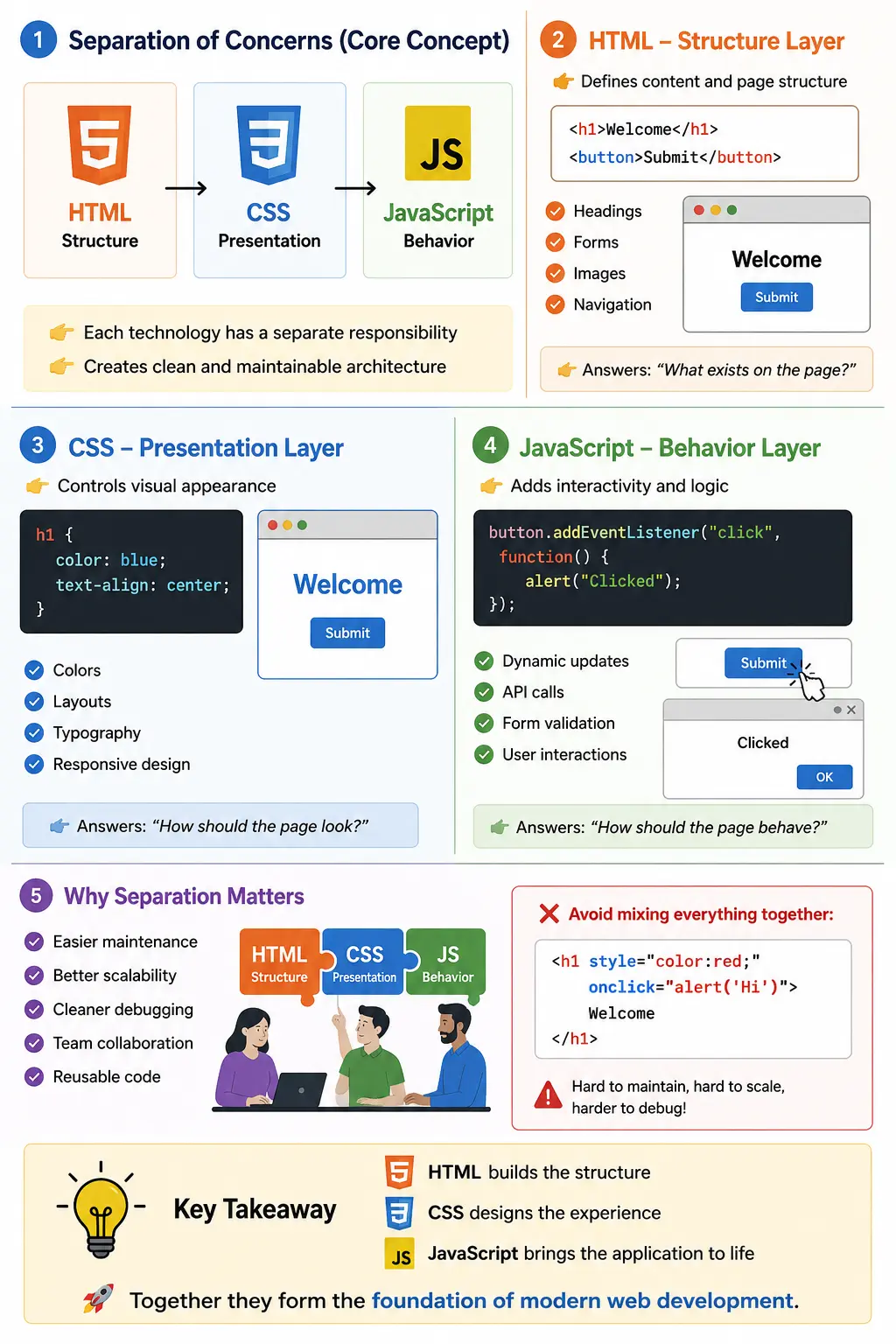
Understanding Separation of Concerns
Separation of Concerns means dividing a system into independent sections where each section focuses on one responsibility. Instead of placing content, styling, and logic in the same location, modern applications isolate them into specialized layers.
This architectural approach improves:
- Maintainability
- Reusability
- Scalability
- Readability
- Debugging efficiency
Without separation of concerns, applications quickly become chaotic and difficult to maintain. Imagine trying to debug a large application where HTML, CSS, and JavaScript are all mixed inside single files with no organization. Even small UI changes could become risky and time-consuming.
A useful analogy is building a car:
| Car Component | Web Equivalent |
|---|---|
| Car body structure | HTML |
| Paint and design | CSS |
| Engine and controls | JavaScript |
Without structure, nothing exists. Without styling, the product looks poor. Without behavior, the system cannot interact with users.
This layered architecture forms the foundation of professional frontend development.
HTML – The Structure Layer
HTML (HyperText Markup Language) is responsible for defining the structure and semantic meaning of content on a webpage. It answers the question:
“What exists on the page?”
HTML defines:
- Headings
- Paragraphs
- Buttons
- Forms
- Images
- Navigation
- Tables
- Lists
- Semantic sections
Example:
<h1>Welcome</h1>
<p>This is a website.</p>
<button>Submit</button>
This code creates content and structure, but it does not define:
- Colors
- Layout
- Fonts
- Animation
- Interaction
HTML alone creates a plain document-like interface.
Role of HTML in Modern Development
HTML is much more than simple text formatting. In modern engineering, HTML provides:
- Semantic meaning
- Accessibility foundation
- SEO structure
- Form handling
- Navigation hierarchy
- DOM generation
Semantic HTML elements such as:
<header>
<nav>
<article>
<section>
<footer>
help browsers, search engines, accessibility tools, and automation frameworks understand page structure.
Modern frontend systems still fundamentally depend on HTML because browsers render content through the DOM (Document Object Model), which originates from HTML parsing.
CSS – The Presentation Layer
CSS (Cascading Style Sheets) controls how HTML content visually appears to users. CSS answers the question:
“How should the page look?”
CSS controls:
- Colors
- Typography
- Layouts
- Spacing
- Positioning
- Animations
- Responsiveness
- Visual hierarchy
Example:
h1 {
    color: blue;
    text-align: center;
}

button {
    background-color: green;
    color: white;
}
This transforms plain HTML into a visually appealing interface.
Without CSS:
- Websites appear plain
- Layouts collapse
- User experience suffers
- Responsive behavior disappears
CSS is responsible for converting raw structure into professional UI.
Role of CSS in Frontend Architecture
Modern applications rely heavily on CSS for:
- Responsive layouts
- Design systems
- Accessibility support
- Branding consistency
- Component styling
- User experience optimization
CSS also powers:
- Dark mode
- Animations
- Hover interactions
- Mobile responsiveness
- Adaptive layouts
Modern UI frameworks such as Bootstrap, Tailwind CSS, and Material UI are fundamentally CSS systems built to improve frontend scalability.
JavaScript – The Behavior Layer
JavaScript is the programming language responsible for behavior, interactivity, and application logic. JavaScript answers the question:
“How should the page behave?”
JavaScript enables:
- Click handling
- Dynamic updates
- Form validation
- API communication
- Business logic
- DOM manipulation
- State management
Example:
button.addEventListener("click", function() {
    alert("Button clicked");
});
Now the webpage becomes interactive.
Without JavaScript:
- Buttons cannot perform actions
- Dynamic content cannot update
- API communication becomes impossible
- Single Page Applications cannot exist
JavaScript transformed the web from static documents into dynamic applications.
Combined Example – How HTML, CSS, and JavaScript Work Together
Consider this example:
HTML
<h1 id="title">Welcome</h1>

<button id="btn">
    Click Me
</button>
CSS
#title {
    color: blue;
}

#btn {
    background-color: green;
    color: white;
}
JavaScript
document.getElementById("btn")
.addEventListener("click", function() {

    document.getElementById("title")
    .innerText = "Button Clicked";

});
Result:
| Technology | Contribution |
|---|---|
| HTML | Creates heading and button |
| CSS | Styles elements |
| JavaScript | Changes content dynamically |
This demonstrates separation of concerns clearly.
Why Separation of Concerns Is Important
Separation of concerns is not just theoretical architecture—it directly affects real-world engineering quality.
Better Maintainability
Without separation:
<h1 style="color:red;" onclick="alert('Hi')">
This approach mixes structure, styling, and behavior together, leading to:
- Poor readability
- Difficult debugging
- Hard scalability
- Code duplication
With separation, each concern stays isolated and maintainable.
Reusability
One CSS file can style an entire application. One JavaScript module can support multiple components.
Example:
<link rel="stylesheet" href="styles.css">
<script src="app.js"></script>
This architecture reduces duplication and speeds development.
Team Collaboration
Modern Agile teams include:
| Team | Responsibility |
|---|---|
| UI/UX Designers | CSS and design systems |
| Frontend Developers | HTML and JavaScript |
| Backend Developers | APIs and business services |
| QA/SDETs | Validation and automation |
Separation of concerns enables parallel workstreams.
Scalability in Large Applications
Large-scale applications contain:
- Thousands of components
- Multiple development teams
- Shared UI libraries
Without separation, scaling becomes impossible.
Modern component-based development depends heavily on structured separation between:
- Structure
- Styling
- Logic
This architecture supports maintainable enterprise systems.
Easier Debugging
Separation simplifies debugging dramatically.
Examples:
| Problem | Likely Layer |
|---|---|
| Missing content | HTML |
| Broken layout | CSS |
| Failed interaction | JavaScript |
Developers can isolate issues quickly instead of investigating mixed code.
Historical Evolution of Web Development
Early web development frequently mixed everything together.
Example:
<font color="red">
Old approaches used:
- Inline styles
- Embedded scripting
- Table-based layouts
Problems included:
- Massive duplication
- Difficult maintenance
- Poor scalability
Modern frontend engineering evolved specifically to solve these problems.
Modern Frontend Architecture
Professional applications now separate responsibilities into dedicated files:
index.html
styles.css
app.js
Each layer has a clear role:
| File | Responsibility |
|---|---|
| HTML | Structure |
| CSS | Presentation |
| JavaScript | Behavior |
This is now standard frontend architecture across the industry.
Browser Perspective – How Browsers Process Them
Browsers process these technologies in stages.
Step 1 – HTML Parsing
The browser parses HTML and creates the DOM tree.
Step 2 – CSS Parsing
The browser parses CSS and creates the CSSOM tree.
Step 3 – Render Tree Creation
DOM + CSSOM combine into the Render Tree.
Step 4 – JavaScript Execution
JavaScript manipulates:
- DOM
- CSS
- Browser behavior
Understanding this pipeline is essential for performance optimization and automation stability.
Real-World Example – E-Commerce Product Page
Consider an e-commerce website.
HTML Creates
- Product title
- Product image
- Description
- Buttons
CSS Controls
- Responsive layout
- Product card design
- Spacing and typography
- Hover effects
JavaScript Handles
- Add-to-cart functionality
- Dynamic pricing
- Quantity changes
- API calls
All three technologies collaborate but maintain separate responsibilities.
Modern Frameworks Still Follow Separation of Concerns
Even modern frameworks maintain these distinctions.
| Framework | Structure | Styling | Logic |
|---|---|---|---|
| React | JSX | CSS/Tailwind | React logic |
| Angular | Templates | Stylesheets | TypeScript |
| Vue | Templates | Scoped CSS | Vue logic |
Frameworks abstract implementation details, but the architectural separation still exists underneath.
Common Misconceptions
Myth: CSS Is Optional
Reality: Modern applications rely heavily on CSS for usability and responsiveness.
Myth: JavaScript Replaces CSS
Reality: CSS is optimized for rendering and should handle presentation concerns.
Myth: HTML Is Just Text
Reality: HTML provides:
- Accessibility structure
- SEO hierarchy
- Semantic meaning
- DOM generation
Best Practices
HTML Best Practices
- Use semantic tags
- Maintain proper structure
- Improve accessibility
CSS Best Practices
- Avoid inline styles
- Use reusable classes
- Build responsive layouts
JavaScript Best Practices
- Keep logic modular
- Avoid excessive DOM manipulation
- Separate business logic from UI code
Separation of Concerns in Testing
This architecture also improves testing quality.
HTML Impacts
- DOM structure
- Accessibility
- Automation locators
CSS Impacts
- Visual consistency
- Responsive behavior
- Layout stability
JavaScript Impacts
- Functional workflows
- Dynamic interactions
- Business logic execution
Automation engineers rely heavily on understanding these distinctions.
Industry Standard Frontend Engineering
Professional applications consistently follow:
| Technology | Core Responsibility |
|---|---|
| HTML | Structure |
| CSS | Presentation |
| JavaScript | Behavior |
This layered architecture supports:
- Cleaner codebases
- Better scalability
- Easier debugging
- Faster development
- Maintainable systems
Separation of Concerns Is About Responsibility, Not Distance
A common misunderstanding is that separation requires every concern to live in a completely unrelated file. Separate files are useful in simple sites, but modern component systems may keep a template, styles, and behavior close together. The architecture remains separated when each part has a clear responsibility and can be reasoned about without mixing unrelated logic.
For example, a React component may contain JSX, import a stylesheet, and define event handlers in one module tree. HTML-like markup still describes structure, CSS still controls presentation, and JavaScript still manages behavior and state. Physical proximity can improve component ownership while conceptual boundaries preserve maintainability.
The real warning sign is not co-location. It is inappropriate responsibility: JavaScript manually calculating routine layout that CSS can express, CSS generated content carrying essential information, or generic HTML elements recreating controls that native elements already provide. Good separation assigns work to the platform layer best suited to perform it.
Semantic HTML as the Stable Foundation
HTML communicates what content means. Headings establish an outline, navigation identifies major links, forms connect labels and controls, buttons represent actions, tables express relationships, and landmarks identify page regions. Browsers, assistive technologies, search engines, reader modes, and automation tools all use this structure.
A button should normally be a button, not a styled div with a click handler. The native element supplies keyboard activation, focus behavior, form semantics, disabled state, and accessibility information. JavaScript can enhance the action and CSS can customize its appearance without rebuilding its fundamental behavior.
Semantic HTML also makes graceful failure possible. A link with a real destination can navigate when JavaScript is unavailable. A form with a meaningful action can submit through browser behavior. Headings and paragraphs remain readable before styles load. Strong structure gives the other layers something reliable to enhance.
CSS as a Constraint and Presentation System
CSS does more than attach colors to tags. It resolves competing declarations through the cascade, inherits appropriate values, calculates sizes, participates in normal flow, and uses layout algorithms to distribute available space. Flexbox, Grid, intrinsic sizing, media queries, and container queries describe relationships that the browser recalculates as content and space change.
This declarative model is different from JavaScript. CSS states the desired constraints, such as a grid with responsive tracks or a control with a visible focus state, and the browser applies them continuously. Replacing this with scripts that read widths and assign coordinates usually creates more code, resize problems, and unnecessary layout work.
CSS should also avoid taking ownership of content meaning. Generated content can support decoration, but critical labels, instructions, and status messages belong in HTML so they remain available across accessibility, copying, translation, and nonvisual presentation.
JavaScript as State and Behavior
JavaScript responds to events, validates complex conditions, communicates with APIs, manages application state, coordinates asynchronous work, and updates the document when data changes. It handles behavior that cannot be represented by markup and style rules alone, such as adding an item to a cart, refreshing a token, submitting data, or synchronizing a client-side route.
Behavior should be attached to meaningful elements and expressed through state rather than uncontrolled visual manipulation. A script can set an attribute such as aria-expanded, hidden, or a state class, and CSS can render the corresponding appearance. This keeps the source of truth understandable and allows styling to change without rewriting application logic.
Business rules should not become scattered DOM operations. Calculation, validation, and data transformation can live in testable functions or services, while the UI layer translates results into semantic states and messages. This boundary makes both automated testing and future redesign easier.
Progressive Enhancement
Progressive enhancement starts with meaningful HTML, adds CSS for presentation, and then adds JavaScript for richer behavior. The approach does not require every advanced application to work fully without scripts. It requires the baseline content, navigation, and states to remain as robust as the product allows, with enhancement layered deliberately.
A server-rendered product page can show its title, price, description, and purchase form through HTML. CSS creates the responsive layout and interaction states. JavaScript may update quantity, validate stock, calculate delivery options, and submit without a full page refresh. If enhancement fails, users should receive an understandable fallback rather than an empty screen whenever practical.
This layered thinking improves resilience under slow networks, script errors, unsupported features, and staged loading. It also encourages teams to preserve browser capabilities instead of replacing them automatically.
The Browser Rendering and Execution Pipeline
The browser parses HTML into the Document Object Model and CSS into the CSS Object Model. It combines relevant information into a render tree, calculates geometry during layout, paints pixels, and composites layers. JavaScript can run during or after these stages and may modify DOM nodes, attributes, classes, or inline styles.
These systems influence one another. A script that inserts content changes structure. A class change alters applicable CSS. A size change may require layout, while some visual changes require paint or compositing. Understanding the pipeline helps developers identify whether a slow interaction comes from network work, JavaScript execution, style recalculation, layout, paint, or another source.
Careless mixing can create performance problems. Repeatedly reading layout values and writing style changes in the same loop may force synchronous layout. A better design batches updates, uses CSS for continuous visual constraints, and measures actual performance in browser tools.
Forms Show All Three Layers Clearly
HTML defines a form's labels, controls, groups, required state, input types, and submit action. Native validation can provide a useful baseline through attributes such as required, min, max, and pattern. The structure establishes relationships that assistive technologies and browser features understand.
CSS presents the form as a usable layout and defines focus, invalid, disabled, and success states. It provides spacing, target size, contrast, and responsive behavior. Placeholder text should not replace labels, and visual state should not depend only on color.
JavaScript adds dynamic validation, conditional fields, asynchronous checks, autosave, API submission, and server-error mapping. It should not erase the semantic relationships already supplied by HTML. When the server rejects a field, JavaScript updates the associated message and state, while CSS controls appearance and HTML maintains the accessible connection.
Application State Across the Layers
State may include whether a menu is open, a request is loading, a record is selected, a form is invalid, or a user is authenticated. JavaScript commonly owns dynamic state, but that state must be exposed to the document in a meaningful way. Attributes, text, and DOM structure communicate state to users and tools, while classes or attribute selectors let CSS present it.
Consider a disclosure control. HTML supplies a button and the controlled content. JavaScript toggles visibility and updates aria-expanded. CSS styles the expanded state and transition. If the script only rotates an icon without updating semantic state, the interface may look correct but remain unclear to assistive technology and automated tests.
Teams should define one source of truth. Duplicating state in a JavaScript variable, several classes, inline styles, and unrelated attributes invites contradictions. Components are easier to debug when behavior updates a clear semantic state and presentation derives from it.
Accessibility Depends on Cooperation
Accessibility cannot be assigned to only one layer. HTML provides names, roles, relationships, landmarks, and keyboard-capable controls. CSS preserves contrast, focus visibility, readable sizing, source-order consistency, reduced motion, and layouts that survive zoom. JavaScript manages dynamic focus, announcements, state changes, and keyboard interaction for genuinely custom widgets.
A defect in any layer can make the interface inaccessible. A semantic button hidden by CSS cannot be used. A visible custom control without keyboard JavaScript cannot be operated. A dynamic message inserted without an appropriate relationship or announcement may go unnoticed. Reviews should therefore test the integrated experience rather than declaring one technology accessible in isolation.
Native HTML should be preferred when it matches the interaction. Custom widgets require complete keyboard and assistive behavior, not merely a styled appearance and mouse click.
Performance Responsibilities
HTML performance involves document size, semantic simplicity, media hints, and avoiding unnecessary nodes. CSS performance includes stylesheet delivery, unused rules, font loading, stable dimensions, responsive images, and avoiding expensive visual work. JavaScript performance includes bundle size, parsing, execution, event handling, data work, rendering updates, and network coordination.
The layers share responsibility for user-facing metrics. An image without dimensions can create layout shift through HTML and CSS interaction. A large script can delay behavior and block work. Late style injection may move content. Optimization requires measuring the full loading and interaction path rather than blaming one technology by default.
Separation helps optimization because ownership is clearer. A layout issue can be addressed in CSS, unnecessary interaction code can be removed from JavaScript, and excessive wrapper markup can be simplified in HTML without redesigning unrelated layers.
Separation in Component Frameworks
React, Angular, Vue, Svelte, and Web Components package structure, presentation, and behavior into reusable units. This can appear to contradict separation of concerns, but components separate by feature while retaining internal responsibility boundaries. A component owns the markup, styles, and behavior required for one coherent purpose.
JSX is not a reason to abandon semantic HTML, and scoped styles do not eliminate the cascade or browser layout. Framework event handlers are still JavaScript behavior. Understanding the platform beneath the abstraction is essential for debugging generated DOM, inherited styles, hydration problems, focus behavior, and performance.
A healthy component exposes a clear API through properties, events, slots, or children. Consumers should not need to reach into private markup with fragile selectors. External layout remains the container's concern, while internal structure and appearance remain the component's concern.
Testing Each Concern at the Right Level
HTML can be tested for semantics, document structure, labels, landmarks, valid relationships, and accessible names. CSS can be tested through responsive checks, visual regression, computed state, contrast, focus visibility, layout stability, and supported browsers. JavaScript can be tested with unit tests for logic, integration tests for state and API behavior, and end-to-end tests for critical workflows.
End-to-end tests should not duplicate every low-level assertion. A unit test can verify a calculation quickly, while a component test verifies rendering and interaction, and a smaller end-to-end suite confirms that the complete journey works. Clear boundaries make failures more diagnostic.
Automation locators should prefer stable semantics and test-specific attributes when needed rather than styling classes that change during redesign. CSS selectors are a locator syntax, but visual class names are not automatically a stable testing contract.
Debugging by Identifying the Responsible Layer
When content is missing, inspect the HTML or the JavaScript responsible for rendering it. When content exists but is hidden, overlapped, or misaligned, inspect computed CSS, layout, overflow, and stacking contexts. When clicking does nothing or stale information remains, inspect events, state, network requests, and JavaScript errors.
The boundaries are not always absolute. A CSS rule may hide content because JavaScript set the wrong class, or a script may calculate incorrectly because the HTML contains unexpected data. Start with the observed symptom, inspect the DOM and computed styles, review console and network evidence, and follow the source of state.
A reduced reproduction is valuable. Preserve the smallest HTML structure, CSS rules, and script behavior that still demonstrates the issue. This reveals unnecessary coupling and often makes the correct ownership obvious.
Common Separation Anti-Patterns
Inline event handlers mix behavior into markup and complicate policy, reuse, and testing. Large quantities of inline style generated by scripts make the cascade difficult to inspect. Essential text inserted through CSS generated content is unavailable in important contexts. Generic elements with click handlers recreate native controls incompletely.
Another anti-pattern is using JavaScript to solve every responsive layout problem. Window resize listeners and manual dimensions are often less robust than Grid, Flexbox, container queries, and intrinsic sizing. Conversely, CSS should not be forced to represent complex business decisions through enormous state class combinations when JavaScript should own the logic.
Global selectors that style every nested element, scripts that query presentation classes, and components that modify styles outside their ownership boundary all create hidden coupling. Code review should ask not only whether the feature works, but whether each concern is handled in the most appropriate layer.
Real-World Example: Account Dashboard
In an account dashboard, HTML defines navigation landmarks, account headings, balance data, transaction tables, filters, buttons, and form controls. The structure remains understandable to search, accessibility, and testing tools and provides a meaningful baseline while resources load.
CSS arranges the dashboard into responsive regions, styles cards and tables, preserves readable hierarchy, shows focus and validation states, and adapts the layout from wide screens to narrow containers. It also defines skeleton or loading presentation without owning the request itself.
JavaScript retrieves account data, manages filters and pagination, responds to user actions, submits transfers, handles errors, and updates semantic states. When a request fails, JavaScript presents an error element, HTML relationships make it understandable, and CSS gives it appropriate emphasis. Each layer contributes without replacing the others.
Practical Architecture Checklist
- Use semantic HTML to represent content, controls, and relationships.
- Let CSS manage visual presentation, responsive constraints, and interaction styling.
- Let JavaScript manage events, asynchronous work, application state, and dynamic behavior.
- Expose dynamic state through meaningful attributes, text, and document structure.
- Prefer native browser behavior before recreating it with generic elements.
- Keep business logic separate from direct DOM manipulation where practical.
- Test semantics, visuals, logic, integration, and critical workflows at suitable levels.
- Use stable automation contracts instead of presentation classes.
- Measure performance across all three layers rather than optimizing by assumption.
- Allow component co-location while preserving clear responsibility boundaries.
Hands-On Separation Exercise
Build a notification component to practice the boundaries. Start with HTML containing a region, heading, message, action button, and dismiss button. Confirm that the heading relationship and button labels make sense before applying styles. This establishes the component's content and semantic controls independently of its appearance.
Use CSS to define spacing, color variants, responsive wrapping, focus indicators, and transitions. Represent informational, success, warning, and error presentation through reusable classes or data attributes. Ensure that meaning is not communicated by color alone and that the layout survives long messages, enlarged text, and a narrow container.
Add JavaScript only for behavior: dismissing the notification, invoking the optional action, and updating any dynamic state. The script should listen to the buttons rather than inline click attributes and should avoid assigning unrelated visual properties one by one. It can update a semantic attribute or state class that CSS presents.
Finally, test each concern independently and together. Inspect the markup without CSS, disable JavaScript to observe the baseline, use keyboard navigation and zoom, and unit-test any behavior logic. This small exercise reveals whether structure, presentation, and behavior remain understandable while still forming one coherent component.
Interview Perspective
A concise answer:
HTML defines structure, CSS defines presentation, and JavaScript defines behavior.
A stronger engineering answer:
Modern frontend architecture follows the principle of separation of concerns, where HTML handles semantic structure, CSS manages visual presentation and responsiveness, and JavaScript controls dynamic behavior and business interactions. This separation improves maintainability, scalability, debugging, and collaboration.
Interviewers often expect candidates to understand:
- Semantic HTML
- Responsive CSS
- DOM manipulation
- Separation of concerns
- Modern frontend architecture
Key Takeaway
HTML, CSS, and JavaScript are complementary technologies with clearly separated responsibilities. HTML provides structure, CSS provides presentation, and JavaScript provides behavior. The principle of Separation of Concerns ensures applications remain scalable, maintainable, reusable, and easier to debug.
Modern frontend engineering fundamentally depends on respecting these boundaries.
One-Line Insight
👉 HTML builds the structure, CSS designs the experience, and JavaScript brings the application to life.