OAuth 2.0 Overview
Introduction
OAuth 2.0 is one of the most important security frameworks used in modern API systems. Modern applications often need to access protected resources without asking users to share passwords with every application they use. A travel application may need permission to read a user's calendar. A reporting tool may need limited access to a cloud storage account. A mobile app may need to call protected profile APIs. A third-party integration may need to create records in a CRM system. In all of these cases, giving the third-party application the user's password would be risky and difficult to control.
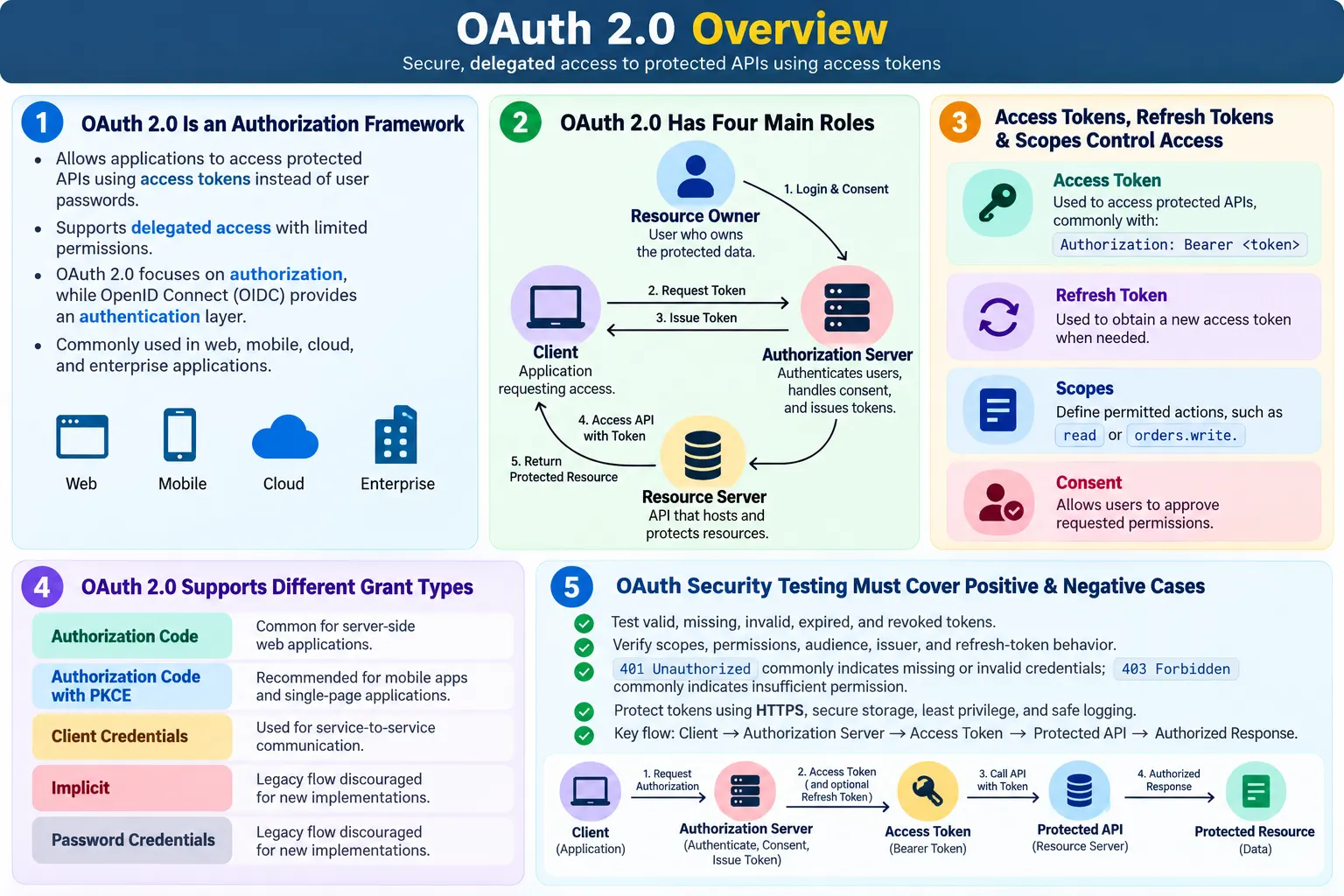
OAuth 2.0 solves this problem by allowing applications to obtain limited access to protected resources using access tokens. Instead of sharing the user's password with the application, the user authenticates with a trusted authorization server. The authorization server issues an access token that represents the approved access. The client application then sends that token to the API when calling protected endpoints. The API validates the token and checks whether the token allows the requested operation.
OAuth 2.0 is used by major platforms such as Google, Microsoft, GitHub, LinkedIn, Salesforce, Amazon, and many enterprise identity systems. It is also widely used inside organizations for web applications, mobile applications, single-page applications, backend services, microservices, partner APIs, cloud APIs, and internal developer platforms. For API testers, OAuth 2.0 is a must-know topic because many secure API test suites require valid tokens, scope checks, token expiration handling, refresh flows, and negative security scenarios.
A common beginner mistake is treating OAuth 2.0 as only a login feature. OAuth 2.0 is primarily an authorization framework. It answers whether a client application has permission to access a protected resource. Authentication, which proves who the user is, is commonly handled by the identity provider's login process or by OpenID Connect layered on top of OAuth 2.0. This distinction matters in interviews, architecture discussions, and test planning.
What Is OAuth 2.0?
OAuth 2.0 is an authorization framework that allows a client application to obtain limited access to protected resources on behalf of a resource owner without sharing the resource owner's password. The resource owner is usually the user. The protected resource is usually data or functionality hosted by an API. The client is the application that wants access. The authorization server issues tokens. The resource server hosts the protected API.
A simple definition is this: OAuth 2.0 allows applications to securely access protected APIs using access tokens instead of user passwords. The access token is a credential. It does not need to contain the user's password. It can be short-lived, limited by scope, and revoked when needed. This makes OAuth more suitable for modern API ecosystems than asking users to give passwords to every application.
OAuth 2.0 does not define one single login screen or one single token format. It defines roles, flows, grant types, token concepts, and rules for delegated access. An access token may be a JWT or an opaque token. A client may be a web application, mobile app, single-page application, backend service, command-line tool, or machine-to-machine integration. The implementation details vary, but the core idea remains the same: applications use tokens to access APIs with limited permission.
Why OAuth 2.0 Was Introduced
Before OAuth-style authorization became common, third-party applications sometimes asked users for their usernames and passwords. That created serious security problems. If a calendar application asked for a user's Google password, the application could potentially access everything protected by that password, not just the calendar permission the user intended. If the application was compromised, the user's main account credentials were exposed. If the user changed the password, every connected application could break. If the user wanted to revoke only one application's access, there was no clean way to do that without changing the password for everything.
OAuth 2.0 improves this model. The user authenticates with the trusted provider, not directly with every third-party app. The provider can ask the user for consent and issue a token with limited scope. The user can revoke access later. The token can expire. The application never needs to know the user's password. This separation reduces risk and gives both users and providers better control.
OAuth also helps enterprise systems. A company may want one internal service to access another service with specific permissions. It may want a reporting tool to read data but not modify it. It may want a partner application to access only selected APIs. OAuth provides a common framework for issuing and validating tokens so access can be controlled without sharing broad credentials.
OAuth 2.0 Is Authorization
One of the most common interview questions is whether OAuth 2.0 is authentication or authorization. The precise answer is that OAuth 2.0 is primarily an authorization framework. It tells an API that a client has permission to access protected resources. It does not, by itself, define a standard way to prove user identity to the client application. That identity layer is commonly handled by OpenID Connect.
In practice, many users experience OAuth as part of login. A website may offer "Sign in with Google." The user clicks it, logs in at Google, and returns to the website. Behind the scenes, OAuth and OpenID Connect may both be involved. OAuth provides access tokens for API authorization. OpenID Connect provides identity information through an ID token and userinfo endpoint. Because these are often combined, people casually say OAuth login. For technical discussion, it is better to say OAuth is authorization, while OpenID Connect provides authentication on top of OAuth.
For testers, this distinction affects coverage. If the requirement is user identity, tests may need to validate ID tokens, issuer, audience, subject, login session, and profile claims. If the requirement is API access permission, tests need to validate access tokens, scopes, resource access, expiration, and authorization failures. A strong tester knows which layer is being tested.
OAuth 2.0 Roles
OAuth 2.0 defines four primary roles: resource owner, client, authorization server, and resource server. Understanding these roles makes the flow easier to reason about. Without this vocabulary, OAuth discussions can become confusing because the browser, app, identity provider, backend API, and user may all be involved at different points.
| Role | Responsibility | Example |
|---|---|---|
| Resource Owner | Owns the protected resource | A user who owns calendar or drive data |
| Client | Application requesting access | A travel app, mobile app, or reporting tool |
| Authorization Server | Authenticates the user, obtains consent, and issues tokens | Google, Microsoft, Okta, Auth0, Salesforce identity server |
| Resource Server | API that hosts protected data or actions | Google Drive API, Microsoft Graph API, internal employee API |
The resource owner is usually the end user. For example, John owns his Google Drive files. The client is the application that wants access to those files. The authorization server is the trusted system that authenticates John, asks for approval, and issues tokens. The resource server is the API that stores and returns the protected files. In some systems, the authorization server and resource server are operated by the same company. In other systems, they are separate components.
High-Level OAuth Workflow
A high-level OAuth flow starts when the client application requests access. The user is sent to the authorization server or interacts with a login and consent screen. The user authenticates with the provider. The provider asks whether the user allows the client to access specific resources. If the user approves and the request is valid, the authorization server issues an access token. The client then calls the resource server with that token.
The protected API does not accept the token blindly. It validates the token before returning data. Validation may include checking token signature, issuer, audience, expiry, scopes, revocation, token type, and client identity. If the token is valid and has the required permission, the API processes the request. If the token is missing, invalid, expired, or not trusted, the API returns an authentication error. If the token is valid but lacks the required permission, the API returns an authorization error.
The practical workflow is this: the client requests access, the user authenticates, the user grants permission, the authorization server issues a token, the client sends the token to the API, and the API returns protected data only if the token is valid and authorized. This flow keeps the user's password away from the client application and allows access to be limited and revoked.
Access Tokens
An access token is a credential issued by the authorization server that allows the client to access protected resources. The client sends the access token to the resource server, usually in the HTTP `Authorization` header using the bearer token format:
GET /employees
Authorization: Bearer eyJhbGciOi...
The actual token format depends on the authorization server. Some access tokens are JWTs, which can be decoded and validated by checking signature and claims. Other access tokens are opaque strings, which must be looked up or introspected by the server. API testers do not need to assume every token is a JWT. The test should follow the system's documented validation behavior.
Access tokens are usually short-lived. A token may expire after minutes or hours. Short lifetimes reduce the risk if a token is stolen. When a token expires, the client must obtain a new one through the appropriate flow. A protected API should reject expired tokens consistently. Testers should validate token expiry because APIs sometimes accidentally accept expired tokens due to clock skew, caching, or incorrect validation.
Refresh Tokens
Some OAuth flows return refresh tokens. A refresh token is used to obtain a new access token after the current access token expires. The refresh token is sent to the authorization server, not to the resource server. It should not be used to call APIs directly. Because refresh tokens can extend access over time, they must be stored more carefully than short-lived access tokens.
| Point | Access Token | Refresh Token |
|---|---|---|
| Main purpose | Access protected APIs | Obtain new access tokens |
| Typical lifetime | Short-lived | Longer-lived |
| Sent to | Resource server | Authorization server |
| Used in API requests | Yes | No |
| Security risk | Grants access until expiry or revocation | Can extend access by obtaining new tokens |
Testing refresh tokens requires validating valid refresh, expired refresh token, revoked refresh token, reused refresh token if rotation is enabled, refresh after password change, refresh after logout, and refresh with wrong client credentials. These scenarios matter because a weak refresh implementation can allow long-term unauthorized access even if access tokens are short-lived.
OAuth Scopes
Scopes define what the client is allowed to access. A scope may be broad, such as `read`, or specific, such as `calendar.read`, `orders.write`, or `profile.email`. When the client requests authorization, it asks for one or more scopes. The user or administrator may approve them. The access token then represents the granted permissions. The API checks those scopes when processing requests.
Scopes are central to API testing because they turn authorization into concrete, testable rules. A token with read scope should not perform write operations. A token with profile scope should not access payment data. A token issued for calendar access should not call drive APIs unless that scope was granted. Scope validation is one of the most common OAuth security checks.
Testers should create tokens with different scopes and validate both allowed and denied behavior. Do not test only with a full-permission token. Full-permission tokens can hide missing scope checks. A strong OAuth test suite includes minimum-scope success tests and insufficient-scope failure tests.
OAuth Consent
Consent is the process where the resource owner approves what the client application may access. For example, a user may see a screen asking whether a travel app may read calendar events and view basic profile information. If the user approves, the authorization server can issue a token with those scopes. If the user denies consent, the client should not receive the requested access.
Consent gives users control and makes access explicit. It also helps organizations enforce policy. In enterprise systems, administrators may pre-approve some applications, block others, or restrict which scopes can be granted. Consent behavior depends on the provider and application type.
API testers may not always test the consent screen directly, especially if they focus on backend APIs. However, they should understand its effect. A token should contain only approved scopes. Denied consent should not produce a valid access token. Changed consent should affect future tokens. Revoked consent should prevent continued access according to the provider's rules.
OAuth 2.0 Grant Types
OAuth 2.0 defines several grant types, also called flows. A grant type describes how the client obtains an access token. The right grant type depends on the client type and security needs. A backend web application, mobile app, single-page application, machine-to-machine service, and legacy trusted client should not all use the same flow.
Authorization Code flow is commonly used for web applications. The user authenticates with the authorization server, the client receives an authorization code, and the backend exchanges that code for tokens. Authorization Code with PKCE is recommended for public clients such as mobile apps and single-page applications because it protects the code exchange from interception. PKCE stands for Proof Key for Code Exchange.
Client Credentials flow is used for machine-to-machine communication where there is no human user. A backend service authenticates as itself and obtains a token to call another service. This is common in microservices and internal APIs. Resource Owner Password Credentials is a legacy flow where the user gives username and password directly to the client. It is generally discouraged for new systems because it weakens the separation OAuth was designed to provide. Implicit flow is also legacy and deprecated for most new applications because better options exist today.
| Grant Type | Typical Use | Current Guidance |
|---|---|---|
| Authorization Code | Server-side web apps | Common and recommended with secure handling |
| Authorization Code with PKCE | Mobile apps and single-page apps | Recommended for public clients |
| Client Credentials | Service-to-service APIs | Common for machine access |
| Resource Owner Password Credentials | Legacy trusted clients | Discouraged for new implementations |
| Implicit | Older browser apps | Deprecated for most new applications |
OAuth 2.0 in API Testing
OAuth API testing starts with obtaining a valid token through the supported flow. The tester then sends the token to a protected endpoint and verifies the expected response. After the happy path is working, the tester should validate missing token, invalid token, expired token, revoked token, wrong audience, wrong issuer, malformed token, insufficient scope, wrong client, and unauthorized resource access.
Scope validation is especially important. A token with `read` permission should not call a write endpoint. A token for one API should not be accepted by another API if the audience is different. A token for one tenant should not access another tenant's data. A token for one user should not access another user's resources. These are practical authorization risks, not just theoretical security topics.
Refresh-token behavior should be tested when the flow supports it. A valid refresh token should obtain a new access token. An expired or revoked refresh token should fail. If refresh-token rotation is enabled, old refresh tokens should become invalid after use. Logout, password change, account disablement, or consent revocation may also affect refresh behavior. The expected rules should be documented and validated.
Example Test Cases
| Scenario | Expected Result | Purpose |
|---|---|---|
| Valid access token with required scope | 200 OK or expected success status | Confirms authorized access works |
| Missing access token | 401 Unauthorized | Confirms protected endpoint rejects anonymous calls |
| Invalid access token | 401 Unauthorized | Confirms untrusted tokens are rejected |
| Expired access token | 401 Unauthorized | Confirms expiry is enforced |
| Valid token with missing scope | 403 Forbidden | Confirms scope-based authorization works |
| Token issued for wrong audience | 401 Unauthorized or documented error | Confirms token audience validation |
| Valid refresh token | New access token issued | Confirms refresh flow works |
| Revoked refresh token | Refresh request rejected | Confirms revocation is enforced |
These test cases should use clear test data and separate token types. A test for invalid token should not accidentally use a valid token with insufficient scope. A test for authorization failure should use a valid token that lacks permission. Clear separation makes failures easier to diagnose.
OAuth 2.0 vs Basic Authentication
OAuth 2.0 and Basic Authentication solve different problems. Basic Authentication sends a Base64-encoded username and password with every request. OAuth 2.0 uses access tokens issued by an authorization server. OAuth supports scopes, token expiration, refresh tokens, delegated access, and better control for third-party applications. Basic Authentication is simpler but less flexible.
| Point | OAuth 2.0 | Basic Authentication |
|---|---|---|
| Credential sent to API | Access token | Username and password encoded with Base64 |
| User password exposure | Not sent to every API call | Sent with every protected request |
| Scope support | Supported | No native scope concept |
| Token expiration | Supported and recommended | No built-in token lifecycle |
| Best fit | Modern APIs and third-party access | Simple internal or legacy APIs |
For public APIs, mobile apps, web applications, and third-party integrations, OAuth is usually more appropriate than Basic Authentication. For a simple internal tool protected by HTTPS and network controls, Basic Authentication may still be acceptable. Testers should understand the tradeoff rather than treating one mechanism as universally correct.
OAuth 2.0 vs API Keys
API keys usually identify applications. OAuth access tokens usually represent authorized access for a user, client, or service. API keys are often long-lived and useful for rate limiting, quota tracking, and application identification. OAuth tokens are usually short-lived and can include scopes, claims, permissions, and delegated authorization.
| Point | OAuth 2.0 | API Key |
|---|---|---|
| Primary purpose | Authorization for user, client, or service access | Application identification |
| Credential lifetime | Access tokens are often short-lived | Keys are often long-lived |
| Permission detail | Scopes and claims are common | Usually broader and application-level |
| Delegated access | Supported | Usually not the main purpose |
| Common use | Secure APIs, login integrations, cloud APIs | Developer platforms, public APIs, rate limits |
Some APIs use both. An API key may identify the application, while an OAuth access token identifies the user and granted permissions. In testing, validate missing and invalid cases for each credential separately. If both are required, a request with only one credential should fail according to the API design.
REST Assured Example
Once an OAuth access token is available, REST Assured can send it as a bearer token:
given()
  .header("Authorization", "Bearer " + accessToken)
.when()
  .get("/employees")
.then()
  .statusCode(200);
A missing-token test omits the header:
given()
.when()
  .get("/employees")
.then()
  .statusCode(401);
A scope failure test uses a valid token that does not have the required scope:
given()
  .header("Authorization", "Bearer " + readOnlyToken)
.when()
  .post("/employees")
.then()
  .statusCode(403);
In a real framework, token generation should be handled securely. The framework may call the token endpoint, extract the access token, cache it for the test, and refresh it when needed. Credentials, client secrets, and refresh tokens should come from secure configuration, not hardcoded source code.
Postman Example
Postman supports OAuth 2.0 in the Authorization tab. A tester can select OAuth 2.0, configure authorization URL, token URL, client ID, client secret if applicable, scopes, callback URL, and grant type. Postman can obtain a token and automatically add it as a bearer token to requests. This is useful for manual testing, exploration, and documenting protected endpoints.
Postman environments can store access tokens and refresh tokens, but this must be handled carefully. Exported environments may contain secrets. Shared workspaces may expose values to team members. Testers should avoid storing production secrets in casual collections. When using Postman for OAuth testing, validate not only successful calls but also expired tokens, insufficient scopes, revoked tokens, and missing authorization.
Karate Example
Karate can send OAuth access tokens using the bearer header:
Given header Authorization = 'Bearer ' + accessToken
When method GET
Then status 200
Karate can also call a token endpoint in a setup flow, capture the token, and reuse it in feature files. This is practical for automated API testing because tokens often expire. A clean setup can obtain fresh tokens for admin, normal user, read-only user, and service client scenarios.
As with any automation tool, secrets must not be written directly in feature files. Use secure configuration and mask tokens in reports. A missing-token scenario should not inherit a global authorization header accidentally. Each security test should control the token state intentionally.
Real-World Examples
Google APIs use OAuth 2.0 to allow applications to access services such as Google Drive, Gmail, Calendar, and profile data without asking users to share Google passwords. The client requests scopes, the user approves access, and the application receives tokens. The API then checks whether the token allows the requested operation.
Microsoft Graph uses OAuth 2.0 access tokens to protect Outlook, OneDrive, Teams, SharePoint, users, groups, and directory data. Tokens can represent users or applications. Permissions may be delegated or application-level. Testing Graph-style APIs requires careful attention to scopes, tenant, admin consent, and token audience.
GitHub supports OAuth and token-based access for repositories, issues, pull requests, packages, and organization resources. A token with read-only repository permission should not perform administrative actions. Salesforce uses OAuth 2.0 for secure access to CRM data and enterprise integrations. Internal enterprise APIs often use OAuth through identity providers such as Okta, Auth0, Azure AD, or custom authorization servers.
Security Best Practices
Always use HTTPS with OAuth tokens. Access tokens and refresh tokens are credentials. If an attacker captures them, the attacker may access protected APIs until the token expires or is revoked. Avoid sending tokens in URLs. Use the `Authorization` header. Store tokens securely based on client type. Server-side applications can use secure server storage. Browser and mobile applications require careful platform-specific handling.
Use short-lived access tokens and protect refresh tokens carefully. Request only the scopes required for the application. Follow least privilege. Revoke compromised tokens. Validate issuer, audience, expiry, signature, scopes, and client identity. Prefer Authorization Code with PKCE for public clients such as mobile apps and single-page applications. Avoid legacy flows such as implicit flow and resource owner password credentials for new designs unless there is a clear and justified reason.
Avoid logging tokens. Access tokens and refresh tokens should not appear in application logs, gateway logs, automation logs, CI logs, screenshots, or downloadable reports. If request logging is enabled for debugging, sensitive headers and token responses must be redacted. Test automation should treat OAuth secrets and tokens as sensitive data.
Common Mistakes
A common mistake is confusing OAuth with authentication. OAuth 2.0 is primarily authorization. It grants client applications limited access to resources. Authentication is commonly provided by OpenID Connect or the identity provider's login process. Saying OAuth is login is understandable in casual conversation, but in interviews and design discussions it is better to be precise.
Another mistake is granting excessive scopes. Applications should not request more permissions than they need. A calendar app that only reads events should not request permission to delete files. Excessive scopes increase risk if the client or token is compromised. Testers should verify that endpoints enforce the minimum required scopes.
Storing tokens insecurely is another common issue. Tokens in local storage, logs, source code, screenshots, or shared API collections can be exposed. Refresh tokens are especially sensitive because they can be used to obtain new access tokens. Testers should review how tokens are handled in automation and tools, not only whether API calls succeed.
Ignoring token expiration creates unstable and insecure behavior. Applications should handle expired tokens gracefully. APIs should reject expired tokens. Test suites should include expiry tests instead of relying only on permanently valid test tokens. Logging tokens, accepting wrong audiences, skipping scope checks, and using deprecated grant types without justification are also common OAuth mistakes.
Interview Questions
A common interview question is: what is OAuth 2.0? A strong answer is that OAuth 2.0 is an authorization framework that allows client applications to access protected resources using access tokens instead of user passwords. It enables delegated and limited access without requiring users to share credentials with every application.
Another common question is whether OAuth 2.0 is authentication or authorization. The correct answer is that OAuth 2.0 is primarily authorization. Authentication is commonly handled by OpenID Connect or the identity provider's login process. OAuth tells the API what the client is allowed to access; OpenID Connect helps identify the user to the client.
Interviewers may ask about the four OAuth roles. The roles are resource owner, client, authorization server, and resource server. The resource owner owns the data. The client requests access. The authorization server issues tokens. The resource server hosts the protected API and validates tokens before returning resources.
They may also ask what testers should validate. A strong answer includes valid access tokens, missing tokens, invalid tokens, expired tokens, revoked tokens, scope validation, permission checks, refresh token behavior, token audience, token issuer, HTTPS usage, least privilege, and safe token storage. Mention that `401 Unauthorized` is common for invalid or missing tokens, while `403 Forbidden` is common when a valid token lacks permission.
Interview-Ready Explanation
OAuth 2.0 is an industry-standard authorization framework that allows client applications to access protected resources without requiring the user's password. Instead of sharing credentials with the application, the user authenticates with an authorization server. The authorization server issues an access token with approved permissions, and the client sends that token to the protected API using the bearer token format.
OAuth 2.0 defines four main roles: resource owner, client, authorization server, and resource server. It supports scopes, consent, access tokens, token expiration, refresh tokens, and multiple grant types. Authorization Code with PKCE is recommended for public clients such as mobile apps and single-page applications, while Client Credentials flow is commonly used for service-to-service communication. OAuth is primarily authorization, while OpenID Connect is commonly used for authentication on top of OAuth.
During API testing, testers should validate token generation, valid access, missing tokens, invalid tokens, expired tokens, revoked tokens, insufficient scopes, permission checks, refresh token behavior, HTTPS usage, secure token storage, and safe logging. A secure OAuth implementation must validate not only whether a token exists, but whether it is trusted, unexpired, issued for the correct audience, and allowed to perform the requested operation.
Key Takeaway
OAuth 2.0 allows applications to access protected APIs using access tokens instead of user passwords. It is central to modern API security because it supports delegated access, limited scopes, token expiration, consent, refresh flows, and integration with identity providers. It is used across cloud APIs, enterprise systems, web applications, mobile applications, microservices, and third-party integrations.
For API testers, OAuth 2.0 must be tested beyond the happy path. Validate valid tokens, invalid tokens, missing tokens, expired tokens, revoked tokens, wrong scopes, wrong audience, wrong issuer, refresh behavior, and permission enforcement. A good OAuth test strategy proves that access is granted only when the token is valid and authorized, and denied cleanly when identity, scope, or policy requirements are not met.