Client-Server Architecture
Introduction
Every time you open a website, log into a banking application, watch a movie on a streaming platform, purchase a product online, or use a mobile application, a vast amount of communication happens behind the scenes. Although these applications may appear simple from a user's perspective, they are powered by one of the most fundamental concepts in software engineering: the Client–Server Architecture.
Client–Server Architecture forms the foundation of modern computing systems. Nearly every web application, mobile application, enterprise platform, cloud service, and API-driven system relies on this architectural model. It defines how software components communicate, how data is exchanged, and how responsibilities are divided between users and backend systems.
Understanding Client–Server Architecture is essential for developers, testers, automation engineers, architects, and DevOps professionals because it provides the foundation for understanding web applications, REST APIs, databases, microservices, cloud computing, and distributed systems.
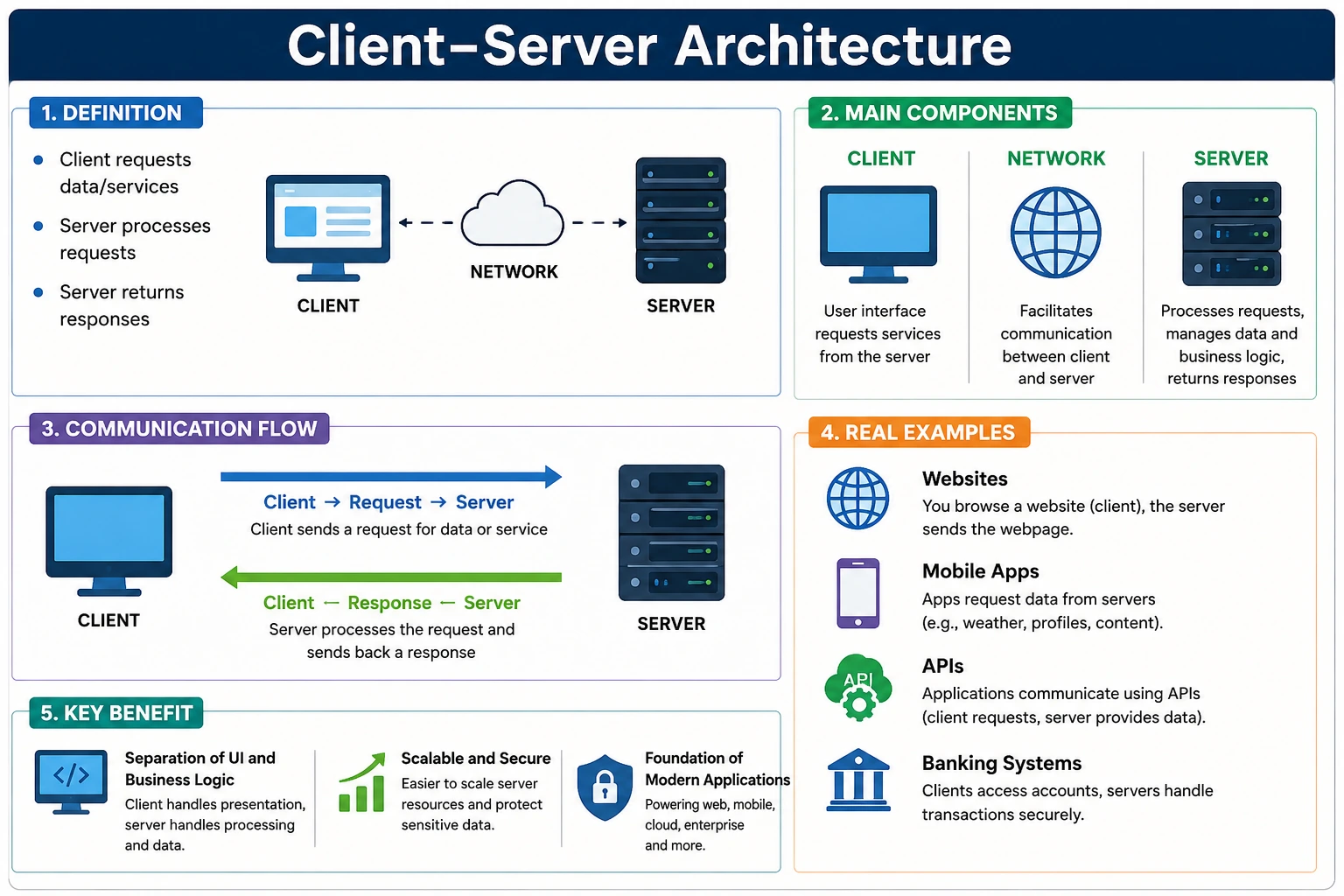
In simple terms, Client–Server Architecture is a software architecture model in which a client sends requests to a server, and the server processes those requests and returns appropriate responses. This seemingly simple concept powers billions of interactions every day across the internet.
What Is Client–Server Architecture?
Client–Server Architecture is a communication model where two distinct entities collaborate to provide functionality.
The first entity is the client, which initiates requests and interacts with users.
The second entity is the server, which processes requests, executes business logic, accesses resources, and generates responses.
The client and server communicate over a network using standardized communication protocols such as HTTP, HTTPS, TCP/IP, WebSocket, or gRPC.
At its core, the architecture follows a simple pattern:
Client → Request → Server
Client ← Response ← Server
The client asks for something.
The server fulfills the request.
The client receives the result.
This model allows responsibilities to be separated efficiently, making applications scalable, maintainable, and secure.
Understanding the Concept Through a Real-World Analogy
A restaurant provides one of the easiest ways to understand Client–Server Architecture.
Imagine you visit a restaurant.
You are the client.
The kitchen is the server.
The waiter acts as the communication channel.
The process works as follows:
- You place an order.
- The waiter carries the order to the kitchen.
- The kitchen prepares the food.
- The waiter delivers the food back to you.
Similarly:
Client (Browser)
       ↓
Request
       ↓
Server
       ↓
Response
       ↓
Client
Just as customers do not cook their own meals inside the restaurant kitchen, clients typically do not directly access databases or business logic. Instead, servers handle the complexity and return only the required information.
This separation of responsibilities is one of the main reasons Client–Server Architecture became the dominant model in software development.
The Evolution of Client–Server Systems
Before client–server systems became popular, many applications used centralized mainframe architectures.
Users connected to a central computer through terminals.
The central machine performed all processing.
While this approach worked, it had limitations:
- Poor scalability
- Limited flexibility
- High maintenance costs
- Single point of failure
As networking technologies improved, organizations adopted Client–Server Architecture because it distributed responsibilities more effectively.
Clients became responsible for user interaction.
Servers became responsible for data management and business processing.
This separation enabled the rapid growth of the internet and modern computing.
Today, even highly advanced cloud-native systems still follow the same fundamental client–server principles.
Core Components of Client–Server Architecture
To understand how the architecture functions, we must examine its major components.
The Client
The client is the system that initiates communication.
Clients are responsible for presenting information to users and collecting user input.
Common examples include:
- Web browsers
- Mobile applications
- Desktop applications
- Smart TVs
- API testing tools
- IoT devices
Examples of web browsers include:
- Google Chrome
- Microsoft Edge
- Mozilla Firefox
- Safari
A client's primary responsibilities include:
- Accepting user input
- Sending requests
- Displaying responses
- Managing user interactions
- Rendering user interfaces
The client focuses primarily on the presentation layer.
The Server
The server is the system that receives requests and performs the actual work.
Servers are responsible for:
- Processing requests
- Executing business logic
- Accessing databases
- Managing authentication
- Returning responses
Examples of server technologies include:
- Spring Boot
- Node.js
- ASP.NET
- Django
- Express.js
- Laravel
The server acts as the brain of the application.
While clients handle user interaction, servers handle application intelligence.
The Network
The network provides the communication channel between clients and servers.
Examples include:
- Internet
- LAN (Local Area Network)
- WAN (Wide Area Network)
- VPN connections
Without a network connection, clients cannot communicate with servers.
The quality of the network directly affects:
- Response time
- Application performance
- User experience
- Reliability
The Request–Response Lifecycle
The heart of Client–Server Architecture is the request–response lifecycle.
Every interaction follows a predictable sequence.
Step 1: User Initiates an Action
A user performs an activity such as:
- Clicking Login
- Searching for products
- Submitting a form
- Watching a video
Example:
User clicks LoginStep 2: Client Sends Request
The client converts the action into a request.
Example:
POST /loginRequest body:
{
  "username": "admin",
  "password": "admin123"
}
The request travels through the network to the server.
Step 3: Server Processes Request
The server receives the request.
It may:
- Validate input
- Authenticate users
- Execute business logic
- Query databases
- Call external services
For a login request:
Validate credentials
↓
Check database
↓
Generate token
Step 4: Server Sends Response
After processing, the server generates a response.
Example:
{
  "status": "success",
  "token": "xyz123"
}
Step 5: Client Displays Result
The client receives the response and updates the user interface.
Example:
Login SuccessfulThis entire process often completes within milliseconds.
Basic Client–Server Architecture Diagram
A simplified architecture can be represented as:
+------------+       Request        +------------+
|   Client   | ------------------>  |   Server   |
| (Browser)  |                      |            |
| (Mobile)   | <------------------  |            |
+------------+       Response       +------------+
This simple diagram represents the fundamental interaction that powers nearly every internet-based application.
How APIs Fit into Client–Server Architecture
Modern applications rarely allow clients to communicate directly with databases.
Instead, APIs act as intermediaries.
The architecture becomes:
Client
   |
   v
 API Layer
   |
   v
Server
   |
   v
Database
The API defines:
- Endpoints
- Request formats
- Response formats
- Authentication rules
- Validation rules
Without APIs:
Client → Databasewould create security, scalability, and maintainability problems.
With APIs:
Client → API → Server → Databasecommunication becomes standardized and secure.
This is why APIs are often described as the communication bridge between clients and servers.
Types of Client–Server Architecture
As software systems evolved, several variations emerged.
1-Tier Architecture
In a 1-tier architecture, everything exists within a single system.
Application + DataExample:
Calculator ApplicationNo network communication is required.
This architecture is simple but limited.
2-Tier Architecture
A 2-tier architecture connects clients directly to databases.
Client
   |
Database
Examples include:
- Desktop inventory applications
- Legacy business software
While simple, this model has security and scalability limitations.
3-Tier Architecture
This is the most common architecture used today.
Client
   |
Application Server
   |
Database
The application server acts as an intermediary.
Benefits include:
- Better security
- Better scalability
- Improved maintainability
Examples:
- Banking systems
- E-commerce platforms
- Social media applications
N-Tier Architecture
Large enterprise systems often use multiple layers.
Client
   |
Web Server
   |
Application Server
   |
Microservices
   |
Database
Each layer has a specialized responsibility.
Benefits include:
- High scalability
- Better fault isolation
- Improved performance
Most cloud-native applications use N-tier architectures.
Client–Server Architecture in Web Applications
Consider an e-commerce website.
When a user searches for a product:
Browser
   |
Search Request
   |
Web Server
   |
Application Server
   |
Database
The server retrieves product data and returns:
[
  {
    "id": 101,
    "name": "Laptop",
    "price": 1200
  }
]
The browser renders the information for the user.
Although the process appears simple, numerous components collaborate behind the scenes.
Client–Server Architecture in API Testing
API testing directly validates communication between clients and servers.
The client may be:
- Postman
- Rest Assured
- Karate
- Browser
- Mobile application
The server may be:
- Spring Boot API
- ASP.NET API
- Node.js API
- Django API
Example request:
GET /users/101Response:
{
  "id": 101,
  "name": "John"
}
API testers verify:
- Request correctness
- Response correctness
- Status codes
- Headers
- Authentication
- Performance
A deep understanding of Client–Server Architecture helps testers identify whether failures originate on the client side, server side, network layer, or database layer.
HTTP as the Language Between Client and Server
In most web and API systems, the client and server communicate through HTTP or HTTPS. HTTP is the protocol that defines how a client should ask for a resource and how a server should return the result. HTTPS adds encryption on top of HTTP, which protects sensitive data while it travels across the network. When a browser loads a page, when a mobile app fetches profile details, and when an API automation script validates an endpoint, the communication usually follows this protocol-based request and response model.
An HTTP request is not just a simple message. It contains several parts that help the server understand what the client wants. The request method explains the action, such as GET for reading data, POST for creating data, PUT or PATCH for updating data, and DELETE for removing data. The URL identifies the resource. Headers carry extra information such as content type, authorization token, accepted response format, language, cache preference, and user agent. The body carries data when the client needs to send information to the server, such as login credentials, order details, search filters, or a JSON payload.
The server response also has a clear structure. It usually contains a status code, response headers, and response body. The status code tells whether the request was successful, failed because of client input, failed because of authentication, or failed because of a server problem. A response body may contain HTML for a browser, JSON for an API client, XML for older integrations, binary content for file downloads, or an empty response when no content is required.
This structure is extremely important in API testing. A tester should not only check whether the visible page works. The tester should understand whether the request was correctly formed, whether the server applied the expected business rule, whether the response code matched the result, whether headers were correct, and whether the response data was complete and secure. Client-server architecture gives testers the mental model required to examine each of these layers clearly.
Client Responsibilities in More Detail
The client is often described as the system that sends requests, but in real applications its responsibilities are broader. A browser client renders HTML, CSS, and JavaScript so users can interact with the application. A mobile client manages screens, local storage, device permissions, offline behavior, push notifications, and API calls. An API testing client such as Postman or Rest Assured does not display a business screen, but it still acts as a client because it prepares requests, sends them to the server, and reads responses.
A good client usually performs basic validation before sending a request. For example, a login screen may ensure that username and password fields are not empty. A checkout screen may ensure that mandatory shipping fields are filled. This improves user experience because the user receives quick feedback. However, client-side validation should never be treated as the final security check. Since clients can be bypassed, modified, or automated, the server must validate all important data again.
The client also manages presentation. It decides how to show success messages, errors, loading indicators, table data, forms, buttons, and navigation. In modern single-page applications, the client may perform a large amount of rendering and state management. Frameworks such as React, Angular, and Vue often fetch data from APIs and then build the user interface dynamically in the browser. Even in such applications, the core architecture remains client-server: the client requests data and the server supplies reliable responses.
For testers, client responsibility matters because not every defect belongs to the server. If the server returns correct data but the screen displays it incorrectly, the defect is likely in the client layer. If the client sends the wrong field name or wrong data type in the request body, the server may reject the request even though the server is functioning correctly. Understanding the client's role helps testers report defects accurately instead of describing every failure as an application failure without root cause.
Server Responsibilities in More Detail
The server is responsible for much more than sending data back to the client. In a serious business application, the server validates incoming requests, checks authentication, applies authorization, executes business rules, talks to databases, calls external systems, creates logs, handles errors, and returns responses in a predictable format. The server is the trusted side of the architecture because it owns the business logic and protects the data.
Consider a payment request. The client may display a button that says Pay Now, but the server must perform the actual work. It must check whether the cart is valid, whether the price has changed, whether the user is allowed to place the order, whether the payment details are acceptable, whether inventory is still available, and whether the payment gateway confirms the transaction. Only after all required rules pass should the server confirm the order. This is why server-side validation is central to reliable application behavior.
The server also controls data access. Clients should not directly query production databases because that would expose sensitive schema details and create major security risks. Instead, the server provides controlled APIs that decide exactly what data can be read or changed. For example, a customer profile API may return a name and email address, but it should not return password hashes, internal audit fields, or other users' private information. This responsibility makes the server a key security boundary.
From an API testing perspective, server responsibility is where most meaningful validation happens. Testers check whether the server enforces required fields, rejects invalid data, handles duplicate requests, protects unauthorized resources, returns correct status codes, and maintains data consistency. A test that sends invalid payment data and expects a proper error is really testing whether the server protects the business process from bad input.
Common Request and Response Elements
Client-server communication becomes easier to understand when the main request and response elements are clear. The endpoint is the address of a resource or operation, such as /users, /orders/1001, or /payments/refund. The method explains the intent of the request. The headers describe supporting information. The body carries the main data when needed. Query parameters add filtering, sorting, pagination, or search criteria to the request.
For example, a product search request may look like this:
GET /products?category=laptop&sort=priceIn this case, the client is not sending a large body. Instead, it passes query parameters to describe what it wants. The server reads those parameters, applies the search rule, queries the database or search service, and returns matching products. A product creation request is different because the client must send data in the request body:
POST /products
Content-Type: application/json

{
  "name": "Laptop",
  "price": 1200,
  "category": "Electronics"
}
The response must then clearly communicate the result. If the product is created successfully, the server may return 201 Created with the created product details. If the price is missing, it may return 400 Bad Request. If the user is not logged in, it may return 401 Unauthorized. If the user is logged in but does not have permission, it may return 403 Forbidden. These distinctions help clients behave correctly and help testers identify whether the server is following API contract expectations.
Status Codes and Their Meaning in Client-Server Communication
Status codes are one of the most useful signals in client-server architecture. They provide a compact summary of the result before the client even reads the response body. A successful read request normally returns 200 OK. A successful creation request often returns 201 Created. A request that completes but has no response body may return 204 No Content. These codes tell the client that the operation succeeded and that it can continue with the next action.
Client-side errors use the 4xx range. These errors usually mean the request was invalid, incomplete, unauthorized, forbidden, or asking for a resource that does not exist. For example, 400 Bad Request indicates invalid request syntax or data. 401 Unauthorized indicates missing or invalid authentication. 403 Forbidden means the identity may be known, but the user is not allowed to perform the action. 404 Not Found indicates that the requested resource could not be found.
Server-side errors use the 5xx range. These errors indicate that the server failed while processing a request that may otherwise be valid. 500 Internal Server Error usually means an unexpected application failure. 502 Bad Gateway, 503 Service Unavailable, and 504 Gateway Timeout often appear in distributed systems where gateways, load balancers, upstream services, or infrastructure layers are involved.
In API testing, status codes should be validated along with the body. A server that returns an error message with 200 OK is misleading because clients may treat the operation as successful. Similarly, a server that returns 500 Internal Server Error for invalid user input is exposing poor validation design. Good client-server communication requires status codes, headers, and body content to agree with one another.
Authentication and Authorization in Client-Server Systems
Authentication and authorization are central to secure client-server architecture. Authentication answers the question, "Who is the user or client?" Authorization answers the question, "What is this user or client allowed to do?" Many beginners mix these ideas, but they are separate responsibilities. A user can be authenticated and still not be authorized to access a specific resource.
In modern APIs, authentication often happens through tokens. The client sends credentials to an authentication endpoint. If the credentials are valid, the server returns a token. The client then includes that token in future requests, commonly through an Authorization header. The server validates the token before processing protected operations. This design prevents the user from sending a password with every request and supports stateless communication across multiple servers.
Authorization is applied after authentication. For example, an ordinary customer may be allowed to view their own order history but not another customer's order history. An admin user may be allowed to update product prices, while a regular user cannot. The client may hide unavailable buttons, but the server must still enforce the rule because a malicious or automated client can directly call the endpoint.
Testers should design cases for both authentication and authorization. They should verify missing tokens, invalid tokens, expired tokens, valid tokens with insufficient permission, and valid tokens with correct permission. These tests are important because security failures in client-server architecture can expose sensitive data or allow unauthorized actions.
State, Sessions, and Stateless APIs
Another important concept in client-server architecture is state. State refers to information that must be remembered across interactions. In a traditional web application, the server may create a session after login and store session information on the server side. The client keeps a session identifier, often in a cookie, and sends it with each request. The server uses that identifier to understand who the user is and what session data belongs to them.
Many modern APIs prefer stateless communication. In a stateless API, each request contains enough information for the server to process it independently. The server does not need to remember previous requests in a local session. This is common in REST-style APIs where tokens, request headers, and request data provide the necessary context. Statelessness improves scalability because any available server instance can process the request without depending on a specific machine's memory.
However, stateless does not mean the application has no data. It means the server does not rely on conversational memory between requests. The database still stores users, orders, payments, preferences, and business records. The client still stores tokens or local UI state. The key idea is that each request should be self-contained enough for the server to evaluate it correctly.
This matters in testing because testers should not assume that one request automatically prepares the next unless the system intentionally stores data. API test suites should be clear about setup, authentication, created records, and cleanup. When state is handled poorly, tests become flaky because they depend on hidden ordering or previous execution history.
Performance Considerations in Client-Server Architecture
Performance in client-server systems depends on both sides of the communication. The client may be slow because of heavy JavaScript, large images, poor rendering logic, or inefficient state updates. The server may be slow because of expensive database queries, poor indexing, synchronous calls to slow third-party services, inefficient algorithms, or overloaded infrastructure. The network may add latency because of distance, packet loss, DNS delays, TLS negotiation, or unstable connectivity.
API response time is a useful measurement because it focuses on the server and network part of the interaction. If a browser page feels slow, API testing can help determine whether the delay comes from backend response time or frontend rendering. For example, if an API returns in 100 milliseconds but the page takes five seconds to update, the client layer likely needs investigation. If the API itself takes five seconds, the server or downstream dependency is more likely responsible.
Scalability is also connected to performance. A server that handles ten users may fail under ten thousand users if it is not designed properly. Load balancing, caching, database indexing, connection pooling, asynchronous processing, queues, and horizontal scaling are common techniques used to support growth. In distributed systems, performance must be evaluated not just for one endpoint but for the complete chain of services involved in a business flow.
Testers can contribute by validating response time expectations, checking behavior under concurrent users, identifying endpoints with inconsistent response times, and confirming that failures are handled gracefully. A strong understanding of client-server architecture helps testers ask better questions when performance problems appear.
Common Failures in Client-Server Communication
Many real application failures are communication failures between the client and the server. A request may never reach the server because of network problems. A request may reach the wrong endpoint because the client URL is misconfigured. A request may fail because headers are missing. A server may reject a request because the body format is invalid. A downstream service may timeout before the server can return a complete response. Each failure has a different cause, even though the user may simply see a generic error message.
One common issue is contract mismatch. The client expects a field named customerName, but the server sends name. The server expects a numeric ID, but the client sends a string. The client sends a date in one format, but the server expects another. These mismatches can break applications even when both sides are individually working. API contracts, schema validation, and version control help prevent these issues.
Another common issue is timeout handling. If the server takes too long, the client may stop waiting. If the client retries automatically, duplicate operations may occur unless the server is designed to handle idempotency. For example, retrying a payment request without proper safeguards can create serious business problems. Client-server architecture must therefore be tested not only for happy paths but also for retries, duplicate requests, slow responses, and partial failures.
Error message quality also matters. A server should not expose internal stack traces, database errors, or sensitive configuration details. At the same time, it should provide enough information for legitimate clients and testers to understand the failure. Good API error responses are consistent, secure, and actionable.
Client-Server Architecture and Microservices
Microservices add more layers to the client-server model, but they do not replace it. In a microservices system, the browser or mobile app may call an API gateway. The gateway may call an order service. The order service may call inventory, payment, shipping, notification, and customer services. Each service may be a client to another service while also acting as a server for incoming requests. This means client-server communication happens repeatedly inside the backend.
This layered communication is powerful because services can be developed, deployed, and scaled independently. However, it also introduces complexity. A failure in one service can affect the user-facing operation. Network latency between services can add up. Different services may have different contracts, versions, security requirements, and timeout rules. Observability through logs, metrics, tracing, and reports becomes essential.
For API testers, microservices require broader thinking. Testing a single endpoint is useful, but testers should also understand which downstream systems are involved. If an order API fails, the problem may be in the order service, inventory service, payment gateway, authentication service, message broker, or database. This is why modern API testing often includes contract testing, integration testing, service virtualization, and environment-aware test data management.
The important point is that microservices are still built from client-server interactions. The difference is that there are more clients and more servers involved in the complete flow. Understanding the basic model makes the advanced architecture easier to reason about.
Testing Strategy Based on Client-Server Layers
A practical testing strategy should align with the layers of the architecture. UI tests validate how the client behaves from a user's perspective. API tests validate the contract and behavior between client and server. Integration tests validate how the server communicates with databases, external services, message queues, and other internal systems. Unit tests validate small pieces of server or client logic in isolation.
This layered testing approach prevents teams from pushing every validation into slow end-to-end tests. If a business rule belongs on the server, it can often be tested faster and more reliably through API tests. If a calculation belongs in a service class, it may be better covered by unit tests. If a browser rendering issue is important, it belongs in UI testing. Client-server architecture helps teams decide the correct level for each test.
For example, login can be tested at multiple levels. A UI test can confirm that a user can log in through the screen. An API test can confirm that valid credentials return a token and invalid credentials return a proper error. A security test can confirm that locked users cannot authenticate. A unit test can validate password policy logic. Together, these tests provide stronger coverage than one long UI scenario that tries to check everything at once.
Good testers use architecture awareness to reduce duplication. They do not test the same rule repeatedly through expensive paths unless there is a reason. Instead, they choose the fastest reliable layer that proves the behavior. This improves feedback speed and makes automation suites easier to maintain.
Best Practices for Designing Client-Server APIs
Client-server systems become easier to use and test when APIs are designed clearly. Endpoints should represent meaningful resources or operations. Request and response formats should be consistent. Error responses should follow a standard structure. Status codes should match the outcome. Authentication should be predictable. Field names should be stable and understandable. Versioning should be planned before breaking changes are introduced.
API responses should avoid exposing unnecessary data. Returning too much information increases payload size and may create security risk. Returning too little information forces clients to make extra calls, which can reduce performance. A good design balances completeness, clarity, and efficiency. Pagination should be used for large collections, filtering should be explicit, and sorting should be predictable.
Backward compatibility is another important practice. Once clients depend on an API, sudden response changes can break web apps, mobile apps, partner integrations, and automation scripts. If a field must be removed or behavior must change, teams should use versioning, deprecation notices, or coordinated rollout plans. This is especially important when external consumers use the API.
Documentation also matters. Developers and testers need to know endpoint purpose, request schema, response schema, authentication rules, possible status codes, error formats, and example payloads. Tools such as OpenAPI specifications help teams create a shared contract. When the contract is clear, client-server integration becomes more reliable.
How to Explain Client-Server Architecture in Interviews
In interviews, client-server architecture should be explained in a simple but complete way. A strong answer can start with the basic definition: it is a model where a client sends a request to a server, and the server processes the request and returns a response. Then the answer should connect the concept to real applications such as browsers, mobile apps, API clients, application servers, databases, and network communication.
A better interview answer also explains responsibilities. The client handles user interaction, request creation, and response display. The server handles validation, authentication, authorization, business logic, database access, and response generation. The communication usually happens through HTTP or HTTPS in web applications. APIs define the contract between client and server.
For a testing interview, it is useful to mention how this knowledge helps debugging. If a login test fails, the issue may be wrong client input, missing headers, invalid credentials, server validation failure, database problem, expired token, or network timeout. A tester who understands architecture can isolate the problem faster by checking request, response, status code, headers, logs, and data state.
A concise interview-ready answer could be: Client-server architecture is the foundation of web and API systems. The client, such as a browser, mobile app, or API tool, sends a request. The server receives it, applies business rules, accesses required resources, and returns a response. This model separates presentation from processing, improves scalability and maintainability, and helps testers validate APIs by examining requests, responses, status codes, headers, authentication, and data flow.
Advantages of Client–Server Architecture
Centralized Management
Business logic resides on servers.
This allows organizations to manage applications centrally.
Updates can be deployed without modifying client software.
Scalability
Servers can be scaled independently.
Organizations can:
- Add more servers
- Use load balancers
- Deploy cloud resources
This enables applications to support millions of users.
Better Security
Sensitive data remains on servers.
Clients receive only necessary information.
This reduces exposure to security threats.
Easier Maintenance
When business rules change:
Update Serverrather than:
Update Every ClientThis dramatically simplifies maintenance.
Resource Sharing
Multiple users can access the same services simultaneously.
Examples:
- Shared databases
- Shared APIs
- Shared cloud services
This improves efficiency and reduces costs.
Disadvantages of Client–Server Architecture
Despite its strengths, the architecture has limitations.
Server Dependency
If the server becomes unavailable:
Client → No ResponseThe application stops functioning.
Network Dependency
Communication requires connectivity.
Network failures can prevent application usage.
Performance Bottlenecks
Heavy traffic can overload servers.
Without proper scaling:
- Response times increase
- Users experience delays
Security Risks
Servers are attractive attack targets.
Potential threats include:
- DDoS attacks
- SQL injection
- Authentication bypass
- Data breaches
Strong security practices are essential.
Real-World Examples
Banking Applications
Mobile App
     |
Banking API
     |
Core Banking Server
     |
Database
Every account inquiry follows the client–server model.
Amazon
Browser
    |
Amazon APIs
    |
Microservices
    |
Databases
Product searches, orders, and payments all rely on client–server communication.
Netflix
TV App
   |
Netflix APIs
   |
Streaming Services
   |
Content Servers
Video streaming is fundamentally a client requesting content from servers.
Why Client–Server Architecture Matters for Testers
For software testers and automation engineers, understanding Client–Server Architecture is critical.
Many defects originate from communication failures.
Examples include:
- Incorrect API responses
- Database inconsistencies
- Authentication issues
- Network latency problems
When a test fails, understanding the architecture helps determine whether the problem exists in:
- Client layer
- API layer
- Server layer
- Database layer
- Network layer
This significantly improves debugging efficiency.
Conclusion
Client–Server Architecture is the foundational model behind modern software systems. It establishes a clear separation of responsibilities between clients, which handle user interaction, and servers, which manage business logic, data processing, and resource management. Through a request–response communication model, clients and servers collaborate to deliver the applications and services that power today's digital world.
From web applications and mobile apps to cloud platforms, APIs, banking systems, streaming services, and enterprise software, Client–Server Architecture remains at the heart of modern computing. Its advantages in scalability, maintainability, security, and centralized management have made it the dominant architecture for software development.
For developers, testers, API engineers, and architects, mastering Client–Server Architecture is essential because it serves as the conceptual foundation for understanding APIs, web technologies, distributed systems, microservices, cloud computing, and modern application design. Understanding how clients and servers communicate is one of the most important building blocks in a successful software engineering career.